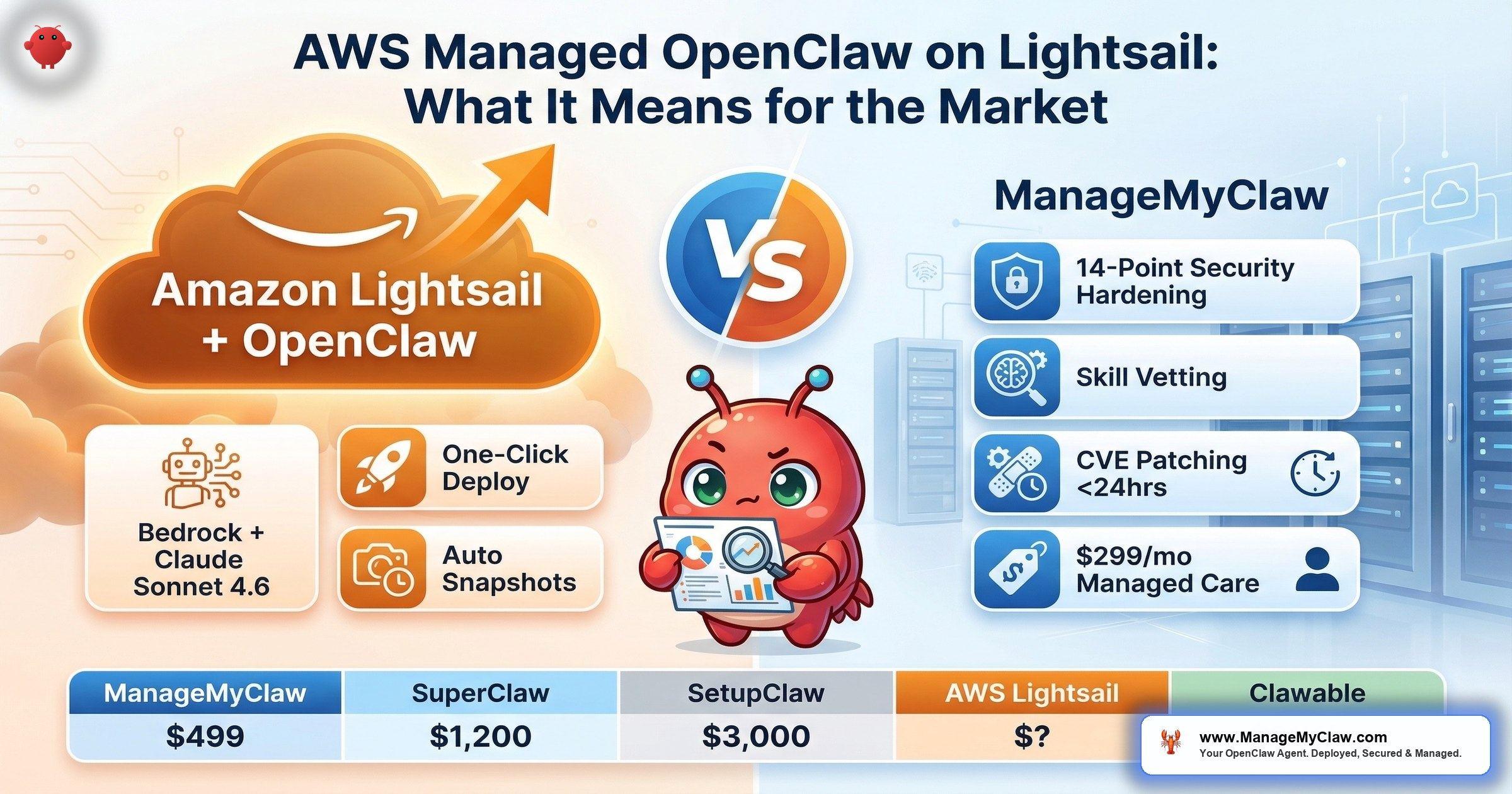
“When Amazon Web Services enters your category, you don’t ignore it. You also don’t panic. You do the math and ask the questions nobody else is asking.” — AWS launching managed OpenClaw on Lightsail with Bedrock + Claude Sonnet 4.6, March 2026
135,000 exposed OpenClaw instances. 2,062 CVEs in the official Docker image. 9+ disclosed platform vulnerabilities. And now AWS is launching managed OpenClaw on Lightsail — with Amazon Bedrock pre-configured and Claude Sonnet 4.6 as the default AI model. That’s the backdrop, per InfoQ (March 2026) and the official AWS announcement: “Introducing OpenClaw on Amazon Lightsail to Run Your Autonomous Private AI Agents.” The headline tells you the ambition. The market implications take longer to unpack.
AWS has the infrastructure. Nobody disputes that. Lightsail is already the simplest AWS entry point — a flat-rate VPS product designed to compete with DigitalOcean and Linode on simplicity. Adding one-click OpenClaw deployment to that catalog makes sense from AWS’s perspective: OpenClaw is the fastest-growing self-hosted AI agent platform, and Lightsail needs product hooks to justify its existence inside the AWS portfolio. The Bedrock integration is the strategic move — every OpenClaw agent on Lightsail funnels AI inference through AWS’s own model API, creating sticky revenue beyond the hosting fee.
Amazon Bedrock comes pre-configured as the default AI provider, running Claude Sonnet 4.6. No API key management, no third-party model setup. The AI inference layer works out of the box. Users can also access third-party models through the AWS Marketplace, though those incur additional fees beyond the base Bedrock token usage.
The question isn’t whether AWS can run OpenClaw. Of course they can. And credit where it’s due: the AWS announcement describes built-in security features — sandboxing to isolate each agent session, one-click HTTPS access, device pairing authentication, and automatic snapshots that back up configuration continuously. That’s more than a bare one-click deploy button. The question is whether those built-in layers are sufficient when the software you’re managing has 9+ disclosed CVEs, a Docker image carrying 2,062 known vulnerabilities, and independent researchers are finding 42,665 exposed instances with 93.4% exhibiting authentication bypass conditions.
Think of it like a hardware store selling chainsaws. Nobody questions whether Home Depot can stock and sell a chainsaw. The question is whether “sold at Home Depot” means someone taught you how to use it safely — or whether you’re on your own the moment you walk out the door.
What the Community Already Knows About Self-Hosting
AWS isn’t entering a vacuum. The community has been working through the self-hosting question for months, and the conversations are blunt about what goes wrong.
On r/sysadmin, a thread titled “OpenClaw is going viral as a self-hosted ChatGPT alternative and most people setting it up have no idea what’s inside the image” reached 2,244 upvotes and 318 comments. That’s not a niche post — that’s the sysadmin community sounding an alarm. The concern is specific: people are deploying OpenClaw without understanding the Docker image they’re running, the ports they’re exposing, or the permissions they’re granting.
On r/openclaw, a user posted “Gave up self-hosting VPS, tried clawcloud.dev — actually works” — 83 upvotes, 13 comments. The title says it all: someone with enough technical ability to attempt VPS self-hosting gave up and went to a managed platform. Another thread, “Can I run openclaw on a virtual machine?” (3 upvotes, 13 comments), showed that even the basic deployment question generates a long comment thread. On r/VPS, “Best VPS hosts for OpenClaw?” pulled 6 upvotes and 27 comments — people are still shopping for the right hosting, let alone the right security posture.
This is the market AWS is entering. Not a market of sophisticated DevOps teams who’ll harden their own instances. A market of founders, solopreneurs, and small-team operators who want OpenClaw running and don’t want to spend 15+ hours on Docker networking and iptables rules. The gap between “deployed” and “deployed securely” is exactly where things break.
The Security Questions AWS Hasn’t Answered
Let’s be honest about what AWS has shipped and where the gaps remain. The announcement describes real security features: sandboxing to isolate agent sessions, one-click HTTPS, device pairing authentication, and automatic configuration snapshots. That’s a meaningful baseline. But a cloud security engineer on DEV Community who deployed and tested the offering — in a post titled “I Deployed OpenClaw on AWS and Here’s What I Found as a Cloud Security Engineer” — raised questions the announcement doesn’t address:
- Gateway exposure: AWS themselves recommend avoiding exposing the gateway to the open internet — but defaults don’t enforce it
- CVE-2026-25253: One-click RCE vulnerability still affects the deployment with 17,500+ vulnerable instances in the wild
- Docker-level hardening: No confirmation of non-root user,
--cap-drop=ALL, or no Docker socket mount - Firewall hardening: No DOCKER-USER iptables chain configuration (Docker bypasses UFW and host firewalls by default)
- Skill vetting: 91% of malicious ClawHub skills are labeled “benign” by the ecosystem’s safety scanner
- CVE patching SLA: No published response time for critical vulnerability patches
- Tool permissions: No tool allowlists — agents may have default access to every system command
These aren’t hypothetical concerns. SecurityScorecard’s STRIKE team found 135,000+ exposed OpenClaw instances in the wild. Independent security researcher Maor Dayan separately identified 42,665 exposed instances, with 5,194 actively verified as vulnerable and 93.4% exhibiting authentication bypass conditions. The official Docker image carries 2,062 CVEs. And the platform itself has 9 original CVEs plus 9 more disclosed in March 2026 alone. AWS’s built-in sandboxing and HTTPS are steps in the right direction. But when a cloud security engineer’s own assessment says the gateway shouldn’t be exposed to the open internet, and CVE-2026-25253 is still active, one-click deployment with default settings doesn’t fully solve the problem — it adds infrastructure reliability under a platform that still needs hardening.
It’s the difference between a restaurant passing a health inspection and a restaurant giving you a clean fork. The fork is nice. But you want to know what’s happening in the kitchen.
Where AWS Lightsail Has a Genuine Advantage
We’re not going to pretend AWS entering this market is bad news. AWS brings real strengths that no boutique provider can match, and you should weigh them honestly:
- Infrastructure reliability. AWS operates the largest cloud infrastructure on the planet. Lightsail runs on the same backbone as EC2. Uptime, redundancy, and global data center coverage are world-class. Available across all AWS commercial regions where Lightsail operates. No boutique managed OpenClaw provider can match AWS’s infrastructure footprint.
- Bedrock + Claude Sonnet 4.6 built in. Amazon Bedrock comes pre-configured as the default AI provider, running Claude Sonnet 4.6. No API key management, no third-party model setup. The AI inference layer works out of the box.
- Built-in security baseline. The deployment includes sandboxing to isolate each agent session, one-click HTTPS access, device pairing authentication, and automatic snapshots that back up configuration continuously.
- Ecosystem integration. If you’re already in the AWS ecosystem — S3, RDS, Lambda, CloudWatch — having OpenClaw on Lightsail means native integration with services you already use.
- Price at scale. Lightsail’s flat-rate VPS pricing starts low. For pure hosting costs, AWS can undercut smaller providers because they’re amortizing across millions of customers.
- Brand trust. For enterprise buyers who need “AWS” on the vendor list to satisfy procurement, this solves a checkbox that no startup can solve.
It makes OpenClaw usable within minutes instead of requiring separate AI provider configuration. For teams that don’t want to choose, configure, and manage API keys for an AI provider, this removes a real friction point. The question is whether infrastructure reliability and a security baseline are sufficient, or whether the operational layers above that baseline are what actually keep your deployment safe.
The Managed OpenClaw Market: A Pricing Comparison
AWS Lightsail doesn’t exist in isolation. Here’s how the managed OpenClaw market stacks up as of March 2026 — setup costs, ongoing costs, and what’s actually included at each price point.
| Provider | Setup Cost | Managed Care | Year 1 TCO | Security Hardening |
|---|---|---|---|---|
| ManageMyClaw | $499–$2,999 | $299/mo | ~$4,087 (Starter + MC) | Included at every tier |
| SuperClaw | $1,200–$2,400 | $250–$1,250/mo | ~$4,200 (Remote + ClawCare) | Included (“Hardening” service) |
| SetupClaw | $3,000–$6,000 | Not offered | $3,000–$6,000 (setup only) | Unknown |
| Clawable | ~$1,058 | ~$1,678/mo | ~$21,194 | Unknown |
| ClawCloud.dev | Included in hosting | Included in hosting | Varies (hosting-based) | Unknown |
| AWS Lightsail | One-click deploy | Not offered | Instance + Bedrock tokens* | Sandboxing, HTTPS, device pairing |
*AWS Lightsail costs: Lightsail instance fee (4GB memory plan recommended) + Amazon Bedrock token usage per message (Claude Sonnet 4.6) + possible Marketplace fees for third-party models. Data transfer overages and snapshot storage incur extra costs. Hosting ($12–$24/month) and AI model API costs ($50–$200/month) are separate at all providers. All pricing verified March 2026 from provider websites and the official AWS announcement.
What the table shows: the market has two tiers. Providers like SetupClaw and Clawable charge more upfront or more monthly — SetupClaw at $3,000–$6,000 with no ongoing care, Clawable at ~$21,194 Year 1 TCO with expensive managed care baked in. At the other end, ClawCloud.dev bundles hosting and management into a single fee, which is why one r/openclaw user with 83 upvotes said they “gave up self-hosting VPS” and switched.
AWS Lightsail enters with more than just a deployment button — Bedrock integration, session sandboxing, HTTPS, and device pairing are real features. But the cost model is multi-layered: you’re paying for the Lightsail instance, Bedrock token usage on every message your agent sends, potential Marketplace fees for non-default models, data transfer overages, and snapshot storage. That’s different from a flat managed care fee. And it’s still different from a managed service that includes workflow configuration, skill vetting, tool allowlists, and CVE patching SLAs. Whether AWS adds those operational layers over time remains to be seen.
Convenience vs. Security: The Real Tradeoff
One-click deployment solves the first problem: getting OpenClaw running. It doesn’t solve the second: getting OpenClaw running safely. Those are different problems with different solutions, and the market has been learning this the hard way.
The r/sysadmin thread — 2,244 upvotes, 318 comments — captured the core issue: most people deploying OpenClaw don’t understand what’s inside the Docker image they’re running. A one-click deploy on Lightsail makes the deployment part easier. It doesn’t make the operator more informed. And with 91% of malicious ClawHub skills labeled “benign” by the ecosystem’s safety scanner, the skill supply chain risk follows you to every hosting platform, AWS included.
What security hardening actually involves beyond clicking “deploy”:
- Docker container sandboxing — non-root user, capability drops, no Docker socket mount, read-only filesystem where possible
- Network firewall rules — DOCKER-USER iptables chain to restrict outbound traffic (Docker’s default networking bypasses host firewalls)
- OAuth authentication layer — external auth middleware instead of relying on OpenClaw’s built-in authentication
- Skill vetting — manual review of every ClawHub skill before installation (typosquatting checks, publisher verification, SKILL.md audit, MCP server tool inspection)
- Tool permission allowlists — restricting which system commands the agent can execute
- CVE patching pipeline — staging-tested updates with defined response SLAs for critical vulnerabilities
- Kill switch — ability to shut down agent execution remotely if something goes wrong
AWS Lightsail ships with sandboxing, HTTPS, and device pairing — that covers some of this list. But skill vetting, tool permission allowlists, CVE patching pipelines, and kill switches are still your problem. If those operational layers get added over time, the offering becomes genuinely competitive. Until then, the gap between “built-in security baseline” and “hardened production deployment” is the gap that matters.
What a Cloud Security Engineer Actually Found
Theory is one thing. Deployment is another. A cloud security engineer published a hands-on assessment on DEV Community titled “I Deployed OpenClaw on AWS and Here’s What I Found as a Cloud Security Engineer.” The findings are worth reading in full, but the key takeaways align with what we’ve been saying about managed OpenClaw:
- AWS’s own guidance says don’t expose the gateway to the open internet. The deployment docs recommend restricting access. That’s good advice — but it’s guidance, not enforcement. Default configurations don’t lock this down.
- Auth token rotation isn’t automated. AWS recommends regularly rotating auth tokens. That’s a manual operational task. Miss it, and you’re one leaked token from a compromised agent.
- CVE-2026-25253 affects the deployment. This is a one-click remote code execution vulnerability. 17,500+ vulnerable instances exist in the wild. The Lightsail deployment isn’t immune.
Separately, security researcher Maor Dayan conducted an independent scan that identified 42,665 exposed OpenClaw instances, of which 5,194 were actively verified as vulnerable. The most striking finding: 93.4% exhibited authentication bypass conditions. That means the vast majority of exposed instances — regardless of hosting provider — aren’t properly authenticated. Device pairing and HTTPS help, but only if every deployment actually uses them. The numbers say most don’t.
The security engineer’s conclusion isn’t “don’t use AWS.” It’s “understand what the deployment gives you and what it doesn’t.” That’s the same conclusion we’d reach about any hosting provider. Infrastructure is necessary. It’s not sufficient.
What AWS Entry Means for Smaller Providers
AWS entering any market changes the dynamics. But not always in the way you’d expect. Here’s the honest read:
Convenience-only providers are in trouble. If your value proposition is “we make it easy to deploy OpenClaw” — and that’s all — AWS just ate your lunch. Nobody out-conveniencees Amazon. The managed OpenClaw providers whose only differentiation is a nice UI and a payment gateway are the ones who should be worried. On r/SaaS, a post titled “My OpenClaw managed host hit $2.1k MRR, but growth has completely flatlined” already showed the consolidation pattern before AWS even entered.
Security-first providers have a clearer story. When the world’s largest cloud provider offers a basic managed deployment, the question buyers ask shifts from “can anyone help me deploy this?” to “who actually hardens it properly?” AWS’s entry validates the category while making the security gap more visible, not less.
The market gets bigger, not smaller. AWS’s distribution reaches millions of developers and IT decision-makers who’ve never heard of OpenClaw. Every Lightsail user who deploys OpenClaw and then realizes they need security hardening, workflow configuration, and ongoing care is a potential customer for providers who do that work. AWS doesn’t build relationships. They build infrastructure. The two aren’t substitutes.
It’s the WordPress pattern all over again. Amazon launched Lightsail with one-click WordPress in 2016. WordPress managed hosting didn’t die — it grew. WP Engine, Kinsta, and Flywheel thrived because “running WordPress” and “running WordPress well” turned out to be very different products. The same dynamic is playing out with OpenClaw.
What You Should Do Right Now
Whether you’re already running OpenClaw or evaluating it for the first time, AWS’s entry changes the question you should be asking. It’s no longer “where do I host this?” It’s “who ensures it’s secure after deployment?”
- If you’re evaluating AWS Lightsail for OpenClaw: the Bedrock integration and built-in security baseline (sandboxing, HTTPS, device pairing) are real. But read the cloud security engineer’s DEV Community assessment. Understand that CVE-2026-25253 still affects the deployment, AWS recommends against open internet gateway exposure, and skill vetting / tool allowlists / CVE patching SLAs aren’t included. Budget for Bedrock token costs on top of the instance fee.
- If you’re already self-hosting: the CVE tracker covers all 18 disclosed vulnerabilities with affected versions and fixes. Verify you’re running version 2026.2.22 or later to patch the allowlist bypasses.
- If you want OpenClaw running securely without managing the security yourself: compare providers on what’s included beyond deployment. Setup is the easy part. Ongoing hardening, CVE patching, and skill vetting are the parts that determine whether your agent becomes one of the 135,000 exposed instances or not.
The market just got more interesting. AWS’s infrastructure is real. The security questions are also real. Your job is to weigh both.
Frequently Asked Questions
What is AWS Managed OpenClaw on Lightsail?
AWS has launched a managed OpenClaw deployment on its Lightsail platform with Amazon Bedrock pre-configured as the default AI provider, running Claude Sonnet 4.6. The deployment includes built-in security features: sandboxing to isolate each agent session, one-click HTTPS access, device pairing authentication, and automatic snapshots. It’s available across all AWS commercial regions where Lightsail operates. Users pay for the Lightsail instance (4GB memory plan recommended) plus Bedrock token usage per message, with possible additional costs for third-party Marketplace models, data transfer overages, and snapshot storage.
Is AWS Lightsail OpenClaw deployment secure?
AWS includes a meaningful security baseline: session sandboxing, one-click HTTPS, device pairing authentication, and automatic configuration snapshots. A cloud security engineer assessment on DEV Community confirmed these features work but noted that CVE-2026-25253 (one-click RCE, 17,500+ vulnerable instances) still affects the deployment, and AWS recommends against exposing the gateway to the open internet. Layers like skill vetting, tool permission allowlists, DOCKER-USER firewall chain configuration, and CVE patching SLAs are not included. With 42,665 exposed instances identified by independent researcher Maor Dayan — 93.4% exhibiting authentication bypass conditions — the operational layers above the baseline matter as much as the baseline itself.
How does AWS Lightsail compare to ManageMyClaw for OpenClaw deployment?
AWS Lightsail provides cloud infrastructure, one-click deployment, Bedrock + Claude Sonnet 4.6 AI integration, and a security baseline (sandboxing, HTTPS, device pairing, auto snapshots). ManageMyClaw provides full security hardening (Docker sandboxing, DOCKER-USER firewall chain, OAuth, skill vetting, tool allowlists) plus ongoing managed care with 24-hour critical CVE patching, staging-tested updates, and personal support. Starting at $499 (Starter) with $299/month managed care. AWS Lightsail costs are multi-layered (instance + Bedrock tokens + possible Marketplace fees + data transfer + snapshots). ManageMyClaw addresses the operational layers — skill vetting, CVE patching SLAs, tool allowlists — that AWS’s built-in features don’t cover.
Should I wait for AWS before choosing a managed OpenClaw provider?
That depends on your timeline and requirements. If you need AWS branding for enterprise procurement or you’re already deep in the AWS ecosystem, waiting for full documentation makes sense. If you need a hardened OpenClaw deployment running now — with workflow configuration, skill vetting, and a published CVE response SLA — the existing managed providers already offer that. OpenClaw has 18 disclosed CVEs as of March 2026. Every week you run an unhardened instance is a week of exposure.
What are the security risks of running OpenClaw on any cloud platform?
The risks are platform-independent. OpenClaw’s official Docker image carries 2,062 CVEs. The platform has 9+ original CVEs plus 9 more disclosed in March 2026, including CVE-2026-25253 (one-click RCE affecting 17,500+ instances). 91% of malicious ClawHub skills are labeled “benign” by the ecosystem’s safety scanner. SecurityScorecard found 135,000+ exposed instances, and independent researcher Maor Dayan identified 42,665 more with 93.4% exhibiting authentication bypass conditions. These risks exist whether you deploy on AWS, DigitalOcean, Hetzner, or a Mac Mini under your desk. AWS’s built-in sandboxing and HTTPS help, but a cloud security engineer’s assessment confirms they don’t cover gateway exposure, auth token rotation, or skill supply chain risks. Full details on the vulnerability landscape are in our CVE tracker.
Will AWS kill smaller managed OpenClaw providers?
Providers whose only value is deployment convenience are at risk — AWS does convenience at scale better than anyone. Providers that differentiate on security hardening, workflow configuration, skill vetting, CVE patching SLAs, and personal support are in a different category. AWS launched one-click WordPress on Lightsail in 2016. Managed WordPress hosting (WP Engine, Kinsta, Flywheel) grew after that, not despite it, because “running WordPress” and “running WordPress well” are different products. The same pattern is likely with OpenClaw.
Can I use AWS Lightsail for hosting and ManageMyClaw for security?
Yes. ManageMyClaw deploys on your VPS — any VPS, including Lightsail. If you want AWS infrastructure with Bedrock’s Claude Sonnet 4.6 integration, plus professional security hardening, workflow configuration, and managed care on top, that’s a supported configuration. You get AWS’s infrastructure reliability, Bedrock’s AI integration, and ManageMyClaw’s full security stack including the operational layers (skill vetting, CVE patching SLAs, tool allowlists) that Lightsail doesn’t include. See pricing and tiers.


