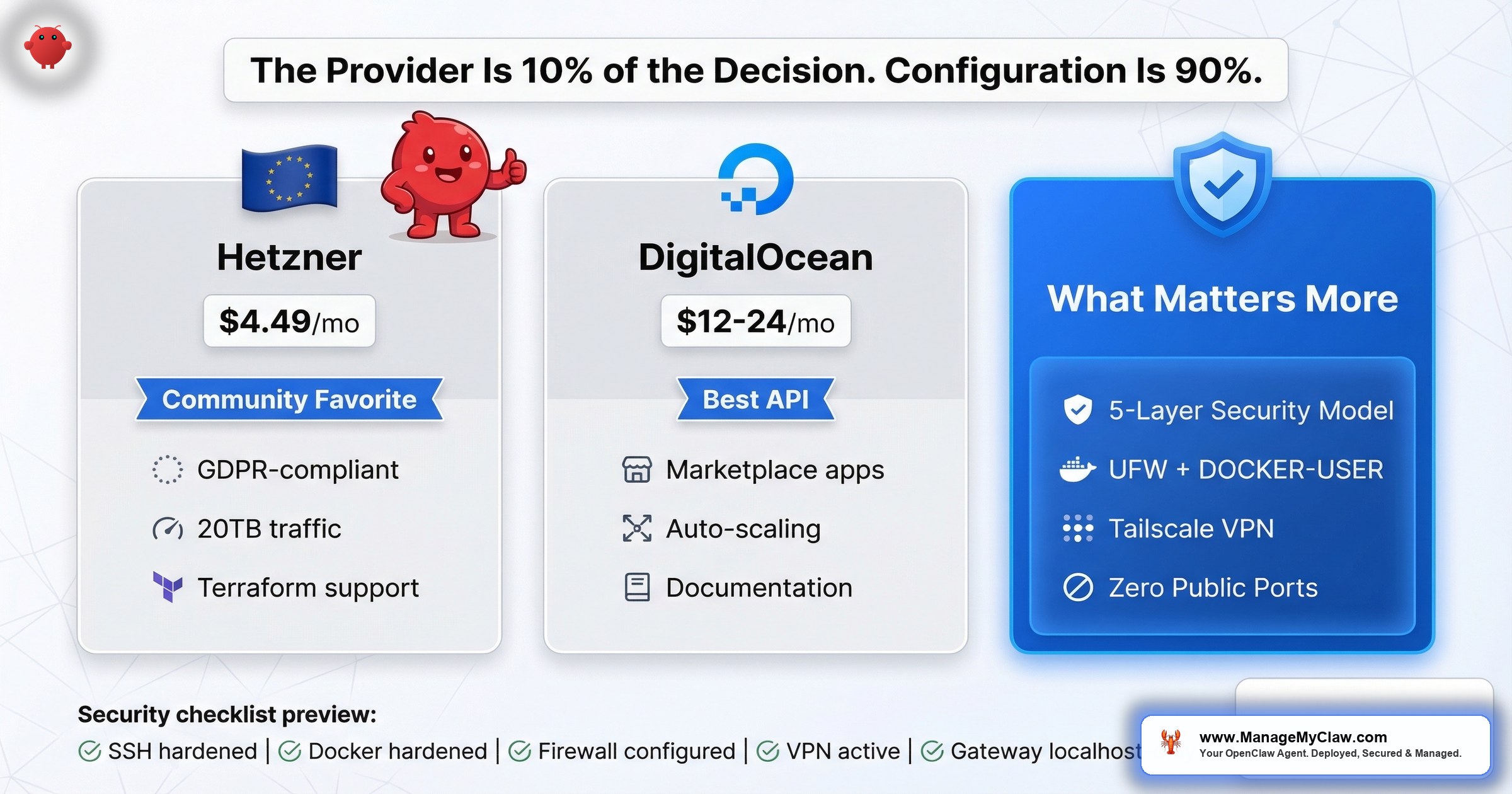
The provider is 10% of the decision. The 5-layer security model and zero-public-ports pattern are the other 90%. 135,000+ exposed instances prove that most people get the VPS right and the configuration wrong.
102 upvotes. 63 comments. A top comment that says “This should be pinned.” On r/openclaw, a post titled How I Set Up OpenClaw on a Hetzner VPS — Full Guide (102 points, 63 comments) became the community’s de facto starting point for VPS-based deployments. And on r/VPS, the thread Best VPS hosts for OpenClaw? (6 points, 27 comments) showed the same question from the other direction — people who already know VPS infrastructure, trying to figure out what OpenClaw needs from it.
Here’s the short answer: 2 vCPUs, 4GB RAM, 80GB SSD, Ubuntu 24.04 LTS. $12–$24/month. That’s the spec. Hetzner and DigitalOcean are the two providers you’ll see referenced most often, and either one works.
Here’s the longer answer: 135,000+ exposed OpenClaw instances suggest the provider doesn’t matter nearly as much as what happens after you click “Create Droplet” or “Add Server.” On r/sysadmin, a thread titled OpenClaw is going viral… most people setting it up have no idea what’s inside the image (2,244 points) produced a comment that distills the entire problem: “Way back when, we also had software that could run autonomously on your system with full permissions. We called it ‘malware.'”
Choosing a VPS provider for OpenClaw is like choosing a safe manufacturer for your house. The brand matters. But if you leave the door wide open, the safe doesn’t help.
This post covers both: which VPS providers fit OpenClaw’s requirements and why, and the security configuration that actually determines whether your deployment survives in production.
What OpenClaw Actually Needs from a VPS
The minimum spec is straightforward. From the operations playbook and confirmed by community deployments:
- 2 vCPUs — OpenClaw isn’t CPU-intensive. It orchestrates API calls, not local inference. 2 cores handle the scheduling, Docker runtime, and background processes.
- 4GB RAM — Docker containers, the OpenClaw process, and the OS itself share this. 4GB is the floor for a single-agent deployment. If you’re running multiple agents or adding n8n alongside, go to 8GB.
- 80GB SSD — The Docker image, logs, agent memory files, and OS take up space over time. 80GB gives you room for 6–12 months of operation before cleanup.
- Ubuntu 24.04 LTS — The community’s default. Most guides, troubleshooting threads, and Docker Compose files assume Ubuntu. You can use Debian or Fedora, but you’ll be translating every tutorial.
That’s it. No GPU. No special networking. No bare-metal performance requirements. OpenClaw’s compute-intensive work happens on the LLM provider’s infrastructure (OpenAI, Anthropic, etc.), not on your VPS. Your server is a traffic cop, not a factory floor.
On r/openclaw, a thread titled Can I run openclaw on a virtual machine? (3 points, 13 comments) confirmed this — the minimum spec runs comfortably on any modern VPS. The question isn’t whether your VPS can handle it. It’s whether your configuration can secure it.
The VPS Comparison: Hetzner vs. DigitalOcean vs. the Rest
Two providers show up in nearly every OpenClaw VPS discussion. Here’s how they compare on what matters:
| Factor | Hetzner | DigitalOcean |
|---|---|---|
| 2vCPU / 4GB / 80GB plan | ~$7–$12/mo | ~$24/mo |
| Data center locations | EU (Germany, Finland), US (Ashburn, Hillsboro) | US, EU, Asia-Pacific, multiple regions |
| EU data residency | Strong (EU-headquartered, GDPR by default) | Available (EU regions), US-headquartered |
| API quality | Good, improving | Excellent, well-documented |
| Marketplace / templates | Limited app marketplace | Strong Droplet marketplace, 1-click templates |
| Price-to-performance | Best in class — roughly half the cost | Higher, but includes managed features |
| Community OpenClaw guides | Multiple Reddit guides, community favorite | Good documentation, automation-friendly |
| Best for | Cost-conscious, EU privacy, raw value | Automation workflows, API-driven provisioning |
Hetzner: The Community Default
Hetzner shows up more than any other provider in OpenClaw VPS discussions. The 102-upvote guide on r/openclaw was specifically about Hetzner. OpenClaw itself maintains an official Hetzner setup guide in its documentation — one of only a handful of provider-specific install paths they’ve published. The reasons are straightforward: you get roughly double the specs at half the price of comparable US-based providers, and the European data centers give you GDPR-compliant data residency without any extra configuration.
For a typical OpenClaw deployment, a Hetzner CX22 or CX32 (2–4 vCPU, 4–8GB RAM, 40–80GB SSD) runs $7–$15/month. That’s the entire hosting bill. Your LLM API costs will likely be 5–10x higher than the server itself.
For European users, Hetzner isn’t just cheaper — it’s a compliance shortcut. As an EU-headquartered company with data centers in Germany and Finland, Hetzner’s infrastructure satisfies EU data residency requirements by default. Your agent data, API keys, and workflow configurations never leave EU jurisdiction. For businesses subject to GDPR, this eliminates the cross-border data transfer headaches you’d face with US-headquartered providers, even those with EU region options.
The hardening ecosystem. The community hasn’t just written setup guides — they’ve written hardening guides specifically for Hetzner. A DEV Community article covers cloud firewall, SSH keys, and fail2ban with a minimal port surface. GenAI Unplugged’s Substack walkthrough focuses on budget-safe security. On Medium, Alireza Rezvani published a 60-minute guide for a secure production setup deployed with zero public ports using Tailscale. Tim Kleyersburg wrote a 24/7 access guide. Each one approaches the same problem from a different angle, and all of them converge on the same conclusion: the server setup is half the work, the security hardening is the other half.
The second-most-upvoted comment on that Hetzner guide added a critical detail most VPS comparisons skip: “One thing I would add though is a proxy + iptables for blocking outgoing requests.” That’s not a Hetzner-specific concern — it’s a reminder that what you configure on the VPS matters more than which VPS you pick.
DigitalOcean: The Automation-Friendly Option
DigitalOcean costs more per spec — roughly $24/month for a comparable 2vCPU/4GB droplet. But the value proposition isn’t raw compute. It’s the ecosystem. DigitalOcean’s API is one of the best-documented in the VPS industry, their droplet marketplace includes pre-configured templates, and their managed database and monitoring add-ons reduce operational overhead if you’re building a more sophisticated stack around OpenClaw.
If you’re automating your provisioning — spinning up new instances, tearing down test environments, managing infrastructure as code — DigitalOcean’s API and Terraform provider make that workflow smoother. If you’re deploying one instance and managing it manually, you’re paying a premium for capabilities you won’t use.
Infrastructure as Code: Terraform and Pulumi for Automated Deployment
On GitHub, andreesg/openclaw-terraform-hetzner provides Terraform modules for deploying OpenClaw on Hetzner Cloud: VPS provisioning, firewall configuration, cloud-init automation, and deployment tooling, all codified. Instead of clicking through a dashboard and SSH-ing into a box, you run terraform apply and get a hardened instance in under 5 minutes. Pulumi’s blog covers deploying on AWS or Hetzner with Tailscale integration in a single deployment pipeline.
The advantage of IaC isn’t just speed. It’s that your security configuration becomes version-controlled and reviewable. When a new CVE drops, you update the module, run terraform apply, and every instance gets the fix. No SSH sessions. No forgetting to patch the staging server.
Manual setup is fine for one server. Infrastructure as Code is how you stop making the same security mistake on server number three that you already fixed on server number one.
Other Providers Worth Knowing About
Hetzner and DigitalOcean aren’t the only options. Vultr, Linode (now Akamai), and OVH all meet the spec requirements. But the OpenClaw community hasn’t coalesced around them the way it has around Hetzner and DigitalOcean, which means fewer guides, fewer troubleshooting threads, and more time solving problems someone else has already solved on a different provider.
Think of it like choosing a car mechanic. Three shops might all be equally competent. But the one your friends use is the one where you can text someone at midnight when the check-engine light comes on.
What Actually Matters More Than the Provider
Here’s where VPS comparison posts usually stop. They give you a table, recommend a provider, and move on. But 135,000+ exposed OpenClaw instances on the public internet tell you the real story: the provider choice is 10% of the decision. The other 90% is what you do after provisioning.
On r/selfhosted, a thread titled How to set up open claw, what nobody tells you before you start (26 comments) laid out the gap between “I have a VPS” and “I have a working, secure deployment.” On r/selfhosted, another thread — If you’re self-hosting OpenClaw, here’s every documented security incident (152 points, 40 comments) — produced a top comment with 105 upvotes: “That’s what you get when you forget to add the ‘and make it secure’ bit in your prompt.”
The people who are exposed aren’t using bad providers. They’re using fine providers with bad configurations. The configuration checklist below separates the 135,000 from the ones that actually hold up.
The 5-Layer Security Model
The community has converged on a multi-layer security architecture for production OpenClaw deployments. A widely-referenced gist by thedudeabidesai and GenAI Unplugged’s Substack series formalize it into 5 distinct layers, each catching what the layer above misses:
- UFW firewall — Your first perimeter. Deny all incoming by default, allow only SSH (port 22). Remember: this layer alone is insufficient because Docker bypasses UFW for published ports.
- Tailscale VPN — Zero-config mesh networking. Your OpenClaw instance is accessible only from your Tailscale network — no public ports, no authentication endpoints exposed to the internet.
- SSH tunnel — Even within your VPN, access OpenClaw through an SSH tunnel for an additional encrypted layer. Belt and suspenders.
- Gateway token — OpenClaw’s built-in authentication token for the Gateway WebSocket. Even if someone reaches your network, they can’t interact with the agent without the token.
- Device pairing — Bind specific devices to your OpenClaw instance. Unknown devices are rejected regardless of whether they have network access or the gateway token.
The core principle: never expose OpenClaw on a public port. Always run behind a firewall with SSH key-only access and fail2ban. The 5-layer model means an attacker would need to compromise your firewall, your VPN, your SSH keys, your gateway token, and your device pairing — all independently — to reach your agent. Any single layer failing is survivable. That’s the point.
The VPS Security Checklist for OpenClaw
Every item below is non-optional. Skip any one of them and you’re part of the 135,000.
1. SSH Hardening (Before Anything Else)
Your VPS is reachable from the entire internet the moment it’s provisioned. Before you install Docker, before you pull the OpenClaw image, lock down SSH:
- PermitRootLogin no — Disable root login entirely. Create a non-root user with sudo access.
- PasswordAuthentication no — SSH keys only. Passwords are brute-forceable. Keys aren’t.
- MaxAuthTries 3 — Lock out after 3 failed attempts. Automated scanners hit every new VPS within minutes of provisioning.
These 3 settings go in /etc/ssh/sshd_config. Restart the SSH service. Test that you can still log in with your key before closing your current session. If you lock yourself out, you’re reinstalling the OS.
2. Docker Hardening: 5 Flags That Aren’t Optional
OpenClaw runs inside Docker. Docker’s defaults give the container more access than it needs. These 5 flags constrain it to the minimum:
- Run as non-root user —
--user 1000:1000. If the container is compromised, the attacker doesn’t get root on the host. - Read-only filesystem —
--read-only. The container can’t write to its own filesystem. Mount specific writable volumes for data that needs persistence. - Drop all capabilities —
--cap-drop=ALL. Linux capabilities are granular root permissions. Drop them all, then add back only what’s needed. - No new privileges —
--security-opt=no-new-privileges. Prevents privilege escalation inside the container. - No Docker socket mount — Never mount
/var/run/docker.sockinto the container. A container with Docker socket access can control the host.
Docker’s own blog reinforces this with “Run OpenClaw Securely in Docker Sandboxes” — official guidance on container isolation that mirrors these 5 flags. The full walkthrough with Docker Compose examples is in the Docker sandboxing guide. If you only read one linked post from this article, make it that one.
3. Firewall Configuration: The UFW Trap
This is where most VPS deployments silently fail. You set up UFW (Ubuntu’s built-in firewall), allow only ports 22 and 443, and assume you’re protected. You aren’t. Docker bypasses UFW. Docker manages its own iptables chains, and standard UFW rules don’t apply to Docker-published ports.
The fix is the DOCKER-USER iptables chain. This is the only iptables chain that Docker doesn’t overwrite on restart. Rules in DOCKER-USER persist and apply to Docker traffic. If you’re running UFW without configuring the DOCKER-USER chain, your OpenClaw instance is likely accessible on the public internet regardless of what your UFW rules say.
The full configuration — including the specific iptables commands for the DOCKER-USER chain — is in the firewall configuration guide.
4. Port Binding: Localhost Only
Bind OpenClaw’s port to localhost: 127.0.0.1:9090:9090 in your Docker Compose file, not 9090:9090. The difference is critical. Without the 127.0.0.1 prefix, Docker binds to 0.0.0.0 — every network interface, including public-facing ones. The Gateway WebSocket should never be exposed to the public internet. Period.
5. VPN for Remote Access: The Zero-Public-Ports Pattern
If you need to access your OpenClaw instance from outside your network, use a VPN — not port forwarding. Tailscale is the community standard: zero-config mesh VPN, works across devices, and your OpenClaw interface never touches the public internet. You connect to your Tailscale network, and from there to your VPS. No open ports, no authentication endpoints exposed.
The most secure deployment pattern — documented in Alireza Rezvani’s Medium guide and the Pulumi blog — is the zero-public-ports approach. You deploy OpenClaw with no ports exposed to the public internet. Not even SSH. Tailscale handles all connectivity: your VPS joins your Tailscale network during cloud-init provisioning, and every subsequent connection — SSH, the Gateway WebSocket, monitoring — routes through the encrypted Tailscale mesh. From the public internet’s perspective, your server doesn’t exist. Port scanners find nothing. Shodan indexes nothing. The 135,000 exposed instances? They’re running the opposite of this pattern.
Don’t run OpenClaw on your main machine.
— SkyPilot blog. Cloud isolation combined with zero public ports gives you defense in depth.6. Block Outgoing Requests to Unknown Hosts
Remember the community advice about a proxy and iptables for outgoing requests? This is where it applies. By default, your OpenClaw container can reach any host on the internet. A compromised agent or a malicious skill can exfiltrate data to any endpoint. Restrict outbound traffic to a whitelist of known API hosts (api.openai.com, api.anthropic.com, your specific integration endpoints) and block everything else.
The Complete VPS Setup Checklist
Here’s the full sequence, in order. Each step depends on the one before it.
| # | Step | What It Prevents | Time |
|---|---|---|---|
| 1 | Provision VPS (2vCPU / 4GB / 80GB / Ubuntu 24.04) | — | 2 min |
| 2 | SSH hardening (root login off, key-only auth, MaxAuthTries 3) | Brute-force SSH attacks | 5 min |
| 3 | Install Docker, configure 5 hardening flags | Container escape, privilege escalation | 15 min |
| 4 | Configure UFW + DOCKER-USER iptables chain | Unauthorized network access (UFW bypass) | 10 min |
| 5 | Bind ports to 127.0.0.1 only | Public exposure of Gateway WebSocket | 2 min |
| 6 | Install Tailscale for remote access | Open ports for remote management | 5 min |
| 7 | Configure outbound request whitelist | Data exfiltration from compromised agents | 10 min |
| 8 | Pull OpenClaw image, deploy with Docker Compose | — | 5 min |
| Total setup time | ~55 min |
Total time: about 55 minutes if you know what you’re doing. Considerably longer if you don’t — and getting it wrong on any single step can leave you exposed without knowing it.
The Self-Hosting Reality Check
On r/AI_Agents, a thread titled How to deploy openclaw if you don’t know what docker is (step by step) (6 points, 16 comments) captures the core tension of VPS-based OpenClaw hosting. The people who want to run OpenClaw on a VPS are often not the people who are comfortable configuring iptables chains and Docker security flags. On r/openclaw, the thread Possible to run openclaw for free? (7 points, 64 comments) showed the same pattern: 64 comments, most of them from people trying to find the cheapest path to a running instance.
The cheapest path and the secure path aren’t the same path.
On r/openclaw, a thread titled Gave up self-hosting VPS, tried clawcloud.dev — actually works (83 points) told the quieter story: someone who went through the VPS setup process, hit the security and maintenance complexity, and opted for a managed alternative. 83 upvotes suggests it resonated.
The Hetzner VPS guide itself hints at this. One commenter pointed to an alternative resource: “If anyone is curious about setting up OpenClaw, I wrote the most detailed guide for all systems, any tech level. r/openclawsetup.” A whole subreddit dedicated to the setup process. That’s how much complexity is involved — enough to justify its own community.
There’s a reason nobody self-hosts their email server anymore, even though the technology is well-understood. The setup is doable. The maintenance isn’t.
When Self-Hosting a VPS Makes Sense (And When It Doesn’t)
Self-host on a VPS if:
- You’re comfortable with Linux server administration, Docker, and iptables
- You have time for ongoing maintenance — updates, CVE tracking, configuration audits
- You need EU data residency and want full control over where data lives
- Your budget is optimized for the $12–$24/month hosting range and you have the skills to trade time for money
Don’t self-host if:
- You don’t know what DOCKER-USER iptables chain means (and you just read about it for the first time in this post)
- You don’t have a plan for patching OpenClaw when the next CVE drops
- The 55-minute setup checklist above looks more like a 5-hour project
- Your priority is running workflows, not managing infrastructure
ManageMyClaw provisions on Hetzner and DigitalOcean by default using infrastructure-as-code automation — the same Terraform-style approach the community recommends, but managed for you. You pay the hosting provider directly — $12–$24/month, no markup. ManageMyClaw implements the full 5-layer security model: UFW firewall, Tailscale VPN with zero public ports, SSH tunnel access, gateway token configuration, device pairing, Docker sandboxing, and ongoing CVE patching. The $499 Starter tier includes VPS provisioning and full hardening. Full pricing breakdown here.
The Bottom Line
The VPS choice is the easy part. Hetzner if you want the best price-to-performance ratio and EU data residency. DigitalOcean if you want a polished API and ecosystem for automation. Either one at 2vCPU, 4GB RAM, 80GB SSD, running Ubuntu 24.04 LTS, at $12–$24/month.
The hard part is everything after provisioning. The 5-layer security model: UFW firewall, Tailscale VPN with zero public ports, SSH tunnels, gateway tokens, and device pairing. Docker sandboxing with 5 non-optional flags. The DOCKER-USER iptables chain that makes your firewall actually work with Docker. Localhost port binding. Outbound request whitelisting. Infrastructure as Code if you’re managing more than one instance. And then the ongoing maintenance — updates, CVE tracking, configuration audits — that doesn’t stop after the initial setup.
135,000+ exposed instances prove that most people get the provider right and the configuration wrong. Don’t be most people.
Frequently Asked Questions
What are the minimum VPS specs for running OpenClaw?
2 vCPUs, 4GB RAM, and 80GB SSD running Ubuntu 24.04 LTS. This handles a single-agent deployment comfortably. OpenClaw’s compute-heavy work happens on the LLM provider’s servers (OpenAI, Anthropic), not on your VPS, so you don’t need GPU capability or high-end processing power. If you’re running multiple agents or pairing OpenClaw with additional services like n8n, upgrade to 4 vCPUs and 8GB RAM.
Is Hetzner or DigitalOcean better for OpenClaw?
Both work well. Hetzner offers roughly double the specs at half the price and is the most-referenced provider in OpenClaw community guides, making it the default choice for cost-conscious deployments. DigitalOcean costs more per spec but provides a better API, droplet marketplace with pre-configured templates, and a smoother automation workflow. Choose Hetzner for raw value and EU data residency. Choose DigitalOcean for API-driven provisioning and managed ecosystem features.
How much does it cost per month to run OpenClaw on a VPS?
The VPS itself costs $12–$24/month for the recommended spec. But hosting is only one part of the total cost. LLM API calls (OpenAI, Anthropic) typically add $40–$80/month depending on your usage and model routing strategy. A well-optimized total setup runs $80–$120/month. The VPS is the smallest line item in most OpenClaw budgets.
Why does Docker bypass UFW firewall rules?
Docker manages its own iptables chains for container networking. When Docker publishes a port, it inserts iptables rules that take priority over UFW’s rules. This means your carefully configured UFW deny rules may have no effect on Docker-published ports. The fix is using the DOCKER-USER iptables chain, which is the only chain Docker preserves across restarts. The firewall configuration guide walks through the specific commands.
Can I run OpenClaw on a VPS for free?
Some cloud providers offer free tiers (Oracle Cloud’s ARM instances, for example), and the r/openclaw thread “Possible to run openclaw for free?” (64 comments) explored every option. The short answer: you can get the VPS for free, but you still need LLM API credits, and free-tier VPS instances often have limited specs, inconsistent availability, and no SLA. For production use, the $12–$24/month for a proper VPS is the floor for reliability.
What’s the most common security mistake when deploying OpenClaw on a VPS?
Not configuring the DOCKER-USER iptables chain. Most people set up UFW, allow only SSH and HTTPS, and assume they’re protected. But Docker bypasses UFW entirely for published ports. The result: your OpenClaw Gateway WebSocket is accessible on the public internet even though your firewall “blocks” it. This single misconfiguration accounts for a large portion of the 135,000+ exposed instances identified by SecurityScorecard.
Should I self-host OpenClaw on a VPS or use a managed service?
Self-host if you have Linux administration experience, understand Docker security, and have time for ongoing CVE patching and configuration audits. Use a managed service if your priority is running workflows rather than maintaining infrastructure. ManageMyClaw provisions on Hetzner or DigitalOcean with full security hardening included in the $499 Starter tier — you pay the hosting provider directly for the VPS.
What is the 5-layer security model for OpenClaw VPS deployments?
The community-recommended security architecture uses 5 independent layers: UFW firewall (perimeter defense), Tailscale VPN (private network access), SSH tunnel (encrypted transport), gateway token (application-level authentication), and device pairing (endpoint verification). Each layer catches what the one above misses. An attacker would need to compromise all 5 independently to reach your agent. The key principle: never expose OpenClaw on a public port, and always run behind a firewall with SSH key-only access and fail2ban.
What is the zero-public-ports deployment pattern?
The zero-public-ports pattern deploys OpenClaw with no ports exposed to the public internet — not even SSH. All connectivity routes through a Tailscale VPN mesh configured during cloud-init provisioning. From the public internet, your server is invisible to port scanners and services like Shodan. This approach is documented in multiple community guides and the Pulumi blog, and it’s the most secure way to run a remotely-accessible OpenClaw instance.
Can I use Terraform or Pulumi to deploy OpenClaw on a VPS?
Yes. The community has built infrastructure-as-code tooling for automated OpenClaw deployment. On GitHub, andreesg/openclaw-terraform-hetzner provides Terraform modules for Hetzner Cloud with VPS provisioning, firewall configuration, and cloud-init automation. Pulumi’s blog covers deploying on AWS or Hetzner with Tailscale integration. IaC makes your security configuration version-controlled and repeatable — when a CVE drops, you update the module and every instance gets the fix.
Is Hetzner GDPR-compliant for OpenClaw hosting?
Hetzner is EU-headquartered with data centers in Germany and Finland, making it one of the simplest paths to GDPR-compliant OpenClaw hosting. Your agent data, API keys, and workflow configurations stay within EU jurisdiction by default. For businesses subject to GDPR, this eliminates cross-border data transfer concerns that arise with US-headquartered providers, even those offering EU region options. OpenClaw also maintains an official Hetzner setup guide at docs.openclaw.ai/install/hetzner.


