106 upvotes on r/openclaw. $547 billion in AI investment that delivered zero business value. And the post that triggered it all was a single observation: “The best OpenClaw setups I’ve seen all have one thing in common: they do less.”
That sentence landed because it contradicts the pitch everyone’s selling. The pitch says: more agents, more integrations, more automation, more everything. Ship 5 workflows on day one. Connect every tool. Build the whole system. The pitch sounds ambitious. It also has an 80% failure rate.
$547 billion of the $684 billion companies invested in AI in 2025 delivered zero intended business value, according to Pertama Partners’ analysis. An NBER study of nearly 6,000 executives confirmed the same pattern: over 80% of companies report zero measurable impact from AI — despite 70% actively using AI tools. Goldman Sachs found no economy-wide productivity link, but a median 30% productivity gain in exactly 2 use cases: customer support and software development.
The deployments that work don’t start with ambition. They start with restraint. One workflow. One agent. One job. Stable before adding anything else.
The community calls this the “boring setup.” Here’s why boring wins — and how to build it in 3 stages.
What the Boring Setup Actually Looks Like
The top comment on that r/openclaw thread (13 upvotes) pushed back on the framing — constructively:
“Solid framework. The ‘boring setup’ principle is real — but I’d push back slightly on the ceiling. The key isn’t doing less, it’s building incrementally. We started exactly where you describe: one agent…”
— r/openclaw, top comment (13 upvotes)That distinction matters. Boring doesn’t mean limited. It means sequenced. You still end up with a multi-agent system handling email, reporting, onboarding, and customer service. You just don’t start there.
Think of it like building a house. Nobody installs the kitchen cabinets before the foundation cures. But if you follow the construction schedule, you end up with a house that doesn’t crack when the weather turns.
“100% right. I am between A and B with three agents and can confirm.”
— r/openclaw, community member confirming the maturity modelBetween stages A and B. 3 agents. Still building incrementally. Not 10 agents launched on a long weekend.
On r/AI_Agents, a thread titled “Running AI agents in production — what does your stack look like in 2026?” (43 upvotes, 38 comments) surfaced the same principle from the production side.
“Running a multi-agent system in production for about 8 months now. Here’s what actually survived vs what we threw out: Survived: Python orchestrator that treats each agent as a subprocess with its own…”
— r/AI_Agents, top comment (16 upvotes)8 months in production. And the takeaway isn’t “here’s what we built.” It’s “here’s what survived.” The boring setup is the set of decisions that survive contact with reality.
SitePoint’s “OpenClaw Production Guide: 4 Weeks of Lessons” confirmed the same pattern from the tutorial side. The key insight: the “boring” automations — CI pipelines, structured logging, simple deployment scripts — are the ones that deliver actual, measurable time saved per week. Not the flashy multi-agent orchestrations. Not the 21-tool integrations. The automations nobody writes blog posts about because they just quietly work.
“Automating your development workflow with OpenClaw isn’t a one-day project, but you don’t need to do everything at once. Start with a simple CI pipeline for your most active repository and add complexity as your team’s automation maturity grows.”
— SitePoint, “OpenClaw Production Guide: 4 Weeks of Lessons”That sentence is the boring setup framework in one breath. Start simple. Add complexity as maturity grows — not as ambition grows.
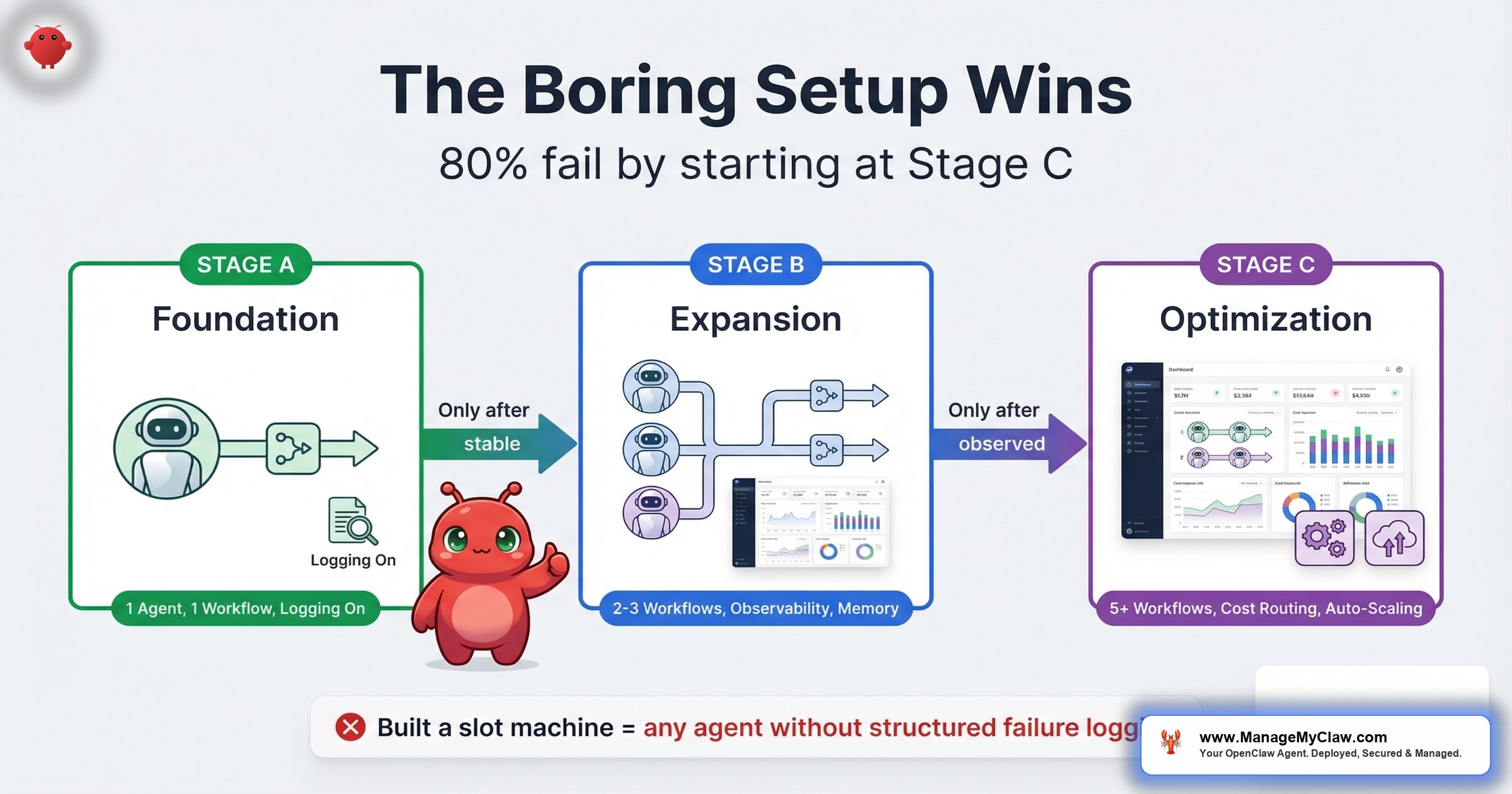
The Maturity Model: 3 Stages of Deployment Sophistication
Based on the community patterns across r/openclaw and r/AI_Agents, every successful deployment follows the same progression. Here’s the model — with specific criteria for knowing when you’re ready to advance.
| Stage | What You Run | What You Observe | When to Advance | Common Mistake |
|---|---|---|---|---|
| A — Foundation | 1 workflow, 1 agent, read-only or low-risk write (morning briefing or email triage) | Uptime, output quality, token costs, failure frequency | 30 days without manual intervention; measurable time savings confirmed against baseline | Jumping to Stage B after 1 good week |
| B — Expansion | 2–3 workflows, separate agents per task, structured logging | Per-workflow error rates, token cost per task, context persistence across sessions | All workflows stable for 30+ days; total monthly cost within budget; no unresolved failure modes | Adding workflows without adding observability |
| C — Optimization | 3–5 workflows, agent orchestration, SKILL.md for persistent context, cron-based context injection | Cross-workflow dependencies, cost trends over time, quarterly ROI against initial baseline | This is the steady state — optimize and maintain | Treating the system as “done” instead of something that needs ongoing review |
The r/openclaw commenter who said “I am between A and B with three agents” is doing it right. 3 agents, still in the expansion phase, still building incrementally. Not 10 agents launched in a weekend with no logging.
The critical gate between stages: you don’t advance from A to B until your first workflow runs for 30 days without you touching it. Not 30 days with “a few small fixes.” 30 days of autonomous, correct operation. If you can’t get one workflow stable, adding a second doesn’t double your productivity — it doubles your troubleshooting.
Why Observability Comes Before Complexity
On r/AI_Agents, a post titled “I built AI agents for 20+ startups this year. Here is the engineering roadmap” hit 444 upvotes and 93 comments — one of the highest-engagement threads on the sub.
“Phase 5 logging point is the one most people skip. You can’t improve what you can’t observe. ‘Built a slot machine’ is the right mental model for any agent without structured failure logging.”
— r/AI_Agents, top comment (21 upvotes)Built a slot machine. That’s what an agent without logging is. You pull the lever, you get an output, and you have no idea why it was good or bad, no ability to reproduce successes, and no way to diagnose failures.
“A bit more sophisticated than the usual OpenClaw on Mac mini post.”
— r/AI_Agents, commenter on the engineering roadmap threadIt’s like running a restaurant without checking the kitchen. The food might come out fine tonight. But you have no early warning system for the night it doesn’t.
On r/openclaw, a thread on production-ready plugins (154 upvotes, 59 comments) confirmed the same pattern.
“Strong list. The biggest unlock for me was routing plus observability together, not either one alone.”
— r/openclaw, production-ready plugins thread (154 upvotes)“Manifest is open source btw, I’m a contributor. Very useful plugin to manage AI costs!”
— r/openclaw, cost-management plugin commenterMicrosoft’s Security Blog (February 2026) published “Running OpenClaw safely: identity, isolation, and runtime risk” — arguing for governance-by-design: runtime enforcement of policies, coordinated model management, and deep visibility into execution paths. Not governance as an afterthought you bolt on after an incident. Governance baked into the architecture from Stage A. The boring setup doesn’t just agree with Microsoft’s recommendation — it is Microsoft’s recommendation, applied at the individual deployer level instead of the enterprise level.
The boring setup principle applied to observability is straightforward:
- Stage A: log every agent run — timestamp, task, token count, pass/fail, output summary. A text file is fine. You need a record, not a dashboard.
- Stage B: structured logging per workflow. Error categorization (API failure, token limit, malformed input, timeout). Monthly cost tracking by workflow.
- Stage C: cross-workflow observability. Which workflows depend on shared context? Which ones have correlated failures? Quarterly cost trends.
Why this matters: You add observability before you add complexity because diagnosing a 1-workflow failure is straightforward. Diagnosing a 3-workflow failure cascade without logs is a weekend you don’t get back. The teams who skip logging at Stage A spend 3x longer debugging at Stage B.
The SKILL.md Pattern: Persistent Context Across Sessions
On r/openclaw, a post titled “OpenClaw 102: Updates from my 101 on how to get the most from your OpenClaw bot” hit 214 upvotes and 31 comments.
“The SKILL.md section is what most people skip and then wonder why their agents keep reinventing context every session. The thing that changed everything for me: treating cron jobs not as schedulers but as context injectors.”
— r/openclaw, top comment (12 upvotes)Two ideas in one comment, and both are Stage C patterns that the boring setup unlocks:
1. SKILL.md as persistent memory. Without a SKILL.md file, every new session starts from scratch. Your agent doesn’t remember that you prefer bullet-point briefings, that your CRM uses a non-standard date format, or that client onboarding emails should CC your operations lead. A SKILL.md file persists this context across sessions — the agent reads it at session start and has immediate access to accumulated configuration knowledge. It’s the difference between a new hire who reads their notes and one who asks you the same questions every morning.
2. Cron jobs as context injectors. Most people think of cron jobs as schedulers: run this task at 8 AM. But a cron job can also inject fresh context into an agent’s working memory — pulling yesterday’s metrics, today’s calendar, and this week’s priorities so the agent starts every session with current data instead of stale assumptions. This is what separates an agent that just executes from one that executes with awareness of what changed overnight.
These patterns are Stage C because they only matter once you have stable workflows worth persisting context for. Building a SKILL.md before your first workflow runs for 30 days is premature optimization. Building it after 3 workflows are stable is the move that takes your deployment from “working” to “working well.”
The 5 Failure Modes the Boring Setup Prevents
The 5 predictable failure modes behind the 80% rate map directly to what the boring setup avoids:
| Failure Mode | What Goes Wrong | How the Boring Setup Prevents It |
|---|---|---|
| Wrong task | Automating judgment calls or unstructured work | Stage A forces you to pick 1 structured, repeatable workflow. No room for “let’s try everything.” |
| No audit | Automating a broken process | 1-workflow focus makes it obvious when the process — not the agent — is the problem. |
| Bad data | Agent fed inconsistent or stale inputs | Cron-based context injection (Stage C) keeps data fresh. Logging catches stale inputs before they compound. |
| Poor maintenance | Deploying and forgetting | Observability from Stage B means you know when something drifts before it fails. |
| Wrong expectations | Expecting 10x immediately | 30-day gates between stages force realistic expectations. You measure before you expand. |
The boring setup isn’t a philosophy. It’s a prevention framework. Every stage gate exists because the failure it prevents has a body count in the community threads.
The Production Stack That Survives
Across the r/AI_Agents and r/openclaw threads, a consistent pattern emerges for what actually survives in production versus what gets thrown out in the first 90 days. Here’s the stack, mapped to the maturity model:
Stage A — Foundation stack
- 1 agent with a defined scope and minimal permissions
- System-prompt safety constraints (never in user messages)
- Basic run logging (timestamp, task, pass/fail)
- Kill switch configured and tested
- Docker sandboxing with proper firewall rules
DigitalOcean Marketplace and Hostinger VPS now offer one-click OpenClaw apps. Deploying takes less time than brewing coffee. But one-click deployment does not equal production-ready. Those marketplace images ship without security hardening, without structured logging, without kill switches, and without the firewall rules that keep your agent from making network calls it shouldn’t. The one-click gets you running. Stage A gets you running safely. Don’t confuse “deployed” with “production-ready” — that confusion is where a significant chunk of the 80% failure rate lives.
Stage B — Expansion stack
- 2–3 agents, each as a separate subprocess with isolated permissions
- Structured failure logging with error categorization
- Monthly cost tracking per workflow
- Routing logic (which tasks go to which agent)
- Vetted plugin stack — observability and cost management together
Stage C — Optimization stack
- SKILL.md for persistent cross-session context
- Cron jobs as context injectors, not just schedulers
- Cross-workflow dependency mapping
- Quarterly ROI review against initial baseline
- Agent memory and evaluation tracking
“I’m especially curious about agent memory and evaluation — how do you keep track of what agents learn and how well they’re performing?”
— r/AI_Agents, commenter on the production stack threadIf you’re asking that question, you’re ready for Stage C. If you’re not asking it yet, you’re not there — and that’s fine. The boring setup says: stay where you are until the next stage’s problems are the ones you’re actually facing.
How to Start: The First 30 Days
If you’re starting from zero, here’s the exact sequence that maps to Stage A of the maturity model:
- Week 1: Pick 1 workflow. Start with morning briefing (read-only, zero risk) or email triage (highest time savings). Both are documented in the workflow library. Don’t pick the most ambitious use case. Pick the most automatable one.
- Week 1–2: Configure the agent. One agent, one job, minimal permissions. Safety constraints in the system prompt. Kill switch tested. Use an agent template designed for this specific workflow so you’re not writing configuration from scratch.
- Week 2–4: Run and observe. Log every run. Track what works and what doesn’t. Adjust the agent’s instructions based on actual output — not hypothetical improvements. Measure time saved against your pre-deployment baseline.
- Day 30: Evaluate. Is the workflow running without manual intervention? Are the time savings real and measurable? Is the monthly API cost within your expected range? If all 3 are yes, you’re ready for Stage B. If any are no, fix the Stage A problems before adding Stage B complexity.
The hardest part isn’t the configuration. It’s the discipline to wait 30 days before adding the next workflow. Every experienced deployer in every thread says the same thing: the impatient ones are the ones posting “why did my setup break” 6 weeks later.
The Incrementalist Advantage
The boring setup framework isn’t about doing less permanently. It’s about doing less first so you can do more later — with confidence.
Consider 2 founders who both want 5 automated workflows:
- Founder A deploys all 5 on day one. By week 3, 2 workflows have silent failures. By week 6, a cascading error takes out a third. By month 3, the whole system is rebuilt from scratch after a weekend debugging session.
- Founder B deploys 1 workflow. Gets it stable in 30 days. Adds a second. Gets both stable. By month 4, they have 3 stable workflows with clean logs and measurable ROI. By month 6, they’re at 5 — and none of them require weekend interventions.
Founder B is slower to deploy and faster to value. That’s the incrementalist advantage. You trade speed-to-deploy for speed-to-stable — and stable is what pays.
There’s a Medium article making the rounds right now: “21 Advanced OpenClaw Automations for Developers (2026)” — with the subtitle claiming “nobody talks about” these automations. But the thing is, the boring automations that people do talk about are the ones that actually work in production. Advanced does not mean better. A sophisticated 21-automation stack with no observability, no staging gates, and no failure logging is just 21 ways to break your deployment simultaneously. HelloPM’s “OpenClaw for Product Managers” guide shows the same pattern from the non-technical side — growing interest from PMs and ops leads who don’t want 21 advanced automations. They want 1 that reliably saves their team 5 hours a week.
“fwiw new user here, Kimi2.5 surprisingly capable for real world tasks.”
— r/openclaw, new user testing one model on one use caseNew user. Starting with one model, one use case, testing in the real world. That’s Stage A. And it’s exactly where new users should be — building confidence on one workflow before scaling up.
The Bottom Line
The best OpenClaw deployments aren’t the most ambitious. They’re the most disciplined. 1 workflow, stable for 30 days, before adding the next. Observability before complexity. Logging before scaling. Safety constraints in the system prompt, not in a user message that gets compacted away.
The 80% failure rate doesn’t come from bad technology. It comes from skipping stages. The boring setup is boring because it works — and because the exciting alternative has a $547 billion track record of not working.
Start at Stage A. Get it stable. Then build.
Frequently Asked Questions
What is the “boring setup” framework for OpenClaw?
A 3-stage deployment model based on patterns from production OpenClaw deployments. Stage A: 1 workflow, 1 agent, minimal permissions, basic logging. Stage B: 2–3 workflows with structured observability and per-workflow cost tracking. Stage C: persistent context via SKILL.md, cron-based context injection, and quarterly ROI reviews. You advance stages only after 30 days of stable operation at the current level.
Why do 80% of AI automation projects fail?
5 predictable failure modes: automating the wrong tasks (judgment calls instead of structured workflows), skipping the workflow audit, building monolithic agents, deploying without security hardening, and having no kill switch. $547 billion of $684 billion invested in AI in 2025 delivered zero business value. The technology works — the deployments don’t. The full breakdown is in our failure analysis.
How long should I run one workflow before adding a second?
30 days without manual intervention. Not 30 days with “a few small fixes” — 30 days of autonomous, correct operation. If you can’t get one workflow stable, adding a second doubles your troubleshooting, not your productivity. Measure actual time savings against your pre-deployment baseline before expanding.
What’s the best first workflow to deploy?
Morning briefing or email triage. Morning briefing is read-only (zero risk of destructive action). Email triage delivers the highest single-workflow time savings — 78% reduction in inbox processing time. Both are documented in the workflow library with triggers, prerequisites, API costs, and failure modes.
What is SKILL.md and why does it matter?
A persistent configuration file your agent reads at the start of every session. Without it, every new session starts from scratch — your agent doesn’t remember your preferences, your CRM’s date format, or which clients get priority handling. With it, accumulated context persists across sessions. It’s a Stage C pattern: only worth building once you have stable workflows worth persisting context for.
Why is observability more important than adding more agents?
An agent without structured logging is a slot machine — you pull the lever and hope for a good output with no ability to diagnose failures or reproduce successes. Add logging before you add complexity. Diagnosing a 1-workflow failure is straightforward. Diagnosing a 3-workflow failure cascade without logs is a weekend you don’t get back.
How does the boring setup framework apply to ManageMyClaw’s service tiers?
ManageMyClaw’s Starter tier ($499) is Stage A by design — 1 workflow, properly configured, with security hardening and a tested kill switch. The Pro tier ($1,499) maps to Stage B: 3 workflows with structured observability. Managed Care includes quarterly optimization reviews — the Stage C practice of measuring ROI against your initial baseline and adjusting. The tier structure follows the maturity model because the maturity model is how deployments actually succeed.


