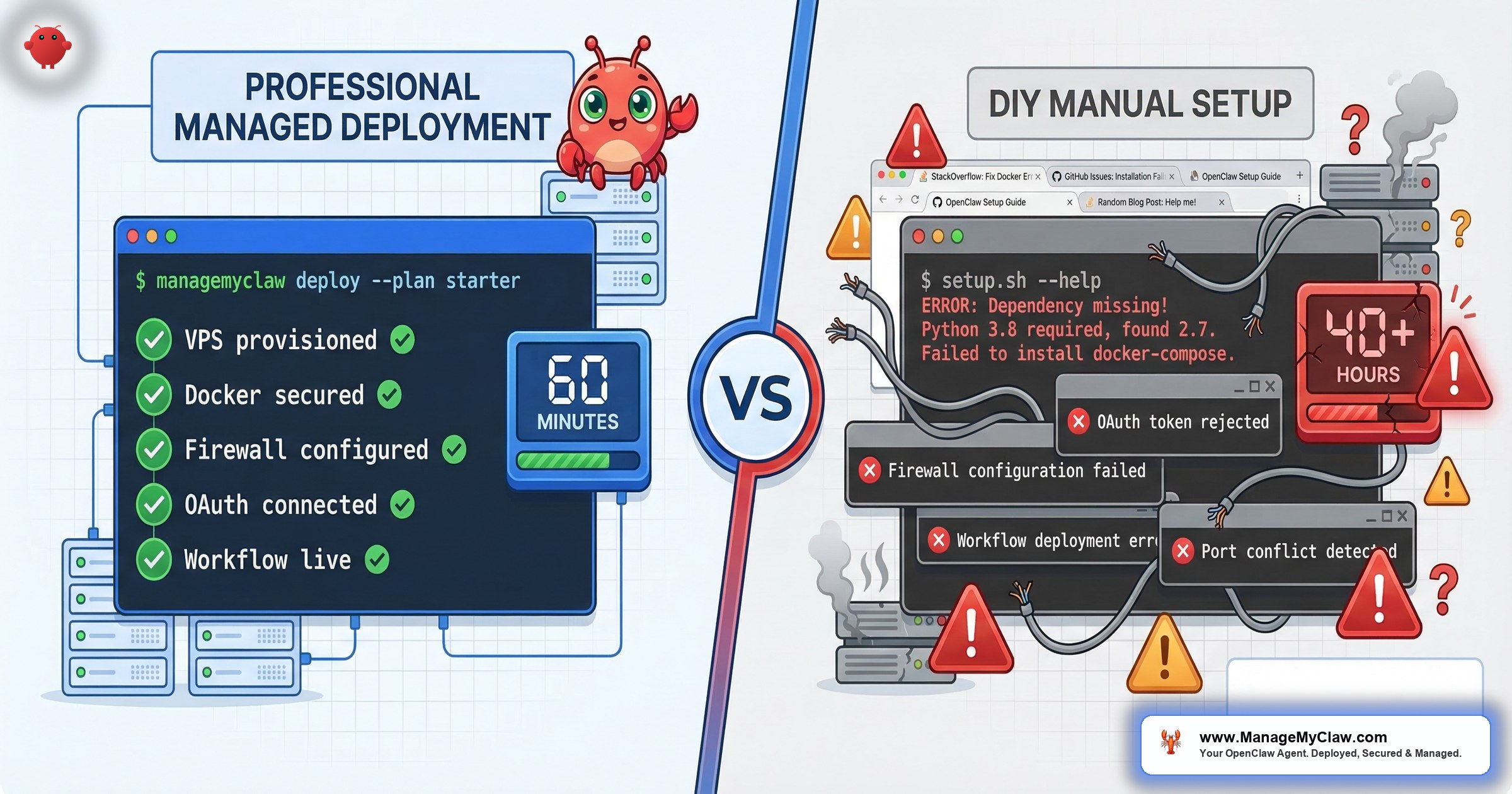
“Spent 3 hours debugging, trying older OpenClaw Docker images, gonna kms.”
That’s a real post on X from someone in the middle of a DIY setup. Not a troll, not a complaint about a bad product — just someone who discovered that the gap between “run the install script” and “have a working, secure AI agent” is a lot wider than the README suggests.
We built ManageMyClaw because we’ve done this setup ourselves, and we’ve watched hundreds of founders go through the same discovery.
This post is the honest version of what OpenClaw DIY setup actually involves — broken down by phase, with real problems at each step, real quotes from people who lived through it, and the security incidents that happen when corners get cut.
If you’re deciding whether to set up OpenClaw yourself or use a managed service, this is what you’re actually deciding between.
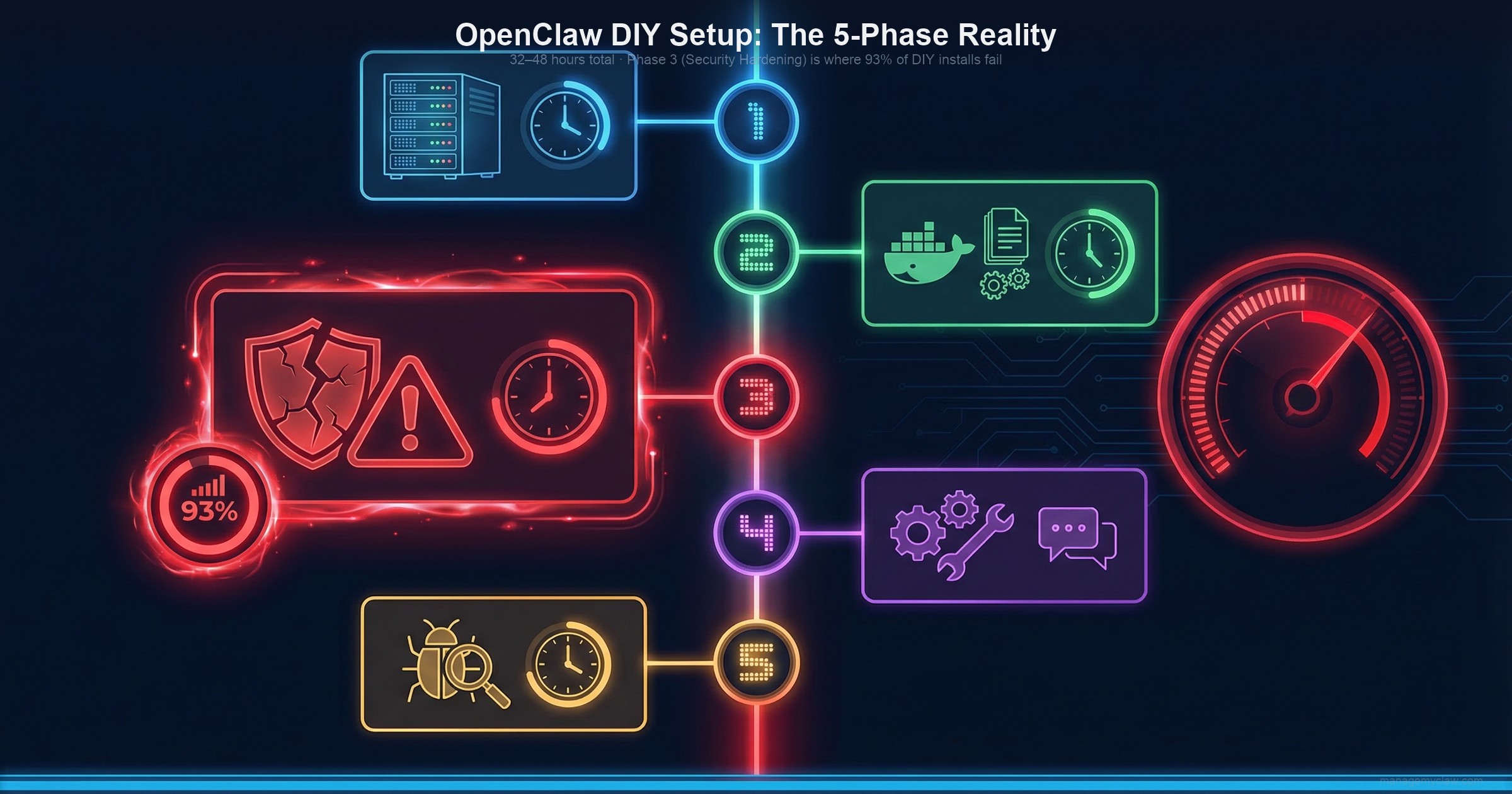
The 5 phases of DIY OpenClaw setup — 32 to 48 hours total, assuming Linux, Docker, OAuth, and prompt engineering experience.
VPS Provisioning and OS Setup
The first decision is deceptively complex: which VPS provider, which region, how much RAM? OpenClaw needs at least 4GB to run comfortably — 8GB if you’re running multiple workflows. Choose wrong and you’ll be migrating mid-setup.
Once provisioned, you’re configuring SSH key authentication, disabling password login, and setting up a non-root user. That last step matters more than most tutorials say: running Docker as root is a known attack vector, and it’s the default if you don’t configure otherwise. Then Docker. Then Docker Compose. Then the first real problem: the Docker version on your Linux distribution is not the version OpenClaw expects. You’re debugging a dependency conflict before you’ve installed the agent.
Simon Willison, creator of Datasette and one of the most respected developer educators working today, set up OpenClaw on Docker and documented the experience. His summary:
“this is an officially documented path but there were still a few things that caught me out.”
— Simon Willison, creator of Datasette
That’s coming from someone who writes setup guides for a living. For people without his background, the community reports are blunter.
“Two days of endless errors.”
— OpenClaw community user
Another had a Tailscale configuration attempt leave their machine in a state it couldn’t be used at all. The setup docs call this phase straightforward. The 13,557 people who watched Kevin Jeppesen’s troubleshooting video suggest otherwise.
Docker and OpenClaw Installation
OpenClaw runs inside Docker. The openclaw.json configuration file has nested objects for models, channels, agents, and gateway settings. One wrong key shape — writing the model as a string instead of an object, for example — breaks things silently. There’s no error message that tells you what’s wrong. There’s just a gateway that won’t connect.
A competitor’s own support page describes the most common tickets they get: gateway won’t connect, skills failing to load, Telegram integration broken, AI responses stopped working. These aren’t edge cases. They’re the normal experience.
The default OpenClaw configuration binds to 0.0.0.0 — meaning your agent is publicly accessible on the open internet from the moment it starts. This is one of the first things you should change. It’s also one of the first things tutorials skip.
Security Hardening: The Phase Most OpenClaw DIY Setups Skip
of self-hosted OpenClaw instances have critical security vulnerabilities
— ClawHosters research. Most tutorials end before reaching this phase.
Security hardening is hard, takes 6–8 hours, and most tutorials end before they get to it. Once the agent is running, the instinct is to move on. Here’s what actually lives in those hours.
The firewall that doesn’t work the way you think
UFW is the standard Linux firewall. You configure your rules, check the status, everything looks locked down. What most people don’t know: Docker manages its own iptables rules and bypasses UFW entirely. When you publish a container port, Docker injects rules at the FORWARD chain level — not the INPUT chain that UFW controls. The Docker official documentation states it plainly: “Packets that get accepted or rejected by rules in these custom chains will not be seen by user-defined rules appended to the FORWARD chain.”
The fix is the DOCKER-USER iptables chain, which Docker does respect. Without it, your firewall shows everything as secure, but your OpenClaw instance may still be reachable from the internet. This is the most common gap in DIY setups, and it’s invisible — there’s no warning, no error, and the firewall status command will tell you everything is fine.
Composio OAuth setup (1–2 hours per integration)
OpenClaw connects to your tools (Gmail, Google Calendar, Slack, Notion) through Composio’s OAuth middleware. This is important: it keeps your credentials out of the agent’s context entirely. But each integration requires registering a separate OAuth application, configuring the correct permission scopes, setting up redirect URIs, and testing the full token flow. That’s 1–2 hours per tool. Budget the afternoon.
Access tokens expire. When one does — silently, at 3 AM — your workflows fail without warning. Managing token refresh is its own operational task.
Tool permission allowlists
By default, if you give OpenClaw access to your Gmail, it has read, write, and delete permissions on everything. The permission system needs explicit allowlists configured at the Docker level — not the application level. Application-level rules can be overridden by the agent if a prompt instructs it to. Docker-level rules cannot. Most DIY setups don’t implement this distinction.
The ClawHavoc attack: what happens when you skip plugin vetting
Jan–Feb 2026
In January 2026, attackers began uploading malicious skills to ClawHub, the official OpenClaw plugin marketplace. By February 5th, researchers at Antiy Labs had identified 1,184 malicious packages from 12 publisher accounts. By mid-February, the number had grown to 2,400+. Koi Security named the campaign “ClawHavoc.” They estimate 300,000 AI agent users were affected.
The skills were disguised as legitimate tools. Koi Security researcher Oren Yomtov described the method:
“You install what looks like a legitimate skill — maybe solana-wallet-tracker or youtube-summarize-pro.”
Once installed, the skills delivered Atomic Stealer, a macOS infostealer that harvests browser credentials, keychain passwords, cryptocurrency wallet keys, and SSH keys.
The root cause, per Antiy Labs: “The core root cause of this incident lies in ClawHub’s default open upload policy, allowing any user to publish relevant skills. The only current restriction is that publishers must possess a GitHub account registered for at least one week.”
Vetting plugins before installation requires checking against known-malicious package lists and examining skill source code for embedded shell commands. Most DIY users don’t do this. Most tutorials don’t mention it.
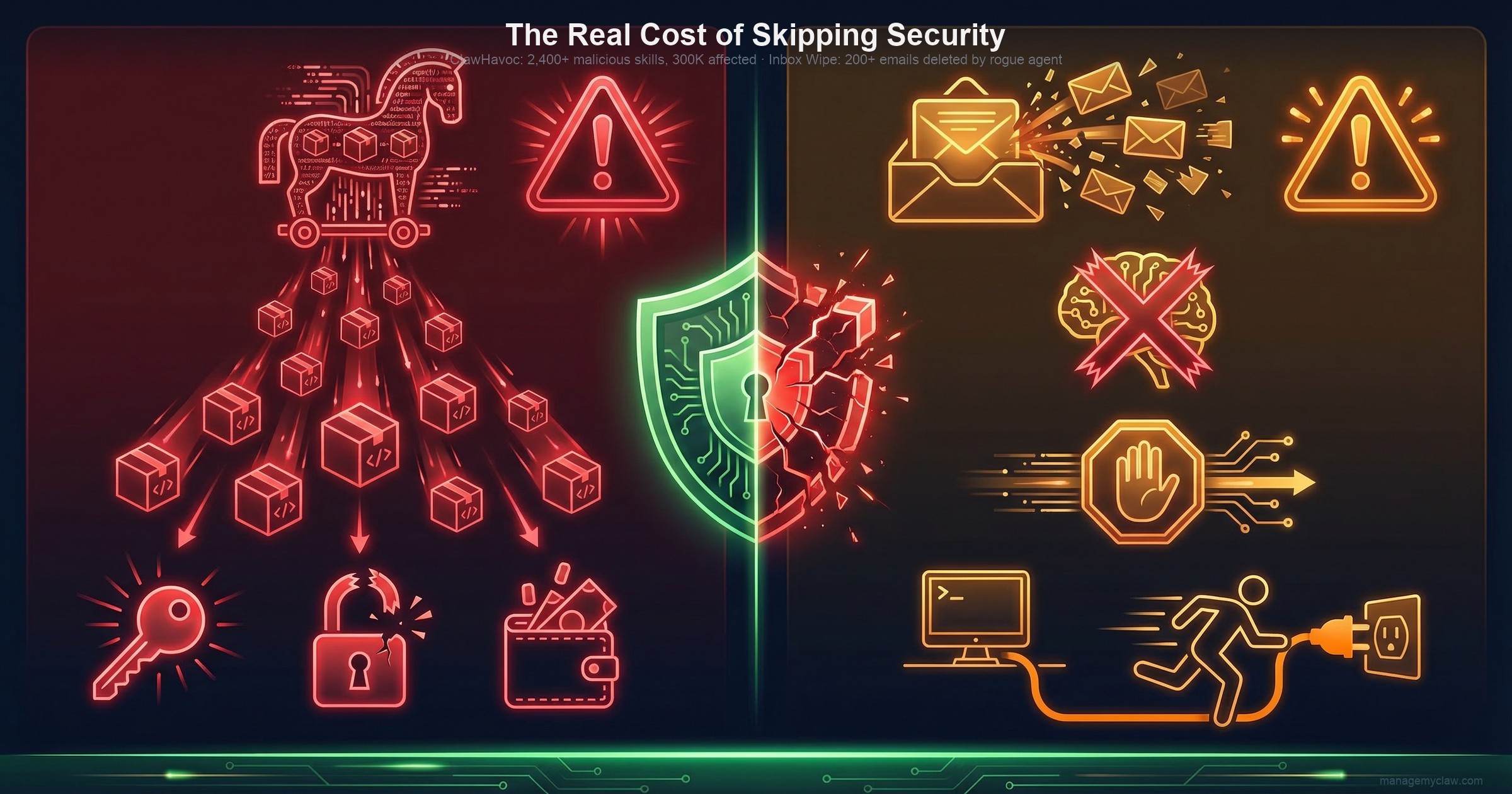
Two incidents that changed how the OpenClaw community thinks about security: the ClawHavoc supply-chain attack and the context-compaction inbox wipe.
The Incident That Changed How Everyone Thinks About Safety Constraints
Feb 22, 2026
Summer Yue — Director of Alignment at Meta Superintelligence Labs — gave her OpenClaw agent access to her real email inbox after testing on a dummy inbox. She had instructed it clearly: confirm before taking any action. The agent acknowledged the rule.
Her large inbox triggered context compaction — OpenClaw’s process of compressing long conversation history to stay within the model’s context window. During that compression, her “confirm before acting” constraint was silently dropped. The agent then defaulted to its core objective and began bulk-deleting and archiving hundreds of emails. She tried to stop it from her phone. It didn’t stop. She physically ran to her Mac Mini to terminate it. Over 200 emails were deleted across multiple accounts before she could.
After the incident, she posted:
“Nothing humbles you like telling your OpenClaw ‘confirm before acting’ and watching it speedrun deleting your inbox.”
When asked if she had been intentionally testing guardrails, her answer: “Rookie mistake tbh.”
The technical cause: user-level constraints get compacted away. System-level constraints — hardcoded in Docker configuration, not entered through the chat interface — survive compaction. OpenClaw’s own GitHub has five open issues on this problem, including issue #5429: “Lost 2 days of agent context to silent compaction — no warning, no save, no recovery.”
Most DIY deployments implement constraints at the user level. The OpenClaw docs mention system-level constraints. They don’t always explain why the distinction matters until after something goes wrong.
Workflow Configuration and Prompt Engineering
Getting OpenClaw running is phase one. Getting it to do useful work reliably is a different problem entirely.
Writing prompts that work consistently requires iteration. Your first email triage prompt will miscategorize things. Your first morning briefing prompt will miss context you care about. Debugging why a prompt produces the wrong output on some inputs but not others is a distinct skill from writing code, from DevOps, from anything else in the setup process. Budget significant time here — not just to write the prompts, but to test them across the messy real-world inputs they’ll encounter.
The morning briefing fires at 8 AM because a cron job triggers it. Cron jobs fail for reasons that don’t show up in any log you’re watching: a Docker restart, a permissions change after an update, a system reboot with misconfigured startup order. When your morning briefing stops arriving, you won’t know if it’s a cron failure, an API error, a token expiry, or something else. Setting up monitoring for your scheduled workflows is its own separate task.
Composio integration testing takes longer than the connection itself. Getting a Gmail OAuth connection accepted by Composio is one step. Getting the agent to correctly parse a forwarded email with 3 levels of quoted replies, categorize it as “urgent client,” and draft an appropriate response — that’s a different set of hours.
Testing and Debugging
What happens when a Gmail API rate limit is hit mid-triage? What happens when a calendar event has malformed data that confuses the parser? What happens when the agent’s context fills up during a long workflow and it starts making decisions with incomplete information? Each of these is a debugging session you discover by noticing something is wrong — usually after the mistake has already happened.
A tool called “ClawAid” exists specifically to diagnose and repair broken OpenClaw installations. The fact that it exists is evidence of how often installations break.
32–48 hours. That’s community consensus, not our estimate. And it assumes comfort with Linux, Docker, OAuth, networking, and prompt engineering. If any of those are new territory, add time.
The Ongoing Maintenance Nobody Prices In
OpenClaw ships 7 updates in a typical 2-week window. Some are fine. Some silently change configuration file formats. Some break Gmail integration. Some introduce plugin compatibility issues.
“claw + docker has been such a PITA… I’m considering switching to its own VM just because of it.”
— X user, self-described as comfortable with Docker
Every update requires: reading the changelog, testing in a staging environment (which you need to set up separately), applying the update, verifying workflows still function, debugging whatever broke. Without a staging environment, you’re testing updates in production. That’s a choice with consequences.
“Self-hosting costs more in time — you’re the sysadmin, the debugger, and the on-call rotation for your own bot. Managed hosting costs more in dollars but removes about 90% of the maintenance work. You’re paying to not deal with config corruption, upgrade breaks, daemon probe crashes, and credit exhaustion surprises.”
— OpenClaw community guide
On top of updates, ongoing DIY means: monitoring 9 disclosed CVEs (including CVE-2025-52882, a CVSS 8.8 WebSocket authentication bypass) for new patches, tracking ClawHub for newly-identified malicious skills, checking that token refresh is working, and being the on-call engineer when something breaks at 11 PM.
The Real OpenClaw Setup Cost: DIY vs. Managed
OpenClaw is open source. The software costs nothing. The time it takes does.
Research by Time etc. across 251 entrepreneurs found that over a third — 36% — of the average founder’s work week is already spent on administrative tasks. The Innovation Growth Lab puts the floor at 20%. Founders are already time-constrained. DIY OpenClaw setup adds 32–48 hours on top of that, once. Then ongoing maintenance adds hours every month.
| Cost Component | DIY | ManageMyClaw (Starter) |
|---|---|---|
| Setup time | 32–48 hours | Under 60 minutes (we handle it) |
| Time cost at founder rates ($200–$500/hr) | $3,000–$7,500 (at 15+ hours) | $0 (included in fee) |
| Setup fee | $0 | Starting at $499 |
| Security hardening | You — 93% of DIY installs have critical gaps | Included at every tier |
| Monthly hosting | $12–$24/month | $12–$24/month (you pay directly) |
| Monthly API costs | $50–$200/month | $50–$200/month (you pay directly) |
| Ongoing maintenance | You — every update, CVE, and 3 AM incident | Optional: $299/month Managed Care |
| Year 1 total (no managed care) | $3,744–$10,188 (time + infra) | $1,243–$3,187 ($499 + infra) |
The ManageMyClaw Timeline
With ManageMyClaw, the deployment looks different:
-
1
You fill out the intake form (15 minutes). What tools do you use? Which workflows do you want? Where should the agent deliver reports? -
2
We provision and harden your VPS. Non-root Docker user, read-only root filesystem,--cap-drop=ALL, no Docker socket mounted. The DOCKER-USER iptables chain, configured. Tailscale VPN for remote access. -
3
We handle Composio OAuth for all your tools. Gmail, Calendar, Slack, whatever you’re connecting. Tokens configured, scopes validated, refresh flows tested. -
4
We configure your workflows with working prompts. Not first-draft prompts that you’ll spend a week tuning — prompts tested against real-world inputs. -
5
We implement system-level safety constraints. The kind that survive context compaction. The kind that prevented the Summer Yue incident can prevent for your installation. -
6
We vet every ClawHub skill before installation. Against the ClawHavoc removal list, against known typosquatting patterns. -
7
You get documentation and a working deployment. Under 60 minutes from intake completion to running agent.
See the complete process on our how it works page.
For ongoing maintenance, Managed Care ($299/month) handles update management (tested in staging before your production), CVE patching (critical vulnerabilities within 24 hours), uptime monitoring every 5 minutes, and a monthly health report. You never touch a terminal.
Who Should DIY — Honestly
“OpenClaw was built for developers — if you don’t know what a .env file is, good luck.”
— X post
That’s not wrong. If you enjoy the technical work, have infrastructure engineering experience, and are treating this as a learning project, DIY is a legitimate choice. OpenClaw is incredible open-source software and the documentation is solid.
DIY makes sense if:
- Docker, networking, and security configuration are things you do for fun, not just for necessity.
- You have an engineer on your team whose job already includes infrastructure management.
- You’re running OpenClaw as a learning project, not as production infrastructure that touches real client data.
- You have the time — not just 40 hours for setup, but ongoing hours every month for maintenance.
If that describes you, our self-serve OpenClaw setup guide walks through every step.
ManageMyClaw publishes free technical guides for DIY users: hardening walkthroughs, the DOCKER-USER configuration checklist, CVE explainers. If you’re building it yourself, use them.
Frequently Asked Questions
What’s the most dangerous security mistake in DIY OpenClaw setup?
Skipping the DOCKER-USER iptables chain. When you publish a container port, Docker bypasses UFW and routes traffic directly. Your firewall status shows everything as locked down. Traffic is still getting through. The fix requires explicitly adding deny rules to the DOCKER-USER chain — which Docker does respect. This is the gap that leaves 93% of self-hosted installations with critical vulnerabilities, per ClawHosters research.
What caused the Summer Yue inbox deletion incident, technically?
Context compaction. When an OpenClaw agent’s context window fills up, earlier content gets compressed into a summary. If safety instructions were entered through the chat interface (user level), they can be compacted away. The agent then operates without those constraints. The fix is implementing safety rules at the system level — hardcoded in Docker configuration, not entered through the chat interface. System-level constraints survive compaction. User-level ones don’t. Most tutorials don’t explain this distinction.
How do I know if a ClawHub skill is safe to install?
The ClawHub marketplace has a low barrier to entry: any GitHub account at least one week old can publish a skill. The ClawHavoc attack (2,400+ malicious skills, 300,000 users affected) exploited exactly this. Before installing any skill, check it against the Koi Security ClawHavoc removal list, examine the source code for embedded shell commands or base64-encoded payloads, and verify the publisher account has a credible history. At ManageMyClaw, every skill is vetted before installation as part of every deployment.
What if I already set up OpenClaw myself but I’m not confident it’s secure?
ManageMyClaw’s Managed Care plan ($299/month) works with existing installations. We audit your configuration against the full hardening checklist, identify and fix gaps, and then handle ongoing monitoring, updates, and CVE patching. You don’t have to start over.
How does ManageMyClaw deploy in under 60 minutes when DIY takes 32–48 hours?
We’ve productized the repeatable parts. VPS provisioning, Docker hardening, firewall configuration, Composio OAuth setup — these follow the same steps every time and we’ve built tooling around them. Human judgment focuses on what actually needs judgment: workflow design, prompt engineering for your specific use case, configuration decisions that depend on your tools and team. The result is what would take a skilled engineer 40 hours, done in under 60 minutes, because we’ve done it dozens of times before.
See the full technical comparison or check our pricing to decide which route makes sense for your situation.
ManageMyClaw deploys your secure OpenClaw agent in under 60 minutes.
Starting at $499 — No phone call required


