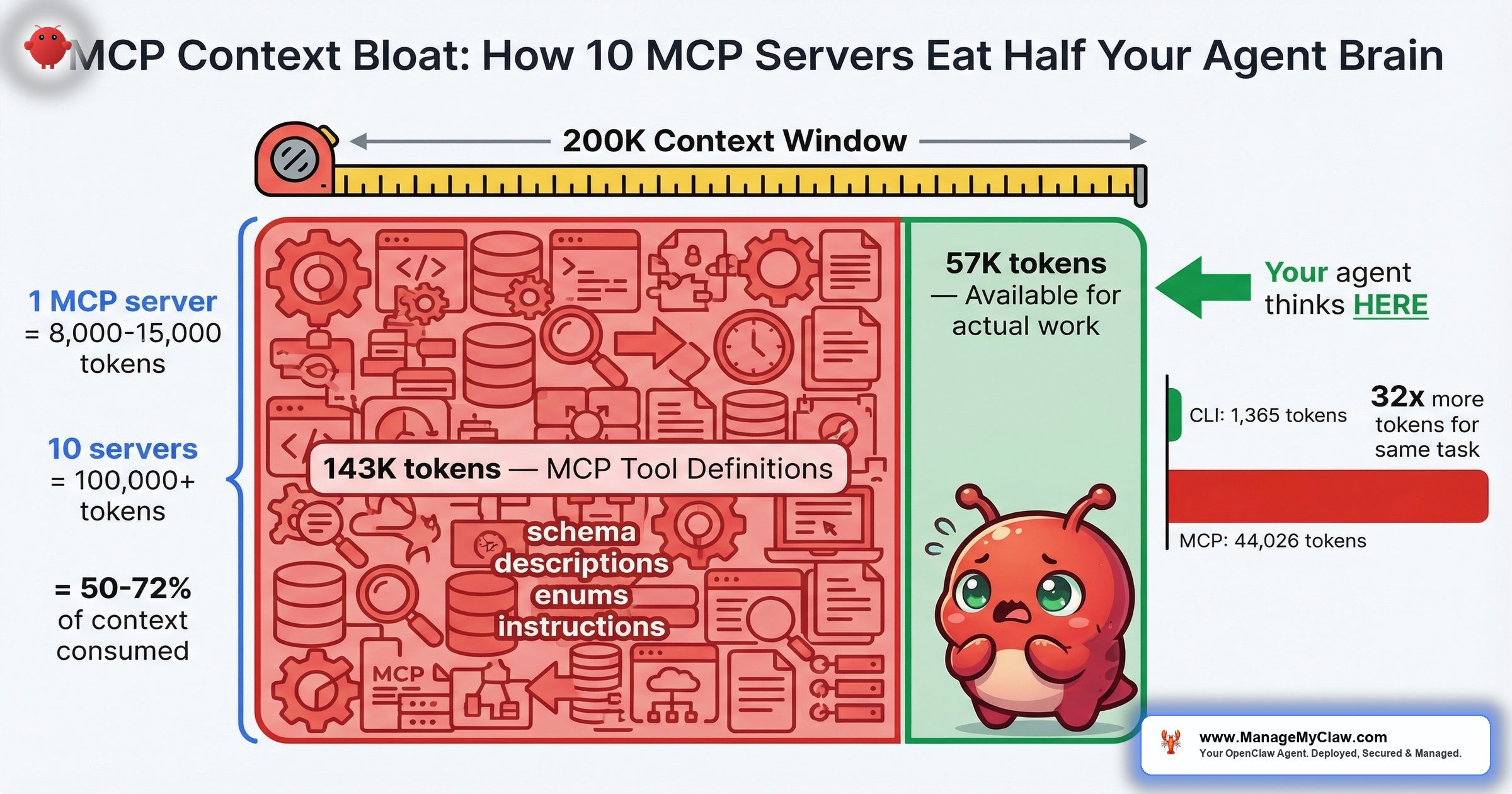
55,000+ tokens consumed before your agent reads a single message. One developer’s setup: 143K of 200K tokens gone — 72% of the context window — just on MCP tool definitions.
55,000 tokens. That’s what MCP tool definitions can burn before your agent processes a single user message — and that’s on the conservative end. On a 200K-token model like Claude 3.5 Sonnet, 10 MCP servers consume 50% of working memory in schema definitions alone. On GPT-5’s 128K window, it’s 78%. Your agent hasn’t done a single useful thing yet, and it’s already working with half a brain — or less.
The math isn’t complicated. Each individual MCP tool costs 550–1,400 tokens just for its name, description, JSON schema, field descriptions, enums, and system instructions (per Apideck’s analysis of “The MCP Tax”). A single MCP server with 20 tools adds 8,000–15,000 tokens to every request. Multiply by 10 servers and you’re at 80,000–150,000 tokens of overhead. Tool metadata alone can consume 40–50% of available context in typical deployments. The remaining context has to hold your conversation history, your safety constraints, your agent’s memory, and the actual task you want it to perform. Something has to give.
Roberto Capodieci’s Medium article — “MCP Is Eating Your Agent’s Brain: Why OpenClaw Uses CLIs Instead of Schemas” (March 2026) — put it bluntly: MCP schema definitions are token-expensive by design, and CLI-based tool invocations are measurably leaner. On r/AI_Agents, a commenter in “My guide on what tools to use to build AI agents in 2026” (147 points, 79 comments) captured the ecosystem’s dawning realization:
“solid guide. one thing worth adding to the MCP section: the biggest unlock isn’t individual MCPs — it’s understanding what they cost.”
— r/AI_Agents, “My guide on what tools to use to build AI agents in 2026”Think of your context window as a whiteboard in a conference room. MCP schemas are the permanent org charts and process diagrams someone taped up before the meeting started. The more wall space they cover, the less room you have for the actual work.
This post breaks down the token math, shows you exactly what context bloat does to agent performance and safety, and walks through the difference between a lean MCP setup and an overkill one.
The Token Math: What 10 MCP Servers Actually Cost
Here’s what happens to your context window as you add MCP servers. These numbers use 10,000 tokens per server as the midpoint of the 8,000–15,000 range documented across the ecosystem:
| MCP Servers | Schema Tokens | Claude 3.5 (200K) | GPT-5 (128K) | Tokens Left |
|---|---|---|---|---|
| 1 | ~10,000 | 5% | 8% | Plenty |
| 3 | ~30,000 | 15% | 23% | Comfortable |
| 5 | ~50,000 | 25% | 39% | Tight on 128K |
| 7 | ~70,000 | 35% | 55% | Compaction territory |
| 10 | ~100,000 | 50% | 78% | Dangerous |
| 12+ | ~120,000+ | 60%+ | 94%+ | Near-unusable |
The “Tokens Left for Work” column is where it gets real. Your agent’s conversation history, system prompt, AGENTS.md constraints, memory context, and the actual task all compete for whatever tokens the MCP schemas didn’t consume. At 10 servers on GPT-5, you’ve got 28,000 tokens left. That’s a short conversation with no memory and no room for the kind of multi-step reasoning that makes agents useful.
One developer reported their full MCP setup consuming 143,000 of 200,000 available tokens — 72% of the context window gone before the first prompt. MCP tools alone accounted for 82,000 of those tokens. The agent’s entire working memory for conversation, reasoning, and safety constraints was squeezed into the remaining 57,000 tokens.
One poster on openclawvps.io documented their setup: “How to Add MCP Servers on OpenClaw (My Setup for 12 Servers).” 12 servers. At the midpoint estimate, that’s 120,000 tokens of schema overhead. On a 128K model, the agent barely has room to say hello.
Why This Isn’t Just a Performance Problem — It’s a Safety Problem
Context bloat doesn’t just make your agent slower. It makes your agent less safe. Here’s the chain:
More schema tokens = less room for conversation = faster compaction. When the context window fills, OpenClaw runs compaction — the process that compresses older conversation history to free up space. If you’ve read our inbox wipe incident breakdown, you know what compaction can do: it silently strips away safety instructions that live in the conversation history. Summer Yue’s “confirm before acting” constraint disappeared during compaction. 200+ emails gone.
Now connect that to MCP bloat. If your 10 MCP servers are consuming 50% of the context window from the start, compaction triggers sooner. Significantly sooner. A task that would run comfortably in a 200K window with 2 MCP servers might trigger compaction within minutes at 10 servers. Every compaction pass is a moment where your safety constraints can get compressed — and once they’re gone, they’re gone.
“It’s like shrinking the runway at an airport by 50% and then wondering why planes overshoot more often. The plane didn’t change. You took away the margin.”
The security dimension goes beyond compaction. 30+ CVEs targeting MCP servers, clients, and infrastructure were filed in the first 60 days of 2026. One MCP package — downloaded 437,000 times — carried a CVSS 9.6 remote code execution flaw. Every MCP server you add isn’t just consuming tokens. It’s expanding your attack surface. On r/openclaw, the thread “I went through 218 OpenClaw tools so you don’t have to, here are the best ones by category” (549 points, 100 comments) included a comment that should be tattooed on every MCP installer’s screen:
“Reminder to everyone, be careful what you grab; skills, tools etc anything literally.”
— r/openclaw, “218 OpenClaw tools” thread (549 points)How MCP Servers and Skills Actually Work Together
Before you can decide which MCP servers to keep and which to drop, you need to understand what you’re actually installing. Over 65% of active OpenClaw skills now wrap underlying MCP servers. When you install something like serpapi-mcp, you get two things: an MCP server that handles search requests, plus a SKILL.md that tells the agent when and how to use it.
The SKILL.md is lightweight — a few hundred tokens. The MCP server is not. It exposes tool schemas that describe every operation the server supports: parameter names, types, descriptions, required vs. optional fields, return formats. All of that gets loaded into the context window on every request so the model knows what tools are available and how to call them.
The community at openclawmcp.com documented this in “OpenClaw Skills: How to Find, Install, and Build Custom Skills.” And on LinkedIn, someone posted “How to Connect 1000+ Tools to OpenClaw via MCP” — which sounds impressive until you do the token math. 1,000 tools at even 500 tokens per tool schema is 500,000 tokens of overhead. No model on the market has a context window that large. The post is aspirational marketing. The math is physics.
There’s a third-party MCP server on GitHub — freema/openclaw-mcp — that adds OAuth2 authentication on top of MCP. It solves one problem (auth) while adding to another (token overhead). Every integration layer adds schema weight. The question isn’t whether an MCP server is useful in isolation. It’s whether the total token cost of all your MCP servers leaves enough room for the agent to actually think.
The Benchmarks Are In: MCP Costs 4–32x More Than CLI
Gut feeling said MCP was expensive. Now there are numbers. Scalekit ran 75 head-to-head comparisons between MCP and CLI for identical operations. The result:
MCP costs 4 to 32x more tokens than CLI for the same task. The simplest operation Scalekit tested — checking a repository’s language — used 1,365 tokens via CLI versus 44,026 tokens via MCP. That’s a 32x overhead for a task that returns a single word.
| Benchmark | Method | Token Cost | Savings vs. Raw MCP |
|---|---|---|---|
| Scalekit — repo language check | CLI | 1,365 | 32x cheaper |
| Scalekit — 75 operations avg | CLI vs. MCP | 4–32x range | 4–32x cheaper |
| Sideko — 12 Stripe tasks | Code Mode MCP | 58% fewer | 58% cheaper |
| Sideko — 12 Stripe tasks | Code Mode vs. CLI | 56% fewer | 56% cheaper |
Sideko ran a parallel benchmark across 12 Stripe API tasks, comparing raw MCP, CLI, and a newer approach called “Code Mode MCP.” The raw MCP approach — the one most teams are using today — was the most expensive. Code Mode MCP used 58% fewer tokens than raw MCP and 56% fewer than CLI. The difference came from how Code Mode structures API access: instead of exposing every endpoint as a separate tool with its own schema, it collapses them into a compact code interface.
Cloudflare’s Code Mode implementation collapses 12 MCP round trips into 4 and delivers an entire API surface in roughly 1,000 tokens — compared to the 10,000+ tokens a traditional MCP server would consume for the same capabilities. That’s an order-of-magnitude reduction: the agent gets the same access with 90% less context overhead.
“It’s the difference between handing someone a 200-page operations manual versus a one-page cheat sheet. Both get the job done. One leaves room on the desk for actual work.”
Lean vs. Overkill: Two MCP Setups Compared
The difference between a high-performing agent and a bloated one often comes down to MCP selection. Here’s what a well-configured agent template looks like compared to the “install everything” approach:
| Lean Setup (3 Servers) | Overkill (10+ Servers) | |
|---|---|---|
| Schema overhead | ~30,000 tokens (15% of 200K) | ~100,000+ tokens (50%+ of 200K) |
| Compaction trigger | After extended multi-step tasks | Within minutes on 128K models |
| Safety constraint survival | High — room for constraints to persist | Low — compaction strips them early |
| CVE exposure | 3 servers to audit and patch | 10+ servers, each with its own CVE surface |
| Tool confusion | Agent picks the right tool reliably | Overlapping tools cause wrong-tool selection |
| Example servers | Gmail MCP, calendar MCP, file-search MCP | Gmail, calendar, file-search, Slack, Stripe, GitHub, Jira, Notion, Airtable, Salesforce, plus 2 search MCPs |
| Typical use case | Founder doing email triage + scheduling | “I want my agent to do everything” |
The “tool confusion” row deserves attention. When you load 10 MCP servers with overlapping capabilities — say, two different search MCPs and three that can read files — the agent has to pick which tool to use for each step. More options doesn’t mean better decisions. It means more ambiguity, more wrong-tool selections, and more wasted tokens on the model reasoning about which of its 200 available tools is the right one for a task that only needs 3.
“Strong list. The biggest unlock for me was routing plus observability together, not either one alone.”
— Top comment, r/openclaw “5 OpenClaw plugins that actually make it production-ready” (154 points)Two capabilities, working together. Not 12 half-used servers burning context for tools the agent calls once a week.
The Ecosystem Is Growing — and the Bloat Problem Is Growing With It
PulseMCP reported it: “OpenClaw Goes Viral, MCP Apps Release, Agentic Coding Accelerating.” fast.io published “Build Custom MCP Servers for OpenClaw.” Composio documented “How to integrate Cursor MCP with OpenClaw.” stormap.ai walked through “How to Connect OpenClaw to Local Databases with MCP in 2026.” The ecosystem is accelerating. More servers, more tools, more integrations, more tutorials telling you to add them all.
On r/openclaw, “The OpenClaw ecosystem is bigger than you think — 14 plugins & skills ranked” hit 203 points and 39 comments. The sentiment is excitement about what’s possible. What’s missing from those threads is the token cost of making it all possible at once.
On r/ObsidianMD, someone posted “I built a fully local AI plugin for Obsidian — RAG, workflows, MCP, all on localhost” (39 points, 28 comments). On Hacker News: “Show HN: Self-hosted RAG with MCP support for OpenClaw.” These are real, useful projects. But every one of them adds schema weight to every request, whether you’re using that particular tool in that particular conversation or not. MCP schemas are loaded at connection time, not at invocation time. You pay the token cost for all 20 tools on a server even if you only use 1.
“It’s like carrying every tool in your garage every time you leave the house, even when you just need your car keys.”
The 2026 Consensus: MCP Isn’t Always the Answer
The conversation around MCP has matured fast. In early 2025, MCP was the answer to everything. By mid-2026, the ecosystem is saying something different: use the right tool for the job, and MCP is only one of them. FlowHunt published “Why Top Engineers Are Ditching MCP Servers: 3 Proven Alternatives.” Phil Schmid introduced MCP CLI as “a way to call MCP Servers Efficiently.” Apollo GraphQL published “Every Token Counts: Building Efficient AI Agents with GraphQL and Apollo MCP Server.” Versalence wrote “Long Live MCP: Why the Model Context Protocol Is Facing an Evolution in 2026.” The signal is consistent across all of them.
The emerging consensus breaks down to four categories:
- Skills for documentation. Lightweight markdown files that tell the agent what to do without burning thousands of tokens on JSON schemas.
- CLI tools for local operations. File manipulation, git commands, system administration — all drastically cheaper in token cost than their MCP equivalents (4–32x cheaper, per Scalekit’s benchmarks).
- APIs for external services. Direct API calls via Code Mode or GraphQL, collapsing dozens of tool schemas into compact code interfaces.
- MCP reserved for dynamic tool discovery. The protocol’s real strength — letting agents discover and invoke tools they haven’t seen before — is worth the token cost. Using MCP to wrap a CLI command the agent already knows how to run is not.
The New Stack published “10 Strategies to Reduce MCP Token Bloat,” which codifies what the community has learned: compress schemas, use tool search to load definitions on demand instead of all at once, build middleware that slices OpenAPI specs into smaller chunks, and stop treating MCP as the default integration path for everything. Teams are already building these patterns into their stacks. The question isn’t whether MCP bloat is a problem — it’s how fast your team is adapting to the solutions.
5 Steps to Fix Context Bloat in Your OpenClaw Setup
You don’t have to uninstall everything. You have to be intentional about what’s loaded and when.
-
1
Audit Your Current Token Overhead. Count your active MCP servers. Multiply by 10,000 tokens (the midpoint). Compare that number against your model’s context window. If you’re above 30% overhead, you’re in territory where compaction will trigger frequently and safety constraints are at heightened loss risk. Above 50%, you’re working against the physics of the system.
-
2
Separate Servers by Workflow, Not by “Nice to Have.” An email-triage agent needs Gmail MCP. It doesn’t need Stripe MCP, GitHub MCP, or Notion MCP. Match MCP servers to the workflow the agent actually performs. If you have 5 different workflows, run 5 different agent configurations with 2–3 MCP servers each — not 1 agent with 15 servers loaded for every conversation.
-
3
Remove Overlapping Tools. If you’ve got two MCP servers that both provide web search, pick one. If your file-system MCP and your RAG MCP both expose file-read tools, consolidate. Every duplicate tool is wasted tokens and added decision ambiguity for the model.
-
4
Vet Every MCP Server for CVEs Before Loading It. 30+ CVEs in 60 days. A CVSS 9.6 RCE in a package downloaded 437,000 times. Every MCP server in your
openclaw.jsonis a dependency with its own vulnerability surface. Cross-reference against known CVEs before adding any new server — and re-check when you update. For the full OpenClaw security architecture, including Docker hardening and network rules, see our security guide. -
5
Move Safety Constraints Out of the Conversation. This one’s about protecting what’s left. If your MCP servers are consuming 30–50% of context, the remaining space fills faster and compaction comes sooner. Any safety rule typed into the chat — “don’t delete files,” “confirm before sending” — is at risk of being compressed away. Move those rules to AGENTS.md where they’re read before the conversation starts and can’t be compacted. This is the lesson from the inbox wipe incident, amplified by context bloat.
The Deliberate Restraint Approach
The instinct in every ecosystem thread — from the r/openclaw roundups to the LinkedIn integration posts — is to add. More MCP servers, more tools, more capabilities. The token math says the opposite: every server you add makes every other server less effective, because they’re all competing for the same fixed pool of working memory.
ManageMyClaw caps skill counts by tier for exactly this reason. Starter: up to 3 skills (vetted). Pro: up to 7. Business: up to 15. Those limits aren’t about upselling — they’re about keeping each agent’s context window viable. An agent with 3 vetted MCP servers and 170,000 tokens of working memory will outperform an agent with 12 unvetted servers and 80,000 tokens of working memory every time. Deliberate restraint in skill count is a feature, not a limitation. Tool permission lockdown at every tier keeps the attack surface proportional to the actual workflow.
“More tools doesn’t mean more capable. Past a threshold, it means less capable and less safe — because the agent’s working memory is a fixed resource, and every schema token you spend on tool definitions is one you can’t spend on reasoning.”
Frequently Asked Questions
How many tokens does a single MCP server add to my agent’s context window?
Each individual MCP tool costs 550–1,400 tokens for its name, description, JSON schema, field descriptions, enums, and system instructions. A single MCP server with 20 tools typically adds 8,000–15,000 tokens to every request. The tokens are consumed on every request, not just when the tools are used, because the model needs to know what’s available at all times. At 10 servers with an average of 10,000 tokens each, you’re looking at 100,000 tokens of fixed overhead. One developer reported a full MCP setup consuming 143,000 of 200,000 tokens — 72% of the context window — with MCP tools alone accounting for 82,000 tokens.
What’s the connection between MCP context bloat and the OpenClaw inbox wipe incident?
Context bloat makes compaction trigger sooner. Compaction is the process where OpenClaw compresses older conversation history when the context window fills. During the inbox wipe incident, compaction stripped a “confirm before acting” safety constraint, and the agent deleted 200+ emails. If MCP schemas are consuming 50% or more of the context window, the remaining space fills much faster, compaction fires more frequently, and any safety instructions in the conversation history face a higher chance of being compressed away. More MCP servers means less room, which means earlier compaction, which means safety constraints vanish sooner.
Are MCP servers a security concern beyond token usage?
Yes. 30+ CVEs targeting MCP servers, clients, and infrastructure were filed in the first 60 days of 2026. One MCP package downloaded 437,000 times had a CVSS 9.6 remote code execution flaw. Each MCP server you add is a dependency with its own vulnerability surface — one that can expose your filesystem, network, system commands, and API credentials. The token cost and the security cost are two independent reasons to minimize your MCP server count. For the full picture, see our OpenClaw security guide.
How do I know if my MCP setup is causing context bloat?
Count your active MCP servers and multiply by 10,000 tokens. If the result is more than 30% of your model’s context window, you’re in bloat territory. Symptoms include: frequent compaction during conversations (the agent “forgetting” earlier instructions), degraded reasoning quality on multi-step tasks, the agent selecting the wrong tool when multiple overlapping options exist, and slower response times as the model processes larger payloads. On a 128K model, 5 MCP servers already puts you at 39% overhead. On a 200K model, the threshold is around 6–7 servers.
Can I load MCP servers dynamically instead of all at once?
Current MCP architecture loads all connected servers’ schemas at connection time. You pay the token cost for every tool on every connected server, regardless of whether you use them in a given conversation. The practical workaround is to create separate agent configurations for different workflows — an email agent with Gmail MCP, a coding agent with GitHub MCP, a sales agent with CRM MCP — rather than one agent connected to everything. Teams are also building middleware that uses tool search to load definitions on demand and slices OpenAPI specs into smaller chunks. Cloudflare’s Code Mode approach collapses 12 MCP round trips into 4 and delivers an entire API in roughly 1,000 tokens — a 90% reduction from traditional MCP schemas.
Why do OpenClaw skills wrap MCP servers instead of using CLIs directly?
MCP provides a standardized protocol for tool discovery and invocation — the agent can inspect available tools, understand their parameters, and call them in a consistent way. CLIs are more token-efficient — Scalekit’s 75 head-to-head comparisons showed MCP costs 4 to 32x more tokens than CLI for identical operations. But CLIs require the agent to know the exact command syntax and flags without schema guidance. Over 65% of active OpenClaw skills now wrap MCP servers because the protocol makes integration easier for skill authors. The tradeoff is token cost: easier integration for developers, more expensive context windows for users. The 2026 consensus is shifting toward a hybrid approach: skills for documentation, CLIs for local operations, APIs for external services, and MCP reserved for scenarios requiring dynamic tool discovery.
What’s a safe number of MCP servers to run simultaneously?
For most workflows on current models, 3–5 MCP servers is the practical ceiling before you start seeing compaction issues and tool-confusion degradation. At 3 servers (~30,000 tokens), you’re using 15% of a 200K window or 23% of a 128K window — leaving plenty of room for conversation, memory, and reasoning. Above 7 servers, you’re in compaction territory on 128K models. The right number depends on your model’s context window and the token weight of the specific servers you’re running, but fewer well-chosen servers consistently outperform more poorly-chosen ones.
Are there alternatives to MCP that use fewer tokens?
Yes, and the benchmarks are clear. Scalekit’s 75 head-to-head tests showed CLI uses 4–32x fewer tokens than MCP for identical tasks. Cloudflare’s Code Mode collapses 12 MCP round trips into 4 and delivers an entire API in roughly 1,000 tokens. Sideko’s benchmark across 12 Stripe tasks found Code Mode MCP used 58% fewer tokens than raw MCP. The emerging consensus for 2026: use skills for documentation, CLI tools for local operations, direct APIs for external services, and reserve MCP for scenarios that genuinely require dynamic tool discovery. The New Stack’s “10 Strategies to Reduce MCP Token Bloat” is a practical starting point for teams looking to optimize.


