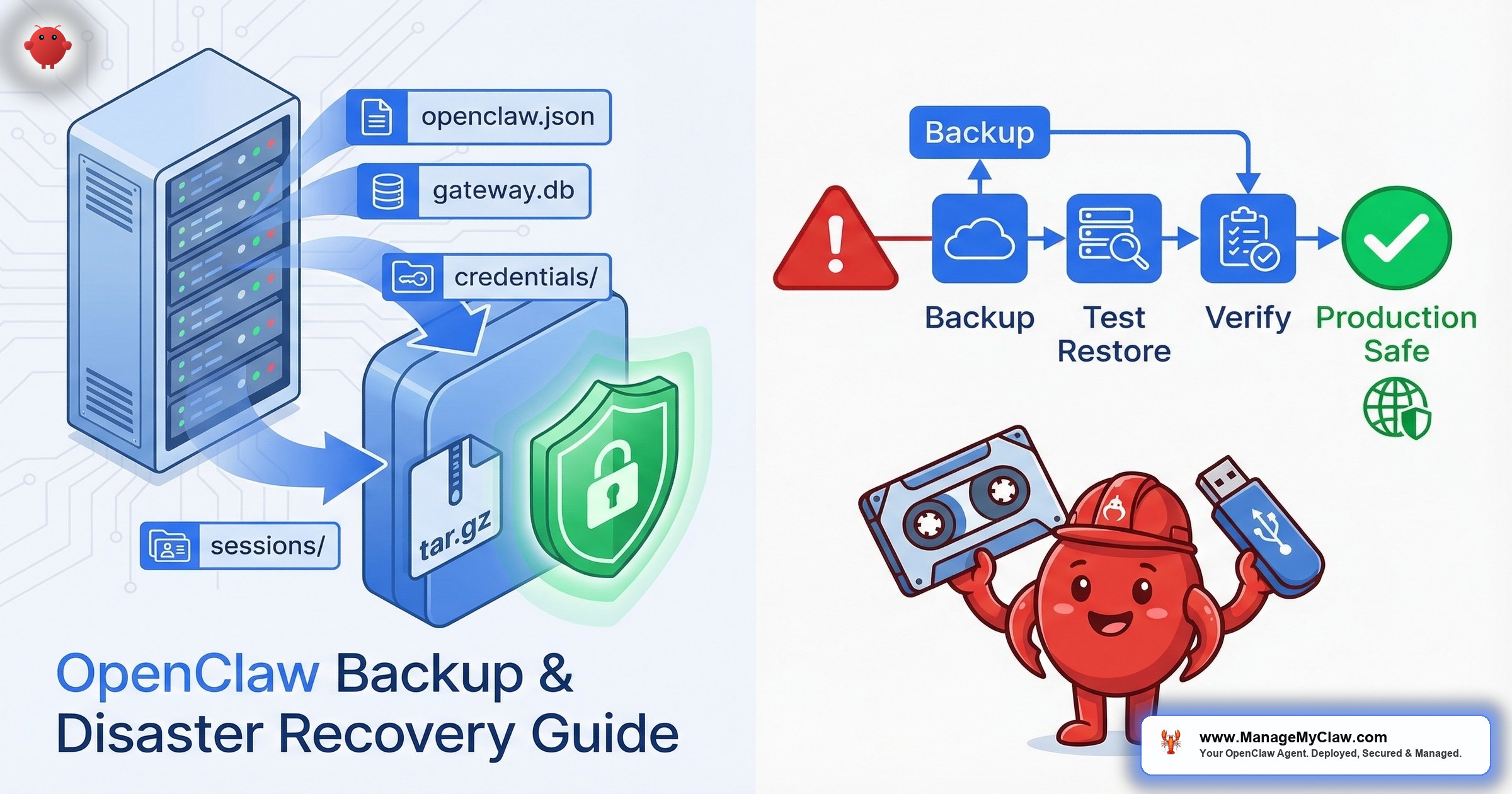
GitHub issue #13616 — “Add backup/restore utility for config, cron jobs, and session history” — has been open since early 2026. It’s one of the most requested infrastructure features in the OpenClaw repository. And it tells you everything about the current state of disaster recovery in the ecosystem: there isn’t one.
Your ~/.openclaw/ directory holds your entire agent’s identity. Configuration. Conversation memory. API credentials. Messaging sessions. Lose it — disk failure, botched update, accidental rm -rf — and you’re rebuilding weeks of context from scratch, re-pairing every messaging channel, and re-entering every API key.
On r/openclaw, a thread titled “How to migrate OpenClaw to a new VPS and keep all chat history?” captures the anxiety precisely. The poster isn’t asking about installing OpenClaw — they’ve done that. They’re asking about the data. The history. The state. The things that make their agent theirs.
It’s like moving to a new house and realizing there’s no moving truck — you can get the house, but nobody’s figured out how to box up your belongings yet.
This guide covers what’s inside your OpenClaw data directory, what hurts most to lose, the backup tools that exist today, a step-by-step migration walkthrough, and the DR gaps that are still unresolved.
What Lives Inside ~/.openclaw/ (And What Hurts to Lose)
Before you can back something up, you need to know what you’re protecting. Your ~/.openclaw/ directory contains 4 critical components:
| Component | File/Directory | What it stores | Pain level if lost |
|---|---|---|---|
| Configuration | openclaw.json |
Agent behavior, model routing, tool profiles, cron schedules, workflow definitions | Moderate — rebuildable if you documented your setup |
| Gateway database | gateway.db |
SQLite database with conversation memory, agent state, interaction history | Severe — weeks or months of context gone |
| Credentials | credentials/ |
API keys, integration tokens, OAuth secrets | High — requires re-generating and re-authorizing every integration |
| Sessions | sessions/ |
Messaging channel authentication — WhatsApp, Telegram, Matrix pairing data | Severe — WhatsApp re-pairing is especially painful |
The 2 most painful losses are gateway.db and sessions/. Config is rebuildable. Credentials can be re-generated. But gateway.db holds your agent’s accumulated memory — every conversation, every preference, every workflow execution. 3 months of running means 3 months of context. Lose it and your agent resets to day 1.
Sessions are equally irreplaceable in real time. WhatsApp uses QR-code-based device linking with waiting periods between re-pairings and occasional multi-day cooldowns if anti-spam systems flag repeated re-linking. If your agent’s WhatsApp session dies, you might be looking at 24-72 hours before it’s back online.
Think of gateway.db as your agent’s brain and sessions/ as its phone book. You can rebuild a house (config). You can get new keys cut (credentials). But you can’t reconstruct memories or instantly restore relationships.
The Built-In Backup: openclaw backup CLI
As of v2026.3.8, OpenClaw ships with a native backup command. On r/OpenClawCloud, the thread “OpenClaw 2026.3.8 release breakdown: gateway restart fix, backup commands” documented the addition alongside a critical gateway restart fix — a pairing that tells you the team recognizes data protection as a first-class concern.
How it works: running openclaw backup creates a timestamped .tar.gz archive of your ~/.openclaw/ directory. The archive includes a manifest.json that maps resolved source paths to the archive layout. Single portable file you can store anywhere.
What gets backed up:
openclaw.json— full agent configurationgateway.db— SQLite database with conversation memory, state, and historycredentials/— API keys and integration tokenssessions/— messaging channel pairing data- Cron job definitions and any custom scripts referenced by workflows
What it doesn’t do: The archive is unencrypted — API keys and OAuth tokens sit in plain text. There’s no automated scheduling (you write your own cron job) and no restore verification. Whether that tar file actually restores cleanly is something you discover when you need it.
Why this matters: The built-in backup is a solid starting point, but it’s a manual tool, not a DR strategy. If you’re running OpenClaw for business workflows — processing client emails, managing calendars, handling daily briefings — a manual backup you remember to run is one step above no backup at all.
Community Backup Tools: What’s Available
The community has stepped in to fill the gaps the built-in command leaves open. 2 tools worth knowing about:
LeoYeAI/openclaw-backup (GitHub)
LeoYeAI/openclaw-backup wraps backup and restore into single commands — archive creation, correct path extraction, no manual tar scripting. On r/openclaw, the thread “Running OpenClaw on my Synology NAS has been way more useful than I expected” shows NAS deployments are a real use case — and NAS environments with non-standard paths make a clean restore tool especially valuable.
Keep My Claw: Encrypted Backups
Keep My Claw addresses the encryption gap with client-side AES-256 encryption before the archive leaves your machine. One-command restore that decrypts and extracts. If you’re backing up to cloud storage, encryption isn’t optional — your credentials/ directory can contain API keys for Gmail, Slack, Stripe, and whatever else your agent integrates with.
Migration Walkthrough: Moving OpenClaw to a New Server
VPS migrations are the most common scenario where backup and restore gets tested for real. Whether you’re upgrading hardware, switching providers, or moving from a development machine to production, the process follows 5 steps.
Step 1: Stop the gateway
This is non-negotiable. Backing up a running SQLite database risks capturing a corrupted state. On Docker: docker stop openclaw-gateway. On bare metal: stop the OpenClaw process. Verify it’s fully stopped before proceeding — a half-written transaction in gateway.db can corrupt the entire database.
Step 2: Archive ~/.openclaw/
Use openclaw backup or create the archive manually: tar czf openclaw-backup-$(date +%Y%m%d).tar.gz ~/.openclaw/. Verify the archive isn’t empty and contains the 4 critical components (openclaw.json, gateway.db, credentials/, sessions/). A quick tar tzf listing confirms the contents before you transfer.
Step 3: Transfer to the new server
Use scp or rsync over SSH. Don’t transfer unencrypted credential archives over unencrypted channels.
Step 4: Restore on the new server
Install OpenClaw on the new server first, then extract: tar xzf /tmp/openclaw-backup-20260321.tar.gz -C ~/. Verify file permissions match the user running OpenClaw — per security best practices, that should be a non-root user.
Step 5: Verify sessions
Start the gateway and immediately test every messaging channel. Send a test message via WhatsApp. Check Telegram. Verify Matrix (if you’re on a post-v2026.2.17 version, check the update survival guide for known Matrix issues). Session tokens can be server-specific, meaning a session that worked on your old VPS might require re-pairing on the new one.
On r/AI_Agents, a post titled “3 commands to fix OpenClaw when it crashes” highlights a related point: most people don’t test their recovery process until they’re mid-emergency. Run the migration steps above on a non-production instance first. If your WhatsApp session doesn’t survive the transfer, you want to know that before your production disk fails at 2 AM.
Building a Real Backup Schedule
A backup you run once and forget about isn’t a backup strategy. Here’s a minimum viable schedule for OpenClaw deployments running business workflows:
| Frequency | What to back up | Why |
|---|---|---|
| Daily | gateway.db |
Conversation memory changes with every interaction. Losing a day of context is recoverable. Losing a month isn’t. |
| Weekly | Full ~/.openclaw/ directory |
Captures config changes, new credentials, and updated session tokens |
| Before every update | Full ~/.openclaw/ directory |
Updates can modify config formats in place. Without a pre-update backup, rollback is impossible. |
| Monthly | Restore test on a separate instance | A backup you’ve never tested is a file you hope works. Tested backups are insurance. |
For daily backups, a cron job that briefly stops the gateway, runs the backup, and restarts takes under 60 seconds of downtime. Keep at least 7 daily backups and 4 weekly backups in rotation — that gives you a month of recovery points.
The monthly restore test is the step everyone skips. It’s also the only step that tells you whether your backups actually work. A corrupted gateway.db inside a tar file looks identical to a healthy one until you try to restore it. ManageMyClaw’s Business tier includes automated daily backups with tested rollback for exactly this reason — because verified backups are a different thing entirely from backups that exist.
The DR Gaps: What’s Still Missing
The current tooling handles the basics. But there’s no standardized disaster recovery framework in the OpenClaw ecosystem. Here’s what’s still missing:
- No automated backup scheduling. The CLI command runs on demand. You have to build your own cron job, your own rotation policy, your own off-site storage pipeline.
- No restore verification.
openclaw backupcreates an archive but doesn’t verify it restores cleanly. There’s noopenclaw backup --verifyflag that checks integrity. - No incremental backups. Every backup is a full snapshot. For a
gateway.dbthat grows over months, full daily snapshots consume storage fast. - No encryption by default. The built-in backup outputs a plain tar.gz containing raw API keys. The community tools (Keep My Claw) solve this, but it’s not in the core.
- No session portability guarantee. Messaging sessions — particularly WhatsApp — may not survive a server migration even with a valid backup. This is partly a WhatsApp limitation, but it means your “full backup” might still require manual re-pairing.
GitHub issue #13616 addresses some of these gaps. But as of March 2026, there’s no standardized DR playbook in the official documentation. You’re assembling one from the CLI command, community tools, and your own automation.
The Bottom Line
OpenClaw backup and disaster recovery is solvable today, but it’s not solved for you. The tools exist. The migration path is documented. But the gap between “tools exist” and “my data is protected” is filled with cron jobs you need to write, restore tests you need to run, and encryption you need to layer on yourself. If your agent handles business workflows, the cost of losing gateway.db isn’t hours of reinstallation — it’s weeks of accumulated context. Back it up. Test the restore. Encrypt the archive. And if you’d rather not manage that yourself, ManageMyClaw’s service tiers include automated daily backups with verified rollback at the Business tier and monthly backup verification under Managed Care.
Frequently Asked Questions
What does the openclaw backup command actually save?
It creates a timestamped .tar.gz archive of your entire ~/.openclaw/ directory, including openclaw.json (configuration), gateway.db (conversation memory and state), credentials/ (API keys and tokens), and sessions/ (messaging channel pairing data). The archive includes a manifest.json that maps source paths to the archive layout so you can verify what’s inside without extracting.
How often should I back up my OpenClaw installation?
At minimum: daily backups of gateway.db, weekly full backups of the entire ~/.openclaw/ directory, and a full backup before every OpenClaw update. OpenClaw ships roughly 13 releases per month — each one can modify config formats in place. Without a pre-update backup, rolling back after a breaking change is effectively impossible. Monthly restore tests confirm your backups actually work.
Can I migrate my OpenClaw agent to a new VPS without losing chat history?
Yes, if you follow the correct sequence: stop the gateway on the old server, archive ~/.openclaw/, transfer the archive via SSH, install OpenClaw on the new server, extract the archive, and verify all messaging sessions. Chat history lives in gateway.db and transfers cleanly. The risk area is messaging sessions — WhatsApp in particular may require re-pairing on the new server even with a valid session backup, due to WhatsApp’s device-linking restrictions.
Is the built-in openclaw backup encrypted?
No. The built-in command creates an unencrypted .tar.gz archive. Since the archive contains your credentials/ directory with API keys and OAuth tokens, storing it unencrypted on cloud storage or shared servers exposes those credentials. Use Keep My Claw for client-side AES-256 encryption, or pipe your tar output through gpg or openssl before uploading to off-site storage.
What happens if I lose gateway.db without a backup?
Your agent resets to day 1. Every conversation it’s had, every preference it learned through Supermemory, every workflow execution record — gone. OpenClaw will still function after reinstallation, but it won’t remember your schedule patterns, your communication preferences, or the context from previous interactions. If you’ve been running for 3 months, that’s 3 months of accumulated intelligence your agent used to make better decisions. There’s no way to reconstruct it. This is why daily gateway.db backups are the single highest-priority item in any OpenClaw backup strategy.
Don’t want to build your own backup infrastructure?
ManageMyClaw’s Business tier includes automated daily backups with tested rollback — your data is backed up, encrypted, and verified every day without you touching a cron job. Managed Care adds monthly backup verification: we restore to a staging instance and confirm everything works. Your agent’s memory, sessions, and credentials — protected and tested.
See Pricing & Plans

