“300,000 users. One file. Every credential on the machine harvested in a single pass.”
— The ClawHavoc Campaign, January–February 2026
In January 2026, the ClawHavoc campaign planted 2,400+ malicious skills on ClawHub. 1 in 5 new skills published during that window were malicious. Roughly 300,000 users installed them. The AMOS infostealer variant embedded in those skills had one primary target: the .env file sitting on your VPS. It harvested Gmail OAuth tokens, Slack API keys, SSH credentials, and anything else stored on disk. Composio OAuth OpenClaw integration is the architectural fix for this — it removes that file from the threat model entirely. But first, let’s understand what those skills actually did.
The attacker didn’t need to break encryption, guess passwords, or exploit a zero-day. They needed one thing: for your credentials to be sitting in a file on the same machine as the agent. That’s the default configuration for most OpenClaw tutorials. It’s the equivalent of taping your house keys under the doormat — technically “hidden,” practically useless the moment someone knows to look there. And right now, everybody knows to look there.
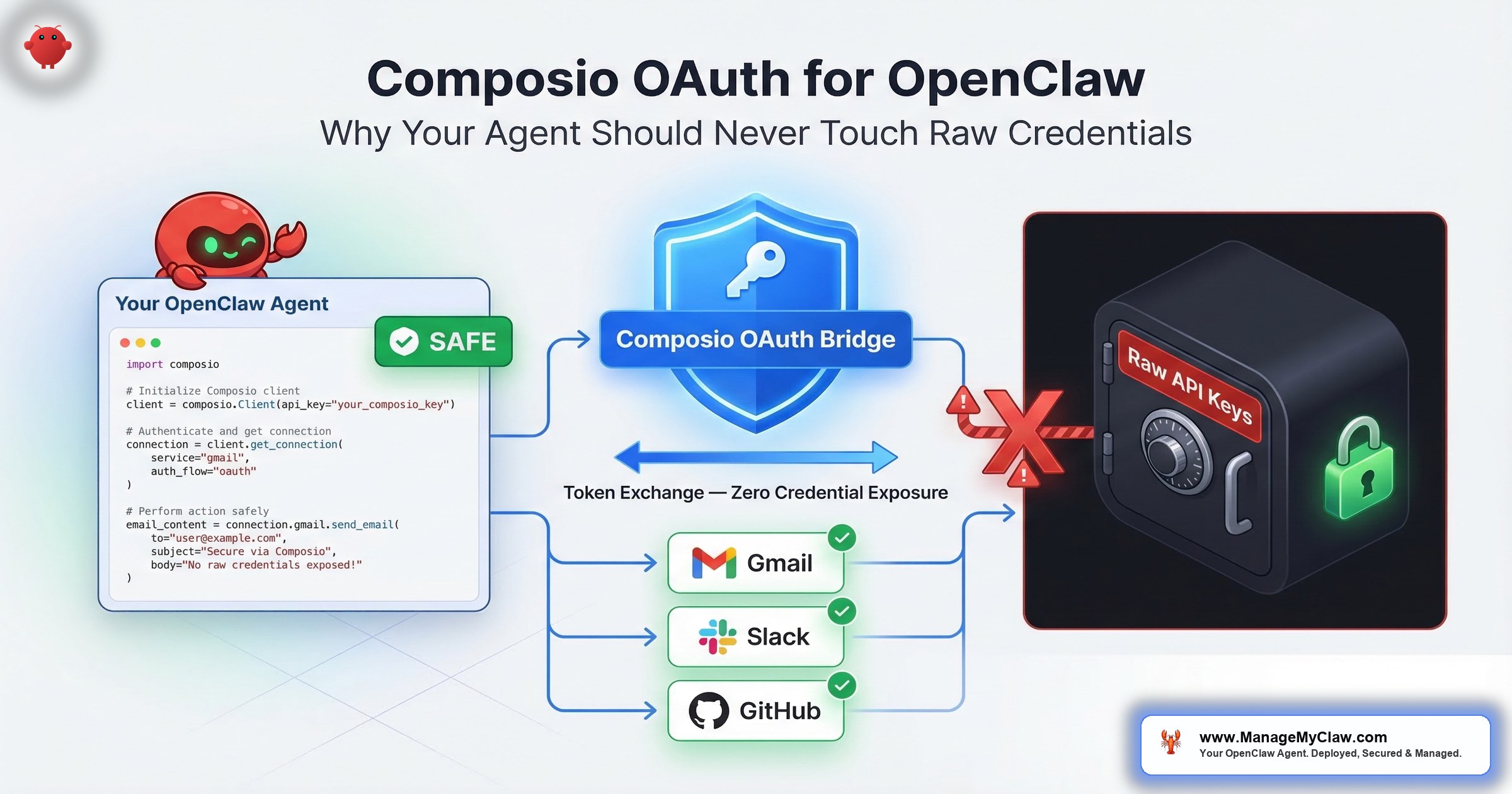
Composio OAuth eliminates the doormat entirely. Your agent never holds raw credentials. Your VPS never stores the Gmail token, the Slack API key, or the calendar secret. This guide walks through the architecture, the step-by-step setup, the kill switch that gives you a real stop button, and the scope mistakes that turn email triage into a full-access inbox breach.
The Credential Crisis Is Accelerating — and AI Agents Are Ground Zero
GitGuardian’s 2026 State of Secrets Sprawl report found 29 million new secrets leaked on public GitHub in 2025 — a 34% year-over-year jump and the largest single-year increase ever recorded. AI-related API keys surged 81% year-over-year, reaching 1,275,105 leaked secrets. And here’s the number that should keep you up at night: Claude Code-assisted commits leaked secrets at roughly 3.2%, double the GitHub-wide baseline.
Meanwhile, credential theft surged 160% in 2025, with infostealers harvesting 1.8 billion credentials from 5.8 million compromised endpoints. Token theft alone accounted for 31% of Microsoft 365 breaches — surpassing traditional credential compromise as the #1 attack vector.
“Running agents 24/7 isn’t a ‘set and forget’ experiment, it’s infrastructure.”
— r/AI_Agents thread with 348 upvotes, 84 commentsWhy this matters: If you’re running OpenClaw with credentials in a .env file, you’re operating the same architecture that ClawHavoc targeted at scale. The question isn’t if those credentials get harvested — it’s which attack vector gets there first.
3 Ways Your Credentials Get Stolen — Only 1 Requires Server Access
Most people assume credential theft means “someone breaks into the server.” That’s attack vector 2 out of 3. The other two don’t require server access at all.
Vector 1: Prompt Injection Exfiltration
A malicious email, document, or web page your agent processes contains hidden instructions. Those instructions direct the agent to read /app/.env and send the contents to an external URL. No server breach, no exploit — the agent does the exfiltration on the attacker’s behalf because the credentials were sitting in a file it could reach.
Only 8.5% of MCP servers use OAuth — the other 91.5% rely on static secrets that prompt injection can extract. OWASP’s LLM Top 10 (2025) flags this as the primary AI agent attack surface. Your agent follows instructions. That’s its job. The problem is when those instructions come from an email it’s triaging instead of from you.
Vector 2: Server Compromise
When your VPS is breached — through CVE-2026-25253 “ClawJacked” (CVSS 8.8, one-click remote code execution), through a misconfigured Docker firewall that bypasses UFW, through a compromised SSH key — every credential stored on that server is exposed simultaneously. One breach, every connected service. Gmail, Slack, Calendar, GitHub, Stripe — the blast radius is proportional to how many integrations your agent has.
Censys identified 21,639 publicly accessible OpenClaw instances in early 2026. A separate audit of 30 popular AI agent projects found that 93% use unscoped API keys. Many of those exposed instances were leaking API keys, OAuth tokens, and plaintext credentials to anyone who knew the port number.
Vector 3: Context Window Logging
Many AI frameworks log the full context window for debugging. If credentials enter the agent’s context — through an environment variable passed at runtime, through a config file the agent reads directly — they end up in your logs. Logs have weaker access controls than the credentials themselves. Debugging sessions get screen-shared. Log files get included in bug reports.
With Composio OAuth, all 3 attack vectors fail. The credentials aren’t on your VPS, so there’s nothing for prompt injection to exfiltrate, nothing for a server breach to harvest, and nothing for debug logs to capture. You’re not patching holes — you’re removing what the attacker is after.
The ClawHavoc Story: 300,000 Users, One File, Every Key Gone
Between January 27 and February 16, 2026, attackers published hundreds of typosquatted skills to ClawHub — packages with names 1 character off from popular tools. The barrier to publishing: a SKILL.md file and a one-week-old GitHub account. No code review. No security scan. No human verification.
The skills contained the AMOS infostealer, which executed silently on installation. It scanned the filesystem for .env files, SSH keys, browser cookies, and OAuth tokens. It exfiltrated everything to attacker-controlled servers. Then the malicious skills wrote persistence hooks into SOUL.md and MEMORY.md — so even if you removed the skill, the backdoor survived agent restarts.
By the time ClawHub pulled the packages, roughly 300,000 users had installed them. ClawHub didn’t notify the affected users.
If those 300,000 users had been running Composio OAuth, the stolen .env file would have contained exactly one credential — a Composio API key. Not raw Gmail tokens. Not Slack secrets. Not SSH keys. One key, scoped to the actions Composio is configured to perform. And that key can be revoked in a single click.
How Composio OAuth Actually Works
Composio’s core principle is brokered credentials: the agent never sees the API key or token. A secure middleware service makes the API call on the agent’s behalf. The token never leaves Composio’s encrypted vault. Here’s the difference:
| Step | Raw Credentials (.env file) | Composio OAuth |
|---|---|---|
| Setup | Paste OAuth token into .env file on VPS |
Complete OAuth flow in Composio dashboard. Token never touches your VPS. |
| Agent request | Agent reads token from .env, calls Gmail API directly |
Agent sends intent (“read inbox”) to Composio. Composio holds the token and makes the call. |
| Token storage | .env on VPS — also potentially in agent logs |
Composio’s SOC 2-compliant encrypted vault. Not on your VPS. Not in agent memory. |
| On VPS breach | All credentials exposed simultaneously | No credentials on VPS to steal. Gmail, Slack, Calendar remain safe. |
| Revocation | Manually revoke at each service — 6 integrations = 6 separate steps while agent runs | One click in Composio. All integrations revoked instantly. |
| Audit trail | Agent logs only — if logging is configured | Every API call logged in Composio’s action log with timestamp and result |
The analogy that makes this click: imagine your agent is a valet. With raw credentials, the valet carries a copy of your house key, your car key, and your office key in their pocket all day. Lose the valet, lose every key. With Composio, the valet walks up to a secure key desk, asks to borrow the car key for 10 minutes, uses it, and returns it. The valet never has a key in their pocket to steal.
Composio supports 500+ integrations exposed as structured, agent-ready actions rather than raw APIs. Your agent calls named actions like “read inbox” rather than making arbitrary authenticated HTTP requests. That constraint helps by default — even if something goes wrong, the blast radius is limited to the specific actions you configured.
The Gmail Scope Problem Most Tutorials Get Wrong
Before we get to the setup steps, there’s a scope problem that affects you regardless of whether you use Composio. When an AI agent requests Gmail access, 2 very different OAuth scopes get used in practice:
| Scope | What It Allows | What It Doesn’t Allow |
|---|---|---|
gmail.readonly |
Read emails, search inbox, read labels and attachments | Delete, send, modify, or move any email — ever |
mail.google.com/ |
Full IMAP/SMTP: read, send, permanently delete (bypasses trash), modify all folders | Nothing — this is unrestricted inbox access |
Most AI agent tutorials default to mail.google.com/ because it’s the path of least resistance. For an OpenClaw email triage setup, gmail.readonly is the correct baseline. The agent reads and categorizes. It doesn’t need permanent delete or unrestricted send.
OAuth tokens are issued independently of your password and remain valid until you explicitly revoke them at Settings → Security → Third-party apps. An attacker who steals a mail.google.com/ token from your .env file retains full inbox access even after you change your password. The incident response instinct is always “change the password.” With OAuth tokens, that instinct is wrong.
Scope selection happens once, at setup. Get it wrong and you’re granting your agent — and anyone who compromises your agent — permanent delete access to your entire inbox. Composio doesn’t eliminate the scope decision, but it does centralize where that scope lives and makes it revocable in one click.
Step-by-Step: Setting Up Composio OAuth for OpenClaw
Budget 30 minutes for a 3-integration setup (Gmail, Google Calendar, Slack). Each additional integration takes roughly 5 minutes. You’ll need CLI access to your VPS and a browser for the OAuth flows.
-
1
Create a Composio account and get your API key. Go to
composio.devand create an account. Navigate to Settings → API Keys and generate a new key. This is the only credential that lives on your VPS. It controls Composio middleware access — not direct access to Gmail or Slack. Treat it accordingly: don’t commit it to version control, rotate it quarterly. - 2 Install the Composio CLI on your VPS.
pip install composio-core

# Authenticate the CLI with your API key
composio login

# Verify the installation
composio whoami-
3
Connect your integrations. For each service your OpenClaw agent needs, run the
composio addcommand. Composio opens a browser-based OAuth flow — you authenticate directly with the service, and the resulting token goes into Composio’s encrypted vault. Your VPS never sees it.
# Connect Gmail (use gmail.readonly scope where possible)
composio add gmail

# Connect Google Calendar
composio add googlecalendar

# Connect Slack
composio add slack

# Verify all connections are active
composio connections list
Each composio add command prints a URL. Open that URL in a browser, complete the OAuth flow, return to the terminal. Done. The token is in Composio’s vault — not in a file on your VPS.
-
4
Configure OpenClaw to route through Composio. In your OpenClaw configuration, replace direct credential references with Composio-managed connections. Set the integration type to
composioand reference the Composio API key from an environment variable:
# config.yaml
integrations:
  gmail:
    type: composio
    composio_api_key: ${COMPOSIO_API_KEY}
    # NOT: oauth_token: [raw token]
    # NOT: client_secret: [raw secret]

  google_calendar:
    type: composio
    composio_api_key: ${COMPOSIO_API_KEY}

  slack:
    type: composio
    composio_api_key: ${COMPOSIO_API_KEY}
Your .env file now contains 1 credential — the Composio API key — instead of separate tokens for every connected service. If a malicious ClawHub skill targets your .env file, it finds 1 key that enables only the actions Composio is configured to perform — not direct Gmail IMAP access, not Slack admin operations, not raw API calls.
- 5 Verify Composio is intercepting calls. Send a test request through OpenClaw, then check Composio’s action log:
# Send a test request through OpenClaw (ask it to check your inbox)
# Then check Composio's action log:
composio logs --integration gmail --limit 5

# You should see the request logged with timestamp and result
# If it appears: your agent is routing through Composio correctly
# If it doesn't: check your config.yaml integration type settingA complete 3-integration Composio OAuth setup takes 30 minutes. After that, your VPS stores 1 credential instead of 6+, and every API call your agent makes has a centralized audit trail. That’s 30 minutes that eliminates the #1 target in the ClawHavoc playbook. If ManageMyClaw is deploying your OpenClaw, Composio setup is included in every package — no configuration on your end.
The Kill Switch: When “Stop” Actually Needs to Mean Stop
With raw credentials, “revoking access” means navigating to each connected service separately. Gmail’s security settings. Slack’s workspace admin. Google Calendar’s third-party apps page. 6 integrations = 6 separate revocation steps — while the agent is still running. The inbox wipe incident showed exactly this problem: Summer Yue ran across her house to physically kill the process because there was no single stop button.
“Good to see some sanity in this AI mayhem. So many well-intended hammers being built without considering that there are ill-intentions or just a lack of guardrails.”
— r/AI_Agents, “What’s your kill switch strategy for agents in production?” (28 upvotes)With Composio OAuth, the kill switch is 1 command:
# Revoke ALL agent access instantly
composio connections revoke --all

# Or target a specific integration
composio connections revoke --integration gmail

# Verify revocation
composio connections list
# All statuses should show "revoked" or "inactive"
All service access revoked simultaneously, instantly. The command also works via API, so a monitoring system that detects anomalous behavior can trigger it programmatically.
The difference between a recoverable incident and a catastrophic one is measured in seconds. 6 separate revocation steps is minutes. 1 command is seconds.
Service Accounts: Don’t Give the Agent Your Personal Keys
Before connecting integrations through Composio, ask yourself: are you connecting your personal Gmail, or a dedicated agent account?
A dedicated Gmail account for the agent (agent@yourdomain.com rather than you@yourdomain.com) means that even a compromised Composio API key — or a bug in how the agent uses the integration — can’t touch your personal email history. The agent operates within its own account boundary. You grant the service account only the specific Gmail labels and access it needs. Revocation cleans up 1 dedicated account, not your primary inbox.
Same principle for Slack: create a dedicated bot user rather than connecting your personal account. Composio supports service accounts through the same OAuth flow — same setup, just authenticated with the service account credentials.
Composio keeps credentials off your VPS. Service accounts limit what those credentials can access. Together, a worst-case breach affects 1 dedicated account with limited permissions — not your personal Gmail with 10 years of history. Don’t skip either layer.
What Composio Doesn’t Cover (Be Honest About the Gaps)
Composio handles credential storage and access revocation. It doesn’t control what the agent does with the data it retrieves. An agent with Gmail access through Composio can still delete emails if your tool permission allowlists don’t restrict that action. The credential layer and the permission layer are complementary — Composio handles “can the agent authenticate to Gmail,” while your OpenClaw tool configuration handles “what can the agent do once authenticated.”
Composio also introduces a dependency. During a Composio outage, your agent’s integrations become unavailable. For most OpenClaw use cases — morning briefings, email triage, daily reporting — brief outage windows are an acceptable tradeoff. For always-on workflows, factor the dependency into your decision.
And yes, Composio sees your data in transit. When your agent reads email through Composio, Gmail’s response passes through their infrastructure. For email triage, calendar management, and Slack notifications, that’s an acceptable tradeoff — Composio’s SOC 2-compliant vault is significantly more hardened than a .env file on a $15/month VPS. For medical records or financial data under specific regulatory frameworks, review their compliance documentation first.
For the complete credential security picture alongside Docker container hardening, see the Docker sandboxing guide. Composio keeps credentials off your VPS. Docker sandboxing keeps a compromised container from escalating to host. The 2 layers together address the full threat model.
The Bottom Line
29 million secrets leaked on GitHub last year. 81% surge in AI-related key exposure. ClawHavoc harvested credentials from 300,000 users through a single file. The IETF just published its first standard for AI agent identity management because the current approach — raw credentials in config files — is fundamentally broken.
Your agent should never hold a credential it doesn’t need.
Composio OAuth isn’t exotic technology. It’s a lockbox for your keys instead of a doormat. It takes 30 minutes to set up, costs nothing for most use cases, and eliminates the single biggest target in every AI agent attack playbook: the plaintext credentials sitting on the same machine as your agent. The setup is boring. The alternative is catastrophic.
For a full picture of OpenClaw security layers beyond credential brokering, read the complete OpenClaw security guide or check our 14-point security checklist. And if you’d rather have a professional handle the Composio setup, OAuth flows, and kill-switch testing before your agent goes live, that’s exactly what ManageMyClaw deployment covers.
Frequently Asked Questions
Does Composio work with all OpenClaw versions?
Composio integration is supported in OpenClaw v0.3.0 and later. The integration approach changed in v0.4.x with a new authentication model, so check the Composio docs for your specific release. Run pip install --upgrade composio-core before setting up new integrations. OpenClaw shipped 7 updates in a 2-week window in early 2026, so version compatibility is worth verifying before you start.
What happens if Composio goes down?
Your agent’s integrations become unavailable until Composio recovers — it can’t access Gmail, Slack, or other connected services. That’s a real tradeoff. For morning briefings and email triage, a brief outage is annoying. For always-on customer service workflows, it could mean missed inquiries. Composio publishes uptime stats on their status page. Factor the dependency into your deployment decision.
Can I mix Composio and raw credentials for different integrations?
Technically yes. Practically, don’t. If any integration still uses raw credentials, a VPS compromise exposes those tokens even if the Composio-managed ones are protected. Your security posture is only as strong as the weakest integration — the one still using a raw token in a .env file. It’s like locking 5 out of 6 doors. The attacker only needs the one you left open.
Does my data pass through Composio’s servers?
Yes. When your agent reads email through Composio, Gmail’s response passes through their infrastructure. For email triage, calendar management, and Slack notifications, that’s an acceptable tradeoff — their SOC 2-compliant vault is more hardened than a .env file on a $15/month VPS. For regulated data (medical records, financial data under specific compliance frameworks), review their data handling documentation before connecting.
Isn’t the Composio API key itself a risk if it’s on my VPS?
Yes, but a much smaller one. A stolen Composio API key gives an attacker access to the specific actions Composio is configured to perform — the same actions your agent can take. That’s narrower than raw OAuth tokens, which also let an attacker reconfigure service settings, create new OAuth clients, and modify authentication. You can scope Composio API keys by integration and action type to further limit blast radius. Rotate quarterly and never commit to version control.
gmail.readonly scope by default, kill switch tested before handoff, and Composio action logs verified. Starting at $499. No OAuth config on your end.
See Plans & Pricing


