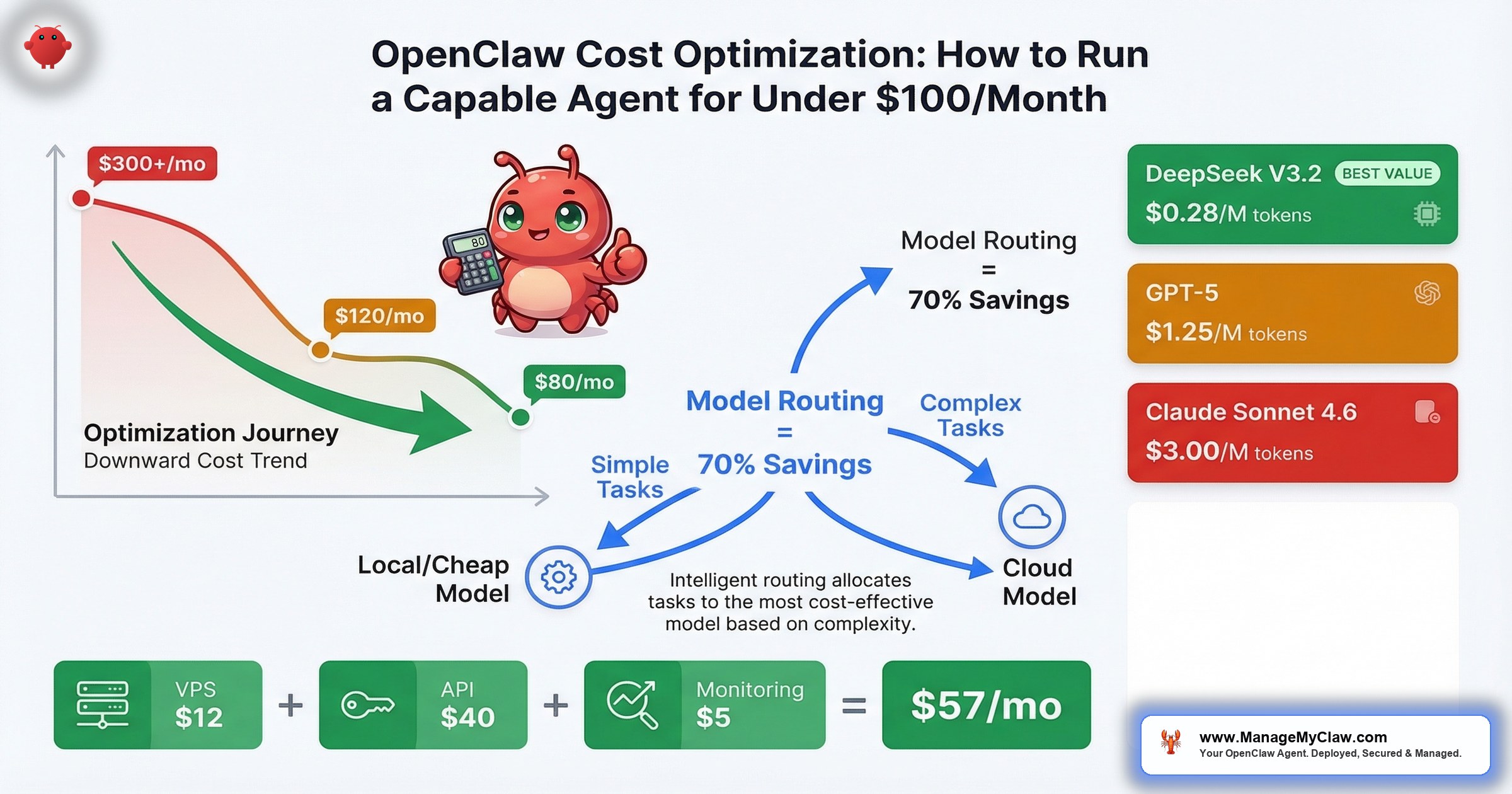
$80–$120 per month. That’s the real cost of a well-optimized OpenClaw setup running an always-on AI agent — less than most SaaS AI tools charge per seat.
$80–$120 per month. That’s the real cost of a well-optimized OpenClaw setup running an always-on AI agent — less than most SaaS AI tools charge per seat. The OpenClaw blog published the math themselves: “The Real Cost of Running OpenClaw: A Practical Guide to Spending Less Than $100/Month.” And on r/openclaw, the thread “Possible to run openclaw for free?” pulled 7 upvotes and 64 comments — which tells you that cost isn’t a niche concern. It’s the first thing people ask after “does it work?”
The problem isn’t that OpenClaw is expensive. The problem is that most people run it the expensive way by default — routing every task through their best model, paying cloud rates for work a local model handles just fine, and never questioning whether a $0.03 API call needed to be a $0.30 one.
It’s like taking an Uber Black to the grocery store. You’ll get there. You’ll also spend 5x what you needed to.
This post breaks down every line item — hosting, API costs per workflow, model routing strategies, and the community-tested moves that have cut real users’ bills by 6x. If you’re already running OpenClaw and your monthly costs are north of $200, the model routing section alone will probably pay for the time you spend reading this. If you’re evaluating whether to deploy, this is the honest cost picture — not the marketing version.
The Single Most Effective Cost Optimization
Don’t use your best model for everything.
That’s it. That’s the move. OpenClaw supports model routing — different models for different task types. The concept is simple: treat model selection like a routing problem, not a quality-maximization problem. Use the cheapest model that handles each task reliably, and reserve expensive models for work that genuinely requires them.
“I switched my OpenClaw to GLM-5 and my API costs dropped 6x while performance barely changed.”
— r/AIToolsPerformance userSix times. Not a marginal improvement — an order-of-magnitude shift from a single configuration change.
The community has been pushing for better tooling around this. GitHub issue #10969 — “Feature: Middleware Hook for Cost-Saving Model Routing” — requests native middleware support so you can define routing rules declaratively: if the task is email categorization, use the cheap model; if it’s drafting a client proposal, escalate to the premium one. Until that ships natively, you can achieve the same result with OpenClaw’s existing model configuration per task type.
“Most cost effective models for open claw?” “What’s the current king of value for OpenClaw?” “Best free model to use with OpenClaw?” — the answer keeps converging on the same pattern: local models for routine work, cloud models for complex reasoning.
— r/openclaw, recurring threadsWhy this matters: Most OpenClaw users are paying 3–6x more than they need to because they configured one model and never revisited the decision. Model routing isn’t an advanced optimization. It’s the first thing you should set up after your agent runs its initial task.
The Hosting Cost Breakdown: 4 Options, Honest Numbers
Hosting is the fixed floor of your monthly bill. It doesn’t scale with usage the way API costs do, which makes it the easiest line item to optimize once and forget. Here are the 4 realistic options:
| Hosting Option | Monthly Cost | Best For |
|---|---|---|
| Budget VPS (Hetzner, DigitalOcean) | $5–$20 | Cloud-only model routing, lightest setups |
| Standard VPS (2vCPU / 4GB RAM) | $12–$24 | Most founders; runs OpenClaw + Docker comfortably |
| Mac Mini (one-time ~$600) | ~$50 amortized | Local LLM + cloud hybrid; runs Ollama natively |
| GPU VPS (for local LLM inference) | $100+ | Full local inference; eliminates API costs entirely |
The sweet spot for most founders is the standard VPS at $12–$24/month. It runs OpenClaw inside Docker with room for logging, monitoring, and a small database. You don’t need GPU compute on the VPS because you’re routing inference to external APIs or a separate local machine.
The Mac Mini option is worth flagging for founders who want to run local models. At ~$600 one-time (amortized to ~$50/month over 12 months), it handles Ollama with models up to 27B parameters comfortably. After 12 months, your hosting cost drops to electricity — roughly $5–$10/month. That math gets very attractive in year 2.
Self-Hosting Break-Even: When Local Beats Cloud
The question everyone asks about self-hosting local LLMs: when does the hardware investment pay for itself? The answer, based on production data: after approximately 8 months, self-hosting local LLMs becomes cheaper than any cloud API for equivalent workloads. If you’re a heavy user processing more than 100M tokens/month, that break-even drops to 3–4 months.
After the break-even point, every month of local inference is essentially free (minus electricity). That’s why the Mac Mini path — or a dedicated GPU machine for heavier workloads — makes financial sense if you’re planning to run OpenClaw for more than a year. The upfront cost is real, but the long-term savings compound aggressively.
Source: haimaker.ai — self-hosting cost analysis, March 2026.
A GPU VPS at $100+/month only makes sense if you’re eliminating all cloud API costs and running heavy inference workloads. For most setups, it’s the equivalent of buying a commercial oven to reheat leftovers.
Why this matters: Hosting is a fixed cost you pay regardless of how many tasks your agent runs. Get this decision right once, and it stays right. The standard VPS at $12–$24/month covers 90% of use cases.
LLM API Pricing: What You’re Actually Paying Per Token (March 2026)
Before we talk workflow costs, you need to understand what the raw API pricing looks like across providers. These are the current per-million-token rates as of March 2026 — and the spread between providers is enormous:
| Model | Input (per 1M tokens) | Output (per 1M tokens) | Best For |
|---|---|---|---|
| OpenAI GPT-4o | $2.50 | $10.00 | Solid mid-tier; good cost-to-quality ratio |
| OpenAI GPT-5 | $1.25 | $10.00 | Cheaper input than GPT-4o; strong reasoning |
| OpenAI GPT-5.2 Pro | $21.00 | $168.00 | Premium tier; reserve for complex reasoning only |
| Anthropic Claude Sonnet 4.6 | $3.00 | $15.00 | Strong writing quality; good for drafts and content |
| DeepSeek V3.2 | $0.28 | $0.42 | 20x cheaper than competitors; ideal for routine tasks |
Sources: tldl.io, intuitionlabs.ai, costgoat.com — verified March 2026.
Look at that spread. DeepSeek V3.2 is 20x cheaper than Claude Sonnet 4.6 and GPT-4o on output tokens. That’s not a rounding error — it’s an order-of-magnitude difference. If you’re routing every task through Claude or GPT-4o without thinking about it, you’re leaving 95% of the possible savings on the table for tasks that don’t need a premium model.
And GPT-5.2 Pro at $168/M output tokens? That’s a model you call when you genuinely need it — complex multi-step reasoning, high-stakes legal review, sophisticated code generation. Routing a status check or email classification through it would be like chartering a helicopter to pick up your dry cleaning.
What These Prices Mean for Real Tasks
Abstract per-million-token pricing is hard to feel. Here’s what common OpenClaw tasks actually cost per execution across providers:
| Task | GPT-4o | Claude Sonnet 4.6 | DeepSeek V3.2 |
|---|---|---|---|
| Periodic status ping (per check) | $0.002 | $0.003 | $0.0001 |
| Monthly cost (every min, 24/7) | $2.88 | $4.32 | $0.14 |
| Morning briefing (per run) | $0.03 | $0.04 | $0.002 |
Sources: betterclaw.io, sentisight.ai, thecaio.ai — verified March 2026.
A periodic status ping — the kind of lightweight health check your agent runs constantly — costs $4.32/month on Claude Sonnet 4.6 but just $0.14/month on DeepSeek V3.2. That’s a 30x difference on a task where output quality is identical across all three models. There’s no reason to run a status check on a premium model. None. This is exactly the kind of decision that model routing automates.
For most users, the realistic monthly API spend lands between $5–$30/month depending on model choice and task volume. That’s the actual number — not the theoretical maximum, but what people are reporting after they configure routing properly. The users spending $100+/month on API costs are almost always running a single expensive model for everything.
API Cost Per Workflow: What Each Task Actually Costs
API costs are the variable portion of your bill — they scale with how many tasks your agent processes. Here’s the per-workflow breakdown from production deployments, so you can map your own workload to an expected monthly range:
| Workflow | Monthly API Cost | Cost Driver |
|---|---|---|
| Morning Briefing | $5–$15 | Read-only; lightest workflow |
| Email Triage (50 emails/day) | $15–$40 | Token count scales with email volume; ~$20 typical |
| Client Onboarding | $10–$30 | Depends on clients/month; 10 clients ≈ $15 |
| Social Media Pipeline | $10–$25 | Content generation; 3–5 posts/week ≈ $15 |
| KPI Reporting | $5–$15 | Structured data + summary; weekly runs ≈ $8 |
| Customer Service Bot | $30–$80 | Heaviest; 50 conversations/day ≈ $50 |
| Total (all 6 workflows) | $75–$205 | Most founders: $50–$100 on 2–3 workflows |
Add hosting ($12–$24) to your workflow costs and you get the complete monthly picture. A founder running email triage, morning briefing, and KPI reporting — the 3 most common starting workflows — is looking at approximately $55–$95/month all-in. That’s the number the OpenClaw blog backs up, and it’s what real deployments consistently land on after the first month of tuning.
The customer service bot is the outlier. At $30–$80/month, it’s the heaviest single workflow because every customer conversation generates significant token volume. If that’s your primary use case, model routing becomes even more critical — routing simple FAQ responses through a cheap model while escalating complex issues to a premium one can cut that $50/month figure in half.
Why this matters: These numbers are the denominator in your ROI calculation. If you’re recovering 5 hours/week at $200/hr ($4,300/month in time value) and spending $80/month to do it, that’s a 54:1 return on operating cost. But only if you’re actually tracking both sides of the equation.
Model Routing in Practice: Local + Cloud Hybrid
The most effective cost architecture for OpenClaw combines Ollama for local inference with OpenRouter for cloud fallback. The logic is straightforward: sensitive tasks stay local, complex tasks escalate to cloud models, and routine tasks go to whichever is cheaper.
Here’s how that maps to real workflows:
| Task Type | Recommended Route | Why |
|---|---|---|
| Email categorization | Local (Ollama) | High volume, low complexity, contains PII |
| KPI number extraction | Local (Ollama) | Structured data; small models handle it fine |
| Draft email responses | Cloud (mid-tier) | Needs natural language quality; not the cheapest tier |
| Social media content | Cloud (mid-tier) | Creative output; quality directly visible to audience |
| Client proposal drafts | Cloud (premium) | High-stakes writing; quality matters most |
| Customer service FAQ | Local (Ollama) | High volume, scripted answers, cost-sensitive |
| Complex customer escalations | Cloud (premium) | Nuanced reasoning; reputation risk if handled poorly |
The privacy benefit of local routing is a bonus, not the primary motivation. Email content, customer data, and financial numbers that stay on your own hardware never touch a third-party API. That’s a compliance win that costs nothing extra when you’re already routing locally for cost reasons.
Fallback Chains and Circuit Breakers
OpenClaw doesn’t just support model routing — it supports intelligent failover. In your agent config, agents.defaults.model.fallbacks lets you define a fallback chain: if your primary model fails or times out, OpenClaw automatically routes the request to the next model in the chain. No manual intervention, no dropped tasks.
The circuit breaker behavior takes this further. When your primary model fails N times within a configured time window, OpenClaw doesn’t keep retrying and burning tokens on failed requests — it trips the circuit breaker and auto-routes ALL requests to the fallback until the primary recovers. This is the same pattern that production microservices use to prevent cascade failures, applied to LLM routing.
The cost-optimization play here is setting your primary model to the cheapest option and your fallback to a premium one. A configuration that production users are running:
- Primary: DeepSeek V3.2 at $0.53/M tokens blended — handles 90%+ of requests
- Fallback: Claude Sonnet 4.5 — catches the edge cases where DeepSeek’s output quality falls short
This setup means you’re paying premium rates only on the ~10% of tasks that actually need premium quality, while the other 90% run at a fraction of the cost. The fallback chain gives you quality assurance without the quality price tag on every request.
ClawRouter (GitHub: BlockRunAI/ClawRouter) is an agent-native LLM router supporting 41+ models with sub-millisecond routing decisions (<1ms overhead). It includes provider health monitoring with automatic adjustment — if a provider’s latency degrades or error rates spike, ClawRouter shifts traffic before your agent’s output quality is affected. Combined with OpenClaw’s native fallback chains, you get enterprise-grade cost architecture on a $18/month VPS.
The performance case for local models has gotten strong enough that cost optimization no longer means quality compromise. Qwen3.5 27B hits 72.4% on SWE-bench — the same range as GPT-5 Mini — and runs free on local hardware via Ollama. GLM-5 pushes even higher at 77.8% on SWE-bench Verified — outperforming Qwen3.5 on coding tasks specifically. For classification, extraction, and structured-output tasks, that’s more than sufficient. You’re not asking these models to write your next investor pitch. You’re asking them to sort your inbox.
Think of it like staffing a restaurant. You don’t need a Michelin-starred chef to prep vegetables. You need someone reliable who does it correctly 1,000 times in a row. The chef handles the dishes where skill actually matters.
Why this matters: The hybrid approach — local for volume, cloud for complexity — is how users are getting to the $80–$120/month target. Without it, you’re paying cloud rates on every token, including the 70% of tokens that don’t need a premium model.
OpenClaw’s system prompt alone is approximately 17,000 tokens. Every single API call includes this overhead. On Claude Sonnet 4.6 ($3.00/M input), that’s ~$0.05 per call just for the system prompt. For local models, it adds 4–8GB to memory via the KV cache — consuming 25–50% of available context on a 16GB machine. Recommended minimum context window: 64K tokens. This is why batch processing (combining items into a single call) is so effective — you amortize the 17K-token overhead across more work per call.
The Full Monthly Cost Picture: 3 Scenarios
Let’s put the hosting and API costs together into 3 realistic deployment profiles. These aren’t best-case projections — they’re what the math actually produces when you add the line items.
Scenario A: Lean Starter — 2 Workflows, Cloud Only
| Line Item | Monthly Cost |
|---|---|
| VPS (standard, DigitalOcean) | $18 |
| Email Triage API | $20 |
| Morning Briefing API | $8 |
| Total | ~$46/month |
Scenario B: Optimized Core — 3 Workflows, Hybrid Routing
| Line Item | Monthly Cost |
|---|---|
| VPS (standard, Hetzner) | $14 |
| Email Triage API (local categorization, cloud drafts) | $12 |
| Morning Briefing API | $6 |
| KPI Reporting API | $8 |
| Mac Mini amortized (12-month) | $50 |
| Total | ~$90/month |
(Year 2, after the Mac Mini is paid off, this drops to ~$40/month.)
Scenario C: Full Stack — 5 Workflows, Cloud Routing with Cost-Optimized Models
| Line Item | Monthly Cost |
|---|---|
| VPS (standard, DigitalOcean) | $18 |
| Email Triage API | $18 |
| Morning Briefing API | $7 |
| Client Onboarding API | $15 |
| Social Pipeline API | $15 |
| KPI Reporting API | $8 |
| Total | ~$81/month |
Scenario C uses cost-optimized models (like GLM-5) across all workflows instead of premium models everywhere. That’s how 5 workflows fit under $100/month without local hardware. If you add the customer service bot, the total stretches to $110–$160 depending on conversation volume — still under what most per-seat AI SaaS tools charge for a single user.
Why this matters: The “under $100/month” target isn’t aspirational. It’s achievable with 2–3 workflows and basic model routing, or with 5 workflows and cost-optimized models. Which scenario you land on depends on how many workflows you’re running and whether you’ve invested in local hardware.
5 Community-Tested Cost Optimization Moves
These aren’t theoretical suggestions. They’re strategies sourced from community discussions, production deployments, and the OpenClaw plugin ecosystem.
1. Route Before You Optimize
Model routing is move #1 because it delivers the largest savings with the least effort. Set up 2–3 model tiers (local/cheap/premium) and assign each workflow to the appropriate tier. Don’t guess — run each workflow on the cheaper model for a week and check output quality. If the output is good enough, the cheaper model stays. Most people discover that 70%+ of their agent’s tasks produce identical results on a model that costs one-fifth as much.
2. Use Observability to Find the Leaks
“Strong list. The biggest unlock for me was routing plus observability together.”
— r/openclaw, “5 OpenClaw plugins that actually make it production-ready” (154 upvotes)Another commenter noted that the Manifest plugin — “Manifest is open source btw, I’m a contributor. Very useful plugin to manage AI costs!” — provides visibility into which tasks are consuming the most tokens. You can’t optimize what you can’t see. Add observability before you start cutting.
3. Batch Instead of Stream
Running email triage continuously (checking every 5 minutes) costs significantly more than batching (every 30–60 minutes). Each API call has a base overhead regardless of how many emails it processes. Batching more emails per call amortizes that overhead. Unless you genuinely need real-time triage, switch to hourly batches and watch your email API cost drop 30–40%.
4. Cache Repeated Patterns
Your customer service bot answers the same 20 questions 80% of the time. Cache those responses. When a new query matches a cached pattern, return the cached response without making an API call. This doesn’t require a complex caching layer — a simple prompt-response lookup table handles the most common case. The 80/20 rule applies directly: caching the top 20 questions eliminates 80% of your bot’s API calls.
5. Quarterly Cost Reviews
Model pricing changes constantly. New models launch that are cheaper and better than what you’re running. The model you chose 3 months ago might cost 3x what a current alternative charges for equivalent quality. Reviewing your model assignments quarterly — testing the new options against your actual task mix — captures savings that compound over time. ManageMyClaw’s Managed Care tier ($299/month) includes quarterly API cost optimization specifically for this reason, with typical savings of 20–40% after the first review.
Why this matters: Each of these moves is individually worth 15–40% in savings. Stacking all 5 is how you go from $200+/month to under $100. The community isn’t guessing at this — they’re sharing real numbers in real threads.
OpenClaw vs. SaaS AI Tools: The Cost Comparison Nobody Runs
The pitch for SaaS AI tools is simplicity: pay per seat, don’t worry about infrastructure. The reality is that you’re paying for simplicity at a markup that makes the total cost of ownership dramatically higher. Here’s the honest comparison:
| OpenClaw (Optimized) | Typical SaaS AI Tool | |
|---|---|---|
| Monthly cost (1 user) | $80–$120 | $100–$300/seat |
| Scaling cost (5 users) | $80–$160 (shared agent) | $500–$1,500 (per-seat) |
| Model choice | Any model, any provider | Vendor-locked |
| Data privacy | Local option available | Cloud-only |
| Year 1 TCO (ManageMyClaw Starter + MC) | ~$4,087 | — |
| Year 1 TCO (comparable SaaS, e.g., Clawable) | — | ~$21,194 |
The Year 1 TCO gap — $4,087 vs. $21,194 — exists because OpenClaw’s infrastructure costs don’t multiply per seat. Your agent processes tasks for your entire team from a single deployment. SaaS tools charge per-seat because their business model requires it. Your cost structure doesn’t have to mirror theirs.
The tradeoff is real, though. SaaS tools handle infrastructure, updates, and support. With OpenClaw, you handle that yourself — or you have someone handle it for you. The OpenClaw for Business page covers where the managed vs. DIY line sits for different team sizes.
Why this matters: The per-seat model that SaaS tools use means your AI costs grow linearly with headcount. OpenClaw’s costs grow with task volume, not team size. For a 5-person team, that structural difference saves $1,000+/month.
What “Under $100/Month” Actually Buys You
The $80–$120/month figure isn’t about running the cheapest possible agent. It’s about running a capable agent at an optimized cost. Here’s what that budget actually delivers:
- Always-on availability — your agent runs 24/7 on your VPS, processing email, generating briefings, and handling onboarding triggers at any hour
- 2–3 production workflows — email triage, morning briefing, and KPI reporting are the most common starting combination
- Model routing across multiple providers — cheap models for classification, mid-tier for drafting, premium only when you explicitly need it
- Privacy-preserving architecture — sensitive data stays on local hardware via Ollama, with cloud fallback for tasks where privacy isn’t the primary concern
- Room to scale — adding a 4th or 5th workflow increases costs incrementally ($10–$25 per workflow), not multiplicatively
That’s a full-time digital assistant — one that processes your inbox, briefs you every morning, pulls your KPI reports, and never takes a vacation — for less than your monthly streaming subscriptions combined.
The cost of running an AI agent isn’t the interesting number. The cost of not running one — measured in founder hours spent on email sorting, report assembly, and onboarding paperwork — is the one that should keep you up at night.
The Bottom Line
A well-optimized OpenClaw setup costs $80–$120/month. Most people who spend more than that haven’t configured model routing — the single change that cuts API costs 3–6x. The community has proven this repeatedly: use the cheapest model that handles each task, reserve expensive models for work that genuinely needs them, and add observability so you know where your tokens are going.
The math is simple. Hosting: $12–$24/month. API costs for 2–3 workflows: $30–$70/month. Total: under $100. Compare that to the $200–$500 most SaaS AI tools charge per seat, or to the value of the hours you recover — at $200/hr, even 2 hours/week saved pays for the entire setup 10x over.
The question isn’t whether you can afford to run an AI agent. At $80/month, the question is whether you can afford not to.
Frequently Asked Questions
Can I really run OpenClaw for under $100/month?
Yes — with model routing configured. A standard VPS ($12–$24) plus 2–3 workflows using cost-optimized models lands at $55–$95/month consistently. The OpenClaw blog documents this themselves. Without model routing, the same setup costs $150–$250 because you’re running premium models on tasks that don’t need them. The routing configuration is the single biggest lever.
What’s the cheapest model that’s actually good enough for production?
For classification and structured-output tasks (email categorization, KPI extraction, FAQ matching), Qwen3.5 27B runs free via Ollama and scores 72.4% on SWE-bench — the same range as GPT-5 Mini. For draft generation and content creation, mid-tier cloud models via OpenRouter provide strong quality at a fraction of premium pricing. The right answer depends on the task: match the model to the work, not to the hardest thing your agent could theoretically do.
How much does model routing actually save?
One user on r/AIToolsPerformance reported a 6x cost reduction after switching to GLM-5 for routine tasks. That’s the upper bound. Typical savings from basic routing (separating classification tasks from generation tasks across 2 model tiers) are 40–60%. ManageMyClaw’s quarterly API cost optimization typically achieves 20–40% savings on top of whatever routing is already in place, by testing new models against your actual task mix.
Should I use local models or cloud APIs?
Both. The hybrid approach — Ollama for local inference on routine and sensitive tasks, OpenRouter for cloud fallback on complex ones — gives you the best cost-to-quality ratio. Local handles the volume (email categorization, FAQ responses, data extraction). Cloud handles the nuance (draft writing, content creation, complex customer escalations). If you process sensitive data (PII, financial records), local routing also solves the compliance question for free.
What’s the biggest hidden cost most people miss?
Model pricing drift. The model you chose 3 months ago might now cost 3x what a newer alternative charges for equivalent output quality. Models get cheaper and better constantly. If you’re not reviewing your model assignments quarterly, you’re overpaying by default. This is the “set it and forget it” tax — and it compounds.
How do I know if I’m overpaying right now?
Check 2 things. First: are you using the same model for every task? If yes, you’re almost certainly overspending — classification tasks don’t need premium models. Second: when did you last benchmark a newer, cheaper model against your current one? If the answer is “never” or “more than 3 months ago,” you’re likely paying 30–50% more than you need to. Add observability (the Manifest plugin is open-source), check which tasks consume the most tokens, and test cheaper models on those specific tasks first.
Does ManageMyClaw help with cost optimization?
The Pro tier includes model routing optimization at setup. The Managed Care tier ($299/month) includes quarterly API cost reviews, where your model assignments are tested against current alternatives and updated for the best cost-to-quality ratio — typical savings are 20–40% after the first review. You pay hosting ($12–$24/month) and AI model API costs ($50–$200/month) separately, so those optimization savings go directly back to you.


