91% of customer service leaders are under executive pressure to implement AI in 2026. Not “exploring.” Not “evaluating.” Under pressure — with deadlines, budget scrutiny, and board-level expectations attached. The data comes from industry surveys tracking the shift from pilot programs to mandates, and the trend line is vertical.
Meanwhile, Shopify reported that AI-assisted orders grew 15x in 2025. Not 15%. Fifteen times. The stores that figured out AI-powered customer interactions early didn’t just improve response times — they fundamentally changed what a 3-person e-commerce team could handle.
Think of it this way: your support inbox is a conveyor belt. Right now, a human picks up every item — “where’s my order,” “wrong size,” “can I get a refund” — whether it takes 30 seconds or 30 minutes. An AI agent is the sorting machine that handles the 30-second items automatically and only passes the 30-minute ones to a person.
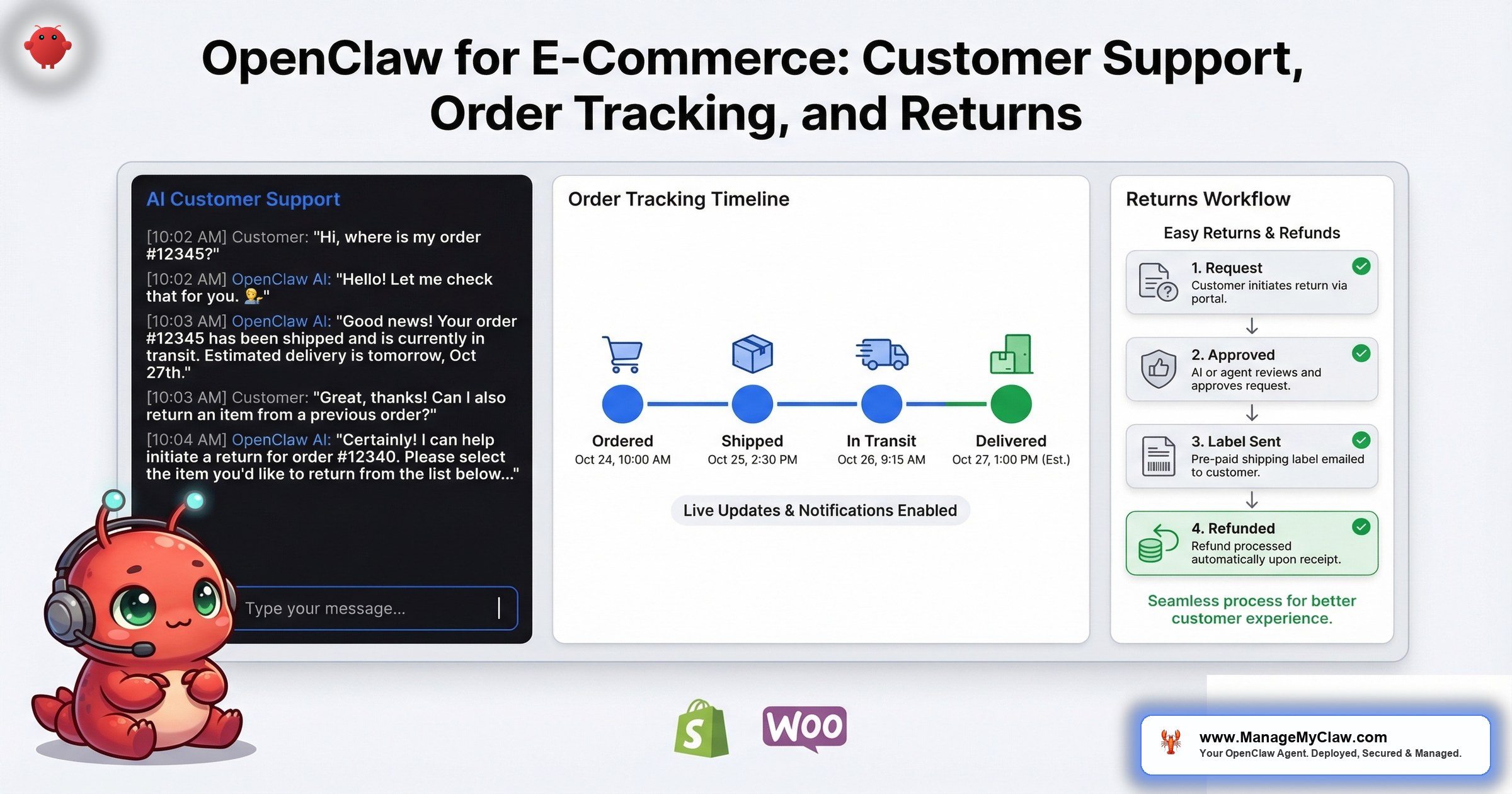
This post breaks down how OpenClaw handles the 3 workflows that consume 70–80% of e-commerce support volume: customer inquiries, order tracking, and returns. What triggers each one, what the agent does, what stays under human control, and what it actually costs to run.
The E-Commerce Support Problem in Numbers
E-commerce customer support has a math problem. The volume scales with revenue, but the margin doesn’t scale with the volume. A store doing $50K/month in revenue might handle 200–400 support tickets monthly. A store doing $500K handles 2,000–4,000. The support costs scale roughly linearly, but the nature of the tickets doesn’t change — 70–80% are routine inquiries with predictable answers.
The industry has noticed. Gorgias, trusted by 15,000+ e-commerce brands, built its entire product around pulling Shopify order data into a unified ticket view so agents can answer faster. Yuma AI has automated up to 89% of customer support for its top customers. Engaige reports resolving up to 80% of support tickets end-to-end without human intervention.
Those are SaaS platforms with per-seat pricing, monthly minimums, and vendor lock-in. OpenClaw does the same work on your infrastructure, with your data staying on your VPS, at API costs of $30–$80/month instead of $300–$1,500/month in platform fees.
The difference between paying for a platform and running your own agent is the difference between renting a food truck and owning a kitchen. The food truck works until the rental company raises prices or changes the menu.
On r/AI_Agents, a thread titled “I built a Social Media Platform using OpenClaw — Spent $965 in the process!” (upvotes tracked at posting) laid out the full cost breakdown of building a production system with OpenClaw. The price tag wasn’t the point — the transparency was. Every dollar was accounted for: API calls, hosting, tooling. That’s the OpenClaw model. You see every line item because you own the infrastructure.
Why this matters: If you’re running an e-commerce store and evaluating AI support tools, the question isn’t whether AI can handle your tickets. Yuma, Engaige, and Gorgias have proved it can. The question is whether you want to pay platform prices for it or run the same capability on your own terms. OpenClaw gives you the second option.
Workflow 1: Customer Support Agent — Handling the 80%
The core e-commerce support workflow follows a pattern that’s almost embarrassingly predictable. Customer sends a message. You look up their order. You check the status. You paste a response from a template you’ve modified 400 times. You hit send. Repeat.
OpenClaw’s customer service workflow (WF-06) automates this loop. The agent monitors incoming inquiries across email, chat widget, WhatsApp, or Telegram. When a message arrives, it:
- Classifies the intent. Is this an order status question, a return request, a product question, a complaint, or something that needs a human? Classification happens in under 2 seconds.
- Pulls relevant data. Order number, shipping status, tracking link, purchase date, return eligibility window — all from your Shopify, WooCommerce, or custom store API via Composio.
- Generates a response. Not a canned template — a contextual reply that references the customer’s specific order, addresses their specific question, and matches your brand voice.
- Stages or sends. Configurable: draft-only for review, auto-send for routine categories, or escalate to a human queue with full context attached.
The key architecture decision is the escalation boundary. You define which categories the agent handles autonomously and which get routed to a person. Typical configuration: order status, shipping updates, and FAQ-type questions are auto-handled. Complaints, refund disputes over a dollar threshold, and anything the agent’s confidence score falls below 85% on gets escalated with the full conversation context and suggested response attached.
On r/OnlineMarketing, a thread titled “comparing ai customer service tools for ecommerce that actually integrate properly” (upvotes tracked at posting) captured the frustration: most AI support tools either integrate with everything badly or integrate with one platform well. The thread was full of store owners who’d tried 3–4 tools before finding one that actually pulled order data into the conversation without manual copy-paste.
Why this matters: The 80% of tickets that are routine — “where’s my order,” “how do I return this,” “do you have this in blue” — follow the exact same pattern every time. They’re repeatable, have structured inputs (order number, SKU, customer email), and have defined outputs (status update, return label, product link). That’s the 3-property test from the OpenClaw for Business framework. If a task passes all 3, it’s automatable.
Workflow 2: Order Tracking — The Highest-Volume, Lowest-Complexity Task
“Where’s my order?” accounts for 30–50% of all e-commerce support tickets across every study that’s ever been done on the subject. It’s also the simplest to automate because the answer is always the same structure: order number, current status, tracking link, estimated delivery date.
The OpenClaw order tracking workflow works on a simple trigger-lookup-respond loop:
- Trigger: Customer sends a message via WhatsApp, Telegram, email, or chat widget containing an order reference or identifiable by their email address.
- Lookup: The agent queries your Shopify/WooCommerce API for order status, shipping carrier, tracking number, and estimated delivery. If multiple orders exist, it identifies the most recent or asks the customer to specify.
- Respond: A natural-language message with order status, tracking link, and estimated delivery date. If the order is delayed, the agent acknowledges the delay and provides the updated ETA from the carrier API.
- Proactive option: Configure the agent to send proactive shipping updates via WhatsApp or Telegram when status changes — “shipped,” “out for delivery,” “delivered” — so the customer never needs to ask.
The proactive notification model is where the real support volume reduction happens. If a customer gets a WhatsApp message saying “Your order #4782 shipped today — tracking: [link], estimated delivery: Thursday” before they think to ask, that’s a ticket that never exists. Multiply that across 200 orders/month and you’ve eliminated 60–100 tickets before they’re created.
The multi-channel delivery — WhatsApp, Telegram, email, chat widget — isn’t a nice-to-have. It’s where your customers already are. 66% of businesses report a productivity boost with agentic AI, according to industry research tracking agentic deployments in 2025–2026. The boost isn’t from the AI being smarter. It’s from the AI being where the customer is, when the customer needs it, without a human scheduling constraint.
Why this matters: Order tracking is the gateway workflow for e-commerce AI adoption. It’s read-only (the agent checks status but can’t modify orders), low-risk, high-volume, and measurable. If you’re hesitant about giving an AI agent access to your store, start here. The permission scope is view-only on orders. The worst case is a wrong tracking number — not a deleted customer database.
Workflow 3: Returns and Refunds — The One That Needs Guardrails
Returns are where the stakes change. Order tracking is read-only. Customer inquiries are mostly informational. Returns involve money moving in the opposite direction, and that requires a different permission architecture.
The OpenClaw returns workflow operates in 2 tiers, defined by dollar thresholds you configure:
Tier 1: Auto-approved returns (under your configured threshold). Customer requests a return on an order under $50 (or whatever threshold you set). The agent verifies return eligibility (within return window, item category is returnable), generates a return shipping label, sends the label to the customer with instructions, and logs the return in your system. No human involved. This handles the high-volume, low-dollar returns that cost more in human time to process than the refund itself.
Tier 2: Human-approved returns (above threshold or exception cases). For returns above your dollar threshold, damaged items, or custom/personalized products, the agent collects all information — order details, reason for return, photos if applicable — packages it into a structured summary, and routes it to your returns queue with a recommended action. The human reviews and approves. The agent then executes the approved action (generate label, issue refund, offer exchange).
The dollar threshold is the critical security boundary. It’s configured at the system level — not in the agent’s prompt where it could get compressed away, but in the Composio permission scope. The agent literally doesn’t have the API permission to issue a refund above the threshold. Even if instructions get confused, the technical capability isn’t there.
Like giving your store manager a petty cash drawer for $50 returns but requiring your signature for anything bigger. The drawer has a physical limit. That’s different from a rule they’re supposed to remember.
On r/OpenClawInstall, a thread titled “OpenClaw’s creator says use this plugin. Lossless Claw fixes the single biggest problem with running AI agents overnight” (upvotes tracked at posting) highlighted the context compaction problem that’s especially relevant for e-commerce agents running 24/7. If your returns policy instructions get compressed out of the agent’s memory at 3 AM when a high-value return request comes in, you need the guardrail to be in the permission layer, not the prompt. That’s the architecture difference between “the agent knows the rule” and “the agent can’t break the rule.”
Why this matters: Returns processing is the workflow where most e-commerce stores get nervous about AI. The tiered threshold approach solves it. Auto-approve the small stuff (which is 80% of the volume), require human sign-off on the big stuff (which is 20% of the volume but 80% of the financial risk). You reduce the workload without reducing the control.
The Cost Architecture: ClawRouter and Model Routing
E-commerce support has a natural cost optimization built into its ticket distribution. Most tickets are simple. Some are complex. If you route every ticket through GPT-4o at $0.01–$0.03 per interaction, a store handling 100 tickets/day pays $30–$90/month in API costs. That’s reasonable. But it’s also 3–5x more than it needs to be.
ClawRouter lets you assign different models to different task types within the same OpenClaw instance. The configuration for an e-commerce support agent typically looks like this:
| Task Type | Model | Cost/Interaction | Why |
|---|---|---|---|
| Order status lookup | GPT-4o-mini | $0.002–$0.005 | Structured query, no reasoning needed |
| FAQ responses | GPT-4o-mini | $0.003–$0.008 | Knowledge base retrieval, low complexity |
| Return eligibility check | GPT-4o-mini | $0.003–$0.006 | Rule-based decision, date math |
| Complaint handling | GPT-4o | $0.01–$0.03 | Tone sensitivity, nuance, de-escalation |
| Product recommendations | GPT-4o | $0.01–$0.02 | Catalog understanding, personalization |
| Escalation summary | GPT-4o | $0.01–$0.02 | Context synthesis for human handoff |
With this routing, a store handling 100 tickets/day where 80% are routine (GPT-4o-mini) and 20% are complex (GPT-4o) pays roughly $15–$35/month in API costs instead of $60–$90. The full model routing framework is covered in the OpenClaw cost optimization guide.
On r/LocalLLM, a thread titled “I tracked every dollar my OpenClaw agents spent for 30 days, here’s the full breakdown” (upvotes tracked at posting) confirmed the pattern: the users spending the least weren’t running worse agents. They were routing smarter. The expensive model handles the 20% of tasks that need reasoning and nuance. The cheap model handles the 80% that are structured lookups.
Why this matters: At $15–$35/month in API costs plus $12–$24/month in VPS hosting, an OpenClaw e-commerce support agent costs $27–$59/month to run. Gorgias pricing starts at $300/month for 50 tickets. The math isn’t close.
Multi-Channel Delivery: WhatsApp, Telegram, Email, and Chat
E-commerce customers don’t pick one channel and stick with it. They DM on Instagram, email for formal complaints, message on WhatsApp for quick questions, and use the chat widget when they’re already on your site. The agent needs to be where they are.
OpenClaw supports multi-channel delivery through Composio connections. For e-commerce support, the standard channels are:
- WhatsApp Business API: The primary channel for stores with international customers. Open rate is 98% vs. 20% for email. The agent receives messages, pulls order data, and responds within the WhatsApp conversation — no app-switching for the customer.
- Telegram: Lower cost than WhatsApp (no per-conversation fees), strong in European and Asian markets. Same order-tracking and returns workflow, different transport layer.
- Email: For formal communications, return confirmations, and refund receipts. The agent uses the draft-then-send model from the email automation workflow — configurable to auto-send for routine responses or stage as drafts for review.
- Chat widget: Embeddable on your store. The agent answers product questions, checks order status, and initiates returns directly from the customer’s browsing session.
60% of businesses adopting agentic AI report cost savings, 55% report quicker decisions, and 54% report enhanced customer experience — but those numbers only hold when the agent is accessible on the channels where customers already interact. A support agent that only handles email misses the 40–60% of inquiries that come through messaging.
Why this matters: Multi-channel isn’t a feature checkbox — it’s where your conversion happens. A customer who gets an instant WhatsApp reply with their tracking link at 11 PM doesn’t email you the next morning. A customer who gets a product recommendation in the chat widget while browsing doesn’t abandon cart to “come back later.” The agent’s availability on the customer’s preferred channel is the difference between a support cost and a revenue driver.
Security for E-Commerce: Permission Scopes That Protect Revenue
An e-commerce support agent connects to your store API, payment processor, and customer communication channels. That’s your revenue pipeline, your customer data, and your brand reputation — all accessible to an agent running 24/7. The security architecture can’t be an afterthought.
The Composio OAuth scopes for an e-commerce support agent should be the tightest in any OpenClaw deployment:
- Shopify/WooCommerce: Read-only on orders and products. The agent can look up order status and product details. It can’t modify orders, change prices, delete products, or access payment information beyond what’s needed for the customer interaction.
- Refund processing: Capped at your configured dollar threshold. The API permission literally doesn’t allow refunds above the cap. This is enforced at the Composio scope level, not the prompt level.
- Customer data: Access only to the customer record associated with the current conversation. No bulk export, no customer list access, no browsing behavior data.
- Communication channels: Send-only on configured channels. The agent can respond to customers but can’t access message history beyond the current conversation thread.
Every permission scope is independently revocable. If you suspect any issue, one click in Composio cuts the agent’s access to that tool without affecting the others. Services like ManageMyClaw handle the full scope configuration during deployment so you don’t have to figure out which permissions to grant and which to restrict.
The ROI Math for E-Commerce
Here’s the cost comparison for a mid-size Shopify store handling 100 support interactions per day:
| Cost Category | Human Support Team | SaaS AI Tool | OpenClaw Agent |
|---|---|---|---|
| Monthly platform/labor | $3,000–$5,000 (1–2 agents) | $300–$1,500 | $0 (self-hosted) |
| API / model costs | N/A | Included in platform fee | $15–$35 |
| VPS hosting | N/A | N/A | $12–$24 |
| Coverage hours | 8–12 hrs/day | 24/7 | 24/7 |
| Data ownership | Yours | Platform’s servers | Your VPS |
| Total monthly cost | $3,000–$5,000 | $300–$1,500 | $27–$59 |
The human support team doesn’t go away entirely. The OpenClaw agent handles 80% of volume, so you’re replacing 1.5 of those 2 support agents, not both. The remaining human handles escalations, complex complaints, and the 20% that genuinely requires judgment. Net monthly savings: $2,000–$4,000 compared to a fully human team, $240–$1,440 compared to a SaaS tool.
You’re not replacing your best support person. You’re eliminating the 300 copy-paste interactions per week that make them want to quit.
What to Automate First (The Sequence That Works)
Don’t deploy all 3 workflows simultaneously. The stores that get the most value from OpenClaw follow a specific sequence:
Week 1–2: Order tracking only. Read-only permissions. The agent looks up order status and responds. No money moves. No data gets modified. You’re testing the agent’s accuracy on the simplest, highest-volume ticket type. If accuracy is below 95% on order lookups, fix the knowledge base before adding more complexity.
Week 3–4: Add FAQ and product questions. Still read-only. The agent now handles “do you ship to Canada,” “what’s your return policy,” and “do you have this in size 10.” You’re expanding the knowledge base, not the permission scope.
Week 5–6: Add returns processing. This is where write permissions come in. Start with draft-only return labels (human approves before sending). After 10–15 clean returns, enable auto-approval for orders under your dollar threshold. Graduate to full automation on the simple cases.
This phased approach isn’t cautious — it’s how the 20% of businesses that succeed with AI deploy. It’s also the sequence ManageMyClaw follows during the 14-day hypercare period on Business deployments. The ones in the 80% that fail try to automate everything on day one and spend the next 3 months debugging edge cases that a staged rollout would have caught in week 2.
The Bottom Line
E-commerce customer support is the most automatable business function that exists. The tickets are predictable, the data is structured, the outcomes are defined, and the volume scales faster than any human team can. OpenClaw handles the 80% that follows a pattern — order tracking, FAQ responses, return label generation — while routing the 20% that requires judgment to a human with full context attached.
The cost is $27–$59/month on your own infrastructure vs. $300–$1,500/month for a SaaS platform that holds your customer data on their servers. The permission architecture ensures the agent can look up orders but can’t modify them, can process returns under your threshold but can’t exceed it, and can respond to customers but can’t access data beyond the current conversation.
Start with order tracking. Expand to FAQ. Graduate to returns. That’s the sequence. The stores that follow it see 80% ticket reduction within 6 weeks.
Frequently Asked Questions
Does this work with Shopify, WooCommerce, or both?
Both, plus any platform with an API that Composio supports. The agent connects to your store’s API to pull order data, product catalog, and customer records. Shopify and WooCommerce are the most common configurations, but BigCommerce, Magento, and custom stores with REST APIs work the same way. The workflow logic is platform-agnostic — only the API connection layer changes.
Can the agent handle product recommendations, not just support?
Yes. When a customer asks “do you have something similar to [product]” or “what do you recommend for [use case],” the agent queries your product catalog and returns personalized recommendations based on the customer’s order history, browsing context, and your configured recommendation rules. This is where the GPT-4o routing matters — product recommendations require catalog understanding and personalization that GPT-4o-mini doesn’t handle as well. On WhatsApp and Telegram, this turns a support interaction into a sales interaction.
What happens if the agent gives a wrong answer to a customer?
The confidence threshold catches most of these. If the agent’s confidence falls below 85% (configurable), it escalates to a human instead of responding. For the first 2 weeks of deployment, run the agent in draft-only mode — it generates responses but doesn’t send them until you approve. Review accuracy during this period. Most stores see 95%+ accuracy on order tracking and FAQ responses within the first week. Product recommendations and nuanced questions take longer to calibrate.
How does the agent know my store’s return policy?
You configure a knowledge base during setup — your return policy, shipping policy, FAQ, product categories, and any brand-specific response guidelines. The agent retrieves from this knowledge base when generating responses. If your return policy changes (holiday extended returns, for example), you update the knowledge base document. The agent picks up the change immediately without redeployment. Policy rules like “30-day return window” and “no returns on sale items” are enforced both in the knowledge base and in the Composio permission scope, so even if the knowledge base has an error, the permission layer prevents unauthorized actions.
What’s the setup time for all 3 workflows?
Self-configuring the full e-commerce support stack (customer inquiries, order tracking, and returns) takes 6–10 hours if you’re comfortable with API configuration and Composio OAuth scopes. That includes writing the knowledge base, configuring the model routing table, setting up multi-channel delivery, and running test interactions. ManageMyClaw handles the full deployment — all 3 workflows, security hardening, knowledge base configuration, and model routing — as part of the Business plan. Under 60 minutes for the deployment; knowledge base calibration happens during the 14-day hypercare period.
Can I set different auto-reply rules for different channels?
Yes. Channel-specific rules are part of the escalation configuration. Common setup: auto-respond on WhatsApp and chat widget (where customers expect instant replies), stage as drafts on email (where a 30-minute response time is acceptable and errors are harder to retract). You can also set different tone guidelines per channel — more casual on WhatsApp, more formal on email — while using the same knowledge base and permission scopes.
Does the agent work in languages other than English?
GPT-4o and GPT-4o-mini handle 50+ languages. The agent detects the customer’s language from their message and responds in the same language. Your knowledge base can be in English — the model translates at response time. For stores with significant non-English volume, writing the knowledge base in the primary customer language improves accuracy. The most common multilingual setup is English knowledge base with Spanish, French, and German response generation.
Ready to stop paying platform prices for e-commerce support?
ManageMyClaw deploys and configures the full e-commerce support stack — customer inquiries, order tracking, returns processing, multi-channel delivery, ClawRouter model routing, and all security hardening. Starting at $2,999 for Business (includes up to 5 workflows). Your data stays on your VPS. No per-ticket fees. No phone call required.
See Plans — Starting at $499

