66% of legal leaders plan to increase their legal tech investments to keep up with growing workloads. Not because they’re chasing trends. Because their current systems can’t keep pace with the volume.
That stat comes from industry surveys tracking the legal technology adoption wave. It sits alongside Gartner’s projection that 40% of enterprise applications will feature task-specific AI agents by 2026 — up from less than 5% just 2 years ago. Anthropic’s CEO has stated publicly that AI will impact 50% of lawyers, consultants, and finance professionals within 12 months. The legal profession isn’t being warned about a future shift. It’s being told the shift is already underway.
The profession that drafts contracts for a living is about to find out what happens when the drafting gets automated. The firms that figure out which parts to automate — and which to protect — will be the ones still standing.
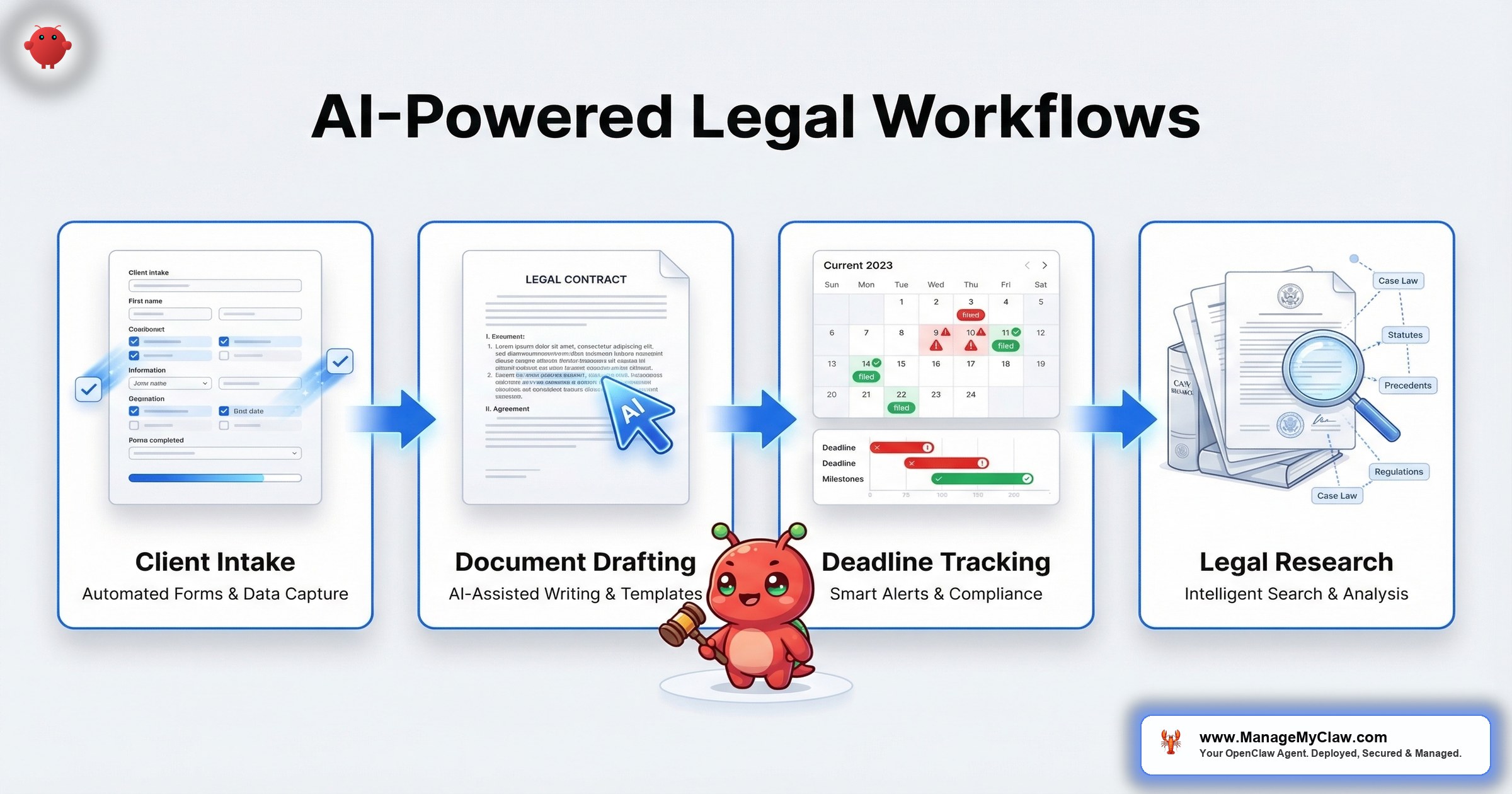
OpenClaw is an open-source AI agent framework with 250,000+ GitHub stars that runs on your own infrastructure and takes autonomous actions across your business tools. Unlike legal-specific SaaS products that lock you into their platform with per-seat pricing, OpenClaw connects to your existing stack — Gmail, Google Calendar, your CRM, your document tools — via Composio OAuth and executes tasks 24/7 with persistent memory. For law firms, that means openclaw legal law firm automation across 4 high-impact workflows: client intake, document drafting, deadline management, and legal research.
This is the practical guide to how each one works, what it costs, and where the guardrails need to be.
The Legal AI Landscape: Real Tools, Real Anxiety
The legal profession has a complicated relationship with AI. On one side, tools like Briefpoint are saving attorneys $20,000+ per year by generating formatted discovery responses in minutes instead of hours. Clio extracts deadlines directly from court documents and creates calendar events automatically. Eve Legal builds AI specifically for plaintiff law firms. Smokeball, Spellbook, and Lawmatics round out a growing stack of legal-specific AI tools that are actually delivering results.
On the other side, there’s genuine fear. On r/LawSchool, a thread titled “Anthropic CEO just announced Ai will get rid of 50% of lawyers” (247 upvotes) triggered exactly the panic you’d expect. Comments ranged from gallows humor to genuine career anxiety. One response captured the sentiment: “The 50% that survives will be the ones who learn to use it, not the ones who pretend it doesn’t exist.”
On r/Lawyertalk, a thread titled “Job market / AI replacing attorneys?” (89 upvotes) reflected the same split. Experienced practitioners pushed back on the doomsday narrative: “AI isn’t replacing lawyers. It’s replacing the tasks that make junior associates miserable — doc review, first-draft research memos, intake data entry. The firms that automate that stuff free their people to do actual lawyering.”
And then there’s the cautionary tale. On r/Lawyertalk, the thread “Groundbreaking lawsuit charges bad legal advice and unauthorized practice of law by OpenAI’s ChatGPT” (312 upvotes) showed what happens when AI gets used without guardrails — a chatbot dispensing legal advice that turned out to be wrong, with no attorney in the loop and no malpractice insurance behind it.
Think of it like the difference between a paralegal and a street-corner notary. Both handle paperwork. Only one operates inside a system with supervision, standards, and accountability. AI in a law firm needs to be the paralegal, not the notary.
Why this matters: The question isn’t whether law firms will adopt AI. 66% of legal leaders have already answered that. The question is whether they’ll adopt it with proper configuration and guardrails — or end up in one of those Reddit horror threads themselves.
Workflow 1: Client Intake — From First Contact to Consultation in Minutes
Client intake is where most law firms hemorrhage time and leads. A potential client fills out a contact form at 9 PM on a Sunday. Someone reviews it Monday morning. By then, that same person has already called 2 other firms — and the first one to respond gets the case.
AI-powered intake changes the timeline from hours to seconds. When a potential client submits a contact form, the OpenClaw agent responds instantly with structured, practice-specific questions. A personal injury lead gets asked about the date of incident, medical treatment received, and insurance information. A family law lead gets asked about custody status, pending court dates, and opposing counsel. The questions aren’t generic. They’re configured per practice area during setup.
Here’s the full sequence the agent executes:
- Instant response: Within seconds of form submission, the lead receives a reply with practice-specific intake questions. No human needed. No business-hours limitation.
- Qualification: Based on the responses, the agent scores the lead against your criteria — statute of limitations, case type match, geographic jurisdiction, conflict check flags. Qualified leads move forward. Unqualified leads receive a polite referral response.
- Routing: Qualified leads get routed to the appropriate attorney or practice group based on case type. A car accident goes to the PI team. A contract dispute goes to the business litigation team.
- Follow-up drafting: The agent drafts a personalized follow-up email with next steps, fee agreement information, and documents the client should gather — queued for attorney review before sending.
- Consultation scheduling: For qualified leads, the agent checks attorney calendar availability and offers consultation slots. No phone tag. No 3-day email chains.
On r/AISEOInsider, a thread titled “500 OpenClaw Use Cases You Can Copy And Run Right Now” listed legal intake as one of the highest-ROI implementations. And the data backs it up — firms using AI intake report 40–60% faster lead response times and significantly higher conversion rates from inquiry to consultation.
It’s like having a receptionist who never sleeps, speaks every client’s language, and has perfect recall of every practice area’s intake checklist. Except this one costs $15–30/month in API fees instead of $4,000/month in salary.
Why this matters: The first firm to respond gets the client. Not the best firm. Not the cheapest firm. The fastest one. AI intake eliminates the gap between “lead submitted a form” and “lead received a qualified response” — from hours to seconds.
Workflow 2: Document Drafting — First Drafts in Minutes, Not Hours
Briefpoint’s data tells the story: $20,000+ savings per attorney per year from AI-generated document drafting. Their platform generates formatted discovery responses — interrogatories, requests for production, requests for admission — in minutes. What used to take a junior associate 3–4 hours now takes 15 minutes of review and revision.
OpenClaw handles a broader range of legal documents through the same principle: the agent drafts, the attorney reviews. The agent never files, never sends to opposing counsel, and never makes strategic decisions. It generates first drafts based on templates, case data, and your firm’s style guidelines.
What the agent can draft:
- Client correspondence and status update letters
- Discovery responses (interrogatories, RFPs, RFAs)
- Demand letters from templated frameworks
- Motion shells with standard legal arguments populated
- Contract review summaries highlighting key terms and risk clauses
- Internal case memos synthesizing deposition transcripts or medical records
What the agent cannot do: Make legal judgments. The drafts are starting points. The attorney’s expertise turns a competent first draft into a filing-ready document. This isn’t about replacing legal judgment — it’s about eliminating the blank-page problem and the 3 hours of formatting that come with it.
On r/legaltech, a thread titled “PI Firms, lets talk AI platforms” (34 upvotes) surveyed the landscape of tools plaintiff firms are actually using. The consensus: “The firms getting real value aren’t using AI for everything. They’re using it for the repetitive stuff — demand letter templates, discovery responses, intake forms — and keeping humans on strategy and negotiation.”
Why this matters: At $20,000+ per attorney per year in time savings, document drafting automation pays for itself before you’ve finished configuring the 2nd workflow. The ROI isn’t speculative. It’s documented across multiple legal AI platforms.
Workflow 3: Deadline and Calendar Management — The Malpractice Insurance You Actually Want
Missed deadlines are the #1 cause of legal malpractice claims. Not bad legal arguments. Not poor strategy. Missed deadlines. The American Bar Association reports that calendar errors and failure to file on time drive more malpractice payouts than any other category of attorney error.
Clio’s approach — extracting deadlines from court documents and automatically creating calendar events — represents the baseline. OpenClaw extends this into a full deadline management workflow:
- Document scanning: When a court filing, scheduling order, or opposing counsel correspondence arrives via email, the agent extracts all dates and deadlines mentioned in the document.
- Calendar creation: Extracted deadlines become calendar events with the appropriate lead times. A 30-day response deadline gets a calendar event at 30 days, a reminder at 14 days, and an alert at 7 days.
- Conflict detection: The agent checks for scheduling conflicts — 2 hearings on the same morning, a deposition scheduled during a trial week, a filing deadline that falls on a court holiday.
- Daily digest: Every morning, the attorney receives a deadline briefing: what’s due this week, what’s coming in the next 30 days, and any conflicts or overlaps that need attention.
A missed statute of limitations is like a surgeon leaving an instrument inside the patient. The procedure was fine. The checklist failure is what triggers the claim. Deadline tracking isn’t glamorous work. It’s the work that prevents the $500,000 malpractice payout.
The security requirement here is critical. Deadline management is read-only by design. The agent reads court documents and creates calendar events. It doesn’t file anything, respond to anything, or modify any case documents. The tool permission allowlist restricts the agent to calendar write access and email read access — nothing else. This is the kind of workflow-specific permission scoping that separates a properly deployed OpenClaw instance from a liability.
Why this matters: If you’re managing deadlines with a spreadsheet, a wall calendar, or the “I’ll remember” system, you’re one busy week away from a malpractice claim. Automated deadline extraction doesn’t forget. It doesn’t take vacations. It doesn’t get overwhelmed during trial prep. Monthly API cost: $10–20.
Workflow 4: Legal Research — The 80% Reduction Nobody Expected
Legal research traditionally follows a predictable pattern: an associate spends 3–5 hours searching databases, reading cases, and synthesizing findings into a memo that the partner reads in 10 minutes. The ratio of research time to decision time is roughly 20:1. That ratio is the automation target.
OpenClaw’s research workflow doesn’t replace Westlaw or LexisNexis. It sits on top of your existing research tools and handles the preliminary work:
- Issue spotting: Given a fact pattern, the agent identifies relevant legal issues and generates a preliminary research outline
- Case summarization: The agent reads case documents and produces structured summaries — holding, key facts, procedural posture, and relevance to your matter
- Regulatory monitoring: For practice areas affected by regulatory changes (employment law, healthcare, immigration), the agent monitors for new rules, guidance documents, and enforcement actions
- Opposition research: The agent compiles publicly available information about opposing counsel’s filing history, argument patterns, and outcomes in similar cases
The critical guardrail: Every research output includes a confidence indicator and source citations. The agent flags when it’s uncertain. The attorney verifies every citation before relying on it. This isn’t Westlaw-level precision — it’s first-pass triage that reduces the research stack from 50 cases to the 8 that actually matter, so the attorney’s expertise is applied where it counts.
Gartner’s projection — 40% of enterprise applications with task-specific AI agents by 2026 — is playing out fastest in knowledge-intensive industries. Legal research is the poster child. The task is well-defined (find relevant authorities), the inputs are structured (fact patterns and legal issues), and the outputs are verifiable (citations either exist or they don’t). It passes every test for automation readiness.
Why this matters: An associate billing at $250/hour spending 4 hours on preliminary research costs $1,000 per matter. An AI agent doing the first-pass triage in 20 minutes costs $2–5 in API fees. Even with 30 minutes of attorney review on top, you’ve cut the research cost by 70–80% per matter. Multiply by 50 matters per year and the math stops being interesting and starts being urgent.
What OpenClaw Costs a Law Firm (Real Numbers)
No vague “it depends.” Here’s the breakdown for a 5-attorney firm running all 4 workflows:
| Cost Component | Monthly | What Drives It |
|---|---|---|
| Client Intake Automation | $15–$30 | Lead volume + practice area count |
| Document Drafting | $30–$60 | Document length + complexity |
| Deadline Management | $10–$20 | Filing volume + court count |
| Legal Research | $20–$50 | Research queries + document volume |
| VPS Hosting | $12–$24 | Provider + instance size |
| Total (all 4 workflows) | $87–$184 | — |
Compare that to the time savings: document drafting alone saves $20,000+ per attorney per year. For a 5-attorney firm, that’s $100,000+ in recovered billable time against an annual operating cost of roughly $1,044–$2,208. The setup investment pays back within the first 2 weeks of operation.
Why this matters: Legal-specific SaaS tools charge $200–$500+ per user per month. For a 5-attorney firm, that’s $12,000–$30,000/year in software licensing alone. OpenClaw running on your own VPS with all 4 workflows costs roughly $2,200/year including hosting and API. The infrastructure savings compound every year.
The Security Baseline for Legal AI (Non-Negotiable)
Law firms handle privileged communications, client financial records, medical documentation, sealed court filings, and personally identifiable information. An AI agent with access to that data operates under the same ethical obligations as the attorney who deployed it. There’s no “it was the AI’s fault” defense in a disciplinary hearing.
The security baseline for legal OpenClaw deployments is the same framework applied to every ManageMyClaw deployment — but the stakes make every component more critical:
- Docker sandboxing with non-root permissions: The agent runs in an isolated container. Even if the agent’s behavior is compromised, it can’t access the host system
- Composio OAuth: Client credentials and email tokens are stored in Composio’s encrypted vault. The agent never handles raw API keys or passwords. Attorney-client privilege isn’t just a legal concept — it’s a configuration requirement
- Tool permission allowlists: Each workflow gets only the access it needs. The intake agent can read forms and write to your CRM — it can’t read case files. The deadline agent can read emails and write to the calendar — it can’t draft documents. Least privilege, per workflow
- System-level constraints: “Never send without attorney review” is hardcoded in the system prompt, not the conversation. Context compaction can’t erase it. This is the exact failure mode that caused the inbox-wipe incident
- Audit logging: Every action the agent takes is logged with timestamps. If a bar association or malpractice carrier asks “what did your AI do with that client file?” — you have the answer
- Kill switch: One-click revocation of all agent access via Composio. Tested before go-live, not discovered during an emergency
Services like ManageMyClaw handle this entire hardening framework during deployment — Docker sandboxing, firewall configuration, OAuth setup, and permission allowlists configured per workflow. For law firms, the security isn’t optional. It’s the reason you hire a deployment service instead of following a YouTube tutorial.
Why this matters: A data breach at a law firm isn’t just an IT problem. It’s a bar complaint, a malpractice claim, and a client notification obligation. The 15+ hours of security hardening that most DIY setups skip is the exact investment that prevents a 6-figure liability event.
Why OpenClaw Instead of Legal-Specific SaaS?
Tools like Briefpoint, Spellbook, and Clio are excellent at what they do. But they come with trade-offs that matter more to law firms than most businesses realize:
| Dimension | Legal SaaS Tools | OpenClaw (Self-Hosted) |
|---|---|---|
| Data location | Vendor’s cloud servers | Your VPS — you control it |
| Pricing model | Per-seat, $200–$500+/user/month | Flat infrastructure cost, ~$87–$184/month total |
| Scope | Single function (drafting OR research OR intake) | All 4 workflows from 1 agent |
| Customization | Limited to vendor’s feature set | Fully configurable per practice area |
| Vendor lock-in | High — data migration is painful | None — open source, your infrastructure |
| Setup complexity | Low — sign up and go | High — 15+ hours DIY, or under 60 minutes with a deployment service |
The trade-off is real: legal SaaS tools are easier to start with. OpenClaw is harder to set up but cheaper to operate, more customizable, and keeps client data on infrastructure you control. For firms handling sensitive matters — or firms tired of paying $500/user/month for 3 different tools that don’t talk to each other — OpenClaw consolidates the stack.
Why this matters: A 5-attorney firm paying for 3 legal SaaS tools at $300/user/month spends $18,000/year on software licensing. OpenClaw running all 4 workflows on a single VPS costs roughly $2,200/year. That’s $15,800/year in savings — recurring, every year, compounding as the firm grows.
The Bottom Line
The legal profession’s AI anxiety is understandable but misplaced. AI isn’t coming for the 50% of lawyers who do high-judgment work — strategy, negotiation, courtroom advocacy, client counseling. It’s coming for the 50% of lawyer time spent on tasks that don’t require a law degree: intake data entry, first-draft document assembly, deadline tracking, and preliminary research.
The firms that automate those 4 workflows recover thousands of billable hours per year and redirect attorney time toward the work that actually requires expertise. The firms that don’t will watch their competitors respond to leads faster, draft documents quicker, miss fewer deadlines, and deliver research memos in hours instead of days.
OpenClaw isn’t the only path — tools like Briefpoint, Clio, and Spellbook are doing real work in specific verticals. But for firms that want all 4 workflows on their own infrastructure, at a fraction of per-seat SaaS pricing, with full control over client data, OpenClaw is the framework that makes it possible. The setup takes 15+ hours if you do it yourself, or under 60 minutes with a deployment service that handles the security hardening.
66% of legal leaders are already increasing their tech spend. The question isn’t whether your firm will adopt AI. It’s whether you’ll be in the group that deploys it with proper guardrails — or the group that ends up in a Reddit thread.
FAQ
Is OpenClaw compliant with attorney-client privilege requirements?
OpenClaw runs on your own VPS — client data stays on infrastructure you control. Unlike SaaS tools that process data on vendor servers, a self-hosted OpenClaw instance keeps privileged communications within your firm’s technical perimeter. Credentials are handled through Composio OAuth, so the agent never holds raw API tokens. Combined with Docker sandboxing and tool permission allowlists, the deployment architecture supports privilege protection at the infrastructure level. That said, each firm should consult their ethics counsel on AI usage policies specific to their jurisdiction.
Can the AI agent file documents with the court or send communications to opposing counsel?
No — and that’s by design. Every legal workflow is configured with explicit permission boundaries. The document drafting workflow creates drafts for attorney review. The intake workflow queues follow-up emails for attorney approval before sending. The deadline workflow writes to the calendar but doesn’t file anything. System-level constraints prevent autonomous external communication. The agent assists. The attorney decides.
How accurate is the AI for legal research and document drafting?
AI-generated legal content requires attorney verification — always. The agent performs first-pass research triage and draft generation, reducing the time from blank page to reviewable document by 70–80%. But every output needs human review for accuracy, legal reasoning, and jurisdiction-specific requirements. The agent flags uncertainty levels and provides source citations. It’s a force multiplier for attorney expertise, not a replacement for it.
What does OpenClaw cost to run for a small law firm?
A 5-attorney firm running all 4 workflows (intake, drafting, deadlines, research) pays approximately $87–$184/month in API and hosting costs. That covers the VPS ($12–$24/month) and AI model API fees ($75–$160/month) for all workflows combined. Compare that to per-seat legal SaaS tools charging $200–$500/user/month. Setup through a deployment service like ManageMyClaw starts at $499 with security hardening included at every tier. See the pricing page for full details.
What happens if the AI makes an error in a legal document?
The same thing that happens when a paralegal makes an error — the reviewing attorney catches it before it leaves the office. Every legal workflow in OpenClaw is designed with a human-in-the-loop. Drafts are queued for review, not filed autonomously. Research outputs include confidence indicators and citations for verification. The audit log records every action the agent took, providing a complete trail for quality control. The attorney remains the responsible party for every document and communication.
How long does it take to set up OpenClaw for a law firm?
DIY setup takes 15+ hours for the base installation plus security hardening, and additional time to configure practice-specific workflows, intake questions, and document templates. A deployment service handles the infrastructure in under 60 minutes, including Docker sandboxing, firewall configuration, Composio OAuth, and permission allowlists. Workflow-specific configuration (intake question sets, document templates, deadline rules) typically adds 2–4 hours of collaborative setup with the firm.
Will AI really replace 50% of lawyers?
Not 50% of lawyers — 50% of lawyer time. The distinction matters. Anthropic’s CEO was describing the impact on tasks, not headcount. Intake data entry, first-draft document assembly, deadline tracking, and preliminary research are automatable today. Courtroom advocacy, client counseling, strategic negotiation, and legal judgment are not. The firms that automate the first category free their attorneys to focus on the second — which is where the billable value actually lives.
Ready to deploy OpenClaw for your law firm?
ManageMyClaw handles the deployment, security hardening, and workflow configuration — so your firm gets AI automation without the 15-hour setup or security risks. Starting at $499. No sales call required.
See Plans and Pricing

