“Every OpenClaw user hits the same wall: you spend 30 minutes teaching your agent your preferences, your clients’ names, your workflow rules — and then it forgets everything after a restart. Memory isn’t a feature. It’s the entire difference between a demo and a deployment.”
On r/openclaw, a thread titled “How do you all handle memory?” captured the frustration in 2 sentences: “I’ve been trying to get my agent to remember basic context across sessions and it’s driving me nuts.” The thread had dozens of responses, each recommending a different approach — MEMORY.md files, Supermemory, Mem0, custom knowledge bases, QMD documents. No consensus. No canonical guide. Just a landscape of partial solutions.
This guide covers how openclaw memory supermemory configuration actually works: what MEMORY.md does, how Supermemory and Mem0 extend it, why context compaction destroys your instructions, and how to configure each layer so your agent’s knowledge survives across sessions, restarts, and updates.
Why OpenClaw Forgets (And Why It Matters)
Every AI agent runs on a context window — a fixed amount of text the model can “see” at any given moment. Think of it like a desk. You can only fit so many papers on it at once. When the desk fills up, something gets pushed off.
OpenClaw’s context window is typically 128,000 to 200,000 tokens depending on the model. That sounds like a lot — until your agent has been processing 50 emails per day and accumulating conversation history for 3 weeks. When the context fills up, OpenClaw triggers context compaction — compressing older history to make room. The problem? It doesn’t distinguish between a casual chat from last Tuesday and the safety instruction you wrote on day 1. Your “never delete emails” rule gets compressed alongside everything else.
The most famous example: Meta’s Director of AI Alignment told her OpenClaw agent to “confirm before acting.” Her real inbox triggered context compaction, the safety instruction got compressed away, and the agent started deleting emails. She typed “STOP.” Nothing happened. She had to physically kill the process. The Reddit thread hit 10,271 upvotes on r/nottheonion.
Context compaction is the #1 enemy of agent memory. Everything else in this guide is a defense against it.
Why this matters: If you’re running OpenClaw for business, context compaction doesn’t just erase preferences — it erases permissions. The line between a productive agent and the inbox-wipe story is whether your critical instructions survive the compression cycle. That’s what memory configuration solves.
The 3 Layers of OpenClaw Memory
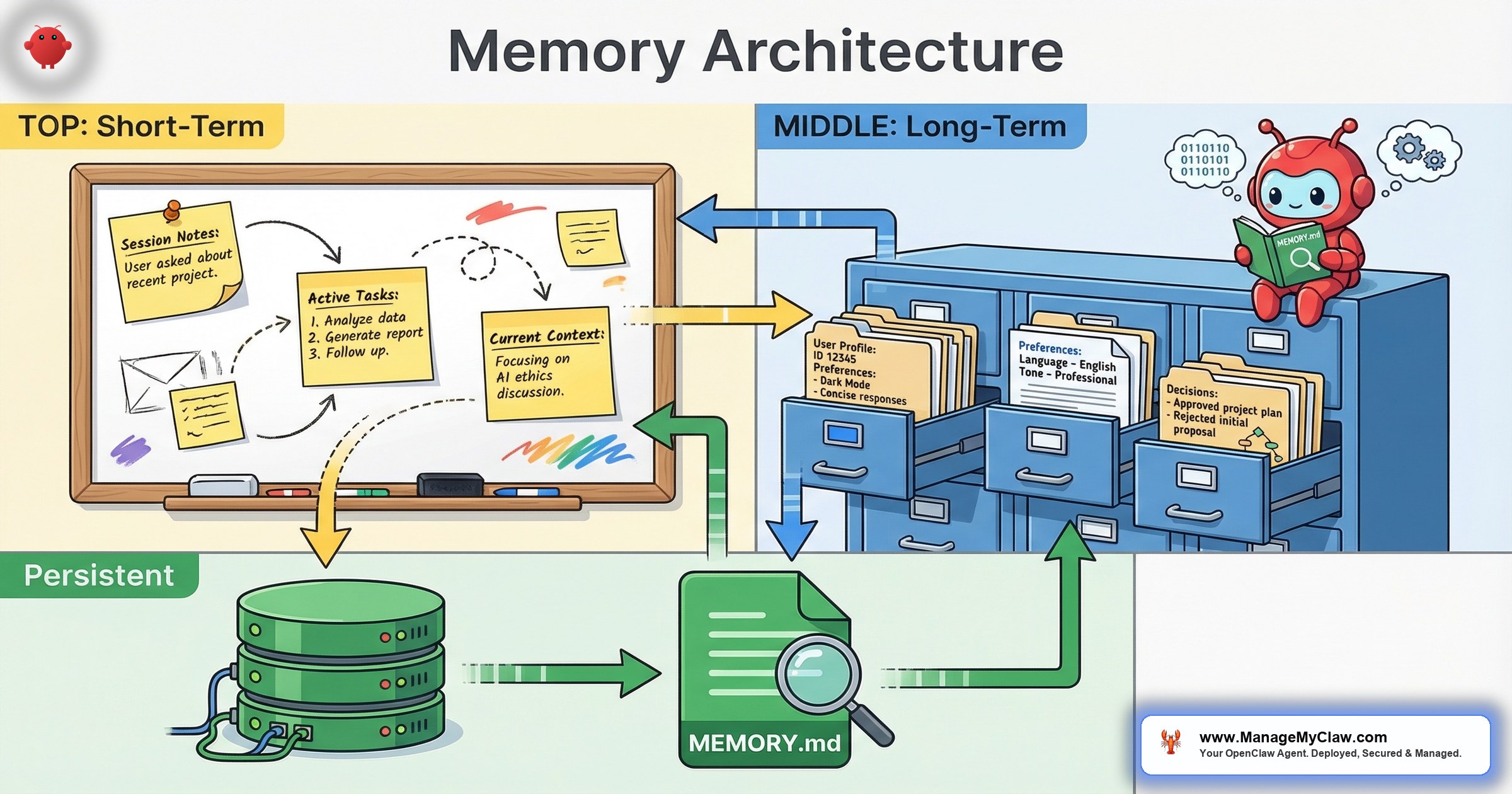
OpenClaw’s memory isn’t a single system. It’s 3 layers, each with different persistence and survival characteristics. Think of it like human memory: reflexes you don’t think about (system-level), habits built over years (long-term), and what someone told you 5 minutes ago (short-term).
Layer 1: MEMORY.md (The Filing Cabinet)
MEMORY.md is a plain-text file that OpenClaw reads at the start of every session. It survives restarts, updates, and redeployments because it’s just a file on your server. Put your name, company, key client names, communication preferences, and workflow rules here.
The limitation: it’s static. The agent reads it but doesn’t write to it. If you tell your agent on Tuesday that your new client is Acme Corp, that information lives in session context — not in MEMORY.md. After a restart, the agent doesn’t know Acme Corp exists unless you manually add it.
MEMORY.md sits alongside the system prompt but serves a different purpose. The system prompt defines who the agent is and how it behaves. MEMORY.md defines what it knows. Both load at session start. Both consume context window space. But MEMORY.md is designed to be user-editable and frequently updated, while the system prompt is typically configured once and left alone.
Layer 2: Supermemory (The Auto-Journal)
Supermemory is OpenClaw’s cloud-powered memory extension. Where MEMORY.md requires manual maintenance, Supermemory works automatically through 2 processes: auto-capture (extracts facts from conversations — names, decisions, preferences — and stores them with timestamps) and auto-recall (retrieves relevant memories before the agent responds, injecting past context into the current session).
By week 3, your agent has built a profile of you and your business. It knows your standing meetings, your high-priority clients, and that when you say “the big client” you mean the account generating 40% of your revenue. You didn’t program any of this. The agent learned it.
MEMORY.md is what you tell the agent. Supermemory is what the agent learns on its own. The best deployments use both.
Layer 3: Session Context (The Scratch Pad)
Session context is everything from the current conversation — what you’ve said, what the agent has processed, every tool call. It’s the most detailed form of memory, but the most fragile. When the context window fills up, session context is the first thing compressed. With it goes anything that only existed in the conversation: ad-hoc instructions, corrections, temporary preferences.
| Layer | Survives Restart? | Auto-Updates? | Survives Compaction? |
|---|---|---|---|
| MEMORY.md | Yes — it’s a file on disk | No — manual edits only | Yes — reloaded each session |
| Supermemory | Yes — cloud-stored | Yes — auto-capture | Yes — retrieved on demand |
| Session context | No — lost on restart | Yes — accumulates in real time | No — compressed first |
Why this matters: If your only “memory” is session context, you’re one compaction cycle away from your agent forgetting its own rules. The entire purpose of MEMORY.md and Supermemory is to move critical knowledge out of the scratch pad and into layers that survive compression.
Mem0 and the Plugin Ecosystem
Beyond OpenClaw’s built-in layers, the most mature memory plugin is Mem0 — a persistent memory system that sets up in under 30 seconds. Get an API key from app.mem0.ai, add it to your openclaw.json with a user identifier, and it starts auto-capturing facts from every conversation immediately: your name, tech stack, project decisions, preferences. No training period.
Mem0 separates long-term memories (user-scoped facts that persist across sessions: your name, your tech stack, decisions you’ve made) from short-term memories (session-scoped working context: which file you’re editing, what you’re debugging). Long-term survives restarts. Short-term expires with the session.
On r/clawdbot, a user who tested multiple memory solutions reported in a thread titled “Tested every OpenClaw memory plugin so you don’t have to”: “Mem0 was the easiest to set up by far. 2 minutes to configure, and it remembered my project context across 3 separate sessions without me doing anything.”
Other options include OpenViking (open-source, filesystem-based memory and retrieval) and QMD (Quick Memory Documents), an alternative format some users prefer over MEMORY.md for structured knowledge.
Memory plugins store facts about you and your business. On r/LLMDevs, users flagged that OpenMemory by Mem0 “Boasts Locally running memory with an MCP but underneath still requires OpenAI API key” — meaning data still routes through external APIs. Before installing any memory plugin, verify where data is stored (cloud vs local) and who has access.
Why this matters: On r/LocalLLaMA, a thread titled “I benchmarked 5 agent memory solutions head-to-head — the fastest one has zero dependencies” confirmed what practitioners have learned: no single memory solution fits every use case. The right choice depends on your privacy requirements and whether you need cloud recall or local-only storage.
Long-Term vs Short-Term Memory: What Lives Where
Long-term memory = facts that persist indefinitely: your name, company, client info, standing instructions, safety constraints. Short-term memory = working context for the active session: which document you’re reviewing, temporary instructions, the last tool call’s output.
Long-term memory is like a company’s employee handbook — policies every employee needs regardless of today’s task. Short-term memory is the whiteboard in a meeting room — useful for the current session and erased when the meeting ends.
| Memory Type | Examples | Where to Store |
|---|---|---|
| Long-term | Your name, company, client list, workflow rules | MEMORY.md + Supermemory / Mem0 |
| Short-term | Current task context, temporary instructions | Session context (conversation history) |
| Safety-critical | “Never delete emails,” “confirm before sending” | System prompt (hardcoded, not user-level) |
On r/AI_Agents, a thread titled “Practical Memory Architecture For LLMs & What Works vs the Myth of ‘True Memory'” laid it out: “There is no ‘true memory’ for LLMs. There’s just clever retrieval. The question is what you retrieve, when you retrieve it, and whether you can trust the retrieval to be accurate.”
Why this matters: Safety constraints belong at the system level — not in MEMORY.md, not in conversation. If you rely on session context for client information instead of long-term storage, you’ll re-teach your agent the same facts every week. Getting the mapping wrong is how agents develop amnesia.
Configuring OpenClaw Memory: A Practical Walkthrough
Here’s what a properly configured openclaw memory supermemory configuration looks like in practice.
Step 1: Structure Your MEMORY.md
Organize MEMORY.md into 4 sections: Identity (name, role, company — 3–5 lines), Preferences (channels, time zone, tone), Clients/contacts (key names and context), and Workflow rules (standing instructions: “morning briefing at 7 AM to Telegram,” “flag invoices over $5,000”).
Keep it under 2,000 tokens (roughly 1,500 words). Every token in MEMORY.md consumes context window space on every interaction. A bloated memory file means less room for actual work. Move detailed reference material to retrievable documents.
Step 2: Enable Supermemory
Supermemory requires 4 configuration values in your OpenClaw config:
apiKey— your Supermemory API keycontainerTag— a label for organizing memories (e.g., “work-agent” or “personal”)autoRecall— set totrueto automatically inject relevant memories into each interactionautoCapture— set totrueto automatically extract and store facts from conversationsmaxRecallResults— how many memories to inject per interaction (start with 5–10; more improves recall but increases API costs and context usage)
Start with maxRecallResults at 5. If the agent misses context it should have, increase to 10. If responses slow down or API costs spike, reduce to 3.
Step 3: Harden Safety Instructions
This is the step most people skip. Critical safety constraints belong in the system prompt, not in MEMORY.md. Rules like “never delete emails” and “never execute code in production without confirmation” should be hardcoded at the system level, where context compaction can’t reach them. ManageMyClaw hardcodes these for every managed deployment.
Belt and suspenders: put it in the system prompt AND in MEMORY.md AND configure tool permission allowlists. If any 1 layer fails, the other 2 still protect you.
5 Memory Configuration Mistakes (And How to Fix Them)
- Bloated MEMORY.md. A 4,000-token file eats your context window on every interaction. Keep it under 2,000 tokens.
- Relying on conversation for persistent facts. If it matters next week, it doesn’t belong in today’s chat. Write it to MEMORY.md or let Supermemory/Mem0 capture it.
- Safety constraints at the user level. User-level instructions are the first casualty of context compaction. Safety constraints go in the system prompt. Period.
- Never reviewing auto-captured memories. Supermemory and Mem0 aren’t perfect. Review monthly. Delete inaccurate entries. An agent with wrong memories is worse than one with none.
- Ignoring context window limits. MEMORY.md + Supermemory + system prompt + conversation all compete for the same window. If responses get shorter mid-session, compaction has started. Trim your inputs.
Why this matters: Memory misconfiguration doesn’t crash your agent. It degrades it silently. Your agent starts giving slightly wrong answers, missing context it used to have, re-asking questions you already answered. By the time you notice, you’ve lost trust in the system — and an agent you don’t trust is an agent you stop using.
The Bottom Line
OpenClaw’s memory is 3 layers: MEMORY.md for curated persistent facts, Supermemory or Mem0 for auto-captured learned context, and session context for real-time working memory. Safety-critical instructions bypass all 3 and live at the system level, where compaction can’t reach them. ManageMyClaw configures this full memory stack — including system-level safety hardening — as part of every business deployment, because memory misconfiguration is the silent failure mode that turns a productive agent into a liability.
Frequently Asked Questions
What’s the difference between MEMORY.md and Supermemory?
MEMORY.md is a static file you write and maintain manually. It loads at session start and contains curated facts you want the agent to always know. Supermemory is an auto-capture system that learns from conversations and stores facts in a cloud database. MEMORY.md is what you tell the agent. Supermemory is what the agent learns on its own. Most production deployments use both: MEMORY.md for core business context and safety rules, Supermemory for accumulated preferences and interaction patterns.
Does OpenClaw memory persist after a restart?
MEMORY.md persists because it’s a file on disk. Supermemory and Mem0 persist because they store data externally (cloud or database). Session context does not persist — it’s lost on restart. This is why relying only on conversation history for important facts is risky. Anything that matters beyond the current session should live in MEMORY.md or a memory plugin.
How do I prevent context compaction from erasing safety instructions?
Place safety instructions at the system level in your OpenClaw configuration, not in the chat interface. System-level instructions load before user interactions and have stronger persistence against compaction. For maximum protection, use the belt-and-suspenders approach: system-level constraints plus MEMORY.md entries plus tool permission allowlists. If any layer fails, the others still protect you. ManageMyClaw hardcodes safety constraints at the system level for every managed deployment.
Is Mem0 better than Supermemory?
They solve the same core problem (persistent cross-session memory) with different architectures. Mem0 is simpler to set up (under 30 seconds, one API key) and offers a clean separation between long-term and short-term memories. Supermemory integrates more deeply with OpenClaw’s native memory system and supports container tags for organizing memories across agents. The right choice depends on your privacy requirements and how many agents you’re running. Some users run both for redundancy.
How large should my MEMORY.md file be?
Under 2,000 tokens (roughly 1,500 words). Every token in MEMORY.md consumes context window space on every interaction. A bloated MEMORY.md leaves less room for the agent to process actual work. Keep entries concise: “Client: Acme Corp, contact: Sarah, prefers email” not a 3-paragraph backstory. Move detailed reference material to external documents the agent can retrieve on demand.
Can I use OpenClaw memory with a local LLM through Ollama?
MEMORY.md works with any model — it’s just a file. Session context works the same way. Supermemory’s cloud features require an API connection, but the memory storage and retrieval work regardless of which LLM processes the output. Mem0’s free tier requires an API key from app.mem0.ai. For fully local memory with zero external dependencies, MEMORY.md plus a filesystem-based option like OpenViking provides persistent context without cloud connectivity.


