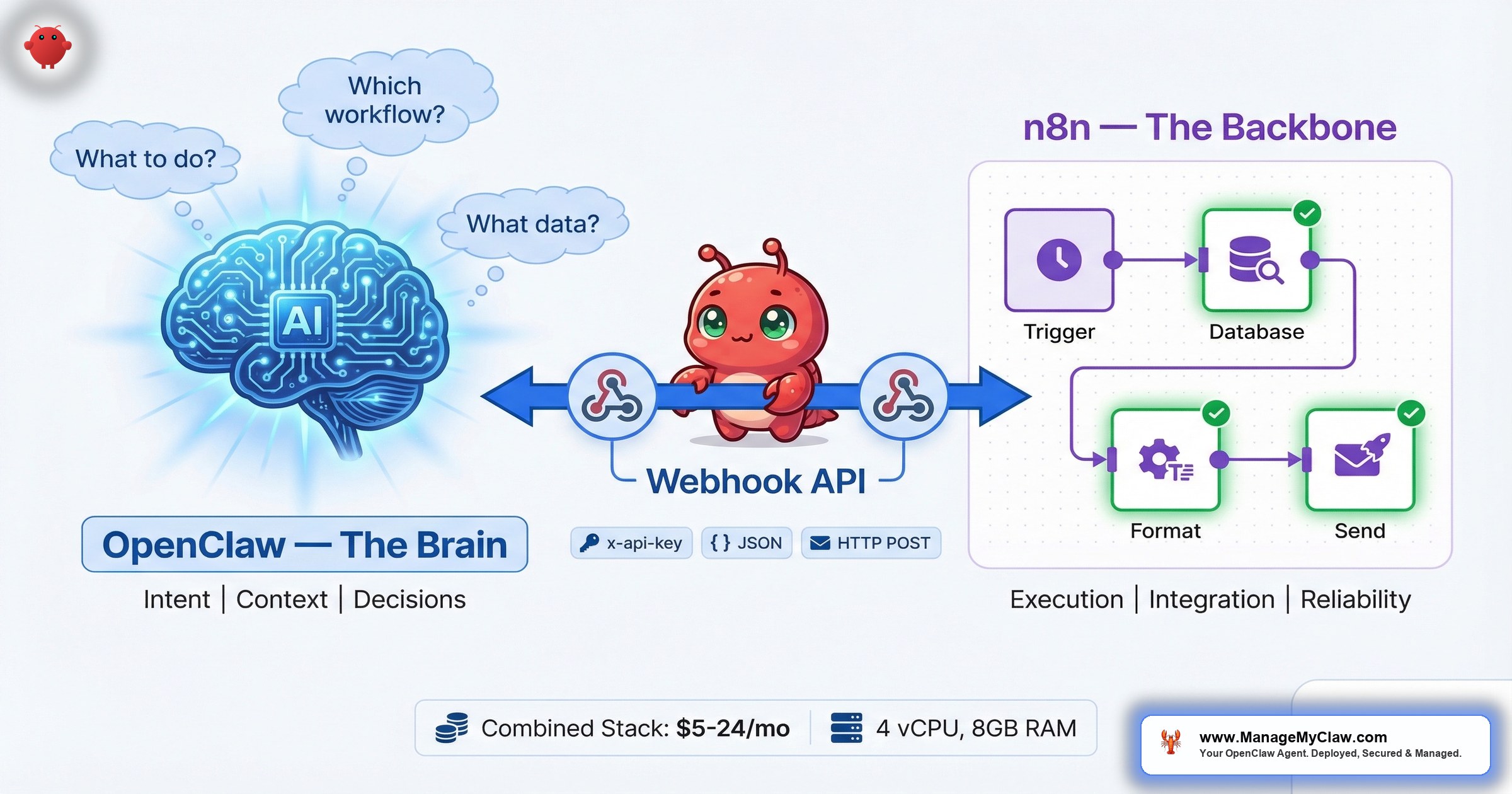
OpenClaw decides WHAT to do. n8n handles HOW it gets done. Combined stack from $5/mo. The systems that survived 8 months of production all share the same architecture: an intelligent layer paired with a deterministic execution layer.
On r/AI_Agents, a thread titled “What is your full AI Agent stack in 2026?” (103 upvotes, 91 comments) surfaced a pattern that keeps showing up across every AI-adjacent subreddit. The top comment, with 14 upvotes: “The reason small businesses are seeing such a massive advantage isn’t just because they have access to the same brains (LLMs) as big companies, but because they can move faster on the Orchestration.”
Orchestration. Not the model. Not the prompt. The layer that connects the AI’s decision-making to the business processes that actually run your company.
That’s the gap most solo deployments leave open. You set up OpenClaw. It reads your email, it summarizes your calendar, it drafts replies. Then you ask it to trigger a 7-step onboarding sequence involving 3 APIs, a CRM update, a Slack notification, and a conditional follow-up email based on whether the client signed the contract. And the whole thing works… once. Then a webhook times out, the CRM returns an unexpected field, and you’re debugging at 11 PM wondering why your new client got a welcome email addressed to someone else.
That’s the difference between a smart assistant and a reliable system. Smart gets you the first 60%. Reliable gets you the other 40% — the part where real money lives.
The stack that handles both is OpenClaw + n8n. OpenClaw is the brain — it interprets your intent, decides what needs to happen, and adapts to context. n8n is the execution layer — it runs the multi-step workflows reliably, handles error states, retries failures, and produces an audit trail you can actually read. Together, the combination is more secure, more affordable, and more auditable than either tool running alone.
This post covers how they fit together, where each one stops and the other starts, what the community is building at the intersection, and how to deploy the stack without spending a month configuring it.
Why 2 Tools Instead of 1
The instinct is to pick one. OpenClaw or n8n. AI agent or workflow platform. But the question itself is wrong — like asking whether you need a pilot or an engine. They solve fundamentally different problems.
OpenClaw is an AI-first agent. It thrives on autonomy, natural language interaction, and proactive task execution. You tell it what you want in plain English, and it figures out how to get there. It decides WHAT to do. n8n is a workflow-first platform. It excels at structured, repeatable, team-friendly automation with a visual interface. You build the process once, and it runs the same way every time. It handles HOW things get done — reliably.
“go for n8n if you want to automate repetitive tasks without writing much code. the framework matters less than people think.. genuinely what will determine if an agent is reliably or not is the infrastructure.”
— r/AI_Agents, “What AI tools are actually worth learning in 2026?” (117 upvotes, 29 upvotes on comment)Infrastructure. That’s the word that separates the stacks that run for 8 months from the demos that break after 8 days.
“Running a multi-agent system in production for about 8 months now. Here’s what actually survived vs what we threw out: Survived: Python orchestrator that treats each agent as a subprocess with its own…”
— r/AI_Agents, “Running AI agents in production what does your stack look like in 2026?” (43 upvotes, 16 upvotes on comment)8 months. That’s the benchmark. And the systems that survived all share the same architecture: an intelligent layer that interprets and adapts, paired with a deterministic layer that executes and logs.
The Architecture: Brain + Backbone
Here’s how the two tools divide responsibility in a production stack:
OpenClaw (the brain):
- Interprets user intent from natural language
- Decides which action or workflow to trigger
- Handles context-dependent decisions — when the right action depends on information the workflow can’t see
- Adapts to new situations without requiring a new workflow to be built
- Manages personal productivity: email triage, briefings, ad-hoc research
n8n (the backbone):
- Executes multi-step business processes via webhooks
- Handles complex data processing, API interactions, and conditional logic
- Retries on failure, branches on conditions, logs every step
- Provides a visual interface that non-technical team members can read and audit
- Runs the same way every time — no drift, no hallucination, no “creative interpretation” of your CRM fields
The connection point: OpenClaw triggers n8n workflows via webhooks. A natural language request — “onboard this new client” — hits OpenClaw, which interprets the intent, extracts the relevant data (client name, email, package), and fires a webhook to n8n. n8n takes over: creates the CRM record, sends the welcome email, generates the contract, notifies your team on Slack, and schedules the kickoff call. Each step is logged. If step 4 fails, steps 1–3 aren’t lost, and step 4 retries automatically.
How the webhook handshake actually works: OpenClaw sends an HTTP POST to n8n’s Webhook URL, including an x-api-key header for authentication. On the n8n side, the Webhook node validates that token before executing any business logic. Once validated, the workflow runs its sequence — database lookup, data formatting, conditional logic checks — and formats the result as a JSON response. n8n sends that data back in the HTTP response body. OpenClaw receives the response, interprets it with the LLM, and writes a natural language answer back to you. The whole round-trip is: intent in → structured webhook out → deterministic execution → structured response back → natural language summary.
Latency and security tip: For the lowest latency and smallest attack surface, run both OpenClaw and n8n on the same server or at least the same private network. Cross-internet webhooks add round-trip latency and expose an additional endpoint to the public internet. When both services share a Docker network (as in the openclaw-n8n-stack setup), the webhook call never leaves the machine.
Think of it like a restaurant. The front-of-house staff (OpenClaw) talks to customers, takes orders, handles special requests, and reads the room. The kitchen (n8n) executes the orders with precision, timing, and consistency. The best restaurants aren’t the ones with a chef who also waits tables. They’re the ones where both sides are excellent at their specific job.
OpenClaw vs. n8n vs. Combined: The Comparison
The differences are architectural, not cosmetic. Here’s what each approach gives you — and what it doesn’t:
| Capability | OpenClaw Alone | n8n Alone | OpenClaw + n8n |
|---|---|---|---|
| Natural language input | Native — talk to it like a person | Limited — requires structured triggers | Natural language in, structured execution out |
| Multi-step workflow reliability | Fragile — no built-in retry or error branching | Built for it — retries, branches, error handlers | n8n handles execution with full error handling |
| Adaptability | High — handles novel requests without new code | Low — requires building a new workflow for each use case | OpenClaw adapts; n8n executes the adapted plan |
| Audit trail | Agent logs (if configured) | Full execution history with step-level logging | Intent logged in OpenClaw + execution logged in n8n |
| Team collaboration | Single-user — conversation-based interface | Team-friendly — visual editor anyone can read | Individual + team workflows in one stack |
| Security surface | Agent holds all API credentials directly | Credentials stored in n8n’s credential vault | OpenClaw triggers via webhook — never touches API keys |
| Cost transparency | LLM API tokens per action (unpredictable) | Execution-based (predictable per workflow) | LLM costs for decisions only; execution costs are fixed |
| Best for | Personal productivity, ad-hoc tasks, adaptive intelligence | Structured business processes, team workflows, integrations | The full stack — personal + business + the bridge between them |
The security row is worth lingering on. When OpenClaw runs a workflow alone, the agent holds every API credential it needs — your CRM key, your email OAuth token, your Stripe secret. If the agent gets compromised (prompt injection, malicious skill, context compaction override), those credentials are exposed. In the combined stack, OpenClaw fires a webhook. The actual API credentials live in n8n’s credential vault. The agent never sees them. That’s not a nice-to-have — it’s the difference between a compromised agent that can read your email versus one that can drain your Stripe account.
Never let your agent create or modify n8n workflows. Limit OpenClaw to triggering existing workflows via webhooks. The moment an AI agent can rewrite its own execution layer, you’ve lost the separation that makes this architecture safe. n8n workflows should be built and reviewed by a human. The agent’s job is to call them, not to author them. This is the line between an automation stack and a system that can autonomously expand its own permissions.
What the Community Is Building
The OpenClaw + n8n intersection isn’t theoretical. The open-source community is already building at the seam between the two platforms — and some of the projects are remarkably mature.
n8n-claw: OpenClaw Rebuilt in n8n
The most ambitious project is n8n-claw (github.com/freddy-schuetz/n8n-claw) — a complete reimplementation of OpenClaw’s architecture inside n8n. It’s not a wrapper or a connector. It rebuilds OpenClaw’s core capabilities as n8n workflows: adaptive RAG-powered memory, Skills via MCP templates, and Expert Agents with delegated sub-agents.
“So if a user asks this system to create a custom MCP, the agent will build that out as an n8n sub-workflow and patch it in.”
— n8n-claw project description, r/n8n (145 upvotes, 30 comments)That’s self-modifying automation — the system builds its own new capabilities as n8n workflows rather than requiring a developer to code them.
“Amazing! I was tinkering around to build the same idea, now I have a much more advanced starting point.”
— r/n8n, n8n-claw announcement thread“Is there a way to monitor/kill it? Sounds really useful but I’m not sure I’d sleep that soundly!”
— r/n8n, n8n-claw announcement threadThat last concern is valid. Self-modifying agents are powerful and also genuinely risky without proper guardrails. The kill-switch question isn’t paranoia — it’s the same operational maturity that separates a weekend project from a production system.
openclaw-n8n-stack: The Pre-Configured Box
On the simpler end, github.com/caprihan/openclaw-n8n-stack takes the opposite approach. Instead of reimplementing OpenClaw inside n8n, it packages both tools in a single deployment. The tagline: “Personal AI operating system in a box. OpenClaw + n8n pre-configured.” One Docker Compose file, both services running, webhooks pre-wired.
This is the pattern most founders should start with. Not rebuilding architecture, but deploying 2 proven tools with a clean connection between them.
3 Patterns That Work in Production
After reviewing community deployments and production setups, 3 integration patterns consistently survive past the demo stage:
Pattern 1: OpenClaw as Router, n8n as Executor
OpenClaw receives a natural language request, classifies it, extracts structured data, and fires the appropriate n8n webhook. n8n runs the workflow end-to-end. This is the simplest pattern and the one with the fewest failure modes. Your OpenClaw configuration stays lean — intent classification and data extraction only. Your n8n workflows stay deterministic — no LLM calls inside the execution path. Each tool does one thing.
Use case: “Onboard Sarah Chen at Acme Corp, Pro package” → OpenClaw extracts name, company, package → fires webhook → n8n creates CRM record, sends welcome email, generates contract, notifies team, schedules kickoff.
Pattern 2: n8n for Core Processes, OpenClaw for Everything Else
Your repeatable business processes — onboarding, invoicing, reporting, email sequences — live entirely in n8n. Your personal productivity workflows — morning briefing, email triage, ad-hoc research, calendar management — stay in OpenClaw. The two systems run independently, connected only when OpenClaw needs to trigger a business process. This is the lowest-risk pattern because neither system depends on the other for its core function.
Use case: OpenClaw handles your morning briefing and email triage. n8n handles your client onboarding pipeline. When OpenClaw detects a signed contract in your inbox, it triggers the n8n onboarding workflow via webhook.
Pattern 3: n8n as the Safety Net
OpenClaw runs autonomously on tasks that benefit from AI judgment — email classification, content drafting, research synthesis. But any action with real-world consequences (sending to a customer, updating a financial record, modifying a production database) gets routed through an n8n workflow with approval gates. OpenClaw proposes; n8n validates and executes. This pattern is the answer to the “Is there a way to monitor/kill it?” question. n8n’s execution log is your audit trail. Its conditional nodes are your approval gates. Its error handlers are your safety net.
Use case: OpenClaw drafts a client follow-up email → sends content to n8n via webhook → n8n checks tone against your brand guidelines, verifies the recipient is correct, and either sends or routes to your review queue.
The Deployment Strategy
The best strategy isn’t choosing one or the other. It’s deploying both — n8n for core business processes, OpenClaw for personal productivity and adaptive intelligence, and webhooks connecting them for the workflows that need both.
Here’s the order that works:
- Week 1–2: Deploy OpenClaw with your first personal productivity workflow (morning briefing or email triage). Get comfortable with the agent’s behavior on low-stakes, read-only tasks.
- Week 3–4: Deploy n8n and build your first business process workflow (client onboarding or reporting). Run it on sample data. Verify every step produces the expected output.
- Week 5–6: Connect them. Set up your first webhook from OpenClaw to n8n. Start with Pattern 1 (router + executor) on a workflow that already works end-to-end in n8n. The webhook is a trigger, not a rewrite.
- Week 7+: Expand. Add workflows to both systems. Add more webhook connections. Move toward Pattern 3 (safety net) for any workflow that touches customers or money.
The same sequential philosophy applies here that applies to the workflow library: one workflow stable before you add the next. The temptation to connect everything on day 1 is the fastest path to a debugging marathon.
What This Stack Costs
Server Requirements for the Combined Stack
Running OpenClaw and n8n together requires more resources than either tool alone. Memory is the primary bottleneck — n8n workflows and OpenClaw’s Node.js runtime both consume significant RAM, and they share the same box.
| Spec | Minimum (Dev/Testing) | Recommended (Production) |
|---|---|---|
| CPU | 2 vCPUs | 4 vCPUs |
| RAM | 4 GB | 8 GB |
| Storage | 40 GB SSD | 80 GB SSD |
If you’re testing on a 1 vCPU / 2 GB box, expect both services to compete for memory under load. The 4 GB minimum keeps things stable for light usage. Production deployments — especially if you’re running multiple concurrent workflows — should target the 8 GB tier.
Deployment Costs: Real Numbers
The combined stack runs on the same infrastructure as OpenClaw alone. n8n is self-hosted (open-source) or $24/month for the cloud version. Here’s what the hosting actually costs for the combined stack, depending on how much you want to manage yourself:
| Deployment Option | Monthly Cost | What’s Included |
|---|---|---|
| DIY Docker Compose | From $5/mo | VPS only (Vultr, Hetzner, etc.) — you handle Docker setup, updates, backups, and SSL |
| xCloud BYOS (bring your own server) | From $10/mo | $5 VPS + $5 xCloud panel — managed deployment, n8n is free self-hosted |
| xCloud managed hosting | From $24/mo | Fully managed server, automated backups, SSL, monitoring included |
| n8n Cloud (no self-hosting) | From $24/mo | n8n hosted by n8n — separate VPS still needed for OpenClaw |
Note: all options above exclude LLM API token costs, which depend on your usage volume. The infrastructure cost for the combined stack is the same or marginally higher than OpenClaw alone — n8n’s resource footprint is modest.
The meaningful cost difference beyond hosting is in LLM tokens — and this is where the combined stack actually saves money.
When OpenClaw runs a 7-step workflow alone, every step involves an LLM call — interpreting the result of step 1, deciding what to do in step 2, parsing the API response, deciding the next action. 7 steps might mean 15–20 LLM calls. When n8n handles the execution, the LLM cost drops to 1–2 calls (intent classification and data extraction). The other 5 steps run as deterministic n8n nodes with zero token cost.
Fewer LLM calls doesn’t just mean lower costs. It means fewer opportunities for the model to hallucinate, fewer tokens for context compaction to compress, and fewer places where a prompt injection could redirect the workflow.
Where This Fits for Business Deployments
n8n is a complementary tool, not a replacement for OpenClaw workflow configuration. OpenClaw still handles the AI-native workflows — briefings, email triage, anything that requires natural language understanding. n8n handles the structured business processes that benefit from deterministic execution and visual auditability.
For ManageMyClaw clients, n8n integration is a natural extension of the workflow configuration that’s already included at every tier. The Starter ($499) includes 1 configured workflow — add n8n as the execution backend and that single workflow gains retry logic, error handling, and an audit trail it wouldn’t have otherwise. Pro ($1,499) with 3 workflows is where the combined stack starts to show its real advantage: business process workflows in n8n, personal productivity workflows in OpenClaw, webhooks connecting them. Business ($2,999) with 5 workflows is the full stack — enough coverage to run both tools as a unified system.
“100% vibing on openclaw. It takes care of it.”
— r/AI_Agents, “What is your full AI Agent stack in 2026?” (103 upvotes)That’s the target state — a stack where you’re not thinking about the infrastructure because the infrastructure is handled.
The Bottom Line
OpenClaw is the best tool for understanding what you need. n8n is the best tool for doing it reliably. Choosing between them is a false binary. The stack that scales — the one that survives 8 months of production use — uses both.
OpenClaw handles intent, context, and adaptation. n8n handles execution, error recovery, and auditability. The webhook between them is where the real leverage lives — natural language in, deterministic execution out, an audit trail on both sides, and API credentials that never touch the agent.
Deploy n8n for your core business processes. Deploy OpenClaw for your personal productivity and adaptive intelligence. Connect them for the workflows that need both brains and backbone.
Frequently Asked Questions
Do I need both OpenClaw and n8n, or can I start with just one?
Start with one. If your biggest bottleneck is personal productivity — email, calendar, briefings — start with OpenClaw. If it’s structured business processes — onboarding, invoicing, reporting — start with n8n. Add the other when your first tool is stable and you feel the gap. Most founders reach that point within 30–60 days.
Is n8n free?
The self-hosted version is free and open-source (fair-code license). You run it on the same VPS as OpenClaw or a separate one. n8n Cloud starts at $24/month if you don’t want to manage hosting. Either way, the execution cost is negligible compared to LLM API tokens — n8n workflows run without LLM calls unless you explicitly add an AI node.
How does connecting OpenClaw to n8n improve security?
When OpenClaw runs a workflow alone, the agent holds every API credential directly — CRM keys, email tokens, payment processor secrets. If the agent is compromised (prompt injection, malicious skill, context compaction override), those credentials are exposed. In the combined stack, OpenClaw fires a webhook to n8n. The actual API credentials stay in n8n’s credential vault. The agent triggers actions without ever seeing the keys. That’s a structural security improvement, not a configuration one.
What’s the difference between n8n-claw and using OpenClaw + n8n together?
n8n-claw reimplements OpenClaw’s entire architecture inside n8n — memory, skills, sub-agents, all built as n8n workflows. OpenClaw + n8n keeps both tools running independently with webhooks connecting them. n8n-claw is more unified but more experimental. The paired approach is more modular and easier to debug because each tool does its own job. For production use, the paired approach has a longer track record.
Can n8n replace OpenClaw entirely?
For structured, repeatable workflows — yes. n8n can handle any process you can draw as a flowchart. But n8n can’t interpret a natural language request it hasn’t seen before, adapt to context without a new workflow being built, or handle the kind of ad-hoc tasks that make OpenClaw valuable for personal productivity. They solve different problems. That’s why the best stacks use both.
How do I monitor the combined stack?
n8n has built-in execution logging — every workflow run is recorded with step-level detail, including inputs, outputs, errors, and timing. OpenClaw’s agent logs cover intent classification and webhook triggers. Together, you get a full trace: what the user asked (OpenClaw log) → what was triggered (webhook log) → what happened at each step (n8n execution log). If something goes wrong, you know exactly where in the chain it broke.
What server specs do I need for the combined stack?
Minimum: 2 vCPUs, 4 GB RAM, 40 GB SSD. Recommended for production: 4 vCPUs, 8 GB RAM, 80 GB SSD. Memory is the bottleneck — both n8n and OpenClaw’s Node.js runtime are RAM-hungry. A $5–$10/month VPS handles the minimum spec. A $20–$30/month VPS covers the recommended spec comfortably.
How much does hosting the combined stack cost?
DIY Docker Compose starts at ~$5/month (VPS only, you handle maintenance). xCloud bring-your-own-server runs ~$10/month ($5 VPS + $5 panel). Fully managed options start at ~$24/month. All options exclude LLM API token costs. The infrastructure cost for adding n8n to an existing OpenClaw deployment is minimal — n8n’s resource footprint is modest.
Should I let OpenClaw create or modify n8n workflows?
No. Limit the agent to triggering existing workflows via webhooks. Never give it the ability to create or modify n8n workflows programmatically. The separation between “the AI decides what to trigger” and “a human decides what the workflows do” is the core security boundary of this architecture. Once the agent can rewrite its own execution layer, you’ve lost the auditability and control that makes the combined stack safer than running the agent alone.
Does ManageMyClaw set up n8n integration?
Workflow configuration is a core deliverable at every tier. If your workflow is best served by an n8n execution backend — multi-step business processes, anything requiring retry logic or approval gates — that’s part of the configuration. Starting at $499 for Starter (1 workflow), $1,499 for Pro (3 workflows), $2,999 for Business (5 workflows).


