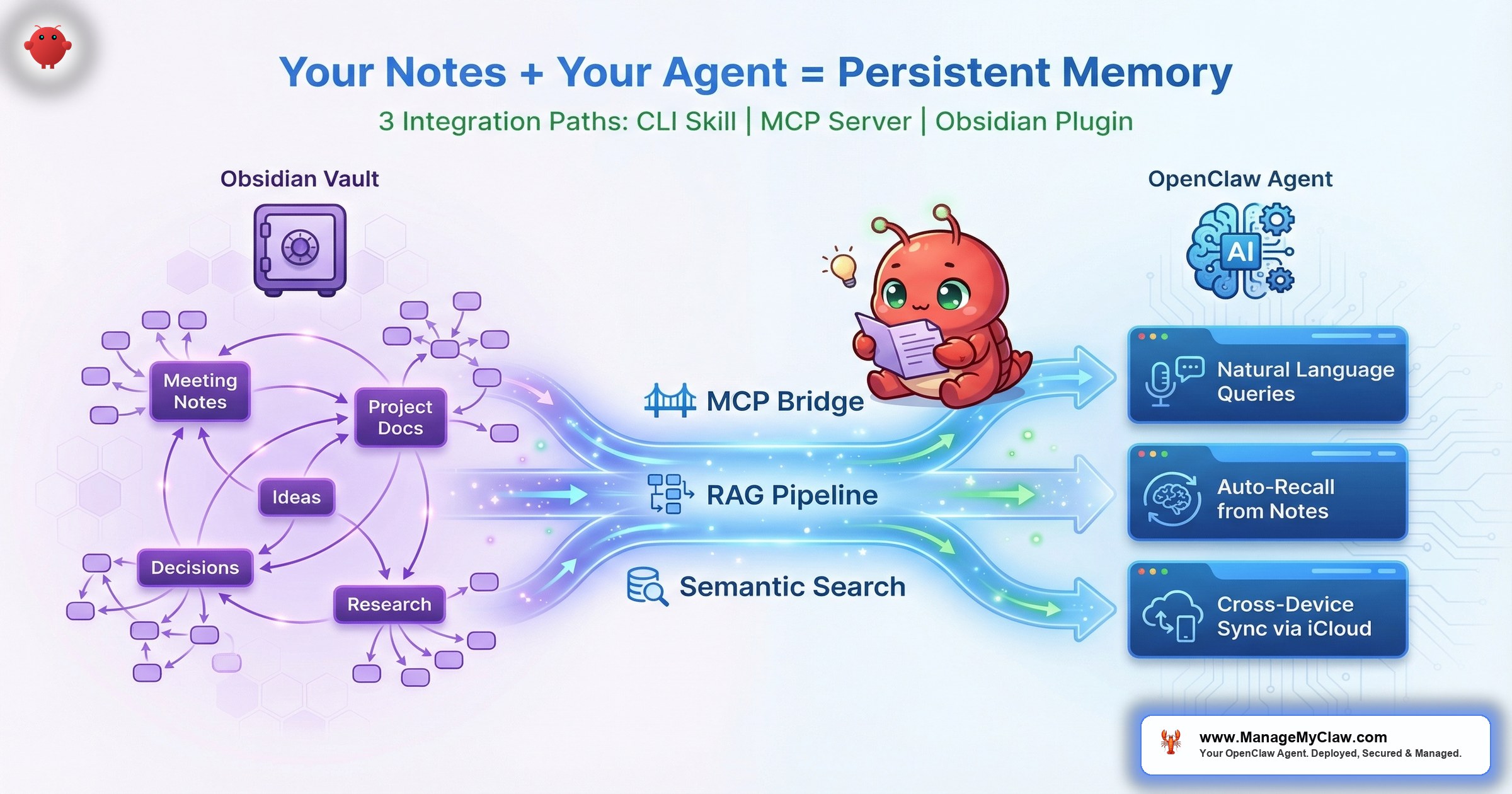
“Your agent doesn’t just answer questions. It answers questions using everything you’ve already written down.” — The knowledge-connected agent concept: Obsidian vault as a searchable, queryable knowledge layer for OpenClaw
4 years of notes. That’s what one r/openclaw user had sitting in ChatGPT history when they posted “Moving 4 Years of ChatGPT History into OpenClaw (Works for CLAUDE too)” — a trending thread as of March 2026. The notes existed. The knowledge existed. But every new conversation started from zero because the agent had no way to access what you’d already figured out.
That’s the core problem Obsidian solves when you connect it to OpenClaw. Obsidian stores your notes as plain markdown files in local folders — no proprietary format, no cloud lock-in, no database abstraction. OpenClaw can access those files directly through the filesystem MCP server or a dedicated Obsidian MCP server. The result: your agent doesn’t just answer questions. It answers questions using everything you’ve already written down.
On r/openclaw, the thread “OpenClaw and Obsidian” is trending right now, with people sharing integration setups and use cases. On r/ObsidianMD, a post titled “I built a fully local AI plugin for Obsidian — RAG, workflows, MCP, all on localhost” pulled 39 points and 28 comments. One comment with 29 upvotes captured the energy perfectly: “Vibe coded.” Another asked the question most knowledge workers are already thinking: “Will this allow me to find files similar to the one that I’m looking currently working with? I would love to use it with my zettelkasten.”
This post covers how the integration actually works — including the Obsidian CLI Skill with built-in vector store indexing, the full RAG pipeline from ingestion to semantic retrieval, and why MCP makes your vault a universal knowledge layer that works with any compatible agent. Plus: note-taking structures that make your vault agent-friendly, where Supermemory fits in for long-term context persistence, and practical setup steps.
How OpenClaw Accesses Your Obsidian Vault
The connection is simpler than most people expect because Obsidian made one good architectural decision years ago: everything is a markdown file in a local folder. There’s no database to query, no API to authenticate against, no proprietary format to decode. Your vault is just a directory tree full of .md files.
OpenClaw connects to those files through 3 main paths:
| Path | Method | What You Get | Best For |
|---|---|---|---|
| 1 | Filesystem MCP Server | Raw read access to vault directory | Quick start, simple setups |
| 2 | Dedicated Obsidian MCP Server | Structured access: tags, frontmatter, links, folders | Obsidian power users |
| 3 | OpenClaw Obsidian Skill (CLI) | Built-in vector store indexing + semantic search | Production knowledge agents |
Path 1: Filesystem MCP server. This is the simplest approach. The filesystem MCP server gives OpenClaw read access to any directory on your machine — including your Obsidian vault. The agent can list files, read contents, and search across your notes. No Obsidian-specific setup needed. You point the MCP server at your vault folder, and the agent can browse it like any other directory.
Path 2: Dedicated Obsidian MCP server. This provides structured access to your vault contents — not just raw file reads, but awareness of Obsidian-specific features like tags, frontmatter, internal links, and folder hierarchies. The Obsidian MCP server exposes these as queryable endpoints, so your agent can ask for “all notes tagged #client-onboarding” or “notes linking to [[Q2 Revenue Forecast]]” without parsing every file manually.
MCP — Model Context Protocol — acts as a universal bridge between your vault and any AI agent. The MCP server exposes your vault contents through a standardized interface. OpenClaw connects to that interface the same way it connects to any other tool. Your vault becomes one more tool in the agent’s toolkit — no custom code, no API keys, no cloud dependency. One server, any compatible agent, same vault.
Path 3: OpenClaw Obsidian Skill via CLI. This is the approach gaining traction on daveswift.com (“OpenClaw + Obsidian: Real Persistent Memory for Your AI Agent“) and story321.com. The OpenClaw Obsidian Skill lets the agent interact with your vault through the Obsidian CLI — organizing, creating, and updating notes inside your personal knowledge base without you opening Obsidian at all. It’s essentially a RAG workflow applied to personal notes: the skill enables ingestion and retrieval from your vault folders with built-in vector store indexing. Your agent doesn’t just read files; it indexes them into embeddings on first pass, then performs semantic lookups on every subsequent query.
Think of it like hiring an assistant who’s read your entire filing cabinet before their first day. They don’t need you to re-explain your client list, your project history, or your decision framework. They already know — because you wrote it all down and they can search it.
All 3 paths keep everything local. Your notes never leave your machine. No cloud sync, no third-party server, no API key that could leak your vault contents. For the agent template configuration, you’re adding a tool definition that maps to a local filesystem path — that’s it. The choice between paths depends on how much intelligence you want at the retrieval layer: Path 1 is raw access, Path 2 is Obsidian-aware access, Path 3 is semantically indexed access.
The Context Window Problem (and Why RAG Is Non-Negotiable)
Here’s where most people’s first attempt fails. They connect their vault, the agent can read files, and it works — for about 3 weeks. Then their vault hits 500+ notes and every request starts burning through tokens like a space heater in July.
The math is straightforward. A typical Obsidian note runs 300–1,000 words. At ~0.75 tokens per word, that’s 225–750 tokens per note. A 500-note vault is 112,000–375,000 tokens. Even with a 200K context window, dumping your entire vault into each request is both expensive and technically impossible at scale.
Stage 1 — Ingestion: Vault markdown files get chunked into segments (by heading or paragraph) and each chunk is converted into a vector embedding using a local or cloud embedding model.
Stage 2 — Indexing: Embeddings are stored in a local vector store (FAISS, ChromaDB, or the built-in index that ships with the Obsidian Knowledge Skill). This is what makes semantic search possible — comparing meaning instead of keywords.
Stage 3 — Retrieval: When your agent asks a question, the query gets embedded, compared against the index, and the top-k most semantically similar chunks are returned as context. The agent never sees the full vault — just the 3–5 chunks that actually matter.
RAG — Retrieval Augmented Generation — solves this by retrieving only the relevant chunks instead of loading everything. When your agent needs to reference your notes on client onboarding, it searches the vault, pulls the 3–5 most relevant notes, and adds only those to the context. 2,000 tokens instead of 200,000. The answer quality stays the same because the agent is working with the right information, not all the information.
C. Dalrymple’s March 2026 Medium post “Customising my OpenClaw instance with RAG (Retrieval-Augmented Generation)” walks through this exact pipeline end to end — from embedding model selection to chunk-size tuning to retrieval threshold configuration. A related “Show HN: Self-hosted RAG with MCP support for OpenClaw” thread on Hacker News showed the community building self-hosted versions of the same architecture, with the key insight being that natural language questions across your entire vault replace manual searching entirely. You stop browsing folders. You just ask.
On r/ObsidianMD, one user described the exact failure mode: “I’ve tried Copilot and local llm helper but they both failed at a functional local rag.” The tools existed. The RAG implementation was the bottleneck. Getting retrieval quality right — which notes surface for which queries — is the difference between an agent that gives you answers from your own knowledge and one that hallucinates because it grabbed the wrong context.
Without RAG, the OpenClaw + Obsidian integration scales inversely with your vault size. More knowledge equals more tokens per request equals higher cost and worse performance. With RAG, more knowledge means better answers at the same cost. The relationship flips from liability to asset.
Note Structures That Make Your Vault Agent-Friendly
Not all vaults are equal from an agent’s perspective. A vault full of brain-dump journals with no structure is technically searchable but practically useless — the agent finds 40 notes mentioning “revenue” with no way to tell which one has the actual forecast versus a passing mention in a meeting note.
2 note-taking methods stand out for agent compatibility:
Zettelkasten (atomic notes with links). Each note covers exactly one idea, concept, or decision. Notes link to related notes. When the agent retrieves a note, it gets a complete, self-contained piece of knowledge — not a fragment torn from a 3,000-word document. The links give the agent a navigation path: if the retrieved note references [[Pricing Strategy]], the agent knows where to find the deeper context without loading everything upfront.
PARA (Projects, Areas, Resources, Archives). This method organizes notes by actionability — active projects first, reference material later, archived work last. For an agent, the advantage is scope filtering. When the agent needs context for a current project, it searches the Projects folder. When it needs reference material, it searches Resources. It never wastes tokens retrieving archived notes from 2 years ago unless you specifically ask for historical context.
| Method | Note Size | Agent Retrieval Quality | Best For |
|---|---|---|---|
| Zettelkasten | Small (100–300 words) | Excellent — atomic retrieval | Research, decision logs, concept maps |
| PARA | Medium (300–1,000 words) | Good — scope-filtered | Project management, reference libraries |
| Daily journals (unstructured) | Large (1,000+ words) | Poor — noisy retrieval | Personal reflection (not agent-optimized) |
You don’t need to restructure your entire vault overnight. Start by making new notes atomic and well-tagged. Over time, break up the longest, most-referenced notes into smaller, linked pieces. Your agent will get smarter as your vault gets more structured — not because the model improved, but because the retrieval is returning cleaner, more relevant context.
SKILL.md and Supermemory: The Layers Most People Skip
Connecting Obsidian gives your agent access to your notes. But access and understanding are 2 different things. An agent with a filesystem MCP pointed at 800 notes still doesn’t know which notes matter for which tasks unless you tell it.
That’s where SKILL.md files come in. On r/openclaw, the thread “OpenClaw 102: Updates from my 101 on how to get the most from your OpenClaw bot” (214 points, 31 comments) nailed this: “the SKILL.md section is what most people skip and then wonder why their agents keep reinventing context every session.” A SKILL.md file tells your agent what your vault contains, how it’s organized, and when to reference specific sections. Without it, the agent treats your vault like an unsorted pile of documents. With it, the agent knows that Projects/Q2-Launch/ has the active campaign plan and Resources/Pricing/ has the competitor analysis.
Supermemory adds a layer on top. While your Obsidian vault holds the knowledge you’ve explicitly written down, Supermemory provides long-term context persistence for your OpenClaw agent — it remembers what happened across sessions. Your agent recalls that you decided to raise prices in the January meeting, that the client prefers email over Slack, that the last 3 quarterly reports used a specific template. This isn’t stored in your vault. It’s stored in the agent’s memory layer, bridging the gap between what you know (Obsidian) and what the agent has learned from working with you (Supermemory).
Think of Obsidian as the reference library and Supermemory as the agent’s personal notebook. The library has the facts. The notebook has the context — which facts mattered, what decisions came from them, what you prefer.
The combination creates what the community calls a “second brain” interface: you query your notes in natural language, the agent searches your vault, cross-references with its own memory, and gives you an answer that accounts for both what you’ve written and what you’ve discussed. The agent that treats cron jobs as “context injectors” rather than just schedulers is an agent that understands the difference between running a task and running a task with the right background.
The Integration Architecture (Step by Step)
Here’s the practical setup, from zero to a working knowledge-connected agent. No theory — just the steps and what each one does.
-
1
Expose your vault via MCP. Add the filesystem MCP server to your OpenClaw configuration, scoped to your Obsidian vault path. The agent now has read access to your notes. This alone gives you basic search — the agent can find files by name, read their contents, and list directory structures.
-
2
Add a RAG layer. Without RAG, the agent reads files one at a time or tries to dump too many into context. A local RAG setup indexes your vault into vector embeddings, so the agent can search by meaning rather than just keywords. The OpenClaw Obsidian Skill handles this natively with built-in vector store indexing. Alternatively, a standalone MCP server with RAG capabilities (like those on publish.obsidian.md/bonfires) gives you more control over embedding models and chunk sizes.
-
3
Write a SKILL.md that maps your vault. Tell the agent what’s where. Which folders contain active projects? Where are templates? What tags mean what? This document turns “agent with access to files” into “agent that knows which files to access for which tasks.” The workflow library shows how SKILL.md files define agent boundaries.
-
4
Configure Supermemory. Enable long-term memory so the agent retains cross-session context. The first session after connecting Obsidian will feel like training a new employee. By the third session, the agent knows your vault structure, your terminology, and your preferences — without you re-explaining them.
-
5
Test with a real query. Ask the agent something only your vault can answer — “What was the outcome of the Q1 strategy review?” or “Summarize my notes on competitor X.” If the agent returns a grounded answer citing specific notes, the pipeline works. If it hallucinates, the RAG retrieval or the SKILL.md mapping needs tuning.
Most users connect their vault via MCP and stop at Step 2. Without the SKILL.md mapping (Step 3), the agent has access but no understanding of your vault’s organization. It treats 800 notes as an unsorted pile instead of a structured knowledge base. The 214-upvote r/openclaw thread confirmed this is the #1 reason agents “keep reinventing context every session.”
MCP as a Universal AI Bridge (Not Just OpenClaw)
One detail that gets lost in the OpenClaw-specific discussion: the MCP server that connects your Obsidian vault isn’t locked to a single AI tool. MCP — Model Context Protocol — is a universal standard, which means the same server that gives OpenClaw access to your vault can give access to any MCP-compatible AI assistant. As documented on publish.obsidian.md/bonfires and covered by KDnuggets, the MCP server implements a complete RAG pipeline for semantic search, document Q&A, knowledge-base queries, and agent memory management — all exposed through a standardized interface.
This matters for 2 reasons. First, no vendor lock-in. If you set up your vault with an MCP-based RAG pipeline today for OpenClaw, and next month a different agent framework supports MCP (which most now do), your vault integration works with zero reconfiguration. You invested in the knowledge layer, not the tool layer. Second, multi-agent workflows. You can have OpenClaw handling research queries against your vault while a different MCP-compatible tool handles writing tasks — both reading from the same indexed knowledge base. The vault becomes the shared brain, and the agents become interchangeable hands.
Think of MCP like USB-C for AI tools. Before USB-C, every phone had its own charger. Now one cable works for everything. MCP does the same thing for knowledge access — one server, any compatible agent, same vault.
The Obsidian plugin ecosystem is tracking this shift. ObsidianStats.com tracks beta plugins including OpenClaw integrations, and the landscape currently includes multiple approaches: direct CLI interaction through the Obsidian Skill, dedicated MCP servers with full RAG pipelines, and native Obsidian plugins that bridge to external agents. The MCP approach is winning because it decouples the knowledge layer from the tool layer — you configure your vault once and every agent benefits.
What This Looks Like for Business Workflows
A knowledge-connected agent isn’t a novelty — it’s a workflow accelerator. Here’s how the integration maps to real business use cases:
- Client communication. Your vault has notes on every client — their preferences, past interactions, outstanding issues. When the agent drafts an email, it references those notes automatically. No more re-reading 6 months of Slack history before writing a status update.
- Decision tracking. You made a decision 4 months ago about which vendor to use. Without the integration, you’d search manually or re-research the same question. With it, you ask the agent: “Why did we pick Vendor A over Vendor B?” and it pulls the original decision note with the full rationale.
- Report generation. Monthly and quarterly reports draw from multiple sources — meeting notes, project updates, financial data. An agent connected to your vault can pull from all of them, assembling a first draft that references your actual data instead of generic templates.
- Onboarding new team members. Point the agent at your processes vault and it becomes a queryable onboarding guide. New hires ask questions in natural language; the agent answers from your documentation. It handles the “where’s the process doc for X?” questions that eat 30 minutes of someone’s day.
Frequently Asked Questions
Do I need a specific Obsidian plugin for OpenClaw?
No. Obsidian stores notes as plain markdown files in local folders, so OpenClaw can access them through the standard filesystem MCP server with no plugin required. A dedicated Obsidian MCP server adds structured access to tags, frontmatter, and internal links — useful but optional. The basic integration works with just a file path.
Will OpenClaw modify or delete my notes?
Only if you grant write permissions through the MCP server configuration. The default setup is read-only — the agent can search and read your vault but can’t change anything. If you want the agent to create new notes or append to existing ones, you enable write access explicitly. The agent template permission layer controls this precisely.
How large can my vault be before performance degrades?
Without RAG, performance starts degrading around 100–200 notes because the agent tries to process too many files per request. With RAG, vaults of 5,000+ notes work smoothly because the retrieval layer only surfaces the 3–5 most relevant notes per query. The bottleneck shifts from vault size to retrieval quality — how well your notes are structured and tagged determines whether the right notes surface.
Do my notes leave my machine?
Only the retrieved chunks are sent to the LLM as part of the prompt — the same way any conversation content is sent. Your full vault stays local. With a local LLM via Ollama, nothing leaves your machine at all. With a cloud LLM, only the specific note excerpts the RAG layer retrieves are included in the API request. The vault itself is never uploaded anywhere.
What’s the difference between Obsidian access and Supermemory?
Obsidian holds your explicit knowledge — the notes you’ve written. Supermemory holds the agent’s operational memory — what it’s learned from working with you across sessions. Your Obsidian vault tells the agent that your pricing is $X. Supermemory tells the agent that last time you discussed pricing, you preferred the quarterly billing framing. They’re complementary layers, not alternatives.
Can I use this with Apple Notes or Notion instead of Obsidian?
Obsidian is the simplest because it’s plain markdown on your filesystem. Apple Notes uses a proprietary database and requires a Mac Mini to access programmatically. Notion works through its API but adds network latency and a cloud dependency. Both are possible with different MCP servers, but Obsidian’s “just a folder of markdown files” architecture makes it the path of least resistance for local, private knowledge integration.
Which Obsidian integration approach should I use — CLI Skill, MCP server, or plugin?
It depends on what you need. The filesystem MCP server is the simplest — raw read access, no extra setup. The OpenClaw Obsidian Skill (CLI) adds built-in vector store indexing, so your agent gets semantic search out of the box without configuring a separate RAG pipeline. The dedicated MCP server with RAG gives you the most control over embedding models, chunk sizes, and retrieval thresholds. A native Obsidian plugin bridges everything from inside Obsidian itself. For most users, starting with the Obsidian Skill or the dedicated MCP server is the right call — you get semantic search without building a custom pipeline.
Does the MCP setup work with AI tools other than OpenClaw?
Yes. MCP is a universal standard, not an OpenClaw-specific protocol. Any MCP-compatible AI assistant can connect to the same server and access the same indexed vault. You configure the knowledge layer once — the RAG pipeline, the vector index, the vault mapping — and any compatible agent can query it. This means switching or adding agents doesn’t require rebuilding your integration from scratch.
How do I start if I don’t have an Obsidian vault yet?
Start with 3 folders: Projects (active work), Resources (reference material), and Decisions (why you chose X over Y). Write atomic notes — 1 idea per note, 100–300 words, with clear titles. After 50 notes, connect the vault to OpenClaw via the filesystem MCP server and test with real queries. You’ll see immediately which notes are useful to the agent and which need restructuring.


