“I went through 218 OpenClaw tools so you don’t have to, here are the best ones by category” — 549 upvotes, 100 comments on r/openclaw
218 tools. That’s how many one r/openclaw user reviewed before posting the results — 549 upvotes, 100 comments. A separate thread, “5 OpenClaw plugins that actually make it production-ready,” pulled 154 upvotes and 59 comments. And a third — “The OpenClaw ecosystem is bigger than you think — 14 plugins & skills ranked” — added 203 upvotes and 39 comments. Three threads, 906 total upvotes, and the same conclusion from every direction: out of hundreds of available plugins, roughly 5 are worth installing for production use.
The rest are either redundant, unstable, or — in at least 3 documented cases — actively dangerous.
It’s like a hardware store with 218 screwdrivers on the shelf. You need 5. Three of them are rigged to electrocute you. The labels don’t tell you which is which.
This post covers both sides. The 5 plugins the community has vetted for production use — with what each does, why it matters, and how many tokens it costs you per request. And the 3 you should never install, with the documented evidence for why.
The ecosystem is larger than most people realize. The OpenClaw Directory now catalogs 39 tools across 9 functional categories. ClawHub hosts 13,700+ skills. And the coverage from the technical press keeps expanding — KDnuggets has published both “7 Essential OpenClaw Skills You Need Right Now” and “Top 7 OpenClaw Tools & Integrations You Are Missing Out,” Composio compiled “Top 10 OpenClaw Plugins to Give Your Workflow a Serious Upgrade,” and PC Build Advisor put out “Best OpenClaw Skills, Plugins and Automations: The Ultimate Guide (2026).” The quantity is not the problem. The quality control is.
The Token Tax You’re Already Paying
Before you install anything, you need to understand the cost of having plugins at all. Every plugin that wraps an MCP server — and over 65% of active OpenClaw skills now do — adds tools to your agent’s context window. A single MCP server with 20 tools adds 8,000–15,000 tokens per request. That’s not per session. That’s per request. Every time your agent processes a task, it pays the token tax for every tool definition loaded into context.
Install 10 MCP servers and half your context window is gone before your agent reads a single instruction from you. That’s the math. And it has a direct cost implication: those tokens aren’t free. At typical API rates, 50,000 tokens of tool definitions on every request adds $15–$40/month in pure overhead — for capabilities your agent may never use in that particular task.
It’s like hiring 10 consultants to sit in every meeting, whether you need them or not. Each one takes up a chair, each one costs money, and most of them have nothing to contribute to the agenda.
This is why the “install everything” approach fails. The community figured this out fast. On r/openclaw, the production-ready plugins thread (154 upvotes, 59 comments) converged on a specific lesson:
“Strong list. The biggest unlock for me was routing plus observability together, not either one alone.”
— commenter, r/openclaw production-ready plugins thread (154 pts)Not more plugins. The right plugins, working together. Here are the 5 that earn their token cost.
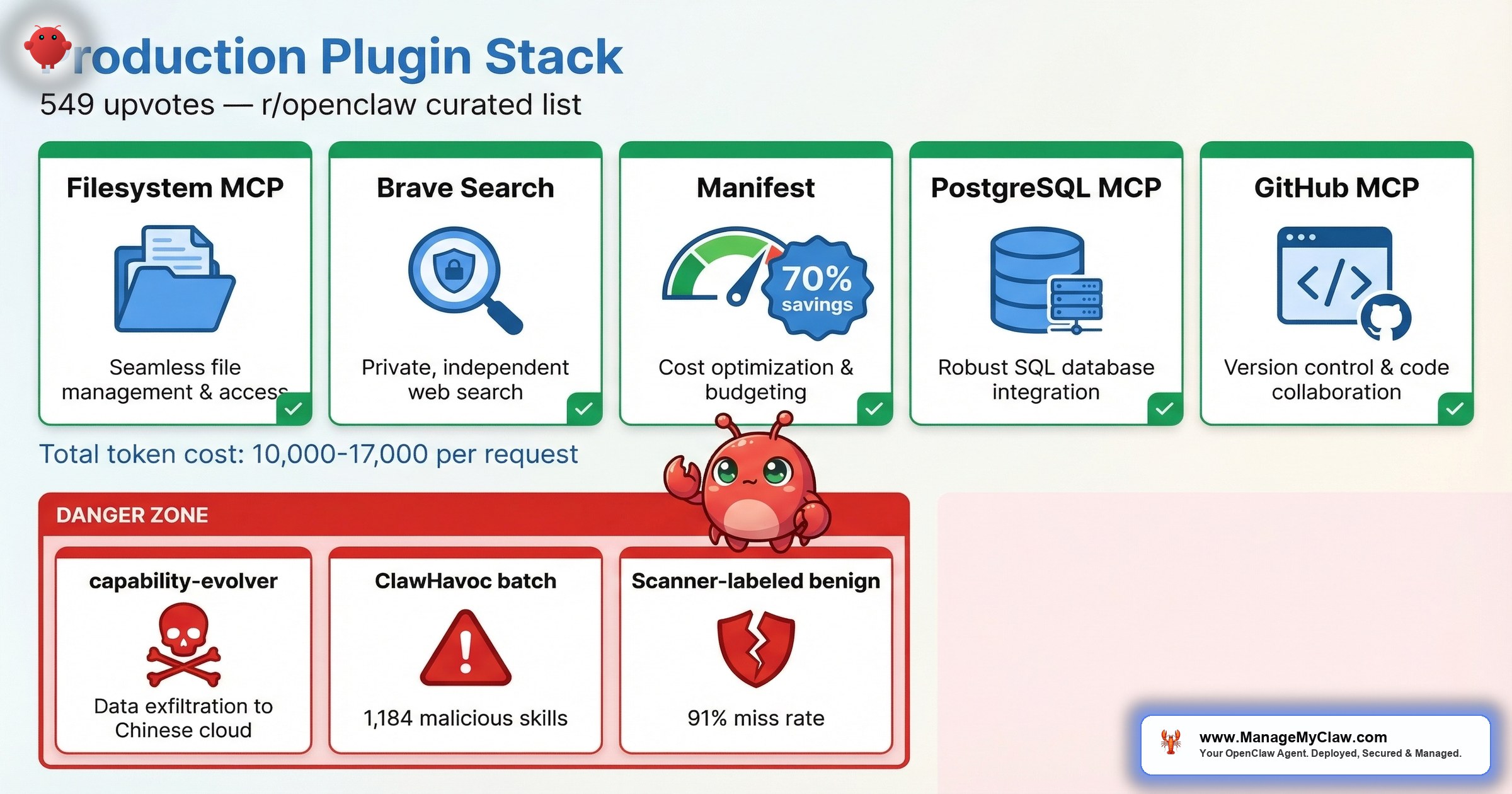
The 5 Production-Ready Plugins
1. Filesystem MCP
What it does: Gives your agent structured read/write access to your local filesystem with permission boundaries.
Why it matters: Without filesystem access, your agent can’t read configuration files, write reports, manage logs, or interact with any local data. This is the foundational plugin — most production workflows depend on it. The key is the permission boundary: you define which directories the agent can access, and everything else is off-limits.
Token cost: ~2,000–3,500 tokens per request (lightweight; 8–12 tools depending on configuration).
2. Brave Search MCP
What it does: Gives your agent web search capabilities through the Brave Search API, returning structured results the agent can parse and act on.
Why it matters: Any workflow that requires current information — market research, news monitoring, competitor analysis, morning briefings — needs a search plugin. Brave’s API returns clean, structured data without the advertising overhead of alternatives. It’s the most commonly recommended first MCP to install in community threads, and for good reason: it turns your agent from a static knowledge base into something that can reference today’s information.
Token cost: ~1,500–2,500 tokens per request (minimal tool surface; 2–3 tools).
3. Manifest (Open-Source Cost Management)
What it does: Routes requests to cheaper models based on task complexity, tracks per-workflow spend, and manages budget alerts across your OpenClaw deployment. Each query is analyzed locally in under 2ms — no data leaves your machine during the routing decision.
Why it matters: Without cost visibility, you’re running blind. Manifest’s intelligent routing cuts API costs by up to 70% by matching task complexity to model capability — simple queries go to cheaper models, complex ones get the full-strength API. On r/openclaw, a contributor confirmed: “Manifest is open source btw, I’m a contributor. Very useful plugin to manage AI costs!” The plugin is open source, which means you can audit the code yourself — a real advantage in an ecosystem where trust is earned, not assumed.
Token cost: ~1,000–2,000 tokens per request (small tool surface focused on cost queries and alerts).
4. PostgreSQL MCP
What it does: Gives your agent read/write access to a PostgreSQL database through structured queries.
Why it matters: Once you move past single-file workflows, you need structured data storage. Client records, workflow logs, KPI history, onboarding states — none of that belongs in flat files. PostgreSQL MCP lets your agent query and update a database directly, which is the backbone of any reporting, CRM, or onboarding automation. The community consistently recommends it as one of the first 5 MCPs to install.
Token cost: ~2,500–4,000 tokens per request (moderate tool surface; query, insert, update, schema introspection).
5. GitHub MCP
What it does: Gives your agent access to GitHub repositories — reading issues, creating PRs, checking CI status, and managing project boards.
Why it matters: If your business involves any software development — including managing freelancers, reviewing agency deliverables, or tracking your own product — GitHub MCP turns your agent into a project management layer. It can triage issues, flag stale PRs, and surface CI failures before they block your sprint. For founders managing technical teams, this is the plugin that creates the most immediate time savings.
Token cost: ~3,000–5,000 tokens per request (larger tool surface; 15–20 tools for full GitHub API coverage).
Honorable Mentions
Composio deserves serious consideration if your workflows touch external apps. It handles OAuth and token management for 850+ external services — Gmail, Slack, GitHub, Jira, HubSpot, and hundreds more — so your agent can authenticate and interact with third-party APIs without you hand-rolling credential flows for each one. If you’re building multi-app automations, Composio eliminates the most tedious part of the integration work.
memory-lancedb is a newer entrant that replaces the standard flat Markdown file storage (MEMORY.md) with vector-backed long-term memory using LanceDB. The difference is meaningful: auto-recall and auto-capture mean your agent’s memory updates without manual MEMORY.md edits. If you’ve been frustrated by stale context or manually curating memory files, this plugin solves the problem at the storage layer.
Memory MCP is worth evaluating once you’re past Stage A of your deployment. It gives your agent persistent memory across sessions. lossless-claw (by Martian Engineering) was recommended in the production-ready thread: “Can I also add: Use this: https://github.com/Martian-Engineering/lossless-claw” — worth investigating if you need lossless context compression. And ClawZempic earned community praise for both functionality and branding:
“I am sorry but ClawZempic is an amazing name. 5 stars!”
— top comment (40 pts), r/openclaw 218-tools review thread (549 pts)The Total Token Budget: What 5 Plugins Actually Cost
| Plugin | Token Cost per Request | Tools Exposed |
|---|---|---|
| Filesystem MCP | ~2,000–3,500 | 8–12 |
| Brave Search MCP | ~1,500–2,500 | 2–3 |
| Manifest | ~1,000–2,000 | 3–5 |
| PostgreSQL MCP | ~2,500–4,000 | 5–8 |
| GitHub MCP | ~3,000–5,000 | 15–20 |
| Total (all 5) | ~10,000–17,000 | 33–48 |
10,000–17,000 tokens per request for 5 plugins. That’s meaningful but manageable — roughly 10–15% of a 128k context window. Compare that to 10 MCP servers eating 50% of your context. The difference between a curated stack and an “install everything” approach isn’t marginal. It’s the difference between an agent that can think and one that’s suffocating under its own tool definitions.
The community insight from that 154-upvote thread bears repeating: routing plus observability together was the biggest unlock. Filesystem MCP gives your agent hands. Brave Search gives it eyes. Manifest gives you cost visibility. PostgreSQL gives it memory. GitHub gives it project context. Five plugins, five capabilities, and a token budget that leaves room for your agent to actually do work.
3 Plugins to Avoid (With Receipts)
The “install carefully” warning isn’t theoretical. Here are 3 documented cases where plugins that looked legitimate turned out to be compromises waiting to happen.
1. capability-evolver
What it claimed: An AI capability enhancement plugin that helped your agent learn and improve over time.
What it actually did: Exfiltrated user data to Chinese cloud storage. The plugin passed every automated security check. It worked as advertised. It also silently copied your data to infrastructure you didn’t authorize.
The evidence: On r/openclaw, in “The OpenClaw ecosystem is bigger than you think — 14 plugins & skills ranked” (203 upvotes, 39 comments), a commenter posted with 24 upvotes: “capability-evolver was exfiltrating data to a Chinese cloud storage. The author removed that, but good example that skills and plugins should always be analyzed before installing and updating.”
The lesson: The author removed the exfiltration code after being caught. Which means it was malicious for the entire window between upload and discovery. A clean version existing now doesn’t undo what happened to everyone who installed it before.
2. The ClawHavoc Batch (1,184+ Malicious Skills)
What they claimed: Cryptocurrency trackers, Solana utilities, YouTube tools, productivity managers, social media schedulers — all with professional READMEs and convincing descriptions.
What they actually did: Delivered Atomic Stealer (AMOS) malware. 1,184 confirmed malicious skills with professional-grade documentation hiding malicious code in SKILL.md configuration files. The ClawHavoc campaign exposed approximately 300,000 users.
The evidence: On r/cybersecurity, “The #1 most downloaded skill on OpenClaw marketplace was MALWARE” reached 811 upvotes and 65 comments. The most-downloaded skill on the entire marketplace — not a random entry from page 50, the #1 most popular skill — was malware.
The lesson: Download count doesn’t equal safety. Professional documentation doesn’t equal legitimacy. If you installed any ClawHub skill between January 27 and February 16, 2026, check it against the Koi Security removal list and review the full ClawHavoc incident breakdown.
3. Any Plugin the Safety Scanner Labels “Benign” (Without Your Own Verification)
What the scanner claims: That the plugin is safe to install.
What the data says: The ecosystem’s safety scanner labels 91% of confirmed threats “benign.” That’s not a rounding error. That’s a scanner that misses 9 out of 10 known malicious entries. On r/netsec, the audit post hit 75 upvotes — and the community reaction was pointed.
Why it misses: The scanner uses signature-based detection built for executable malware. OpenClaw threats live in SKILL.md configuration files that AI agents read and follow. A markdown file with malicious instructions isn’t malware by any scanner’s definition — but when your agent follows those instructions, the result is identical. For the full breakdown, see the OpenClaw security guide.
The lesson: “Benign” on the label doesn’t mean safe in your environment. Every plugin needs manual vetting: read the SKILL.md, check the publisher’s history, list every MCP tool it exposes, and monitor outbound network connections after installation.
How to Vet a Plugin Before Installing It
The 218-tools review thread (549 upvotes, 100 comments) included a commenter who flagged the fundamental issue: “Reminder to everyone, be careful what you grab; skills, tools etc anything literally.” Here’s the minimum vetting checklist, informed by what capability-evolver and ClawHavoc revealed about the gaps in automated scanning:
| # | Check | What to Look For |
|---|---|---|
| 1 | Read the SKILL.md first | Any instruction requesting system-level permissions, executable downloads, or writes to SOUL.md / MEMORY.md is a hard stop |
| 2 | Check publisher’s GitHub | Account age, other published skills, commit history. ClawHavoc used accounts that were days old |
| 3 | List every MCP tool | Enumerate every tool and check access scope. A “productivity” plugin exposing arbitrary HTTP request tools is a red flag |
| 4 | Check for typosquatting | Compare name character-by-character against known legitimate tools. Single-character variations are the oldest supply chain trick |
| 5 | Sandbox first, monitor outbound | Install in a sandboxed environment. capability-evolver was making unauthorized calls to Chinese cloud storage |
| 6 | Pin version, diff updates | Never auto-update. Review changelogs and code diffs before applying any update. See the Composio OAuth guide for credential best practices |
Vetting a plugin once and then auto-updating is like locking your front door and then handing the spare key to everyone who asks nicely.
The Scale of the Problem: Snyk’s ToxicSkills Study
If the checklist above feels paranoid, consider the numbers. Snyk’s ToxicSkills study found prompt injection vulnerabilities in 36% of analyzed skills, with 1,467 confirmed malicious payloads across the ecosystem. That’s not fringe tooling from unknown registries — that’s the mainstream skill ecosystem. More than a third of what’s available has documented injection vectors. The capability-evolver and ClawHavoc incidents aren’t outliers. They’re representative of a structural problem.
SecureClaw is one tool attempting to address this at the framework level. It hardens agent runtimes by mapping every action to the OWASP Top 10 for Agents — covering prompt injection, insecure output handling, excessive agency, and the other categories that define how agents fail in production. SecureClaw specifically prevents prompt injection from reaching the system shell, which is the attack vector that capability-evolver and similar plugins exploit. Their free OpenClaw security scanner uses a 3-Layer Audit Protocol and claims OWASP ASI 10/10 coverage across 2,890+ audited agents.
Whether you adopt SecureClaw or build your own hardening layer, the OWASP agent categories are the right framework for evaluating what your plugins can actually do to your system. For a full walkthrough, see the OpenClaw security guide.
The Routing + Observability Stack
The most actionable insight from the community threads isn’t about individual plugins. It’s about how they work together. The commenter who said “The biggest unlock for me was routing plus observability together, not either one alone” is describing the architecture pattern that separates production deployments from experiments.
Here’s what that looks like in practice:
- Filesystem MCP + PostgreSQL MCP gives your agent the ability to read inputs and write structured outputs. That’s the foundation for any workflow — email triage, reporting, client onboarding.
- Brave Search MCP adds real-time information. Morning briefings, market monitoring, and competitor tracking become possible.
- Manifest gives you cost visibility across all of it. Without Manifest, you’re optimizing blind — you can’t route models effectively if you don’t know what each task costs.
- GitHub MCP adds project context for technical workflows. Optional if you’re not managing code, but essential if you are.
5 plugins. 33–48 tools. 10,000–17,000 tokens per request. That leaves 85–90% of your context window for your agent to actually process your tasks. Add a 6th plugin and you should be asking: what am I getting that’s worth the token cost? If the answer isn’t immediately clear, you don’t need it yet.
Frequently Asked Questions
How many plugins should I install on OpenClaw for production use?
5 is the practical ceiling for most deployments. Each MCP-based plugin adds 1,000–5,000 tokens per request to your context window. With 5 plugins, you’re using roughly 10,000–17,000 tokens on tool definitions alone — manageable at 10–15% of a 128k context window. Install 10 MCP servers and half your context window is consumed before your agent reads a single instruction. Start with Filesystem MCP and Brave Search MCP, then add based on your specific workflow needs.
What happened with the capability-evolver plugin?
capability-evolver was an OpenClaw plugin that passed automated security checks and functioned as described, but was simultaneously exfiltrating user data to Chinese cloud storage. The community caught it, and the author removed the exfiltration code afterward. The incident was documented on r/openclaw with 24 upvotes in the ecosystem ranking thread. It demonstrates that automated scanners miss data exfiltration hidden behind legitimate functionality, and that every plugin needs manual vetting before installation.
Why does the OpenClaw safety scanner miss 91% of threats?
The scanner uses signature-based detection designed for executable malware. OpenClaw threats are typically instructions embedded in SKILL.md configuration files that the AI agent reads and follows. A markdown file with malicious instructions isn’t detectable by traditional antivirus scanning because it isn’t an executable — it’s text that the agent interprets. The mismatch between the detection method and the threat model produces the 91% miss rate documented in the r/netsec audit.
What are the best MCP servers to install first on OpenClaw?
Community consensus across multiple r/openclaw threads points to 5 recommended starting MCPs: Filesystem MCP for local file access with permission boundaries, Brave Search MCP for web search capabilities, PostgreSQL MCP for structured data storage, GitHub MCP for repository management, and Memory MCP for persistent context across sessions. These 5 cover the core capabilities most production workflows require without overwhelming your token budget.
How do I vet an OpenClaw plugin before installing it?
Read the SKILL.md file before installing and flag any instruction requesting system permissions, password entry, or executable downloads. Verify the publisher’s GitHub account age and history. If the plugin wraps an MCP server, list every tool it exposes and check what each tool can access. Compare the plugin name character-by-character against known legitimate tools to catch typosquatting. After installing in a sandbox, monitor outbound network connections for unauthorized endpoints. Pin the version and review diffs before applying any updates.
What is the token cost of running MCP plugins on OpenClaw?
A single MCP server with 20 tools adds 8,000–15,000 tokens per request — not per session, per request. That’s because every tool definition must be loaded into the agent’s context window on every call. With 10 MCP servers, half your context window is consumed by tool definitions before the agent processes any task. A curated 5-plugin stack costs roughly 10,000–17,000 tokens per request, which leaves 85–90% of a 128k context window available for actual work.
Is it safe to install plugins from ClawHub after the ClawHavoc attack?
ClawHub improved its security posture after ClawHavoc by integrating VirusTotal scanning and raising publisher verification requirements. However, the safety scanner still labels 91% of confirmed threats as “benign.” Snyk’s ToxicSkills study confirmed the scope: prompt injection vulnerabilities exist in 36% of analyzed skills, with 1,467 confirmed malicious payloads. You can use ClawHub plugins, but treat every skill as unvetted until you’ve verified it manually: read the SKILL.md, check the publisher, sandbox the install, and monitor network behavior. Minimize your total plugin count and pin versions to avoid silent malicious updates.
What is SecureClaw and how does it harden OpenClaw deployments?
SecureClaw is a security framework that hardens agent runtimes by mapping actions to the OWASP Top 10 for Agents. It specifically prevents prompt injection from reaching the system shell — the attack vector exploited by plugins like capability-evolver. SecureClaw offers a free OpenClaw security scanner with a 3-Layer Audit Protocol and OWASP ASI 10/10 coverage, having audited 2,890+ agents.
How does Manifest reduce OpenClaw API costs?
Manifest routes requests to cheaper models based on task complexity, cutting API costs by up to 70%. Each query is analyzed locally in under 2ms with no data leaving your machine during the routing decision. Simple tasks get routed to cheaper models while complex ones receive the full-strength API. Manifest is open source, so you can audit the routing logic yourself.


