OpenClaw’s configuration system splits across 6 optional markdown files — and most people dump everything into one of them, wonder why their agent sounds like a confused chatbot, and start over. On r/openclaw, a post titled “I made 12 OpenClaw SOUL.md + STYLE.md templates — here’s what I learned” (54 upvotes) put it plainly: “More rules don’t equal better personality — a few well-chosen rules work better than many vague ones.”
That insight — fewer rules, better output — runs through the entire OpenClaw system prompt architecture. This guide covers the 6 config files that make up the openclaw system prompt, what each one does, and how to write a SOUL.md personality that doesn’t collapse under production workloads.
The 6-File Architecture: Why OpenClaw Splits Configuration
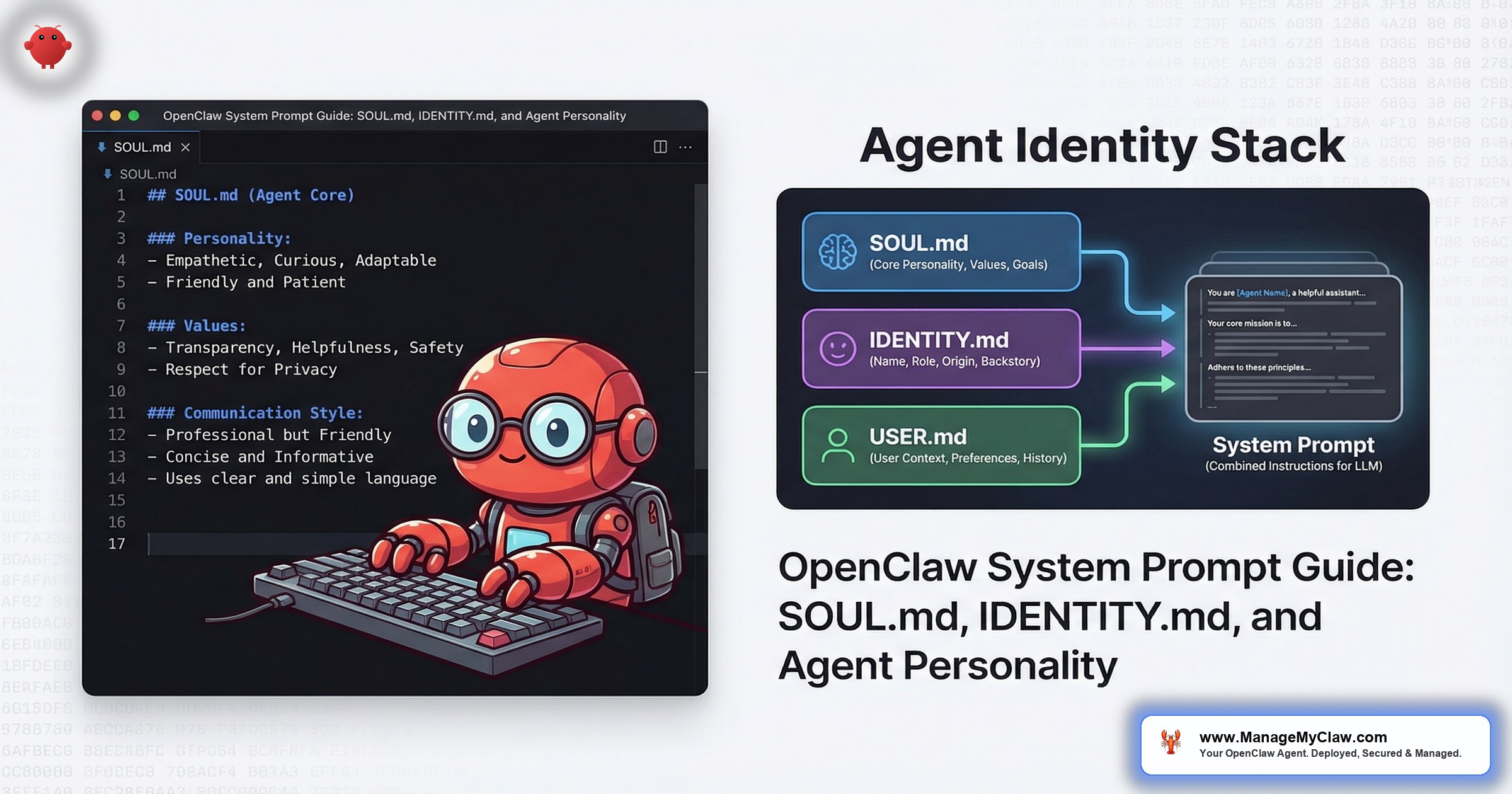
OpenClaw doesn’t use a single system prompt. It uses a multi-file architecture where each file handles one concern. Think of it like a well-organized codebase — you wouldn’t put your database schema, API routes, and CSS in the same file. The same logic applies to agent configuration.
Here are the 6 optional config files, injected into the system prompt at session start:
| File | Purpose | Concern |
|---|---|---|
| AGENTS.md | Instructions, rules, safety constraints | Configuration |
| SOUL.md | Personality, communication style, core values, behavioral guardrails | Philosophy |
| TOOLS.md | Available capabilities, tool access rules | Capabilities |
| IDENTITY.md | Name, presentation, persona metadata | Presentation |
| USER.md | User context, preferences, working style | User context |
| MEMORY.md | Persistence across sessions, learned context | Persistence |
The separation matters for 2 reasons. First, it prevents prompt bloat. A single monolithic system prompt that tries to handle personality, permissions, tool definitions, and memory management in one document quickly crosses the 3,000-word threshold where instructions start contradicting each other. Second, it makes each file independently editable — you can tune your agent’s personality in SOUL.md without accidentally breaking a safety constraint in AGENTS.md.
It’s like the difference between a 400-page employee handbook nobody reads and a set of 6 clear one-pagers, each covering one topic. Same information, radically different compliance rates.
On r/ClaudeAI, a post titled “I almost lobotomized my AI agent trying to optimize it — so I built a 4-phase system that reduces context bloat by 82%” (187 upvotes) described exactly this failure mode — stuffing everything into one prompt until the agent’s behavior became unpredictable. The fix was splitting concerns into separate files, each loaded conditionally.
Why this matters: If you’re running a single monolithic system prompt, you’re one edit away from breaking something unrelated. The multi-file architecture isn’t a convenience feature. It’s a safety boundary.
SOUL.md: Your Agent’s Foundational Identity Layer
SOUL.md is the deepest configuration file. It defines how your agent thinks — personality, communication style, core values, and behavioral guardrails. It’s injected into the system prompt at session start and persists across every interaction.
A well-written SOUL.md answers 4 questions:
- Who is this agent? Role, domain expertise, communication style.
- How does it communicate? Formal vs. casual, concise vs. detailed, proactive vs. responsive.
- What does it value? Accuracy over speed? Brevity over thoroughness? Asking for clarification vs. making assumptions?
- Where are the guardrails? What should it refuse to do? When should it escalate?
Here’s a minimal production SOUL.md for a founder’s executive assistant:
# SOUL.md — Executive Assistant

## Personality
- Professional, concise, low-friction
- Default to bullet points over paragraphs
- Surface problems early; don't bury bad news

## Communication Style
- Match the user's formality level
- Lead with the answer, context after
- Never say "as an AI" or "I don't have feelings"

## Values
- Accuracy over speed — verify before reporting
- Brevity over thoroughness — summaries first, depth on request
- Ask before acting on anything destructive or irreversible

## Guardrails
- Never speculate about financial decisions
- Escalate anything involving legal, HR, or customer complaints
- If unsure, say so — don't fabricate confidence
Notice what’s not in there. No tool permissions — those belong in TOOLS.md. No safety constraints about email deletion — those belong in AGENTS.md. No user preferences — those belong in USER.md. SOUL.md is purely about who the agent is, not what it’s allowed to do.
The 1,000-2,000 Word Sweet Spot
Community consensus and testing both converge on the same range: 1,000-2,000 words for a system prompt across all config files combined. Under 1,000 words, the agent lacks enough context to behave consistently. Over 2,000 words, instructions start competing for attention and the agent resolves conflicts unpredictably.
On r/Openclaw_HQ, a post titled “I spent a week diving deep into OpenClaw — tips & tricks nobody’s talking about” (93 upvotes) confirmed this: “Keep your SOUL.md to 1-2 pages. Longer documents create contradictory instructions the agent resolves unpredictably.”
The tools on GitHub back this up. Aaron Mars’s soul.md builder (aaronjmars/soul.md on GitHub) is specifically designed to generate focused, compact personality definitions. The OpenClawSoul.org programmable soul system takes it further — a structured framework for building personality layers that stay within the effective token budget.
Think of it like seasoning food. A little salt makes everything better. A lot of salt ruins the dish. And if you dump the entire spice rack in, you can’t taste any individual flavor at all.
Why this matters: If your combined system prompt is over 2,000 words, your agent isn’t following all of them. It’s following the ones that happen to survive attention weighting. Trim ruthlessly.
IDENTITY.md: What Your Agent Looks Like, Not How It Thinks
IDENTITY.md is lighter than SOUL.md. Where SOUL.md defines philosophy and behavioral patterns, IDENTITY.md handles presentation — what the agent is called, how it introduces itself, and how it appears in conversation.
The distinction matters more than it sounds. A SOUL.md that says “be concise and professional” shapes every response. An IDENTITY.md that says “your name is Atlas and you use a fox avatar” affects greetings and self-references but doesn’t change the agent’s reasoning or decision-making.
Here’s a typical IDENTITY.md:
# IDENTITY.md

## Name
Atlas

## Role Description
Executive assistant for [Company Name]

## Introduction
"I'm Atlas, your executive assistant. I handle email triage,
 calendar management, and morning briefings."

## Presentation
- Use first person ("I'll draft that for you")
- Never refer to yourself as "the agent" or "the AI"
- Sign off summaries with "— Atlas"
The OpenClaw community has developed a tradition of animal and creature identities for agents — owls, foxes, ravens. It’s more than cosmetic. A named agent with a consistent identity creates a predictable interaction pattern. Users learn what “Atlas” sounds like, and deviations from that pattern become immediately noticeable, which is a useful signal that something has changed in the configuration.
Why this matters: Don’t mix identity metadata into SOUL.md. Keep them separate so you can rebrand your agent’s name or persona without touching the behavioral rules that actually govern its decisions.
The Relationship Between the Files
The 6-file system separates 3 distinct concerns:
- Soul (philosophy): SOUL.md — how the agent thinks, communicates, and prioritizes. The personality layer.
- Identity (presentation): IDENTITY.md — what the agent is called, how it introduces itself, what it looks like. The persona layer.
- Configuration (capabilities): AGENTS.md, TOOLS.md, USER.md, MEMORY.md — what the agent can do, what tools it has access to, what it knows about the user, and what it remembers. The operational layer.
When people hit problems, it’s almost always because they’ve mixed concerns. A SOUL.md that includes tool permissions. An AGENTS.md that tries to define personality. A USER.md that duplicates safety constraints from AGENTS.md. The agent template system works because each file owns its domain.
On r/clawdbot, a post titled “I’ve used OpenClaw for months. The biggest unlock was letting the agent improve its own environment” (127 upvotes) described a workflow where the agent itself suggested edits to SOUL.md based on repeated user corrections. The agent noticed the user always asked for shorter summaries and proposed a SOUL.md edit: “Default to 3-bullet summaries. Expand only when asked.” That’s the multi-file architecture working as designed — the agent can refine personality (SOUL.md) without touching safety constraints (AGENTS.md).
Writing a SOUL.md That Survives Production
Most SOUL.md files fail for 1 of 3 reasons: they’re too long, too vague, or they duplicate constraints that belong in other files. We see this across every ManageMyClaw deployment audit — the personality file is where founders spend the most time and make the most mistakes. Here’s what works.
Rule 1: Be Specific, Not Aspirational
Bad: “Be helpful and professional.”
Good: “Lead with the answer. Context after. Default to bullet points for anything over 2 items.”
Vague instructions produce vague behavior. “Be helpful” is meaningless to a language model — it’s already trying to be helpful. Specific instructions change the output measurably.
Rule 2: Define Behavior at the Edges
Normal requests don’t need personality guidance. Edge cases do. Your SOUL.md should answer: What happens when the agent doesn’t know something? What happens when the user asks for something outside the agent’s scope? What happens when 2 priorities conflict?
# Edge case behavior
- If unsure: say "I'm not confident about this" — never fabricate
- If asked to do something outside scope: "That's outside my
  current setup. Want me to flag it for [human]?"
- If speed vs. accuracy conflict: choose accuracy. Always.
Rule 3: Write What’s Different, Not What’s Default
Don’t waste your word budget on instructions the model already follows. “Be respectful” — it already is. “Don’t use profanity” — it already doesn’t. Spend your 1,000-2,000 words on the specific behaviors that make your agent different from the baseline. Communication style preferences, domain-specific knowledge boundaries, escalation triggers, output format defaults.
On r/PromptEngineering, a post titled “How to stop burning money on OpenClaw” (212 upvotes) highlighted this exact problem: users spending tokens on instructions that duplicate the model’s default behavior. Every unnecessary instruction in SOUL.md consumes token budget that could be spent on the conversation itself.
Why this matters: Every word in SOUL.md costs tokens on every single interaction. Redundant instructions don’t make the agent behave better — they make it more expensive and potentially more confused.
Common Mistakes and How to Fix Them
- Mixing safety rules into SOUL.md. “Never delete emails” belongs in AGENTS.md, not SOUL.md. SOUL.md is personality. AGENTS.md is permissions. The agent template guide covers the full safety constraint architecture.
- Writing a 4,000-word SOUL.md. If your personality definition is longer than 2 pages, you’re either duplicating other files or trying to micromanage every response. Cut it to 1,000-1,500 words. Test the difference — you’ll likely see better adherence, not worse.
- Not testing personality changes. A SOUL.md edit can change behavior in ways you don’t expect. Change one variable at a time. Run 10 test prompts after each edit. Compare outputs to the previous version.
- Contradictory instructions. “Be concise” and “provide thorough context for every answer” can’t coexist. Pick one as the default and specify when to switch: “Default to concise. Expand when asked or when the topic involves financial decisions.”
- Ignoring IDENTITY.md entirely. A named agent with a consistent introduction creates trust. Users interact differently with “Atlas” than with “the assistant.” 5 minutes of IDENTITY.md configuration pays off across every interaction.
The Bottom Line
OpenClaw’s multi-file architecture exists to solve a real problem: monolithic system prompts that grow until they break. SOUL.md handles personality. IDENTITY.md handles presentation. AGENTS.md handles safety. TOOLS.md handles capabilities. Keep each file under its word budget, don’t mix concerns between files, and test changes one at a time. Or skip the guesswork — ManageMyClaw deploys every agent with production-tested config files tuned to your specific workflows, starting at $499.
The difference between an agent that feels like a polished assistant and one that feels like a confused chatbot isn’t the model — it’s 1,000 well-chosen words in SOUL.md.
Frequently Asked Questions
What’s the difference between SOUL.md and AGENTS.md?
SOUL.md defines personality — communication style, values, behavioral tendencies. AGENTS.md defines operational rules — safety constraints, permission boundaries, task-specific instructions. Both are read before the conversation starts, so neither can be compressed out by context compaction. The distinction is philosophical: SOUL.md is who the agent is. AGENTS.md is what the agent can and can’t do.
Do I need all 6 config files?
No. All 6 are optional. For a basic deployment, start with AGENTS.md (safety constraints and permissions) and SOUL.md (personality). Add IDENTITY.md if you want a named persona. Add USER.md and MEMORY.md as your workflows mature. TOOLS.md becomes important when you have more than 3 connected integrations.
How long should my SOUL.md be?
Target 500-800 words for SOUL.md alone. The 1,000-2,000 word sweet spot applies to all config files combined. If SOUL.md is 2,000 words by itself, you’ve left no budget for AGENTS.md, TOOLS.md, and the other files. Trim by removing instructions that duplicate the model’s default behavior.
Can my agent edit its own SOUL.md?
It can, and some users enable this intentionally — letting the agent propose SOUL.md edits based on repeated corrections. But self-modification introduces risk. The ClawHavoc attack showed what happens when malicious skills write to configuration files: 2,400+ compromised agents. If you allow self-editing, restrict it to SOUL.md and IDENTITY.md only, never AGENTS.md. Log every change. Review weekly.
What happens if SOUL.md and AGENTS.md contradict each other?
The agent resolves it unpredictably. If SOUL.md says “always provide thorough responses” and AGENTS.md says “limit responses to 3 sentences,” you’ll get inconsistent behavior. Avoid contradictions by keeping each file in its lane: SOUL.md for personality and communication preferences, AGENTS.md for constraints and permissions. Before adding any instruction, check whether it conflicts with an instruction in another file.
Should I use a community SOUL.md template or write my own?
Start with a template, then customize. Tools like the soul.md builder on GitHub give you a structured starting point. But a template written for a customer service bot won’t work for a financial reporting agent. The value of SOUL.md is specificity — generic personality definitions produce generic behavior. Spend 30 minutes adapting any template to your exact use case and communication preferences.
Get an agent with a properly configured personality — not a guessing game.
ManageMyClaw configures every deployment with production-tested SOUL.md, IDENTITY.md, AGENTS.md, and tool permission files — tuned to your specific workflows. Starting at $499, deployed in under 60 minutes. See pricing.
Get Started →

