“Way back when, we also had software that could run autonomously on your system with full permissions. We called it ‘malware.’” — r/sysadmin, 2,465 upvotes
On r/openclaw, a thread titled “Dedicated VM or Docker Container?” is trending right now — March 19, 2026. It’s the same question that surfaces every week in different words: “Can we install/use OpenClaw in a sandbox environment?” (4 points, 19 comments); “Can I run openclaw on a virtual machine?” (3 points, 13 comments); “How I Set Up OpenClaw on a Hetzner VPS — Full Guide” (102 points, 63 comments). The question keeps coming back because the answer isn’t obvious, and getting it wrong has consequences that range from wasted money to a compromised server.
Here’s the short version: for 80% of deployments, a hardened Docker container with 5 specific security flags is the right choice. For the other 20% — legal, healthcare, financial, multi-tenant — you need VM-level isolation or a MicroVM that splits the difference. This post walks through exactly why, with the numbers, the trade-offs, and the decision framework you need to pick correctly the first time.
Why This Decision Is Different for AI Agents
A web server in a container reads a request, returns a response, and forgets about it. Your OpenClaw agent reads your email, writes to your calendar, executes shell commands, interacts with APIs, and modifies files on mounted volumes. It has broader access than any typical containerized application. That access is the entire point — and it’s the entire problem.
“How on earth anyone can look at the ‘fcks things up machine’ and go ‘what if I gave it the ability to execute code autonomously.’”
— r/selfhosted, “If you’re self-hosting OpenClaw, here’s every documented security incident” (152 pts)The sysadmins aren’t wrong. They’re describing the default configuration — the one where isolation is an afterthought. The VM-vs-Docker decision is about making isolation intentional. Think of it like choosing between an apartment with a deadbolt and a standalone house with its own foundation. Both keep you safe. One shares walls with neighbors; the other doesn’t. Which one you need depends on what’s behind your door.
The 3-Tier Isolation Spectrum
The Northflank blog documented an isolation spectrum that maps cleanly to the OpenClaw deployment decision. There aren’t 2 options. There are 3. Each sits at a different point on the isolation-vs-overhead curve, and understanding where each one breaks down is more valuable than knowing where each one excels.
| Dimension | Full VM | MicroVM / gVisor | Hardened Docker |
|---|---|---|---|
| Kernel | Dedicated kernel per VM | Lightweight dedicated kernel (Firecracker, Kata) or user-space interception (gVisor) | Shared host kernel |
| Isolation Level | Strongest — full hardware abstraction | Strong — VM-grade with container-grade startup | Moderate — namespace/cgroup boundaries |
| Startup Time | 30–60 seconds | ~125ms (Firecracker) to seconds | Fastest — sub-second |
| Resource Overhead | High — dedicated RAM, CPU, disk | Moderate — minimal kernel footprint | Lowest — shares host resources |
| Monthly Cost | $20–$40/month | $15–$30/month | $12–$24/month |
| Lateral Movement Risk | Blocked — separate kernel, filesystem, network stack | Blocked — kernel-level separation | Possible if hardening flags are missing |
| Orchestration | Harder — VM provisioning, snapshots, manual scaling | Moderate — OCI-compatible tooling | Easiest — standard Docker Compose, Portainer |
| Best For | Regulated industries, multi-tenant, maximum paranoia | High-security single-tenant, untrusted plugins | SMBs, single-tenant, fast deployment |
Notice the cost column. You’re paying $8–$16/month more for VM isolation vs. Docker. Whether that premium buys you meaningful security depends entirely on your threat model — not on which approach sounds more impressive in a blog post.
The Case for Docker: Why It’s the Practical Default
Docker gives you the lightest resource footprint, the fastest startup time, and the widest ecosystem of tooling. When the Hetzner VPS guide hit 102 upvotes on r/openclaw, the setup described was Docker-based. The top reply: “One thing I would add though is a proxy + iptables for blocking outgoing requests.” That commenter was pointing at the gap between “running in Docker” and “running in Docker securely” — a gap that’s closed by 5 specific flags.
Docker itself has taken notice. The official Docker blog published “Run OpenClaw Securely in Docker Sandboxes” — direct guidance from docker.com on sandboxing AI agents in containers. That’s Docker’s own team acknowledging both the risk and the viability of their platform for this use case. When the container runtime vendor publishes an official hardening guide for your specific workload, you should read it.
The 5 required Docker security flags transform a container from a packaging format into an actual isolation boundary:
- Non-root user — the agent process runs as UID 65534, not root. A container escape as non-root is fundamentally harder to escalate.
- Read-only root filesystem — malicious code can’t write persistent backdoors to the container’s filesystem.
--cap-drop=ALL— drops every Linux capability. No binding privileged ports, no modifying network interfaces, no loading kernel modules.--security-opt=no-new-privileges— blocks privilege escalation through setuid or setgid binaries, closing a loophole that--cap-drop=ALLalone doesn’t cover.- No Docker socket mount — prevents the agent from controlling Docker itself. Mounting the Docker socket is equivalent to giving root access to the host. Full stop.
With those 5 flags, ports bound to localhost only (127.0.0.1:9090), and proper firewall rules, you’ve created a container that can’t escalate privileges, can’t persist changes, can’t escape to the host, and can’t talk to the internet except through explicitly allowed paths. The full configuration is in the Docker sandboxing guide.
Docker networking bypasses standard firewall rules. If you set up UFW on your VPS and think your container traffic is filtered, it’s not. Docker creates its own iptables chains that sit above UFW. You need the DOCKER-USER iptables chain to control container traffic — standard UFW rules won’t apply. This one misconfiguration accounts for a disproportionate share of exposed deployments. The firewall configuration guide covers it step by step.
The Case for VMs: When Shared Kernels Are a Non-Starter
Every Docker container shares the host kernel. That’s the architectural trade-off. Hardened containers limit what a process can do with kernel access, but the access path exists. A VM eliminates that path entirely. Each VM gets its own kernel, its own filesystem, and its own network stack. A compromised agent inside a VM can destroy everything inside that VM — and nothing outside it.
“Don’t Run OpenClaw on Your Main Machine.”
— SkyPilot blog — recommending cloud isolation with no personal data on the VMThe SkyPilot recommendation is the strongest version of the VM argument: it’s not just about kernel separation, it’s about ensuring the agent never has access to anything it shouldn’t have in the first place. When the VM has no personal data on it, there’s nothing valuable to exfiltrate even if isolation fails completely.
For AI agents specifically, VM isolation solves a problem that container hardening can only mitigate: lateral movement. Your OpenClaw agent has access to mounted volumes — configuration files, data directories, log outputs. A compromised agent in a container could still read and modify anything on those mounted volumes. In a VM, the agent’s entire filesystem is isolated. There are no mounted volumes from the host. There’s no shared kernel to exploit. Even if the agent is fully compromised, the blast radius ends at the VM boundary.
For Windows users specifically, the VirtualBox approach provides complete separation at the virtualized hardware level. Skills-openclaw.com published “Install OpenClaw Windows VirtualBox: Secure Guide 2026” — a walkthrough that treats VirtualBox as a first-class isolation layer, not a workaround.
The cost of that isolation is real. VMs need dedicated RAM and CPU allocation. You’re running a full operating system inside another operating system. A 2 GB Docker container on a 4 GB VPS leaves 2 GB for the host. A 2 GB VM on a 4 GB VPS leaves 2 GB for the host plus the VM’s kernel overhead, its init system, its systemd services — which means you actually need a 6–8 GB server to run what Docker handles on 4 GB. That pushes your monthly hosting from the $12–$24 range into $20–$40.
The Layered Approach: Docker Inside a VM
Here’s the approach the security-conscious crowd keeps arriving at independently: run Docker inside a VM. Snapshots.cloud documented this in “Sandboxing OpenClaw with Virtual Machines” — and it creates two distinct isolation layers that compound rather than overlap.
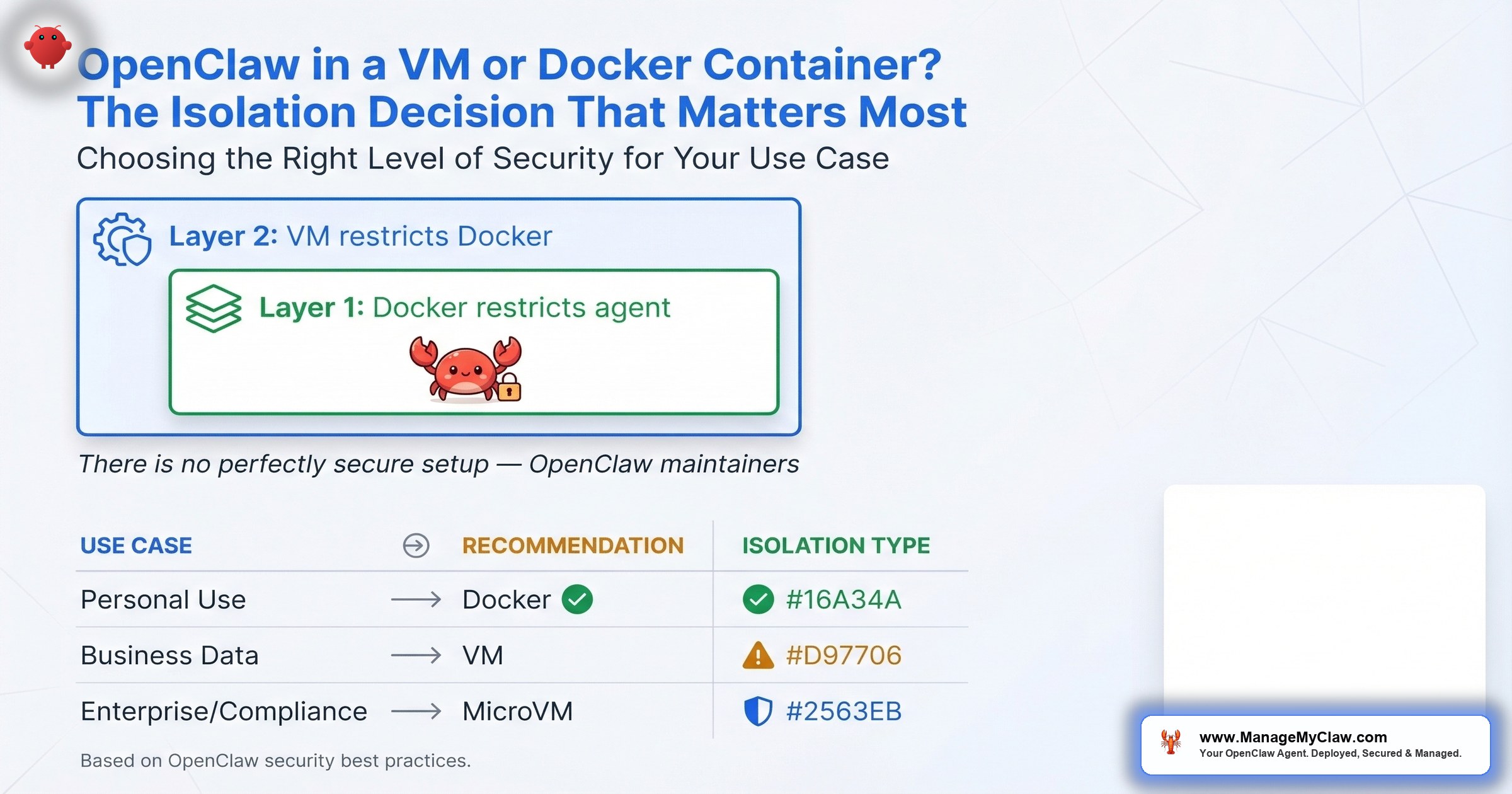
Layer 1: Docker container restricts the agent’s environment to a specific workspace. The 5 hardening flags prevent privilege escalation, persistent modification, and capability abuse. The container is the agent’s immediate cage — it can only see what you’ve explicitly mounted.
Layer 2: VM restricts Docker’s access to physical hardware. Even if the agent escapes the container (kernel vulnerability, misconfigured mount, zero-day), it lands inside the VM — not on your host. The VM has its own kernel, its own filesystem, and its own network stack.
Think of it as defense in depth applied to infrastructure. The container handles the common case: preventing the agent from doing things it shouldn’t. The VM handles the worst case: containing the blast radius when the container boundary fails. You pay for both layers in complexity and cost — but you get a deployment where an attacker needs to chain two independent escapes to reach your host.
When does the layered approach make sense? When you’re handling data sensitive enough that a single point of failure is unacceptable. If you’re running OpenClaw against client financial records or patient data, the VM+Docker combination gives you an answer for compliance auditors that neither layer provides alone: “even if one boundary fails, the other holds.”
The Middle Ground: MicroVMs and gVisor
The isolation spectrum from Northflank documents a middle tier that most VM-vs-Docker debates skip entirely. MicroVMs like Firecracker (built by AWS for Lambda and Fargate) and Kata Containers give you VM-level kernel isolation with near-container startup times. Firecracker boots a minimal VM in roughly 125 milliseconds. You get a dedicated kernel per workload without the full-OS overhead of a traditional VM.
gVisor takes a different approach. Instead of running a separate kernel, it inserts a user-space kernel between your container and the host kernel. Every system call your agent makes gets intercepted and validated before it reaches the real kernel. Think of it like a translator who checks every word before passing it along — if the agent tries to say something the host shouldn’t hear, the translator blocks it.
NVIDIA’s OpenShell adds OS-level sandboxing on top of containers, operating at this same middle tier. It’s designed specifically for autonomous AI agents, which tells you where the industry expects the isolation standard to land — stronger than containers alone, more practical than full VMs for most deployments.
The practical constraint: MicroVMs require KVM or hypervisor support, which rules out shared hosting and some cloud instances. gVisor requires a custom OCI runtime. Neither is plug-and-play for someone following a Hetzner VPS guide for the first time. They’re the right answer for teams that have the infrastructure knowledge to deploy them — and overkill for single-agent deployments that are properly hardened at the Docker level.
The Docker Image Problem Nobody Mentions
Every one of those CVEs is an entry point, and they exist regardless of whether you apply the 5 hardening flags. The flags limit what an attacker can do after exploiting a vulnerability. They don’t eliminate the vulnerabilities themselves.
VM proponents point to this number as evidence that containers aren’t enough. Container proponents point out that most of those CVEs are in dependencies the agent never touches. Both are partially right. The honest answer: 2,062 CVEs in a container image is a supply-chain problem, not an isolation problem. A VM running the same bloated image has the same 2,062 CVEs inside it — they’re just behind an additional wall.
The question is whether that additional wall justifies the additional cost. For most single-tenant, single-agent deployments where you control the skills and configurations: no. For deployments handling PII, financial data, or operating in regulated environments: yes. The wall isn’t about stopping every attack. It’s about limiting the blast radius when something inside the image gets exploited — and with 2,062 CVEs, the probability isn’t zero.
The Decision Framework: Which One Do You Actually Need?
The OpenClaw maintainers themselves state it plainly: “There is no ‘perfectly secure’ setup.” The consensus from security researchers across DataCamp, DEV Community, and the OpenClaw project is that OpenClaw should run in an isolated environment — Docker, VM, or separate physical machine. The debate isn’t whether to isolate. It’s how much isolation your specific situation requires.
The right approach depends on your threat model. Not your preference, not what sounds most impressive, not what a blog post told you is “best.” Here’s the framework that maps threat model to isolation tier:
| Use Case | Threat Level | Recommended Isolation |
|---|---|---|
| Personal use, trusted workflows, internal tools | Low | Hardened Docker (5 flags + firewall) |
| Business use, sensitive data, client work | Medium | VM or Cloud VM |
| Enterprise, compliance (HIPAA/SOC 2/GDPR), multi-tenant | High | MicroVM (Firecracker/Kata), VM+Docker layered, or dedicated hardware |
Now answer these 4 questions and the specific approach reveals itself:
Question 1: How many agents are you running on the same server?
- 1 agent → Docker with 5 hardening flags is sufficient
- 2–3 agents with different permission sets → Docker with separate networks per container
- Multiple agents from different clients or untrusted sources → VM or MicroVM
Question 2: What data does the agent touch?
- Internal docs, scheduling, general email → Hardened Docker
- Financial records, legal documents, patient data → VM or MicroVM
- PII subject to HIPAA, SOC 2, or GDPR → VM with audit trail
Question 3: Do you have a dedicated ops person?
- No ops team → Docker (lowest operational complexity)
- Part-time sysadmin → Docker or gVisor, depending on comfort level
- Dedicated infrastructure team → Any of the 3 tiers
Question 4: What’s your monthly budget for hosting?
- $12–$24/month → Docker on a VPS
- $20–$40/month → VM is viable
- Budget isn’t the constraint → MicroVM or gVisor for best isolation-to-overhead ratio
Running multiple clients’ OpenClaw agents on the same Docker host without network isolation is the highest-risk configuration. A compromised container can reach other containers on the same Docker bridge network, read shared volumes, and exploit kernel vulnerabilities that affect every container on the host. If you’re running agents for different clients on shared infrastructure, VM isolation is not optional — it’s a liability issue.
The Mac Mini Exception
On r/clawdbot, a thread about running OpenClaw safely on a Mac Mini (7 points, 14 comments) proposed a simpler isolation model: “Run open claw safely on a Mac mini on a separate user account.” macOS user-account separation isn’t VM-level isolation, but it creates a permission boundary that prevents the agent from accessing your primary user’s files, keychain, and browser data. For home users running OpenClaw on personal hardware, a separate macOS user account is the minimum viable isolation — and it costs nothing.
That said, macOS user separation doesn’t give you network isolation, read-only filesystem enforcement, or capability dropping. It’s a starting point, not a destination. If you’re running OpenClaw on a Mac Mini for production work, Docker with the 5 hardening flags is still the standard you should meet.
What a Properly Hardened Docker Deployment Looks Like
The Hetzner VPS guide that got 102 upvotes on r/openclaw covers the basics. Here’s what it doesn’t cover — the hardening layer that turns a working deployment into a secure one:
Hardened Docker Run Command
- –user nobody — non-root user (UID 65534)
- –read-only — immutable root filesystem
- –cap-drop=ALL — zero Linux capabilities
- –security-opt no-new-privileges:true — no setuid escalation
- –tmpfs /tmp:rw,noexec,nosuid — writable temp without exec
- –memory=2g –cpus=1.0 — resource caps prevent DoS
- -p 127.0.0.1:9090:9090 — localhost-only port binding
- No Docker socket mount — never mount /var/run/docker.sock
Notice: ports bound to 127.0.0.1 only, not 0.0.0.0. No Docker socket mounted. Config mounted read-only. Memory and CPU capped. And the Hetzner commenter’s advice holds: add a proxy and iptables rules for blocking outgoing requests. The DOCKER-USER chain is where you define what traffic your container can send and receive, because standard UFW rules don’t apply to Docker traffic. Full walkthrough in the firewall configuration guide.
When to Upgrade from Docker to VM
You don’t start with a VM. You start with hardened Docker, and you upgrade when any of these conditions appear:
- You’re handling data subject to regulatory audit. HIPAA, SOC 2, and GDPR compliance officers want to see process-level isolation they can verify independently. A VM provides a clean audit boundary. Container hardening requires explaining namespace semantics to someone who isn’t a Linux engineer.
- You’re running agents for different clients on shared infrastructure. Multi-tenant isolation is the canonical use case for VMs. Client A’s agent can’t see Client B’s data, can’t reach Client B’s network, can’t share a kernel vulnerability with Client B’s workload.
- Your agent runs untrusted or community-built skills. If you’re pulling skills from ClawHub without reviewing every line of source code, VM isolation limits the damage a malicious skill can do. In a container, a malicious skill with access to mounted volumes can read or modify your data. In a VM, there are no mounted host volumes to compromise.
- You’ve experienced a security incident and need to increase your security posture. After a breach, “we moved to VM-level isolation” is a concrete remediation step that demonstrates you’ve invested in stronger boundaries.
The Bottom Line
Docker with all 5 hardening flags, localhost-only ports, and the DOCKER-USER iptables chain covers 80% of OpenClaw deployments. It’s lighter, cheaper ($12–$24/month vs. $20–$40/month for VM), faster to deploy, and easier to maintain. The full security stack — including the 14-point audit checklist from the security pillar — is documented and repeatable.
VMs are the right choice when you’re in the other 20%: regulated data, multi-tenant hosting, untrusted skills, or environments where audit requirements demand kernel-level separation. The layered VM+Docker approach — running containers inside a VM — gives you two independent boundaries for scenarios where a single point of failure is unacceptable. MicroVMs and gVisor sit between the two, offering VM-grade isolation without full-VM overhead — but requiring infrastructure expertise that most small teams don’t have on staff.
The OpenClaw maintainers are right: there is no “perfectly secure” setup. But there’s a setup that matches your threat model, your budget, and your team’s capabilities. The worst isolation choice isn’t “Docker” or “VM.” It’s “neither.” A hardened Docker container is infinitely more secure than a VM you haven’t set up yet.
Frequently Asked Questions
Should I run OpenClaw in a VM or a Docker container?
For most single-tenant deployments, a Docker container with all 5 hardening flags (non-root user, read-only filesystem, cap-drop=ALL, no-new-privileges, no Docker socket mount) plus proper firewall configuration is sufficient. VMs provide stronger kernel-level isolation and are recommended for regulated industries (healthcare, legal, financial), multi-tenant environments, or deployments handling PII. The cost difference is $12–$24/month for Docker vs. $20–$40/month for a VM with enough resources.
What are the 5 Docker security flags required for OpenClaw?
The 5 flags are: running as a non-root user (--user nobody), read-only root filesystem (--read-only), dropping all Linux capabilities (--cap-drop=ALL), preventing privilege escalation (--security-opt=no-new-privileges), and never mounting the Docker socket. Together, they prevent privilege escalation, persistent backdoors, and container escape. See the Docker sandboxing guide for the complete configuration.
Why does Docker networking bypass my firewall?
Docker creates its own iptables chains that take priority over UFW rules. When you expose a container port, Docker modifies iptables directly, bypassing any UFW configuration you’ve set up. The fix is the DOCKER-USER iptables chain, which is the only chain Docker evaluates for container traffic. Standard UFW rules won’t protect your containers unless you also configure DOCKER-USER rules. The firewall configuration guide covers the exact steps.
What are MicroVMs and how do they compare to full VMs for OpenClaw?
MicroVMs like Firecracker and Kata Containers provide dedicated kernels per workload — the same isolation guarantee as full VMs — but with near-container startup times (roughly 125ms for Firecracker) and a smaller resource footprint. They require KVM or hypervisor support, which limits compatibility with shared hosting. gVisor takes a related approach by intercepting system calls in user space rather than running a separate kernel. Both sit between full VMs and hardened Docker on the isolation spectrum.
Can a compromised OpenClaw agent in a Docker container access my host?
With proper hardening (all 5 security flags applied), the attack surface is significantly reduced. The agent can’t escalate privileges, can’t write to the container filesystem, can’t control Docker, and can’t use Linux capabilities. However, Docker containers share the host kernel, which means kernel-level vulnerabilities could theoretically enable escape. A compromised agent can also access any mounted volumes. VM isolation eliminates both of these paths by providing a separate kernel, filesystem, and network stack.
Is it safe to run OpenClaw on a Mac Mini without Docker?
Running on a separate macOS user account provides basic permission isolation — the agent can’t access your primary user’s files, keychain, or browser data. However, you lose the network isolation, read-only filesystem enforcement, and capability dropping that Docker provides. For personal or experimental use, a separate user account is the minimum viable isolation. For production work, Docker with the 5 hardening flags on the Mac Mini is the recommended baseline.
How many CVEs are in the official OpenClaw Docker image?
2,062 CVEs were reported in the official Docker image, documented on r/devsecops (101 upvotes). These CVEs exist in the image’s dependency tree regardless of isolation method — a VM running the same image has the same 2,062 CVEs inside it. Docker hardening flags limit what an attacker can do after exploiting a vulnerability but don’t eliminate the vulnerabilities themselves. This is why defense in depth (container hardening + firewall rules + monitoring) matters more than any single isolation layer.
What is the VM+Docker layered approach for OpenClaw?
The layered approach runs Docker inside a VM, creating two independent isolation boundaries. Layer 1 (Docker container) restricts the agent to a specific workspace with the 5 hardening flags. Layer 2 (VM) restricts Docker’s access to physical hardware with a separate kernel and filesystem. Even if the agent escapes the container, it lands inside the VM — not on your host. An attacker needs to chain two independent escapes to reach your actual machine. This approach is recommended for sensitive data where a single point of failure is unacceptable.
How do I choose the right isolation level for my OpenClaw deployment?
Match your threat model to the isolation tier. For personal use with trusted workflows, hardened Docker with all 5 security flags is sufficient. For business use with sensitive or client data, a VM or cloud VM is recommended. For enterprise deployments with compliance requirements (HIPAA, SOC 2, GDPR), MicroVMs (Firecracker/Kata), the VM+Docker layered approach, or dedicated hardware provide the strongest guarantees. The OpenClaw maintainers themselves confirm there is no “perfectly secure” setup — the goal is matching isolation to your specific risk profile.


