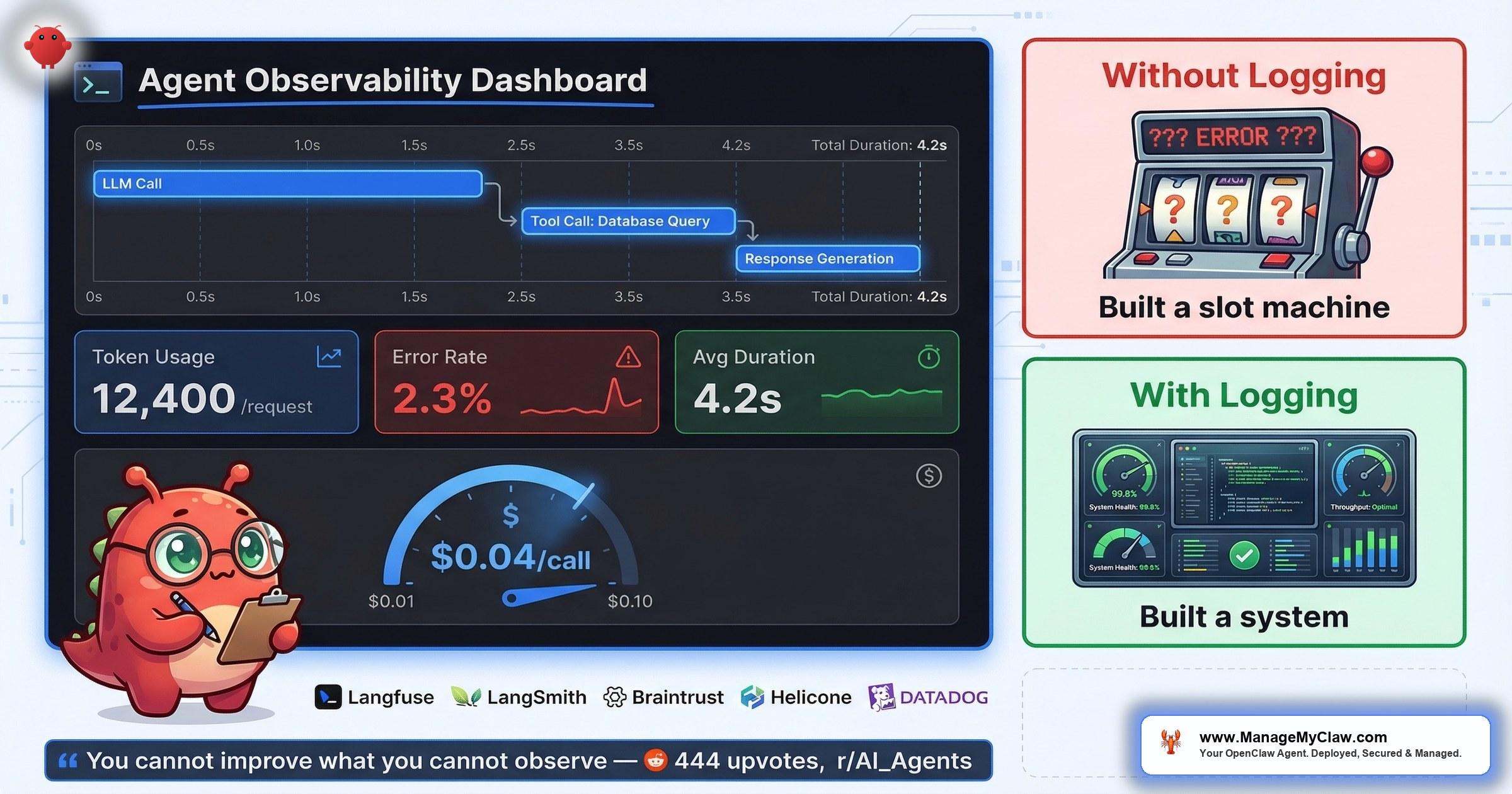
“You can’t improve what you can’t observe. ‘Built a slot machine’ is the right mental model for any agent without structured failure logging.” — top comment, 444-point r/AI_Agents thread
444 upvotes. 93 comments. And the line that cut through the entire thread on r/AI_Agents — titled I built AI agents for 20+ startups this year. Here is the engineering roadmap to actually getting started (444 points, 93 comments) — wasn’t about architecture, model selection, or prompt engineering. The top comment (21 upvotes) went straight to the gap nobody talks about: “Phase 5 logging point is the one most people skip.”
Built a slot machine. That’s what your agent is without structured logging. You pull the lever, get an output, and have no idea why it was good, no way to reproduce successes, and no early warning when failures start compounding. Another commenter on the same thread put it simply: “A bit more sophisticated than the usual OpenClaw on Mac mini post.” Translation: most people skip the hard operational work and jump straight to “look, it does tasks.”
The numbers back this up. Teleport’s February 2026 report found that 88% of enterprises had AI agent security incidents. Without logging, you wouldn’t even know if your agent was compromised — let alone when, how, or what data was exposed. You can’t debug failures you can’t see. You can’t optimize costs you can’t measure. And you can’t prove ROI to anyone (including yourself) without execution records.
Think of it like driving at night with your headlights off. You might reach your destination. You’ll have no idea what you passed, what you nearly hit, or why the engine sounds wrong.
This post breaks down the 6 layers of production agent logging, what to capture at each one, and how to build the observability stack that separates a slot machine from a system you can actually trust.
Why Logging Is the Step That Gets Skipped
On r/AI_Agents, a thread titled Running AI agents in production what does your stack look like in 2026? (43 points, 38 comments) surfaced the pattern from the production side. The top comment (16 upvotes): “Running a multi-agent system in production for about 8 months now. Here’s what actually survived vs what we threw out: Survived: Python orchestrator that treats each agent as a subprocess with its own…”
8 months of production experience, and the surviving stack includes logging as infrastructure, not an afterthought. But the same thread also highlighted the question most teams can’t answer: “I’m especially curious about agent memory and evaluation — how do you keep track of what agents learn and how well they’re performing?”
That question is the gap. Most OpenClaw users deploy, confirm the agent runs tasks, and stop there. They don’t track what the agent does after deployment — which tools it calls, how many tokens each request consumes, which workflows fail silently, or whether error rates are climbing. The result is a system that works until it doesn’t, with no diagnostic trail to explain the transition.
- It’s invisible work. Nobody demos their logging pipeline. Nobody tweets a screenshot of their error-rate dashboard. The incentive structure rewards shipping workflows, not instrumenting them.
- It feels premature. When you’re getting an agent to reliably draft emails, adding structured logging feels like optimizing a race car before you’ve learned to drive. But the logging is what teaches you to drive.
- The defaults don’t help. OpenClaw has built-in audit logging capability, but it isn’t enabled by default. If you don’t know it exists, you don’t turn it on. If you don’t turn it on, you’re running blind.
The 6 Layers of Production Agent Logging
Not all logging is equal. A timestamp and a “task completed” flag tells you almost nothing. The observability stack that actually lets you debug, optimize, and prove value has 6 distinct layers — each one answering a different question.
| # | Layer | What to Log | Why It Matters |
|---|---|---|---|
| 1 | Tool Calls | Which tool, inputs, outputs, duration (ms) | Debug failed workflows step-by-step; identify slow integrations |
| 2 | Token Consumption | Tokens per request, model used, cost per call | Track API spend per workflow; catch cost spikes before they compound |
| 3 | Error Rates | Failure type, frequency, affected workflow, stack trace | Spot failure patterns before they become outages |
| 4 | Execution Times | Workflow start-to-finish duration, per-step timing | Enforce SLAs; catch performance regressions after updates |
| 5 | Model Routing | Which model handled which task, routing decision reason | Validate cost-optimization rules; prove cheaper models handle routine tasks |
| 6 | Security Audit Trail | Auth events, permission escalations, external API calls, data access | Detect compromises; meet compliance; answer “what did the agent access?” |
Layers 1–3 are the minimum viable observability stack. If you log nothing else, log tool calls, token consumption, and errors. That alone gets you out of slot machine territory and into a system you can diagnose.
Layers 4–6 are where observability becomes operational intelligence. Execution times let you set SLAs. Model routing logs let you optimize costs. Security audit trails let you answer the question that 88% of enterprises couldn’t: “What happened, and when?”
The 2026 Observability Platform Landscape
Before diving into each layer, it’s worth understanding the tooling ecosystem — because in 2026, AI agent observability has evolved from a nice-to-have into mission-critical infrastructure. You don’t have to build everything from scratch. A growing category of platforms exists specifically to instrument, trace, and monitor agent workloads.
The current landscape breaks into three tiers:
- Open-source / self-hosted: Langfuse leads here — fully open source, self-hostable, and built specifically for LLM application tracing. If you want to own your data and avoid vendor lock-in, Langfuse is the default starting point.
- Proxy-based / lightweight: Helicone sits as a proxy in front of your LLM calls, capturing every request with zero code changes. Braintrust combines tracing with evaluation, so you can score agent outputs alongside the telemetry. Maxim AI focuses on quality evaluation with built-in testing frameworks.
- Enterprise / full-stack: Datadog added LLM observability to its existing APM stack. LangSmith integrates natively with LangChain-based agents. Arize AI and Weights & Biases bring ML experiment tracking to agent monitoring. TrueFoundry handles end-to-end LLMOps from deployment to observability.
You don’t need all of these. You don’t even need one of these on day one — a structured JSON log file works for getting started. But knowing the landscape matters because the observability stack you choose determines how much of the 6-layer framework you can automate vs. how much you’ll wire by hand.
How Traces and Spans Actually Work
The mental model that makes all of this concrete: every agent execution is a trace, and every step within that execution is a span. When your agent processes a request, it creates a trace. Each LLM call within that trace becomes a child span. Each tool call becomes another child span. If a tool call triggers additional LLM calls, those nest as child spans under the tool call span. The result is a tree structure that mirrors exactly what your agent did.
This isn’t theoretical — it’s how modern observability platforms structure agent telemetry, and it maps directly to the OpenTelemetry standard that is fast becoming the default instrumentation approach for agent monitoring in 2026. OneUptime published a detailed guide in March 2026 on monitoring AI agents in production with OpenTelemetry, and the pattern is straightforward: each agent step becomes a span with rich attributes attached automatically.
What Gets Captured Automatically Per Span
- Timing: total duration, LLM duration, time to first token
- Counts: number of LLM calls, tool calls, and errors (separated into LLM errors vs. tool errors)
- Token breakdown: prompt tokens, cached tokens, completion tokens, reasoning tokens
- Metadata: model name, tool names, parameters, results
- Cost: estimated cost per span, rolled up to the trace level
This is the skeleton behind everything that follows. When we talk about logging tool calls, token consumption, and errors — what we’re really talking about is attaching structured data to spans within a trace. The 6-layer framework maps directly onto this architecture.
Tool Call Logging — Your Diagnostic Backbone
Every action your agent takes goes through a tool call. Send an email? Tool call. Query a database? Tool call. Read a file? Tool call. If you log every tool invocation with its inputs, outputs, and duration, you have a complete replay of what the agent did and how long each step took.
This is the layer that turns “it didn’t work” into “it failed at step 3 because the calendar API returned a 429 after 2,300ms.” That’s the difference between spending 45 minutes guessing and spending 45 seconds reading a log.
In the trace/span model, each tool call is a child span under the parent agent step. The observability platform automatically captures the tool name, parameters passed, the result returned, and timing — but only if you’ve instrumented it. With OpenTelemetry-based setups, this instrumentation can be as simple as wrapping your tool executor with a span decorator. With platforms like Langfuse or Braintrust, it’s often a single SDK call.
What to Capture Per Tool Call
- Tool name — which integration was invoked
- Input payload — what the agent asked the tool to do (sanitize sensitive data)
- Output summary — success/failure, response code, truncated result
- Duration — milliseconds from invocation to response
- Workflow context — which parent workflow triggered this call
Over time, tool call logs reveal patterns that are invisible in real time. You’ll notice that one integration consistently takes 3x longer than the others. You’ll see that 80% of failures cluster around a single API. You’ll spot the tool call that always precedes a timeout. None of this is visible without the log.
Token Consumption — Your Cost Dashboard
Token logging answers the question that matters most after “does it work?”: how much does it cost per task?
Without per-request token tracking, your API bill is a black box. You know the monthly total, but you don’t know which workflow consumed 70% of it. You can’t tell whether last week’s cost spike came from a new workflow, a prompt that ballooned, or a model routing misconfiguration that sent routine tasks to your most expensive model.
“Manifest is open source btw, I’m a contributor. Very useful plugin to manage AI costs!” … “Strong list. The biggest unlock for me was routing plus observability together, not either one alone.”
r/openclaw — “5 OpenClaw plugins that actually make it production-ready” (154 pts, 59 comments)The specifics on Manifest are worth understanding because they illustrate what intelligent cost control actually looks like in practice. Manifest analyzes each incoming query locally in under 2 milliseconds to determine task complexity, then routes the request to the most adapted model. Simple tasks go to cheaper models. Complex tasks go to premium ones. No data leaves your machine during the routing decision — the analysis happens entirely on your local hardware. The Claw Market Map Q1 2026, published by Manifest, now catalogs the broader ecosystem — the OpenClaw Directory tracks 39 tools across 9 functional categories.
But Manifest only works as well as it does because token logging closes the loop. Routing without observability is guessing which model is cheaper. Observability without routing is knowing your costs but not being able to control them. Together, they form a feedback loop: log your costs, identify the expensive workflows, route them to cheaper models, verify the quality holds, repeat.
It’s like having a fuel gauge vs. not having one. You can drive without it. But you’ll only discover the problem when you’re stranded on the shoulder.
Error Rates — Your Early Warning System
Agents fail silently. That’s the fundamental difference between traditional software and AI agent systems. A web app throws a 500 error and your users see it. An agent encounters a malformed API response, retries twice, falls back to a default, and produces an output that looks plausible but is wrong. Without error logging, you’d never know.
Error rate tracking separates transient failures (an API had a 5-second outage) from systemic ones (your prompt template breaks every time the input exceeds 2,000 tokens). The first type resolves itself. The second type gets worse as your workload scales.
- API failures — rate limits, auth expiry, service outages
- Token-limit errors — context window exceeded, response truncated
- Malformed input — upstream data changed format, missing fields
- Timeout errors — tool calls or model inference exceeding thresholds
- Logic failures — agent produced output but it didn’t match expected pattern
When you categorize errors, you can set alerts. A spike in API failures means your credentials may have expired or a provider is having an outage. A spike in token-limit errors means your context is growing and you need to adjust chunking or model selection. A spike in logic failures means something changed in your prompt or your data — and that’s the one that’ll cost you the most if you don’t catch it.
Execution Times, Model Routing, Security Audit
Execution time logging tells you whether your agent is getting slower. After an OpenClaw update, after adding a new workflow, after increasing the context window — these are the moments when performance regressions sneak in. Without timing data, you’ll feel like the agent is “somehow slower” but won’t be able to prove it or pinpoint the cause. With timing data, you’ll see that workflow execution jumped from 12 seconds to 38 seconds after the last update, and the bottleneck is step 4 (calendar API integration).
Model routing logs close the cost-optimization loop. If you’ve set up routing rules (cheap model for email triage, premium model for client proposals), the log tells you whether those rules are actually firing. You’ll catch the misconfiguration where every task was silently routed to your most expensive model because a fallback rule was too broad. Model routing is one of the core cost levers for any OpenClaw business deployment — but the lever only works if you can verify it’s being pulled.
Security audit logging is the layer that addresses the 88% statistic. Teleport’s report didn’t say enterprises were careless. It said they had incidents they couldn’t explain because they lacked the audit trail.
OpenClaw has built-in audit logging capability — but it needs to be enabled. Once on, it captures auth events, permission changes, external API calls, and data access patterns. This is item 11 on the 14-point security audit checklist, and it’s the one that separates “we had an incident” from “we had an incident and know exactly what happened.”
Two plugins from the OpenClaw ecosystem reinforce these layers. SecureClaw hardens your agent’s runtime by mapping every action to the OWASP Top 10 for Agents — it actively prevents prompt injection attacks from reaching the system shell, which means your audit logs capture attempted breaches, not just successful ones. memory-lancedb addresses a different gap: it replaces flat Markdown file storage (the default MEMORY.md approach) with vector-backed long-term memory using LanceDB. Auto-recall and auto-capture mean your agent’s context accumulates without manual file maintenance — and every memory operation becomes a loggable event. Both plugins are cataloged in the OpenClaw Directory alongside the broader set of 39 tools across 9 functional categories.
The Production Logging Checklist
Here’s the checklist, organized by priority. Start at the top and work down. You don’t need all 12 items on day one — but you need the first 5 before you’re running anything you’d call “production.”
| # | Checklist Item | Priority | What You Get |
|---|---|---|---|
| 1 | Enable OpenClaw audit logging | Day 1 | Security audit trail; answers “what did the agent access?” |
| 2 | Log every tool call (name, input, output, duration) | Day 1 | Step-by-step workflow replay for debugging |
| 3 | Track token consumption per request | Day 1 | Per-workflow cost attribution; catch cost spikes |
| 4 | Categorize errors by type | Day 1 | Distinguish transient failures from systemic ones |
| 5 | Record workflow execution times | Day 1 | SLA tracking; performance regression detection |
| 6 | Log model selection per task | Week 1 | Verify routing rules are firing correctly |
| 7 | Set up weekly cost-per-workflow summary | Week 1 | Trend tracking; budget forecasting |
| 8 | Configure error-rate alerts | Week 2 | Proactive failure detection instead of reactive |
| 9 | Track context window utilization | Week 2 | Predict token-limit errors before they happen |
| 10 | Build monthly health report | Month 1 | Uptime, costs, error rates, recommendations — all in one view |
| 11 | Run quarterly cost optimization review | Quarter 1 | Typical savings of 20–40% from routing and model adjustments |
| 12 | Cross-workflow dependency mapping | Quarter 1 | Prevent cascading failures; understand system-level risk |
Items 1–5 are your minimum viable observability stack. A text file is fine. A structured JSON log is better. A dashboard is ideal but not required on day one. The point isn’t the tooling — it’s the habit of recording what your agent does so you can learn from it.
The ROI of Logging: What You Actually Get Back
Logging costs time to set up. Here’s what it pays back:
Cost optimization. When you can see token consumption per workflow, you can route expensive tasks to cheaper models. Quarterly cost optimization reviews — reviewing model routing, prompt efficiency, and API usage patterns — typically yield 20–40% savings. That’s not theoretical; it’s the range ManageMyClaw sees across Managed Care deployments doing exactly this review every quarter.
Faster debugging. Without logs, debugging a failed workflow means re-running it and watching. With tool call logs, you read the execution trace, find the failing step, and fix it. The difference is minutes vs. hours.
Security incident response. 88% of enterprises had AI agent security incidents (Teleport, February 2026). The ones with audit logging can answer “what was accessed, when, and by which process.” The ones without can’t. If your agent is compromised and you don’t have logs, you don’t have a breach response — you have a guessing game.
Proof of value. Your agent saved 10 hours this week? Show the execution log. It processed 47 emails, drafted 12 reports, and updated 8 CRM records? Show the tool call history. Without records, ROI is a feeling. With records, it’s a number. And numbers are what justify the next budget conversation.
What a Monthly Health Report Actually Contains
If you’re building your own observability stack, here’s the template for the monthly health report that turns raw logs into actionable insight. This is the same structure behind ManageMyClaw’s Managed Care ($299/month) health reports, and you can build a version of it yourself if you have the logging layers in place:
| Section | What It Tracks | Why It Matters |
|---|---|---|
| Uptime | % of time agent was available and responsive | Baseline reliability metric |
| API Costs | Total spend, broken down by workflow and model | Budget tracking and cost attribution |
| Workflow Execution | Total runs, success rate, avg duration per workflow | Performance benchmarking |
| Error Rates | Categorized by type, with trend vs. previous month | Regression and degradation detection |
| Recommendations | Routing changes, prompt adjustments, model swaps | Data-driven optimization actions |
The recommendations section is where logging pays for itself. Without data, optimization advice is generic (“try a cheaper model”). With data, it’s specific (“your email-triage workflow used 340,000 tokens last month at $0.015/1K on Model X; switching to Model Y would cut that to $0.003/1K with comparable quality based on your error-rate data”).
The difference between a health report and a dashboard is judgment. A dashboard shows you numbers. A health report tells you what the numbers mean and what to do about them.
From Slot Machine to System
The r/AI_Agents commenter who said you’ve “built a slot machine” wasn’t being harsh. They were being precise. A slot machine has three properties: unpredictable outputs, no diagnostic trail, and no mechanism for improvement. An agent without logging has the same three properties. You pull the lever (run the workflow), get a result (sometimes good, sometimes bad), and have no structured way to make the next pull more reliable than the last.
Logging is the mechanism that converts a slot machine into a system. You can’t improve what you can’t observe. You can’t debug what you can’t replay. You can’t optimize costs you can’t attribute. And you can’t defend against security incidents you can’t detect.
The 6 layers aren’t complicated. Tool calls, tokens, errors, execution times, model routing, security audit. Most OpenClaw users skip all 6. The ones running stable production deployments 8 months in? They didn’t skip any of them.
Frequently Asked Questions
Does OpenClaw have built-in logging?
OpenClaw has built-in audit logging capability, but it isn’t enabled by default. You need to explicitly turn it on in your configuration. Once enabled, it captures auth events, permission changes, and data access patterns. ManageMyClaw enables audit logging as part of every standard deployment — it’s item 11 on the 14-point security audit checklist. Beyond audit logging, the tool call logging, token tracking, and error categorization described in this post require additional configuration or instrumentation on top of OpenClaw’s defaults.
What’s the minimum logging I need for a production deployment?
At minimum, log every tool call (which tool, inputs, outputs, duration), token consumption per request (for cost tracking), and error rates with failure categorization. Those 3 layers get you out of “slot machine” territory. You can start with a structured JSON log file — you don’t need a full observability platform on day one. Add execution timing and model routing logs in week one, and security audit logging from day one if you’re handling any sensitive data.
How does logging help with cost optimization?
Token consumption logging lets you attribute API costs to specific workflows. Once you can see that your email-triage workflow uses 40% of your monthly token budget, you can make targeted decisions: route it to a cheaper model, optimize the prompt to reduce token count, or restructure the workflow to batch API calls. Quarterly cost optimization reviews based on this data typically yield 20–40% savings. Without the per-workflow attribution, you’re optimizing blindly.
Why does Teleport’s 88% statistic matter for OpenClaw users?
Teleport’s February 2026 report found that 88% of enterprises had AI agent security incidents. The critical question isn’t whether incidents happen — it’s whether you can detect and respond to them. Without security audit logging enabled, a compromised OpenClaw agent could access data, make external API calls, or modify configurations, and you’d have no record of what happened. Audit logging is what turns a security incident from an undetectable event into one you can investigate, contain, and learn from.
What’s the difference between audit logging and tool call logging?
Audit logging tracks security-relevant events: who authenticated, what permissions were used, which external services were accessed, and what data was read or written. Tool call logging tracks operational events: which tools the agent invoked, what inputs it sent, what outputs it received, and how long each call took. Audit logging answers “was the system compromised?” Tool call logging answers “why did this workflow fail?” You need both, but they serve different purposes and often live in separate log streams.
Which observability platforms work for OpenClaw agent monitoring?
The 2026 landscape includes several purpose-built options. For open-source and self-hosted: Langfuse gives you full tracing with no vendor lock-in. For lightweight integration: Helicone acts as a proxy requiring zero code changes, and Braintrust combines tracing with evaluation scoring. For enterprise environments already running APM: Datadog, Arize AI, and Weights & Biases have added LLM-specific observability layers. The OpenTelemetry standard is becoming the default instrumentation approach — OneUptime published a March 2026 guide on using it specifically for AI agent monitoring. You don’t need a platform on day one (a structured JSON log file works), but choosing one early avoids painful migration later when your log volume scales.
Can I build this observability stack myself, or do I need a managed service?
You can build it yourself. The 12-item checklist in this post is the full playbook. Enable OpenClaw’s audit logging, add tool call and token logging to your agent configuration, set up error categorization, and build a monthly review process. The technical work is straightforward. The ongoing work — reviewing logs weekly, running quarterly cost optimizations, adjusting routing rules based on the data, responding to security alerts — is where most self-managed deployments fall behind. That ongoing operational work is exactly what Managed Care ($299/month) covers, including the monthly health report with uptime, API costs, workflow execution, error rates, and specific recommendations.
How do I know if my agent has been compromised if I don’t have logging?
You likely won’t. That’s the problem. Without audit logging, a compromised agent can access data, make external API calls, and modify system configurations without generating any alert or record. You might notice indirect signs — unexpected API costs, outputs that don’t match what you expected, or third-party services reporting unusual access patterns — but by the time those signals are visible, the incident has already happened. Audit logging is the difference between detecting a breach in hours vs. never detecting it at all.


