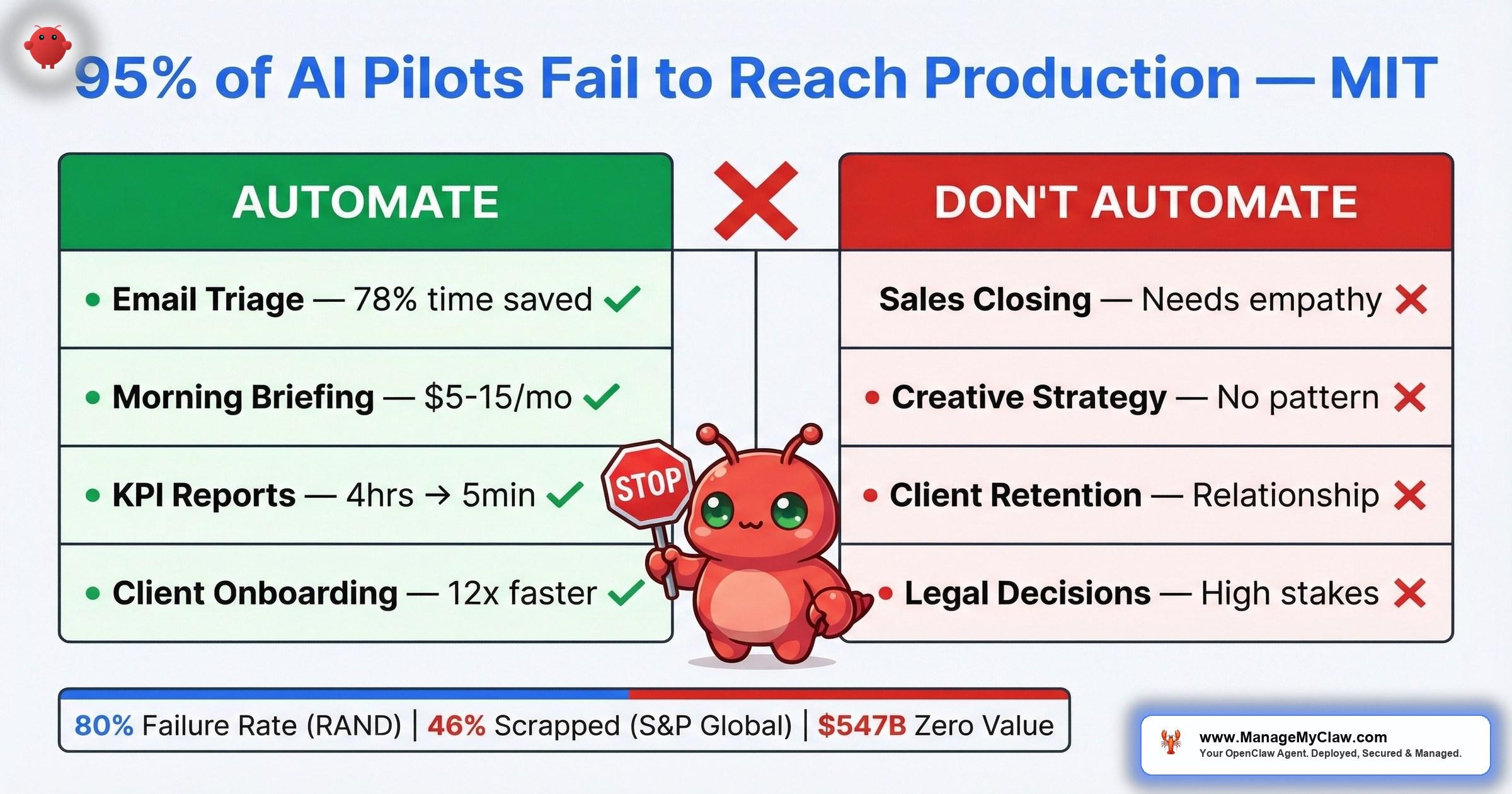
$547 billion in AI investment delivered zero intended business value in 2025. MIT found 95% of enterprise AI pilots fail to reach production. The technology works — the task selection doesn’t.
$547 billion. That’s the amount of the $684 billion companies invested in AI in 2025 that delivered zero intended business value, according to Pertama Partners’ analysis. Not “underperformed.” Not “still ramping up.” Zero. Meanwhile, an NBER study of nearly 6,000 executives confirmed that over 80% of companies report no measurable productivity gains from AI — despite 70% actively using the tools.
The 2026 data is even sharper. MIT’s Project NANDA found that 95% of custom enterprise generative AI pilots fail to reach production with measurable impact. RAND Corporation pegs the broader AI project failure rate above 80%. And S&P Global reported that the average organization scrapped 46% of its AI proof-of-concepts before they ever reached production. Nearly half the pilots — killed before launch. The pattern isn’t subtle.
And yet, some companies see a median 30% productivity gain. Goldman Sachs found it — but only in 2 specific, localized use cases. The difference isn’t the technology. It’s which tasks you point it at.
On r/automation, a thread titled “What’s something businesses are automating with AI that they absolutely shouldn’t be?” started trending this week. The answers cut straight through the hype: tasks that change every time, interactions that depend on relationships, decisions that require human judgment.
r/automation — trending thread, March 2026The community already knows what the data confirms — “automatable” and “should automate” are two very different things.
Think of it like a kitchen knife. It can cut bread and it can cut wire. One of those uses makes dinner. The other destroys the knife.
This post covers the 6 anti-patterns that waste your automation budget, the decision framework for telling the difference, and what actually delivers returns — with production benchmarks and community-verified examples.
Automating Tasks That Change Every Time
AI automation delivers on repeatable patterns. Consistent trigger, structured input, defined output. When the input changes shape every time the task runs, the agent can’t build reliable behavior — it’s guessing, not automating.
McKinsey found that 60% of knowledge worker time goes to routine administrative tasks, and 60–70% of that is technically automatable. But “technically automatable” is a trap. A task that runs differently every Tuesday and Friday, or varies based on which client is involved, or requires reading context that exists only in someone’s head — that’s not a repeatable pattern. That’s ad hoc work wearing a routine mask.
“This is super interesting. Typically what I’ve heard is that the more ‘simple’ non-AI based automations are actually more reliable.”
r/AI_Agents — “Automation Alone Didn’t Help Our Business — Intelligent AI Agents Did”The takeaway isn’t that AI can’t handle complexity. It’s that the tasks worth automating are the boring ones with stable, predictable structures. Variable tasks need human judgment, not an agent that hallucinates consistency where none exists.
Identify the repeatable kernel inside the variable task. A sales call changes every time — but the CRM note that follows it has a consistent structure. Automate the note, not the call.
Automating Relationship-Dependent Interactions
Sales closing, client retention conversations, performance reviews, partnership negotiations. These depend on understanding the specific person — their history with you, their communication style, what they care about, what they’ve tolerated, and what they won’t. An AI agent can draft a perfectly structured follow-up email. It can’t know that this particular client needs a phone call because they went quiet last quarter for a reason that isn’t in the CRM.
“Support queries, qualifying leads and automation of internal ops. Mostly is ecommerce and SaaS based.”
r/AI_Agents — “Where are AI agents actually being used in real business workflows?”Notice what’s on that list — support queries, lead qualification, internal operations. And notice what’s absent: closing deals, retaining at-risk clients, managing high-value relationships.
It’s the difference between a GPS and a tour guide. The GPS calculates the route. The tour guide knows that the shortcut through the alley is actually dangerous at night. Relationship work is tour-guide work.
The idea that replacing human workers with AI is a cost-saving strategy ignores the essential value of human connection and empathy. A machine can process data 24/7, but it cannot build real relationships or understand emotional nuances. The smarter play isn’t firing your team — it’s using AI to automate the boring tasks so your people have more time for the high-touch activities that actually retain clients and close deals.
Automate the prep work around the relationship, not the relationship itself. Lead qualification and scoring? Automate it. The closing conversation? That’s yours.
Automating Without Measuring First
You can’t prove ROI without a baseline. And most companies deploy AI automation without tracking how long the task actually takes today. No baseline means no before-and-after comparison. No comparison means you can’t tell your CFO (or yourself) whether the $200/month in API costs is saving you $2,000 or $20 in time.
This is how the 80% failure rate works in practice. The technology runs. The agent processes email or generates reports. And 3 months later, when someone asks “is this actually worth it?” nobody can answer because nobody measured what “before” looked like.
“Phase 5 logging point is the one most people skip. You can’t improve what you can’t observe.”
r/AI_Agents — “I built AI agents for 20+ startups this year” (444 points)Track the task manually for 1 week before deploying any automation. How many minutes per day? How many times per week? What’s the error rate? Those 5 days of measurement are worth more than 5 months of automation without them. The full framework is in the ROI calculator.
Automating Too Many Workflows at Once
5 workflows deployed on a long weekend. By week 3, 2 have silent failures. By week 6, a cascading error takes out a third. By month 3, you’re rebuilding from scratch — and you’re in worse shape than if you’d never automated at all because now you’ve lost confidence in the entire approach.
CNBC identified “silent failure at scale” as the AI risk that can tip the business world into disorder. It’s not a dramatic crash. It’s a slow accumulation of undetected errors across multiple automated workflows, each one operating without oversight, each one drifting from its intended behavior. By the time someone notices, the damage is compounded across every workflow that was running unsupervised.
“Yes, it’s transformative but only when paired with strong system design and human oversight.”
r/AI_Agents — “The Role of Agentic AI in Business Automation: Is It the Future?”Business automation has been around for decades. The ones that work — payroll, invoicing, email routing — were deployed incrementally, tested in isolation, and stabilized before expansion. AI automation follows the same pattern. The only thing new is the temptation to skip those steps because the setup feels faster.
Deloitte quantified the organizational cost: companies with poor cross-team alignment lose 20–30% of productivity annually due to rework and delays. When you deploy 5 workflows across 5 teams without coordinating ownership, exception handling, and handoff points, you’re not scaling automation — you’re scaling misalignment.
1 workflow. 30 days stable. Then add the second. Better 2 workflows that save 10 hours per week than 10 that collect dust. Browse the workflow library to find the highest-impact starting point.
Automating High-Stakes Decisions Without Human Review
Legal filings. Financial approvals. Medical recommendations. Pricing changes. These are tasks where a wrong answer doesn’t just waste time — it creates liability. An AI agent can draft the legal brief, generate the financial model, or summarize the patient history. It should never be the last set of eyes on any of them.
The failure here isn’t that AI produces bad output. It’s that high-stakes decisions have a different cost function for errors. A misrouted email is an inconvenience. A financial filing with hallucinated numbers is a compliance violation. The agent doesn’t know the difference — both are just token sequences to the model.
Would you let a new hire sign off on your tax return without review? The agent is the new hire. It’s fast, it’s capable, and it has no idea what it doesn’t know.
Use AI to prepare, not to decide. Let the agent do the 90% of work that’s research, formatting, and data assembly. Keep the final sign-off with a human. This is where the real time savings live — you go from 4 hours of preparation + 10 minutes of review to 5 minutes of preparation + 10 minutes of review.
Automating Without a Maintenance Model
Deploy and forget. That’s the plan for most first-time AI automation users. Set up the agent on a Saturday, watch it work on Sunday, and never touch it again. 3 months later, an API update breaks the integration, a prompt change from the model provider shifts the output format, or your own business processes evolve and the agent is still running the old playbook.
The r/AI_Agents thread on building agents for 20+ startups (444 points) surfaced this as the hidden cost most people underestimate. The logging point — “you can’t improve what you can’t observe” — is one side of it. The other side is that observation without a review cadence is just surveillance footage nobody watches.
Build a review cadence. Monthly for the first 90 days. Quarterly after that. Check output quality, error rates, API costs, and whether the workflow still matches how your business actually operates. Automation that worked 6 months ago might need tuning today — not because it broke, but because you changed.
The Decision Framework: Automate vs. Don’t Automate
Before deploying any workflow, run it through this table. If the task falls on the left side, it’s a candidate. If it lands on the right, keep it human — or automate only the structured sub-tasks within it.
| Criteria | Automate | Don’t Automate |
|---|---|---|
| Trigger | Consistent event or schedule (new email, daily cron, form submission) | Ad hoc, varies by context, initiated by judgment call |
| Input | Structured data (emails, form fields, API responses, spreadsheets) | Unstructured, requires reading between the lines, changes format each time |
| Output | Defined action (categorize, draft, summarize, route, report) | Requires empathy, persuasion, novel problem-solving, or strategic direction |
| Error Cost | Low — wrong categorization is fixable in minutes | High — wrong filing, wrong pricing, wrong medical advice creates liability |
| Pattern | Repeats 5+ times per week with consistent structure | Unique each time, requires custom handling |
| Relationship | Transactional or internal (lead scoring, status updates, data pulls) | Trust-dependent (client retention, negotiations, performance feedback) |
Most tasks aren’t cleanly one side or the other. The skill is decomposition — splitting a task into its automatable and non-automatable components. A client proposal has a data-gathering phase (automate it), a drafting phase (automate it), and a relationship-sensitive customization phase (keep it human). You don’t automate the task. You automate the 70% that’s structured and keep the 30% that requires you.
What Actually Works: The ROI Comparison
Here’s the production data on workflows that consistently deliver returns versus the anti-patterns that don’t. These benchmarks are from deployed workflows — not projections.
| Workflow | Time Savings | Monthly API Cost | Verdict |
|---|---|---|---|
| Email triage | 78% reduction in processing time | $15–$40 | High ROI |
| Client onboarding | 12x faster (2 hrs → 10 min) | $10–$30 | High ROI |
| Business reporting | 4 hrs → 5 min | $5–$15 | High ROI |
| Morning briefing | Replaces opening 5 apps | $5–$15 | High ROI |
| Social media pipeline | Cross-platform adaptation automated | $10–$25 | High ROI |
| Sales closing calls | N/A — relationship-dependent | — | Don’t automate |
| Client retention outreach | N/A — trust-dependent | — | Don’t automate |
| Legal/financial filings | Prep automatable, sign-off isn’t | — | Partial only |
| Strategic planning | N/A — requires judgment + context | — | Don’t automate |
| Variable, ad hoc tasks | N/A — no repeatable pattern | — | Don’t automate |
The pattern in the “High ROI” column is consistent: structured inputs, defined outputs, repeatable triggers, low error costs. Every workflow in the “Don’t automate” column violates at least 2 of those properties.
The Pre-Deployment Checklist
Before automating any workflow, run through these 5 questions. If you answer “no” to 2 or more, the task isn’t ready for automation — or it shouldn’t be automated at all.
- Does this task have a consistent trigger? If it only fires when someone remembers to do it, or when “it feels like it’s time,” it doesn’t have a trigger — it has a vibe.
- Can you describe the input format? If the answer is “it depends,” you need to define the conditions before you automate.
- Is the output verifiable? Can a human check in 30 seconds whether the agent got it right? If verification takes as long as doing the task, the automation isn’t saving time.
- Do you have a baseline measurement? How long does this task take today? How often does it run? What’s the error rate? No baseline means no ROI proof — ever.
- What’s the cost of a wrong answer? If a mistake costs you 5 minutes of correction, automate freely. If it costs you a client or a compliance violation, add mandatory human review.
ManageMyClaw’s intake form runs through this logic before any deployment — identifying the 2–3 highest-impact automation candidates and filtering out the anti-patterns. Starter tier starts with 1 workflow by design, not limitation. Because 1 workflow running well is worth more than 5 collecting errors.
What the 20% Do Differently
The companies in the 20% that see real productivity gains from AI aren’t doing more. They’re doing less — and doing it right. The pattern from every community thread, every study, every production deployment:
- They pick boring tasks. Email triage, morning briefings, KPI pulls, onboarding checklists. Not the flashy use case from the demo. The repeatable workflow that eats 2 hours every day.
- They measure before deploying. 1 week of tracking what the task actually costs in time. Then they deploy. Then they compare.
- They start with 1 workflow. Get it stable for 30 days. Add the second only when the first runs without intervention.
- They keep humans on high-stakes decisions. AI prepares. Humans approve. The 90/10 split — 90% of the work automated, 10% final review — is where the real time savings live.
- They build a maintenance cadence. Monthly reviews for the first quarter. Quarterly after that. Not “set and forget” — “set and verify.”
The $547 billion failure isn’t a story about AI not working. It’s a story about companies automating the wrong things, skipping the measurement, and hoping the technology would compensate for the missing process.
MIT’s 95% pilot failure rate, RAND’s 80%+ project failure rate, S&P Global’s 46% scrap rate — these aren’t different problems. They’re the same problem measured at different stages of the pipeline.
The technology works. The question is whether you’re pointing it at tasks where it can deliver — or tasks where you’re paying for the privilege of creating new problems.
The Bottom Line
The most expensive AI automation isn’t the one that costs the most. It’s the one that automates the wrong task. $15/month on email triage that saves 8+ hours per week is one of the best investments in your business. $200/month on an agent that handles client retention calls badly enough to lose 2 accounts is one of the worst.
The 6 anti-patterns — variable tasks, relationship-dependent interactions, no baseline measurement, too many workflows at once, unsupervised high-stakes decisions, and no maintenance model — account for the vast majority of the 80%+ failure rate that RAND, MIT, and S&P Global have all independently confirmed. Avoid all 6 and you’ve already separated yourself from the 95% of enterprise pilots that never reach production and the $547 billion that went nowhere.
The full failure analysis covers the 5 deployment failure modes in depth. Run your numbers through the ROI calculator to see which workflows hit break-even in the first month.
Start with the right task. Measure the baseline. Deploy one workflow. Get it stable. Then expand.
Frequently Asked Questions
What tasks should you never automate with AI?
Tasks that require relationship context (sales closing, client retention), change format every time (ad hoc work with no repeatable pattern), or carry high error costs without human review (legal filings, financial approvals, medical decisions). You can automate the structured sub-tasks within these — the data gathering, the draft preparation, the scheduling — but the judgment call stays with a human.
Why do 80% of AI automation projects fail to deliver ROI?
6 anti-patterns: automating variable tasks, automating relationship-dependent interactions, deploying without baseline measurements, launching too many workflows at once, skipping human review on high-stakes decisions, and having no maintenance model. RAND Corporation pegs the broader failure rate above 80%. MIT’s Project NANDA found 95% of custom enterprise generative AI pilots fail to reach production. S&P Global reported that the average organization scrapped 46% of AI proof-of-concepts before production. The technology works — the task selection doesn’t. Goldman Sachs found a 30% productivity gain, but only in 2 structured use cases.
How do I know if a task is worth automating?
Run 5 checks: consistent trigger, structured input, verifiable output, existing baseline measurement, and low error cost. Tasks that pass all 5 — email triage, morning briefings, KPI reporting, client onboarding — consistently deliver returns at $5–$40/month in API costs. Tasks that fail 2 or more checks are either not ready for automation or shouldn’t be automated.
What’s the best first workflow to automate?
Email triage or morning briefing. Email triage delivers a 78% reduction in inbox processing time at $15–$40/month. Morning briefing is read-only (zero risk of destructive action) and replaces opening 5 apps at $5–$15/month. Both have consistent triggers, structured inputs, and verifiable outputs. Start with one, run it for 30 days, then add the second.
Can I automate parts of a task that shouldn’t be fully automated?
Yes — and you should. A client proposal has a data-gathering phase (automate it), a drafting phase (automate it), and a relationship-sensitive customization phase (keep it human). Legal filings have a research phase (automate it) and a sign-off phase (human review). The 90/10 split — automate the structured 90%, review the judgment-based 10% — is where the biggest time savings come from.
How many workflows should I automate at once?
One. Get it stable for 30 days without manual intervention, then add the second. Deploying 5 workflows on a weekend creates 5 potential failure modes, and when something breaks you can’t isolate which one caused it. Better 2 workflows that save 10 hours per week than 10 that collect dust. ManageMyClaw’s Starter tier is 1 workflow by design — because that’s how deployments succeed.
Why should I measure a task before automating it?
Without a baseline, you can never prove ROI. Track the task manually for 1 week: how many minutes per occurrence, how many times per week, what’s the error rate. Those 5 days of measurement are worth more than 5 months of automation without them. The ROI calculator walks through the full framework with break-even math at 3 founder hourly rates.


