OpenClaw Pricing Comparison 2026
“OpenClaw is free to download. But ‘free software’ and ‘free to run’ aren’t the same thing. A VPS costs $12–24/month. API fees run $50–200/month. Setup takes 15+ hours. This page breaks down every real cost — no adjectives, just math.”
OpenClaw is MIT-licensed, open-source software with 250,000+ GitHub stars and 196 contributors. You can install it right now without paying anyone.
But a VPS costs $12–24/month. AI model API fees run $50–200/month. Setup takes 15+ hours if you do it yourself — and at founder rates of $200–$500/hour, that’s $3,000–$7,500 in time before your agent sends its first morning briefing. Then there’s security hardening, ongoing updates (7 in the last 2 weeks), and the 9 disclosed CVEs you need to track.
This page breaks down every cost of running OpenClaw in 2026 — software, hosting, API, setup services, and managed care. Whether you’re doing it yourself, hiring a freelancer, or using a managed service like ManageMyClaw, SetupClaw, SuperClaw, or Clawable, you’ll find the real numbers here. For a narrative walkthrough, read our 2026 OpenClaw pricing guide.
OpenClaw Software: Free (MIT License)
The OpenClaw software itself costs $0. It’s open-source under the MIT license. You can download it from GitHub, fork it, modify it, and deploy it without paying a licensing fee — ever.
This is what makes OpenClaw different from closed-source AI assistants. You own the code. You control your data. No vendor lock-in.
The software is just the starting point. Running it requires infrastructure, API access, and — if you want it done properly — security hardening that most tutorials skip entirely.
Hosting Costs: $12–24/Month for a VPS (or a $599+ Mac Mini)
OpenClaw needs to run somewhere. You have two options: a cloud VPS or a physical Mac Mini. For 95% of use cases, a VPS is the better choice.
VPS Hosting
A VPS (Virtual Private Server) is a cloud server that runs 24/7. It’s cheaper, more reliable (99.9% uptime), and easier to secure than home hardware.
| VPS Provider | Monthly Cost | Notes |
|---|---|---|
| Contabo | $5–10/mo | Budget option, adequate for single-agent setups |
| Hetzner | $10–15/mo | Strong value, popular with the OpenClaw community |
| DigitalOcean | $12–24/mo | Reliable, well-documented, good for beginners |
| AWS Lightsail | $12–24/mo | One-click OpenClaw images available |
| Hostinger | $10–20/mo | Budget-friendly with OpenClaw tutorials |
Typical recommendation: $12–24/month gets you a VPS with enough CPU, RAM, and storage for 1–3 OpenClaw agents.
Mac Mini
A Mac Mini is the only option if you need iMessage integration (Apple restricts iMessage to macOS hardware). Otherwise, a VPS is cheaper and more reliable.
- Mac Mini M4 (base): ~$599 one-time
- Electricity: $5–10/month
- Home internet dependency: power outages, ISP downtime, and security risks of running a server on a residential network
Even the OpenClaw creator has told users to stop buying unnecessary hardware. Unless you specifically need iMessage, stick with a VPS. Learn more about how our setup process works.
Bottom line: Budget $12–24/month for hosting. This cost is the same regardless of whether you set up OpenClaw yourself or use any service provider.
AI Model API Costs: $50–200/Month
OpenClaw uses AI models (Anthropic Claude, OpenAI GPT, or others) to power its intelligence. These models charge per token — which means every email your agent reads, every response it drafts, and every workflow it runs costs a small amount. Over a month, it adds up.
| Usage Level | Monthly API Cost | Example Workload |
|---|---|---|
| Light | $50–75/mo | Morning briefing + light email triage (20–30 emails/day) |
| Moderate | $75–125/mo | Email triage + calendar management + 1–2 additional workflows |
| Heavy | $125–200/mo | Full suite: email, calendar, onboarding, KPI reporting, content pipeline |
What drives API costs up or down
- Model choice: Claude Sonnet is cheaper per token than Claude Opus. GPT-4o is cheaper than GPT-4. We configure model routing during setup to use the right model for each task — not the most expensive one for everything.
- Email volume: 50 emails/day at ~$20/month. 200 emails/day at ~$60–80/month.
- Workflow complexity: A morning briefing costs $5–15/month. A customer service bot handling 50 conversations/day costs $30–80/month.
- Memory usage: Agents with Supermemory configured use additional tokens to store and retrieve context.
Budget $50–200/month for API costs. This cost is the same whether you self-host, use a freelancer, or use a managed service. Every provider charges this on top of their service fee. If a provider doesn’t mention API costs, they’re hiding them — not eliminating them.
Setup Options Compared: From DIY to White-Glove
This is where the real decisions are. The software is free. Hosting and API costs are roughly the same for everyone. The variable is who sets it up, how well they do it, and what happens afterward.
Option 1: DIY Setup — $0 (Plus 15+ Hours of Your Time)
The cheapest option on paper. The most expensive option in practice for most founders. Full control — you do everything from VPS provisioning to Docker security hardening. See what DIY OpenClaw setup really costs.
- DOCKER-USER iptables chain — Docker bypasses standard UFW firewall rules; most tutorials don’t mention this
- Non-root container users — default Docker runs as root, exposing your host system
- Tool permission allowlists — the inbox-wipe incident happened because the agent had unrestricted access
- ClawHub skill vetting — the ClawHavoc attack planted 2,400+ malicious plugins via typosquatting
- System-level safety constraints — user-level instructions get compacted away when the agent’s memory fills up
Best for: Technical founders who enjoy configuring infrastructure and have 15+ hours to spare.
Year 1 real cost: $3,000–$7,500 in time + $744–$2,688 in hosting/API = $3,744–$10,188.
Option 2: Freelancers (Fiverr, Upwork) — $40–$175
Someone installs OpenClaw on your server. Maybe configures a workflow or two. No security hardening, no ongoing support, no ClawHub skill vetting, no documentation, and no guarantee you won’t be the next inbox-wipe story. When something breaks after the gig closes, you’re on your own.
Best for: People comfortable managing their own security who just want the initial installation done.
Option 3: ManageMyClaw — $499–$2,999 Setup + $299/Month Managed Care
Full-service OpenClaw deployment with 9-point security hardening at every tier. 1–5 workflows configured, 3–15 ClawHub skills vetted, 3–14 days post-launch support. Self-serve purchase — no phone call required. Deployed in under 60 minutes.
Managed care ($299/month) adds 24/7 monitoring, staged update testing, security patching (critical CVEs within 24 hours), monthly health reports, 2 hours hands-on support, quarterly API cost optimization, and a 99.5% uptime SLA.
“We built ManageMyClaw for founders who want professional quality at a startup-friendly price, deployed in 60 minutes, without a phone call.”
— ManageMyClawYear 1 (Starter + MC): ~$4,087 • Year 1 (Starter, no MC): $499 + hosting/API.
Option 4: SetupClaw — $3,000–$6,000 Setup
The original OpenClaw setup service. One-person operation with strong social proof and a 100% money-back guarantee. VPS or Mac Mini setup, security hardening, up to 3 workflows, 14-day hypercare. Must book a 15-minute call before purchasing. Setup time: 5–8 hours. No visible managed care after the hypercare period. Read the detailed ManageMyClaw vs. SetupClaw comparison.
Year 1 cost: ~$4,620+ (their own TCO math: $3,000 setup + $120 hosting + $1,500 API).
Option 5: SuperClaw — $1,200–$2,400 Setup + $250–$1,250/Month Managed Care
Mid-market service based in Austin, TX. Remote ($1,200) or in-person Austin ($2,400) deployment. Configuration, integrations, prompt tuning, security hardening. ClawCare managed service at $250/month. Must book a setup call. ClawCamp workshops: $6,000/weekend.
Year 1 (remote + ClawCare): ~$4,200 ($1,200 setup + $250/mo × 12, excluding hosting/API).
Option 6: Clawable — ~$1,058 Setup + ~$1,678/Month Managed Care
Vancouver-based two-person team offering white-glove deployment with a focus on data sovereignty. Remote deployment (~$1,058 USD). In-person Vancouver (~$2,919 USD). Managed care starting at ~$1,678 USD/month for up to 2 agents. “Your data never leaves your hardware” positioning. Highest managed care pricing in the market by a significant margin.
Year 1 cost: ~$21,194 (~$1,058 setup + ~$1,678/mo × 12, excluding hosting/API).
Managed Care Pricing: The Ongoing Cost of Not Touching a Terminal
Setup is a one-time event. Maintenance is forever. OpenClaw ships updates constantly — 7 in 2 weeks during one recent stretch. Each update can break workflows, change config formats, or introduce new vulnerabilities. Managed care is the difference between catching a breaking change in staging and discovering it when your morning briefing doesn’t arrive.
| Provider | Monthly Cost | What’s Included | Annual Cost |
|---|---|---|---|
| ManageMyClaw | $299/mo | 24/7 monitoring, staged updates, security patching (critical CVEs within 24 hrs), monthly report, 2 hrs hands-on, quarterly API optimization, backup verification, 99.5% SLA | $3,588/yr |
| SuperClaw ClawCare | $250/mo | Monitoring, security patches, software updates, monthly health report, email support | $3,000/yr |
| SuperClaw Super ClawCare | $1,250/mo | Everything in ClawCare + prompt tuning, workflow refinement, monthly strategy call, priority Slack, 4 hrs hands-on/mo | $15,000/yr |
| Clawable Starter | ~$1,678/mo | Up to 2 agents, monitoring, security, support | ~$20,136/yr |
| SetupClaw | Not offered | 14-day hypercare included with setup, then unclear | — |
| DIY | $0 (your time) | You handle every update, patch, and incident | Hours/mo at your rate |
“ManageMyClaw’s managed care includes staged update testing — we apply updates to a staging environment first, verify nothing breaks, then deploy to your production agent. This is the specific reason our managed care clients didn’t notice when OpenClaw v0.4.14 broke Gmail integration for Gog skill users.”
— ManageMyClaw OperationsYear 1 Total Cost of Ownership: Every Option Compared
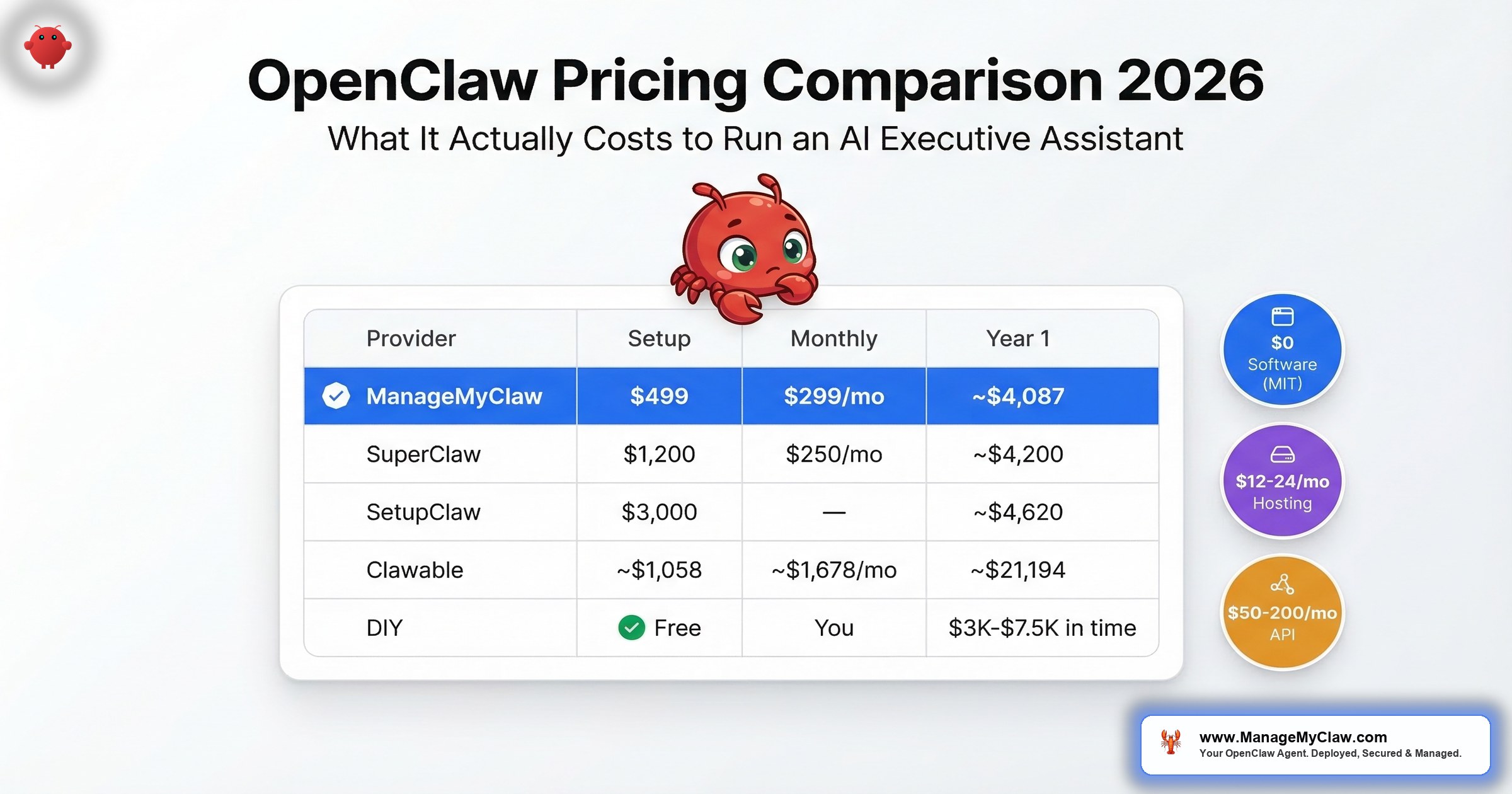
| Provider | Setup | Monthly MC | Year 1 Total |
|---|---|---|---|
| ManageMyClaw (Starter + MC) | $499 | $299/mo | ~$4,087 |
| ManageMyClaw (Starter, no MC) | $499 | — | $499 + infra |
| SuperClaw (Remote + ClawCare) | $1,200 | $250/mo | ~$4,200 |
| SetupClaw (Hosted) | $3,000 | Not offered | ~$4,620+ |
| Clawable (Remote + Starter MC) | ~$1,058 | ~$1,678/mo | ~$21,194 |
| DIY | “Free” | You | $3,000–$7,500 in time |
All prices USD. Customer pays hosting ($12–24/mo) and AI model API costs ($50–200/mo) separately at every provider.
The numbers speak for themselves. Every provider occupies a different point on the price-vs-service spectrum. ManageMyClaw sits in the upper-left quadrant — startup-friendly pricing with full managed care. That’s the gap we built this service to fill. For a side-by-side of every OpenClaw setup service compared, we have a dedicated breakdown.
5 Hidden OpenClaw Pricing Costs That Don’t Appear on Any Provider’s Page
OpenClaw shipped 7 updates in 2 weeks. Each one needs testing against your workflows. Skip the testing and you risk breaking your email triage, morning briefings, or calendar integrations. Budget 1–3 hours per month if you’re self-managing. That’s $200–$1,500/month at founder rates.
9 disclosed CVEs. New ones discovered regularly. The ClawHavoc attack compromised ClawHub’s plugin marketplace. CNCERT issued a formal warning. CrowdStrike, Cisco, and Microsoft published advisories. If you’re self-managing, you need to track all of this and patch within hours. ManageMyClaw’s managed care patches critical CVEs within 24 hours.
The inbox-wipe incident (10,271 upvotes on Reddit) happened because safety instructions got compressed away when the agent’s memory filled up. Fixing this requires system-level safety constraints — not user-level instructions that can be compacted. Most DIY setups don’t configure this correctly.
ClawHub has 13,729+ skills. The ClawHavoc attack planted 2,400+ malicious packages that exfiltrated SSH keys and API tokens through typosquatting. Every new plugin you install needs to be vetted. ManageMyClaw vets every ClawHub skill before installation and monitors for new security advisories.
The hardest cost to quantify, but the most real. Every hour you spend debugging Docker configurations, tracing gateway errors, or reading CVE reports is an hour you’re not spending on your business. The “I Fixed OpenClaw & Set It Loose” video on YouTube has 30,132 views — 30,132 people who spent time fixing their agent instead of using it.
Which Option Is Right for You?
Choose DIY if:
- You’re a developer who enjoys configuring infrastructure
- You have 15+ hours to invest in setup and ongoing maintenance
- You’re comfortable tracking CVEs and applying security patches yourself
- You want full control and learning is part of the value
Choose a freelancer ($40–$175) if:
- You just need the basic installation done
- You’ll handle security hardening yourself
- You have a clear, well-scoped task (not “set up everything”)
- You understand there’s no ongoing support after the gig
- Browse OpenClaw freelancers on Fiverr or Upwork
Choose ManageMyClaw ($499–$2,999) if:
- You want a professionally secured deployment without spending a weekend on it
- You’re a non-technical founder or a technical founder who’d rather spend time on your product
- You want a self-serve purchase path with no phone call required
- You want the option of ongoing managed care so you never touch a terminal again
- You want transparent pricing with no hidden fees
Choose SetupClaw ($3,000–$6,000) if:
- You want a high-touch, personal experience working directly with one person
- Budget is not the primary constraint
- You’re in the SF Bay Area and want in-person Mac Mini setup
- You’re comfortable managing updates yourself after the 14-day hypercare period
Choose SuperClaw ($1,200–$2,400) if:
- You’re in Austin and want an in-person option
- You’re interested in OpenClaw education (ClawCamp at $6,000–$20,000)
- You want managed care from a provider with an established offering
- Mid-market pricing fits your budget
Choose Clawable (~$1,058–$2,919) if:
- Data sovereignty on your own hardware is a non-negotiable requirement
- You’re in Vancouver and want in-person setup
- Your budget supports ~$1,678/month in managed care
- You’re running multiple agents and need their Growth or Scale tiers
“We’re not going to pretend every founder should choose ManageMyClaw. If SetupClaw’s personal touch or SuperClaw’s education offering is what you need, those are legitimate options. The market is big enough.”
— ManageMyClawFrequently Asked Questions About OpenClaw Pricing
Is OpenClaw really free?
The software is free (MIT license). Running it is not. You’ll pay $12–24/month for VPS hosting, $50–200/month for AI model API costs, and either 15+ hours of your own time for setup or a service fee ranging from $40 (freelancer) to $6,000 (SetupClaw in-person). The total real cost of running OpenClaw in Year 1 ranges from about $750 (DIY, minimal usage, not counting your time) to $21,000+ (Clawable with managed care).
What’s the cheapest way to run OpenClaw?
DIY on a budget VPS ($5–10/month) with a cheaper model (GPT-4o mini or Claude Haiku) for $30–50/month in API costs. Total: roughly $35–60/month in infrastructure. But this doesn’t account for your setup time (15+ hours) or the security risks of an unhardened deployment. The cheapest option that includes security hardening is ManageMyClaw Starter at $499 one-time.
Why does managed care cost $299/month?
Because OpenClaw moves fast and breaks things. 7 updates in 2 weeks. 9 CVEs to track. New ClawHub security advisories. The $299 covers 24/7 monitoring, staged update testing, security patching (critical CVEs within 24 hours), monthly health reports, 2 hours of hands-on support, and quarterly API cost optimization. For context: SuperClaw’s equivalent is $250/month, and Clawable’s starts at ~$1,678/month.
Can I start without managed care and add it later?
Yes. Many customers start with a setup-only tier and add managed care after a few weeks of self-managing — usually right after an OpenClaw update breaks something. You can add managed care to any existing ManageMyClaw deployment at any time.
How do API costs work? Will I get a surprise bill?
API costs are paid directly to your AI model provider (Anthropic, OpenAI, etc.) — not to ManageMyClaw. You control your own API keys and can set spending limits. During setup, we optimize your model routing to use the most cost-effective model for each task. We include API cost estimates in your intake process so there are no surprises.
How does ManageMyClaw compare to DIY setup on total cost?
DIY costs $0 in service fees but $3,000–$7,500 in time at founder rates of $200–$500/hour. ManageMyClaw Starter costs $499. If your time is worth more than ~$33/hour (and if you’re reading this, it probably is), ManageMyClaw is cheaper than DIY. Read the full ManageMyClaw vs. DIY breakdown.
Does ManageMyClaw mark up hosting or API costs?
No. You pay your VPS provider directly for hosting. You pay your AI model provider directly for API access. ManageMyClaw charges only for our setup service and optional managed care. We never resell or mark up infrastructure costs. This is why we publish the full cost breakdown — so you can see exactly where every dollar goes.
What’s the typical ROI timeline?
If your agent automates 2 hours of work per day at a founder rate of $200/hour, that’s $400/day in time savings — $8,000/month. The Starter tier ($499) pays for itself in about 1.5 days. Even with Managed Care ($299/month), the monthly cost is recouped in less than a day of saved time. The 5-person team ROI calculation shows approximately 60x return in the first month.