“You just spent 22 minutes on the phone with a lead who can’t buy for 18 months and hasn’t talked to a lender. That’s 22 minutes you didn’t spend with the pre-approved buyer who emailed an hour ago.”
That call happens 6–8 times a week for the average residential agent. NAR’s 2025 Profile of Home Buyers and Sellers found that only 3–5% of real estate leads convert to a closed transaction. Flip that number around: 95–97% of the leads you’re fielding will never buy or sell through you. The time you spend discovering that — one phone call at a time — is time you can’t spend on the 3% who will.
OpenClaw is an open-source AI agent framework — 250,000+ GitHub stars, bare-metal deployment on a VPS you control — that connects to your email, calendar, and CRM through Gog OAuth. For real estate, it handles ai lead qualification real estate workflows by extracting budget range, pre-approval status, target neighborhoods, timeline, and property type from every inbound inquiry — automatically, in under 30 seconds — and scoring the lead before you ever pick up the phone.
It’s the difference between a bouncer who checks IDs at the door and a host who lets everyone in and then spends all night figuring out who actually belongs.
This post breaks down how OpenClaw’s qualification flow works step by step, compares it to the manual process you’re running now, and covers the industry numbers behind why pre-qualification changes the math on your entire lead pipeline. If you’ve read the pillar guide on OpenClaw for real estate, this is the deep dive into qualification specifically.
The Real Cost of Manual Lead Qualification
Here’s how manual qualification works for most agents: a lead comes in from Zillow, Realtor.com, your website, or a sign call. You call them back — assuming you reach them, which takes an average of 3.5 attempts according to InsideSales data. You ask about their budget. Their timeline. Whether they’ve been pre-approved. What neighborhoods they’re interested in. What type of property they’re looking for.
That conversation takes 15–25 minutes when it goes well. When it doesn’t go well — when the lead is vague, noncommittal, or just browsing — it takes longer, because you’re trying to extract information that doesn’t exist yet.
It’s like panning for gold in a river that’s 97% sand. The gold is there. But you’re scooping sand for hours to find it.
Let’s run the numbers on what this costs you in a typical month:
| Metric | Typical Agent | Top Producer |
|---|---|---|
| New leads per month | 40–60 | 100–200+ |
| Unqualified leads (95–97%) | 38–57 | 95–194 |
| Minutes per manual qualification call | 20 | 20 |
| Hours wasted on unqualified leads/month | 12.5–19 hrs | 31.5–64.5 hrs |
| At effective hourly rate ($75–$300/hr) | $940–$5,700 | $9,450–$19,350 |
For a top producer handling 150 leads a month, that’s 48 hours — more than a full work week — spent on conversations that go nowhere. At $200/hour in effective commission earnings, that’s $9,600 in opportunity cost. Every month. Before you count the mental fatigue of hearing “we’re just looking” for the 40th time this quarter.
Zillow’s own data shows the problem from the lead side too: 63% of Zillow leads don’t receive a callback within 24 hours. Not because agents are lazy. Because agents are buried in qualification calls with the other 63% of leads that came in yesterday. The qualified buyers who email at 11 PM sit in your inbox until morning — by which time, as the speed-to-lead data shows, your conversion odds have dropped by 80%.
The irony is brutal: the time you spend qualifying bad leads is the exact reason good leads slip through.
How OpenClaw Qualifies Leads in 30 Seconds
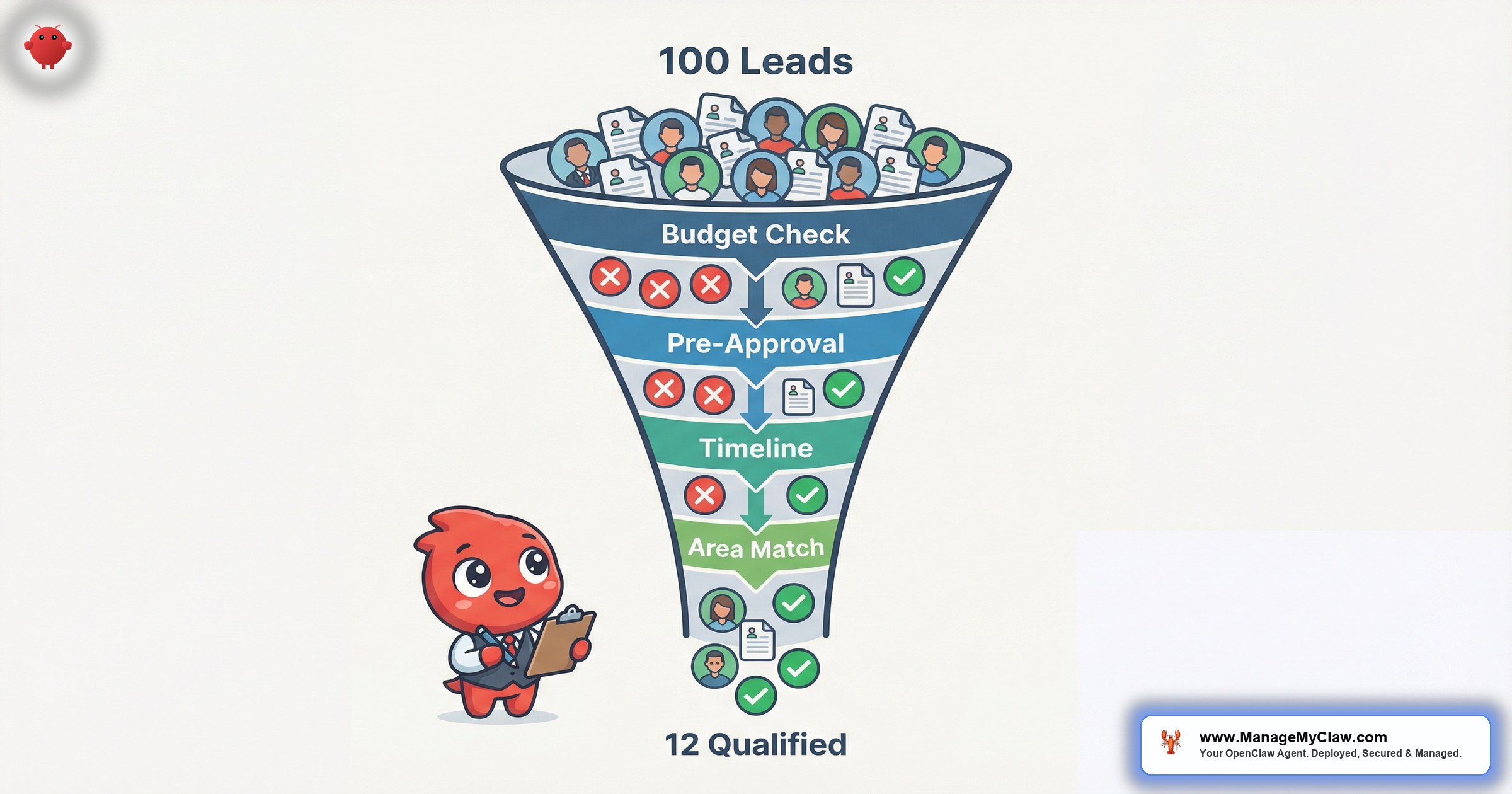
When a new inquiry arrives — by email, web form, or CRM notification — OpenClaw’s qualification flow triggers automatically. The agent reads the full message, extracts every qualification signal present, and scores the lead against 5 criteria. Here’s what it looks for:
-
1
Budget range. The agent scans for dollar amounts, price range language (“looking in the $400K–$500K range”), or indirect signals (“starter home” vs. “luxury” vs. “investment property”). If no budget is mentioned, the field is flagged as missing — and the follow-up email specifically asks for it.
-
2
Pre-approval status. The agent looks for mentions of pre-approval, pre-qualification, lender conversations, or financing type (FHA, VA, conventional, cash). A “pre-approved with Chase for $475K” is a hot signal. “Haven’t talked to a lender yet” is a yellow flag — not disqualifying, but it changes the follow-up approach.
-
3
Target neighborhoods. Specific zip codes, subdivision names, school districts, or geographic descriptions (“west side of town,” “within 15 minutes of downtown”). This matters for matching — and for knowing whether the lead’s budget aligns with their area preferences.
-
4
Timeline. “Looking to move by August,” “lease ends in 3 months,” “just started looking” — each maps to a different urgency tier. Leads within 90 days get a different cadence than leads 6+ months out.
-
5
Property type. Single-family, condo, townhome, multi-family, land, commercial. Combined with budget and area, this completes the matching profile. A “$300K condo in Buckhead” is actionable. “Something nice somewhere” isn’t.
The qualification happens in 2 passes. Pass 1 extracts everything available from the initial inquiry — whatever the lead volunteered in their first message. Pass 2 generates a targeted follow-up that asks only for the missing fields. If the lead said “$400K–$500K, pre-approved, looking in Decatur” but didn’t mention timeline or property type, the follow-up asks about those 2 things specifically. Not a generic intake form. A surgical question.
Think of it as a triage nurse, not a receptionist. The triage nurse doesn’t ask you to fill out 3 forms — they ask the 2 questions that determine whether you need the ER or the waiting room.
Lead Scoring: How OpenClaw Ranks and Routes
Once the 5 qualification fields are populated (either from the initial inquiry or the follow-up response), OpenClaw assigns a tier:
| Tier | Criteria | Action |
|---|---|---|
| A — Hot | Pre-approved + budget confirmed + timeline under 90 days + specific area | Immediate phone notification. Lead summary in your inbox within 60 seconds. Showing suggestions drafted. |
| B — Warm | 3 of 5 criteria present. Missing pre-approval or specific area. | Follow-up email sent asking for missing fields. Moves to A if completed within 48 hours. |
| C — Nurture | 1–2 criteria present. Timeline 6+ months or “just looking.” | Added to 30-day nurture sequence. Monthly market updates. Re-qualified when they re-engage. |
| D — Unqualified | No budget signal, no timeline, no area, or explicit “not buying” indicators. | Polite response with market resources. No follow-up sequence. No agent time spent. |
The routing is what makes this operational, not theoretical. Tier A leads bypass the queue and hit your phone. Tier B leads get 1 targeted follow-up before being escalated or downgraded. Tier C leads enter the long-game nurture pipeline — because that “just looking” lead from 6 months ago is next quarter’s Tier A. Tier D leads get a professional, courteous response and zero more of your time.
You’re not ignoring anyone. You’re triaging. The ER doctor doesn’t ignore the person with a sprained ankle — they just see the person with chest pain first.
The scoring model is fully configurable in your OpenClaw system prompt. If you work luxury ($2M+), “pre-approval” might matter less than “proof of funds.” If you focus on first-time buyers, “hasn’t talked to a lender” isn’t a yellow flag — it’s expected, and the follow-up pivots to lender referrals instead of disqualification. Your market, your rules.
Manual Qualification vs. AI Qualification: Side by Side
Here’s what the same lead looks like through both processes:
- Lead emails at 9:47 PM about a listing
- You see it at 7:15 AM the next morning
- Call attempt #1 at 8:30 AM — voicemail
- Call attempt #2 at 11:45 AM — connects
- 20-minute conversation reveals: no pre-approval, “just browsing,” 12+ month timeline
- Total time invested: ~35 minutes
- Outcome: Tier C lead, should be nurtured
- Reality: forgotten by next week
- Lead emails at 9:47 PM about a listing
- OpenClaw reads email at 9:47 PM (30 seconds)
- Extracts: no budget mentioned, no pre-approval, no timeline, area = listing zip code
- Scores as Tier C — auto-responds with listing details + 2 targeted questions
- Lead replies next day with timeline (“moving in August”) and budget (“$350K–$400K”)
- Re-scored to Tier B — follow-up asks about pre-approval
- Total agent time invested: 0 minutes
- Outcome: lead nurtured automatically until qualified
The difference isn’t subtle. In the manual process, you spent 35 minutes to learn the lead wasn’t ready — and then dropped them because you don’t have a reliable way to nurture 50+ Tier C leads simultaneously. In the OpenClaw process, the lead was classified, responded to, re-engaged, and escalated without consuming a single minute of your day.
Multiply that across 50 leads a month. Manual qualification: 16+ hours. OpenClaw qualification: 0 hours of agent time, with better data and consistent follow-through on every lead regardless of tier.
Inside the Qualification Flow: What OpenClaw Actually Does
Let’s trace a lead through the system end to end. This is the exact sequence OpenClaw executes:
The entire flow completes in under 30 seconds per lead. Compare that to the 20-minute phone call that often ends with less data. OpenClaw doesn’t forget to ask about pre-approval. It doesn’t get sidetracked by the lead wanting to talk about school districts for 10 minutes before you’ve confirmed they can afford the neighborhood.
The follow-up emails for missing fields are generated from your system prompt — they use your name, your tone, your brokerage. They’re not generic bot messages. A lead who mentioned “Brookhaven area, 3-bed, colonial style” gets a response that references those specifics and asks about the 2 missing fields. A lead who wrote 1 sentence gets a different template than a lead who wrote 3 paragraphs. The context-awareness is what makes the response rate usable.
For the full breakdown of how OpenClaw handles the email layer — triage labels, response drafting, and the progressive trust model — see the AI email agents for real estate deep dive.
The Industry Numbers Behind Lead Qualification
The qualification problem isn’t unique to you. It’s structural. Here’s what the data shows across the industry:
- 3–5% conversion rate from lead to closed transaction (NAR 2025). For every 100 leads, 95–97 consume your time without producing revenue.
- 50% of leads aren’t ready to buy at the time they inquire (Realtor.com). They’re 6–18 months out. They need nurturing, not a 20-minute call today.
- 79% of marketing leads never convert to sales due to lack of lead nurturing (MarketingSherpa). The leads weren’t bad — the follow-up was.
- 35–50% of sales go to the vendor that responds first (InsideSales). If you’re spending 20 minutes qualifying Lead #1, Lead #2 is waiting — and your competitor isn’t.
- Agents spend 53% of their time on non-selling activities (NAR). Lead qualification is the single largest component of that non-selling time.
The pattern is consistent: agents are drowning in unqualified leads, losing qualified leads to slow response times, and abandoning nurture-stage leads because they can’t maintain 50+ individual follow-up sequences manually. AI qualification doesn’t fix bad leads. It separates them from good leads fast enough that you can actually focus on the good ones.
The math is uncomfortable: if you’re spending 16 hours a month on qualification calls and 95% of those leads never close, you’re investing 15.2 hours a month in conversations that produce $0 in revenue. That’s not a time management problem. It’s a systems problem.
What Happens to Tier C Leads: The 30-Day Nurture Sequence
This is where most agents leave money on the table. A Tier C lead — “just looking,” timeline 6+ months, no pre-approval — isn’t a dead lead. It’s a future transaction sitting in a queue. The problem is that manually nurturing 50–100 Tier C leads is impossible. You can’t send personalized market updates to 80 people every month while also running showings, writing offers, and managing closings.
OpenClaw’s nurture sequence for Tier C leads runs automatically:
| Day | Message Content | Re-qualification Check |
|---|---|---|
| 1 | Personalized market overview for their area of interest | Does reply include updated timeline or budget? |
| 7 | 2–3 new listings matching their rough criteria | Does any click or reply signal increased urgency? |
| 14 | Neighborhood spotlight: schools, commute, median prices | Does reply narrow the search area? |
| 21 | Rate/market shift update relevant to their price range | Does reply mention pre-approval or new financing info? |
| 30 | Soft check-in: “Has anything changed with your timeline?” | Full re-score based on reply content |
If a Tier C lead replies to the Day 7 listing email with “actually, we just got pre-approved for $425K and need to be in by September” — OpenClaw re-scores them to Tier A, sends you an immediate notification, and drafts a response with 3 matching listings. The nurture sequence worked. You didn’t lift a finger until the lead was ready.
If the lead never replies, the sequence stops after Day 30. No spam. No “just checking in” emails for 6 months. The lead gets a monthly market digest (if you’ve enabled it) and gets re-queued for a new 30-day cycle if they re-engage. Professional, persistent, and proportional.
What the Setup Looks Like
OpenClaw’s qualification flow requires 3 things to be configured before it works:
Prerequisites
- Gog OAuth connected — Gmail read + draft access. The agent reads inbound emails and creates draft responses. Token is revocable from your Google account at any time.
- System prompt configured for your market — your price ranges, your neighborhoods, your property types, your qualification criteria weights. A luxury agent in Manhattan and a first-time-buyer specialist in suburban Atlanta need different scoring rules.
- Response templates loaded — Tier A notification format, Tier B follow-up questions, Tier C nurture sequence content, Tier D polite close. All personalized with your name and brokerage.
- Notification channel set — where Tier A alerts go. Telegram, Slack, SMS, or email. Tier A leads should interrupt you. Everything else waits for the morning briefing.
- 9-point security hardening completed — firewall, fail2ban, non-root systemd service, tool permission allowlists, kill switch tested. Your leads’ financial data (pre-approval amounts, income indicators) flows through this system. Security isn’t optional.
The deployment runs on bare-metal infrastructure — a $12/month VPS with systemd managing the OpenClaw process. No containers. No cloud function cold starts. The agent runs as a persistent service, checking your inbox on a configurable interval (default: every 60 seconds). For the full cost breakdown, see the pricing page.
ManageMyClaw handles the deployment, configuration, and hardening. You provide your market parameters (neighborhoods, price ranges, qualification weights), your response templates (or we draft them for approval), and your notification preferences. The system is up and running in 3–5 business days. Ongoing cost: $12/month VPS + $25–$40/month API fees.
Frequently Asked Questions
What if a lead provides incorrect information to game the scoring?
The scoring is a triage tool, not a background check. If someone claims they’re pre-approved for $500K, the agent takes them at face value and routes them to you. You verify on the human call. The point isn’t to replace your judgment — it’s to make sure your judgment gets applied to the right leads first.
Can I customize the qualification criteria?
Everything is configurable in the system prompt. Add criteria (investor vs. owner-occupant, cash vs. financed), change weights (make pre-approval mandatory for Tier A or optional), adjust the tier thresholds. Your market, your rules. A commercial agent will have different criteria than a residential agent.
Does OpenClaw call leads or just handle email?
Email and text only. OpenClaw doesn’t make phone calls. What it does is tell you which leads to call and give you the qualification data before you dial. Your phone time goes to Tier A and B leads who have already provided budget, timeline, and area — so every call is productive.
How does this work with leads from Zillow or Realtor.com?
Portal leads typically arrive as email notifications. OpenClaw reads those notification emails, extracts the lead data (name, property of interest, any message the lead included), and runs the qualification flow. No API integration with Zillow required — it works through the email layer. For portal-specific email handling, see the email agents post.
What about my data security? Pre-approval amounts and budgets are sensitive.
OpenClaw runs on your VPS. Lead data never leaves your server except through the API calls you’ve explicitly configured. Gog OAuth scopes are limited to read + draft. The 9-point hardening includes firewall rules, fail2ban, and a tested kill switch. You control the hardware, the data, and the access. No vendor has a copy of your client pipeline.
See how ManageMyClaw works — from initial setup to your first automated response.
Explore our complete AI for real estate agents solution.


