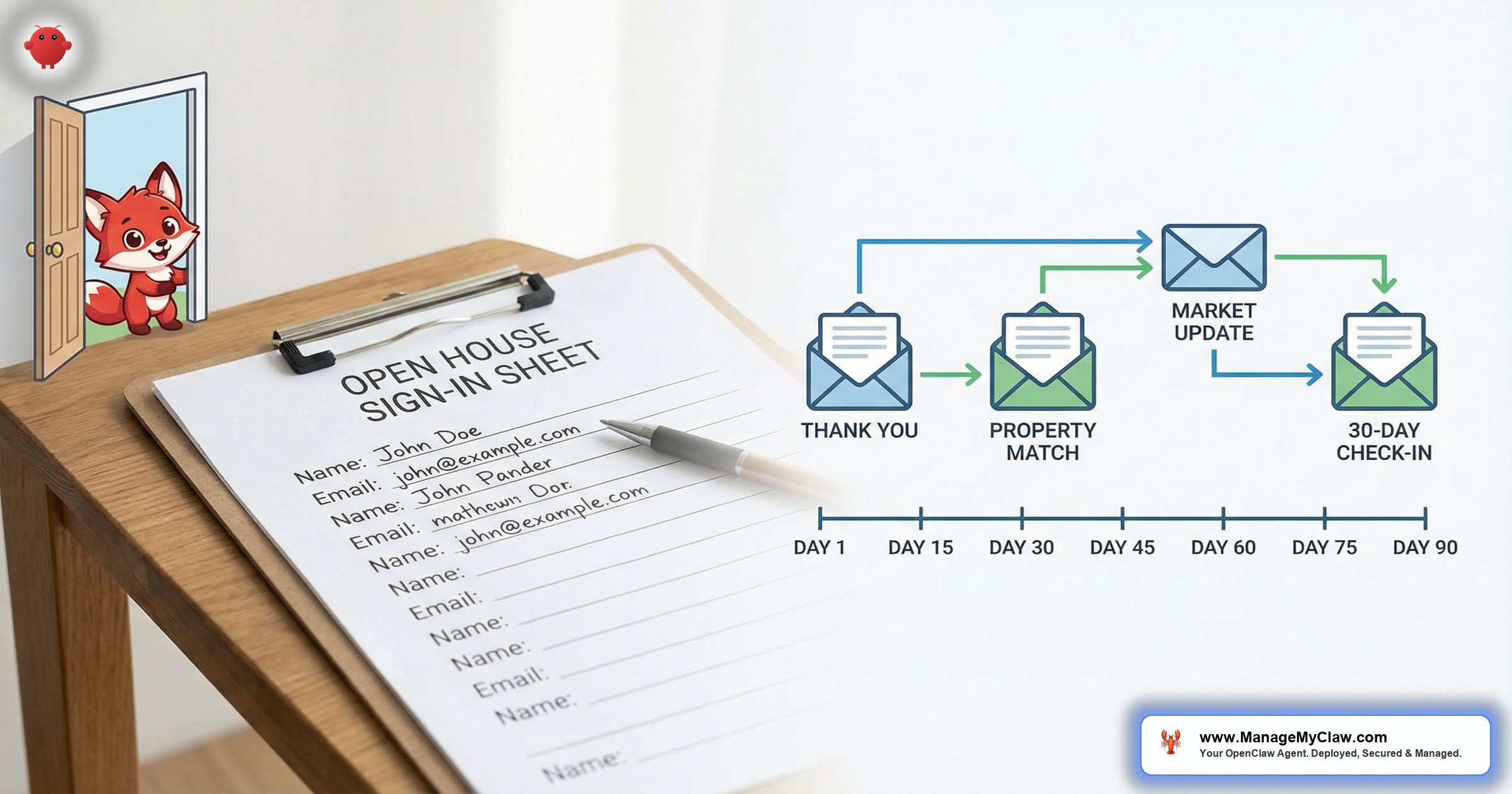
“You spent $340 on staging, 4 hours prepping the property, and 3 hours standing in the doorway greeting strangers. 23 people signed in. You followed up with 4 of them. The other 19 vanished — and at least 3 were pre-approved buyers.”
Open house follow-up ai isn’t a futuristic concept — it’s the gap between your sign-in sheet and your commission check. OpenClaw is an open-source AI agent framework (250,000+ GitHub stars, bare-metal deployment under systemd) that connects to your Gmail via Gog OAuth, reads your calendar, and automates the entire post-open-house workflow: thank-you emails within 2 hours, property matching based on stated preferences, and nurture sequences that re-engage visitors at 30, 60, and 90 days.
NAR’s 2025 Profile of Home Buyers and Sellers reports that 80% of open house visitors never receive a single follow-up from the hosting agent. Not a slow follow-up. Zero contact. Those visitors gave you their email and got nothing back except a free cookie and a flyer they’ll recycle.
It’s like running a restaurant where 23 people sit down, write their names on a waitlist, and then you only bring menus to 4 of them. The other 19 eventually leave and eat somewhere else. You had them in the building.
This post walks through exactly how OpenClaw automates the full open house follow-up pipeline — from the moment a visitor enters their email at your sign-in sheet to the 90-day re-engagement sequence that resurfaces cold leads when they’re ready to buy. If you’ve read the pillar guide on OpenClaw for real estate, this is the deep dive into the open house workflow specifically.
Why 80% of Your Open House Visitors Disappear
A well-marketed open house pulls 15–30 visitors in a 2–3 hour window. According to NAR data, 8–12% are actively searching buyers with a timeline under 90 days. On a 25-visitor open house, that’s 2–3 qualified buyers standing in your property.
Where does follow-up break down? It’s not laziness — it’s logistics. You host Sunday 1–4 PM, collect 23 sign-ins, pack up at 5, and tell yourself you’ll follow up Monday. Then Monday hits: 3 active transactions, title company needs docs by noon, inspection report on another deal. By Monday evening, you send 4 emails to the visitors you remember. The other 19 get nothing. By Wednesday, 2 of those 19 submit inquiries on Zillow. A different agent responds in 3 minutes. They never come back.
You didn’t lose those leads because you’re bad at follow-up. You lost them because you had 47 other things competing for the same 24 hours. The sign-in sheet is a promise you made to 23 people that you’d stay in touch. For 19 of them, you broke that promise before Monday lunch.
InsideSales research shows that open house follow-up effectiveness drops 6x after 48 hours. A visitor who hears from you on Sunday evening remembers the property, remembers the conversation, and feels valued. A visitor who hears from you on Wednesday is already comparing 3 other homes with 3 other agents. By Friday, they can’t remember which open house was yours.
How OpenClaw Automates Open House Follow-Up in 5 Steps
Here’s the full pipeline. You configure it once, and every future open house triggers the same sequence automatically.
-
1
Visitor signs in. Your sign-in form (Google Forms, Curb Hero, Open Home Pro) captures name, email, and 2 qualifying fields: “Working with an agent?” and “Buying timeline?” Data hits a Google Sheet that OpenClaw monitors via Gog OAuth.
-
2
OpenClaw ingests the entry (within minutes). Polls the sheet, deduplicates against your contact list, creates a lead profile. Repeat visitors get the new activity appended to their existing profile.
-
3
Personalized thank-you email (within 2 hours). References the specific property, mentions 1–2 features, asks a qualifying question. Sent via your Gmail through Gog OAuth — comes from your address, not a marketing platform.
-
4
Property match within 24 hours. Cross-references the visitor’s criteria against your active listings. Match found? They get a second email suggesting similar properties in their area and price range.
-
5
Nurture sequence activates. Non-responders enter a 90-day sequence: Day 7, 14, 30, 60, 90. Each email is contextual — based on the property they visited and criteria they mentioned, not a generic newsletter blast.
The difference between this and a drip campaign is that a drip campaign sends the same 5 emails to everyone. OpenClaw sends different emails to the visitor who said “we’re pre-approved and need to move by August” vs. the one who said “just getting a feel for the neighborhood.” Same open house. Completely different follow-up tracks.
The Full Nurture Timeline: Day 0 to Day 90
Here’s the complete open house follow-up ai sequence. You approve the templates once, then the agent handles every subsequent open house.
| Day | Touchpoint | Content | Mode |
|---|---|---|---|
| Day 0 | Thank-you email | References specific property, asks qualifying question about area preference | Auto-send (template-approved) |
| Day 1 | Property match | 1–2 similar listings matched on price, area, timeline | Auto-send |
| Day 7 | Market update | New listings in the visitor’s target area from the past week | Auto-send |
| Day 14 | Price drop alert | Targeted alert if the open house listing or matched properties had a price reduction | Auto-send |
| Day 30 | Re-engagement check-in | “Still looking in [neighborhood]? 4 new listings hit the market this month in your range. Want me to set up showings?” | Draft for review |
| Day 60 | Market shift update | Area-specific data: days on market, median price trend, inventory changes | Draft for review |
| Day 90 | Final re-engagement | “It’s been 3 months since you visited [property address]. If your timeline has shifted, I’d love to catch you up on what’s changed in the market. Free 15-minute call?” | Draft for review |
This is the progressive trust model. Early touchpoints (Day 0–14) are auto-send because they’re templated and low-risk. Day 30+ shifts to draft-for-review because you might know context the agent doesn’t — a phone call, a referral connection, a conversation at the open house. You’re not choosing between “fully automated” and “fully manual.” You’re choosing where each touchpoint falls on that spectrum.
What the Follow-Up Emails Actually Look Like
Generic follow-ups get deleted. Personalized ones get replies. Here’s what OpenClaw actually sends.
Day 0: Thank-You Email
That email references the specific property, mentions features the visitor saw, reflects sign-in data, and sets up the next touchpoint. It reads like you wrote it 20 minutes after the open house. You didn’t.
The Day 1 property match follows the same pattern — referencing the open house listing as context, then suggesting 1–2 similar properties matched on area, budget, and timeline from your MLS data. If OpenClaw can’t find a match, it skips Day 1 and the visitor goes straight to the Day 7 market update instead.
The agent doesn’t fabricate listing details. If it can’t confirm square footage or HOA fees from your data, it omits them rather than guessing. It suggests showings but doesn’t confirm them. Every auto-send template goes through your approval once before it enters the rotation.
How OpenClaw Scores Open House Leads by Engagement
Not all 23 visitors are equal. The open house follow-up ai system tracks engagement and scores each lead based on behavior.
The scoring tracks email opens (how quickly they opened), replies (any response bumps priority), link clicks (did they click the listing page), sign-in signals (“pre-approved” scores higher than “just browsing”), and repeat attendance (visited a previous open house too). These signals combine into a priority ranking:
The scoring produces a simple priority ranking that shows up in your morning briefing:
Without the scoring, you’d treat all 23 visitors the same — or worse, you’d follow up with the 4 you remember and ignore the other 19. With scoring, you know exactly who deserves a phone call and who should stay in the automated sequence. Your time goes where the conversion probability is highest.
For the full breakdown of how OpenClaw qualifies leads by budget, pre-approval, and timeline, see the AI lead qualification guide for real estate. The scoring model described here layers on top of that qualification framework.
What This Looks Like on Your Server
OpenClaw runs on bare-metal infrastructure under systemd — your VPS, your data, no vendor lock-in. The open house follow-up workflow uses 3 components that are already part of the standard OpenClaw deployment:
- Gog OAuth integration — authenticates with your Google Workspace for Gmail, Calendar, and Sheets. 1 scope covers all 3. Revocable in 3 clicks.
- Cron-based polling — a systemd timer checks your sign-in sheet every 15 minutes. New row triggers the pipeline. No Zapier, no middleware.
- Template engine — follow-up templates are plain-text files in OpenClaw’s
skills/directory. The agent personalizes them at send time with visitor and listing data.
The entire pipeline runs as a lightweight systemd service — under 100MB of memory, handling up to 500 visitors per open house. A systemctl status openclaw-openhouse shows the service, and journalctl logs every ingestion, dedup check, and email send in real time. For a visual walkthrough of the deployment, see our how it works page or the speed-to-lead guide which covers the same bare-metal infrastructure.
What 1 Extra Closing Per Quarter Is Worth
Here’s the math for an agent hosting 2 open houses per month.
| Metric | Without Automation | With OpenClaw |
|---|---|---|
| Visitors per open house | 20 | 20 |
| Follow-up rate | 20% (4–5 visitors) | 100% (all 20) |
| Response within 24 hours | 2–3 visitors | 20 visitors (within 2 hours) |
| Leads entering nurture | 0 (no nurture system) | 15–18 (non-responders) |
| Showing requests from follow-up | 1 per quarter | 4–6 per quarter |
| Closings from open house leads/year | 1–2 | 4–6 |
| Additional GCI at $8K avg commission | — | $24,000–$32,000/year |
That’s $24,000–$32,000 in additional GCI per year from leads you’re already generating. You’re not spending more on marketing. You’re just following up with the people who already walked through your door.
And that’s conservative — it doesn’t account for referrals from those additional closings, the compounding contact database, or the hours you save skipping manual follow-up emails.
The ROI question isn’t “can I afford to set this up?” It’s “how many $8,000 commission checks am I leaving on the sign-in sheet every quarter?”
For a detailed breakdown of the cost structure — VPS hosting, API tokens, and what ManageMyClaw handles in the deployment — see our pricing page.
Open House Follow-Up AI: Your Questions Answered
Does the follow-up email come from my actual email address?
Yes. OpenClaw sends via your Gmail through Gog OAuth. The visitor sees your name and email address. No “sent via [platform]” footer.
What if a visitor is already in my CRM from a previous interaction?
OpenClaw deduplicates against your existing contacts. Repeat visitors get the new activity appended, not a duplicate thank-you. See the OpenClaw for real estate guide for dedup details.
Can I customize the follow-up templates?
Yes. Templates are plain-text files in your OpenClaw skills/ directory. Edit tone, branding, qualifying questions, and timing. The deployment team configures the initial set based on your market.
What sign-in apps work with OpenClaw?
Any app that exports to a Google Sheet: Curb Hero, Open Home Pro, Spacio, Google Forms, or a QR code linked to a form. The integration point is the spreadsheet.
How long does it take to get this up and running?
ManageMyClaw deploys the full workflow as part of the standard deployment package. Infrastructure takes 48 hours, template customization another 24. You’re up and running before your next open house.
Explore our complete AI for real estate agents solution.


